writhziden
Closed by request.
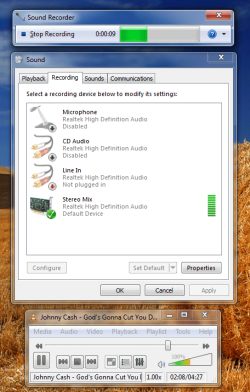
right click in the recording devices window and select show disabled /disconnected devices
View attachment 206997
also its easy to remove the tool bar it added.
How to Hide/Remove Free Sound Recorder Toolbar in Web Browsers
i actually think its a nice program it also has a nice editing suite, thats only a 30 day trial though.
edit, sorry! just noticed post #15
Just for informational purposes, not all audio device drivers include the Stereo Mix device. It is actually very common for laptops not to have Stereo Mix as part of the audio devices. My laptop does not. My desktop does show it as a hidden/disabled device. I actually have to enable it for one of my games or it crashes.
My Computer
- Computer Manufacturer/Model Number
- HP Pavilion e9110t
- OS
- Windows 7 Home Premium 64 Bit
- CPU
- Intel(R) Core(TM)2 Quad CPU Q9550 @ 2.83GHz
- Motherboard
- Pegatron IPIEL-LA3
- Memory
- 6.00 GB Hundai HMT125U6BFR8C-H9
- Graphics Card(s)
- ATI Radeon HD 4850
- Sound Card
- Realtek High Definition Audio/ATI High Definition Audio
- Monitor(s) Displays
- Acer AL2216W
- Screen Resolution
- 1680x1050
- Hard Drives
- Hitachi HDP725050GLA360 ATA Device 500 GB
- PSU
- Unknown/installed by HP
- Case
- HP generic case
- Cooling
- Intel Stock Cooling
- Keyboard
- HP Keyboard
- Mouse
- HP Mouse
- Internet Speed
- Download: 19.15 Mbps Upload: 1.67 Mbps
- Other Info
- Network Adapter Realtek RTL8168D/8111D Family PCI-E Gigabit Ethernet NIC (NDIS 6.20)
Network Adapter 802.11n Wireless PCI Express Card LAN Adapter