Record System Audio

right click in the recording devices window and select show disabled /disconnected devices

View attachment 206997

also its easy to remove the tool bar it added.

How to Hide/Remove Free Sound Recorder Toolbar in Web Browsers

i actually think its a nice program it also has a nice editing suite, thats only a 30 day trial though.

edit, sorry! just noticed post #15

Just for informational purposes, not all audio device drivers include the Stereo Mix device. It is actually very common for laptops not to have Stereo Mix as part of the audio devices. My laptop does not. My desktop does show it as a hidden/disabled device. I actually have to enable it for one of my games or it crashes.
 

My Computer

Computer Manufacturer/Model Number
HP Pavilion e9110t
OS
Windows 7 Home Premium 64 Bit
CPU
Intel(R) Core(TM)2 Quad CPU Q9550 @ 2.83GHz
Motherboard
Pegatron IPIEL-LA3
Memory
6.00 GB Hundai HMT125U6BFR8C-H9
Graphics Card(s)
ATI Radeon HD 4850
Sound Card
Realtek High Definition Audio/ATI High Definition Audio
Monitor(s) Displays
Acer AL2216W
Screen Resolution
1680x1050
Hard Drives
Hitachi HDP725050GLA360 ATA Device 500 GB
PSU
Unknown/installed by HP
Case
HP generic case
Cooling
Intel Stock Cooling
Keyboard
HP Keyboard
Mouse
HP Mouse
Internet Speed
Download: 19.15 Mbps Upload: 1.67 Mbps
Other Info
Network Adapter Realtek RTL8168D/8111D Family PCI-E Gigabit Ethernet NIC (NDIS 6.20)
Network Adapter 802.11n Wireless PCI Express Card LAN Adapter
good point, though the snip i posted was on my laptop :D
 

My Computer

Computer Manufacturer/Model Number
Hewlett packard/p6512uk
OS
Microsoft Windows 7 Home Premium 64-bit 7600
CPU
IIx4 amd athelon 635 processor
Motherboard
FOXCONN 2AA9
Memory
2x2gb
Graphics Card(s)
ati radeon HD 5450
Sound Card
(1) Realtek High Definition Audio (2) AMD High Definition
Monitor(s) Displays
samsung lcd tv 32"
Screen Resolution
1360x 768
Hard Drives
(1) WDC WD10 01FAES-60Z2A0 SATA Disk Device (2) Maxtor OneTouch USB Device (3) ST310003 33AS USB Device (4) WD My Book 1111 USB Device
PSU
?
Cooling
air!
Keyboard
wireless hp
Mouse
wireless Hp,optical
Internet Speed
1.10mb/s
Antivirus
MSE
Browser
Firefox
Does the OP just want to record whatever sound is coming from speakers?

EDIT: It seems so.

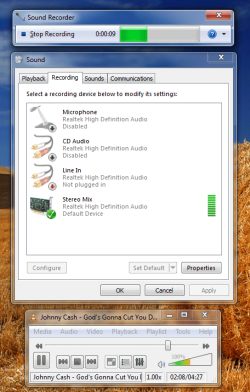
Here's how I achieved that.
-Installed Realtek HD Audio Manager and it installed a device 'Stereo Mix' (and 2-3 more but that aren't important for the objective) as shown in sceenshot.
-Make sure it is enabled.
-Play something like a song.
-Open Sound Recorder and start recording.
Untitled.png
 
Last edited:

My Computer

Computer Manufacturer/Model Number
HCL
OS
Winbdows 7 ultimate x64 | Ubuntu 12.04 x64 LTS
CPU
Core 2 Duo e7400 @ 2.90GHz
Motherboard
Gigabyte G31M-ES2L
Memory
3GB DDR2
Graphics Card(s)
Asus Nvidia GTX 560Ti 1GB
Sound Card
On-board
Monitor(s) Displays
HCL eZeeBee 18.5" LCD
Screen Resolution
1366x768 @ 60Hz
Hard Drives
Western Digital 320GB
PSU
Corsair CX500 V2 500W
Cooling
Stock
Keyboard
Stock
Mouse
Stock
Internet Speed
15-25kBps D/L | 10kBps U/L | Hey Don't laugh
Wkesi2:

The fact is that some sound cards simply will not provide "stereo mix" or "what you hear" recording, regardless of settings, in Windows 7. The "show disconnected devices" or "show disabled devices" idea will not work.

Stereo mix is somewhat more difficult than it was in Vista, and a lot more difficult than it was in XP. As you suspect, it was likely made more difficult in Windows 7 deliberately, to pacify those who don't want you to easily record on your PC.

Here are your choices:

1: try the cable connector from line out to mic in as mentioned previously.

2: try all possible pre-Windows 7 drivers for your existing sound card (Vista, XP, modified drivers found on the net, etc). Try them in normal and compatibility modes. Sometimes this works, but it is a lot of trial and error.

3: Get another sound card known to provide stereo mix on Windows 7. The following cards are likely to provide stereo mix:

HT Omega Striker 7.1

Creative Labs Sound Blaster X-Fi series (excluding Extreme Audio series) and Sound Blaster Audigy series (excluding Sound Blaster Audigy LE, SE, and Audigy Value).

Most any external USB sound card, such as Behringer UFO 202

4: I have heard that certain recording applications, such as Total Recorder, can get around this limitation. I assume Soundflower and Screenflow that you mentioned work similarly to Total Recorder. Unfortunately, the widely used Audacity application cannot by itself get around the limitation. If you want to use Audacity, you would have to try method 1, 2, or 3 above.
 

My Computer

Computer type
PC/Desktop
Computer Manufacturer/Model Number
Ignatz Special; 4 speed manual gearbox; factory air conditioning; one of one
OS
Windows 7 Home Premium SP1, 64-bit
CPU
Intel Skylake i5-6600K, not overclocked
Motherboard
AsRock Z170M Extreme 4, micro ATX
Memory
8 GB HyperX DDR4-2666 (2 x 4 GB)
Graphics Card(s)
none; graphics are integrated on CPU
Sound Card
onboard: Realtek ALC1150; external: USB Behringer UF0-202
Monitor(s) Displays
Dell S2340M 23 inch IPS
Screen Resolution
1600 x 900
Hard Drives
System: Crucial MX100 series SSD, 128 GB;
Data: Samsung Spinpoint 103SJ, 1 TB;
Backup: WD Caviar Green WD30EZRX-00D8PB0, 3 TB
PSU
Rosewill SilentNight 500 watt fanless, semi-modular
Case
Antec Solo II
Cooling
Noctua NH-U12S; Noctua F12 intake, Noctua S12A exhaust
Keyboard
Microsoft 200 6JH-00001 USB
Mouse
Dell or Microsoft optical wired; USB
Antivirus
Microsoft Security Essentials and Malwarebytes Premium
Browser
Pale Moon
Other Info
All fans PWM; speeds at idle: CPU circa 500 rpm; intake circa 600 rpm; exhaust circa 600 rpm; CPU temps 27 idle and 47 C load in a warm room (27 C/81 F) when running Intel Extreme Tuning Utility stress test.
Wkesi2:

The fact is that some sound cards simply will not provide "stereo mix" or "what you hear" recording, regardless of settings, in Windows 7. The "show disconnected devices" or "show disabled devices" idea will not work.

Stereo mix is somewhat more difficult than it was in Vista, and a lot more difficult than it was in XP. As you suspect, it was likely made more difficult in Windows 7 deliberately, to pacify those who don't want you to easily record on your PC.

Here are your choices:

1: try the cable connector from line out to mic in as mentioned previously.

2: try all possible pre-Windows 7 drivers for your existing sound card (Vista, XP, modified drivers found on the net, etc). Try them in normal and compatibility modes. Sometimes this works, but it is a lot of trial and error.

3: Get another sound card known to provide stereo mix on Windows 7. The following cards are likely to provide stereo mix:

HT Omega Striker 7.1

Creative Labs Sound Blaster X-Fi series (excluding Extreme Audio series) and Sound Blaster Audigy series (excluding Sound Blaster Audigy LE, SE, and Audigy Value).

Most any external USB sound card, such as Behringer UFO 202

4: I have heard that certain recording applications, such as Total Recorder, can get around this limitation. I assume Soundflower and Screenflow that you mentioned work similarly to Total Recorder. Unfortunately, the widely used Audacity application cannot by itself get around the limitation. If you want to use Audacity, you would have to try method 1, 2, or 3 above.

There is a fifth option that will cost some money. There are devices out there that capture video and audio from VCRs and digital television receivers. Some of them are called Personal Video Recorders (PVRs). Most video editing software will provide the user with a method to extract just the audio from the video recording, usually in .wav format. There is software out there that will then convert .wav to mp3 or whatever format you want.

To connect a video capture device to your computer, you would need a Y cable splitter (stereo to RCA converter/headphone to RCA converter). I do this all the time for capturing video off my computer for my PhD research. I have used my video editing software to extract audio from video and convert that audio to mp3 before, as well.
 

My Computer

Computer Manufacturer/Model Number
HP Pavilion e9110t
OS
Windows 7 Home Premium 64 Bit
CPU
Intel(R) Core(TM)2 Quad CPU Q9550 @ 2.83GHz
Motherboard
Pegatron IPIEL-LA3
Memory
6.00 GB Hundai HMT125U6BFR8C-H9
Graphics Card(s)
ATI Radeon HD 4850
Sound Card
Realtek High Definition Audio/ATI High Definition Audio
Monitor(s) Displays
Acer AL2216W
Screen Resolution
1680x1050
Hard Drives
Hitachi HDP725050GLA360 ATA Device 500 GB
PSU
Unknown/installed by HP
Case
HP generic case
Cooling
Intel Stock Cooling
Keyboard
HP Keyboard
Mouse
HP Mouse
Internet Speed
Download: 19.15 Mbps Upload: 1.67 Mbps
Other Info
Network Adapter Realtek RTL8168D/8111D Family PCI-E Gigabit Ethernet NIC (NDIS 6.20)
Network Adapter 802.11n Wireless PCI Express Card LAN Adapter
Thanks everyone for your suggestions! I really do appreciate it. The problem at this point seems to be that my sound card is simply incapable of recording the system audio. If I try to get it to work that way, I'll probably end up getting an external usb one like ignatzatsonic suggested. Thanks again everyone :)
 

My Computer

OS
Windows 7 Ultimate 32bit
That's too bad you don't have Stereo Mix. I just tried Audacity using SM as the input device and set to record on sound. I then went to the Sounds panel, clicked on a system sound and hit Test. Audacity recorded it. :geek:
 

My Computer

Computer type
PC/Desktop
Computer Manufacturer/Model Number
Built 2/11/2011
OS
Windows 7 Pro-x64
CPU
i7-2600 3.4GHz - 3.8GHz Turbo
Motherboard
Intel DH67BL-B3
Memory
8Gb - 2x4GB, Muskin 991770 PC3-1333
Graphics Card(s)
Integrated Intel HD 2000
Sound Card
Integrated Intel 10.1 HD, RealTek ALC892
Monitor(s) Displays
Asus LCD VH222H, Haier HL24XSL2a
Screen Resolution
1920x1080, 1920x1080
Hard Drives
Crucial SSD C300-128Gb,
Western Digital WD5002AALX - 500Gb,
Western Digital WD7501AALS - 750Gb
PSU
Seasonic 650W 80+ Gold Modular
Case
Rosewill Defender
Cooling
Stock CPU, Four 120mm case fans, PCH fan added
Keyboard
Logitech EX100 Y-RBH94 Wireless
Mouse
Logitech EX100 M-RCE95 Wireless
Internet Speed
3.0/1.5 Mbs
Antivirus
Microsoft Security Essentials
Browser
Microsoft Internet Explorer 11
Other Info
Antec Veris Premier-Multimedia IR Station,
Cyber Accoustics-3602 Speakers,
AFT XM-5U Card Reader,
Hauppauge TV-HVR-2250,
Sony LX300 USB Turntable
Back
Top