Record "what you hear"

Benway

New member
Local time
7:42 AM
Messages
26
It seams in windows 7 I can no longer "record what you hear". I boot over to XP and I have this functionality (SoundBlaster Live!) but not in W7. I've searched through the myriad of dialog boxes and settings that I now have to go through, but find nothing. I hope this isn't more of MS's DRM watchdog approach to assuming everyone is a thief. I'm a musician and this really hampers my working environment.

Anyone run across this and any fixes? Any official word from MS?

-b
 

My Computer

OS
xp/Windows 7
Hi Benway,have you tried,Start/All Programs/Accessories/Sound Recorder.
 

My Computer

Computer Manufacturer/Model Number
Self Build 64bit
OS
Vista Ult64, Win7600
CPU
Intel Core 2 Quad Q6600 @ 2400 MHz 64bit OS
Motherboard
Asus P5E3 Deluxe WiFi @p 64 bit OS
Memory
4096 MB DDR3-SDRAM
Graphics Card(s)
ATI Radeon HD 3870 Series x2 Crossfired
Sound Card
Realtek on board
Monitor(s) Displays
Samsung SyncMaster - 23 inches
Screen Resolution
1680x1050 pixels at 60 Hz in True Colors
Hard Drives
Hitachi (250 GB)/Samsung 750 GB. /Barracuda 160 GB.
My Book 1 TB external..
PSU
Cooler Master 1000w
Case
Cooler Master Cosmos 1000.
Cooling
Fans and fresh air,
Keyboard
Wireless
Mouse
Wireless
Internet Speed
Never fast enough
Other Info
I use a Magnum.
I have this same problem. Is there no way to record "What You Hear" or "Master Volume Balance" with another program?

I used to sequence MIDI in Cakewalk, and then start up Adobe Audition, hit record, and then play the MIDI file (thus converting it to a WAV file for manipulation).

Is the only way to do this through SoundRecorder now? If so... ugh.
 

My Computer

Computer Manufacturer/Model Number
Home-Built and has been slowly upgraded since 1999
OS
Windows 7 RC (Build 7100)
CPU
AMD Athlon XP 2400+
Motherboard
ECS L7S7A2
Memory
1.25 GB
Graphics Card(s)
ATI Radeon
Sound Card
SoundBlaster Live! Platinum (w/ Live! Drive)
Monitor(s) Displays
ViewSonic 19" LCD
Screen Resolution
1440x900
Hard Drives
320GB PATA
250GB external USB Backup
PSU
500W
Case
Generic Beige Box
Cooling
A bunch of Fans
Keyboard
Old one with the keys pried off that I don't use
Mouse
Microsoft Optical Mouse I found at Unclaimed baggage for $10
Internet Speed
Knology Cable Internet (~6-7Mbps)
Hi Benway,have you tried,Start/All Programs/Accessories/Sound Recorder.
Yeah, that only records about 60 seconds or so. The functionality that was/is in XP is no longer in Win7. I read in over at Sound Issues
it may be drivers provided by MS, so I'll look into that...
 

My Computer

OS
xp/Windows 7
Ok,sorry it did not do as you thought it would.
 

My Computer

Computer Manufacturer/Model Number
Self Build 64bit
OS
Vista Ult64, Win7600
CPU
Intel Core 2 Quad Q6600 @ 2400 MHz 64bit OS
Motherboard
Asus P5E3 Deluxe WiFi @p 64 bit OS
Memory
4096 MB DDR3-SDRAM
Graphics Card(s)
ATI Radeon HD 3870 Series x2 Crossfired
Sound Card
Realtek on board
Monitor(s) Displays
Samsung SyncMaster - 23 inches
Screen Resolution
1680x1050 pixels at 60 Hz in True Colors
Hard Drives
Hitachi (250 GB)/Samsung 750 GB. /Barracuda 160 GB.
My Book 1 TB external..
PSU
Cooler Master 1000w
Case
Cooler Master Cosmos 1000.
Cooling
Fans and fresh air,
Keyboard
Wireless
Mouse
Wireless
Internet Speed
Never fast enough
Other Info
I use a Magnum.
To do what you guys are doing, Sony Sound Forge 9.0e or Cool Edit Pro will work a treat.

Cakewalk should work well too. All depends on your hardware, how you've got it setup and which input you choose to record.

On my downstairs pc with onboard audio (as opposed to my main machine with MOTU Traveler), all I need to do is fire up Sound Forge, play anything I want to record like from a website, and record.
 

My Computer

Computer Manufacturer/Model Number
self built
OS
7600.20510 x86
CPU
P4 550 3.4 GHz HT running at 3.5 GHz
Motherboard
MSI PM8M3-V (MS-7211 v1.x) Micro-ATX mainboard
Memory
OCZ 2 GB(2x1GB) DDR400mHz running @ 414 mHz
Graphics Card(s)
HIS Radeon HD 3850 IceQ 3 Turbo HDMI Dual DL-DVI AGP
Sound Card
MOTU Traveler firewire studio interface 192 kHz 24 bit
Monitor(s) Displays
22" widescreen Acer X223W LCD, 17" Compaq P75 CRT
Screen Resolution
1680x1050 and 1280x1024
Hard Drives
SATA I x2 WD, 400 GB and 120 GB, SATA 2 WD Caviar Black 1 TB
PSU
350W generic
Case
Cybertronpc, it glows blue
Cooling
stock cpu fan, Ice-Q 3 gpu and system, many case fans
Keyboard
Logitch Classical Keyboard 200
Mouse
Logitech Mediaplay cordless
Internet Speed
1792/448 kbits/sec
Other Info
SATA II PCI fake RAID adapter, 1 GB Readyboost, original ATI Remote Wonder (even works with WMC perfectly), Logitech Rumblepad 2 game controller x2
To do what you guys are doing, Sony Sound Forge 9.0e or Cool Edit Pro will work a treat.

Cakewalk should work well too. All depends on your hardware, how you've got it setup and which input you choose to record.

On my downstairs pc with onboard audio (as opposed to my main machine with MOTU Traveler), all I need to do is fire up Sound Forge, play anything I want to record like from a website, and record.

The problem is there is no device to record from. Windows has apparently gotten rid of the Master Balance as a recording device. I don't see it as an option, even in the Audio Mixer.
 

My Computer

Computer Manufacturer/Model Number
Home-Built and has been slowly upgraded since 1999
OS
Windows 7 RC (Build 7100)
CPU
AMD Athlon XP 2400+
Motherboard
ECS L7S7A2
Memory
1.25 GB
Graphics Card(s)
ATI Radeon
Sound Card
SoundBlaster Live! Platinum (w/ Live! Drive)
Monitor(s) Displays
ViewSonic 19" LCD
Screen Resolution
1440x900
Hard Drives
320GB PATA
250GB external USB Backup
PSU
500W
Case
Generic Beige Box
Cooling
A bunch of Fans
Keyboard
Old one with the keys pried off that I don't use
Mouse
Microsoft Optical Mouse I found at Unclaimed baggage for $10
Internet Speed
Knology Cable Internet (~6-7Mbps)

My Computer

Computer Manufacturer/Model Number
HP d4996t (upgraded)
OS
XP MCE .... XP Pro 64 .... W7 U x64
CPU
E6750, 2.67GHz C2D
Memory
4GB, PC2 6400
Graphics Card(s)
GeForce 9400GT
Monitor(s) Displays
Twin Samsung 2443BWT
Screen Resolution
1920x1200
Hard Drives
Many .. 3 Installed
PSU
460W
Internet Speed
Cable
That way you can only record mono, and the quality degrades because you're converting from digital to analog, then back to digital again, and adding any line noise and interference the adapter and cords introduce.

There's no reason we should have to resort to such a workaround.
 

My Computer

Computer Manufacturer/Model Number
Home-Built and has been slowly upgraded since 1999
OS
Windows 7 RC (Build 7100)
CPU
AMD Athlon XP 2400+
Motherboard
ECS L7S7A2
Memory
1.25 GB
Graphics Card(s)
ATI Radeon
Sound Card
SoundBlaster Live! Platinum (w/ Live! Drive)
Monitor(s) Displays
ViewSonic 19" LCD
Screen Resolution
1440x900
Hard Drives
320GB PATA
250GB external USB Backup
PSU
500W
Case
Generic Beige Box
Cooling
A bunch of Fans
Keyboard
Old one with the keys pried off that I don't use
Mouse
Microsoft Optical Mouse I found at Unclaimed baggage for $10
Internet Speed
Knology Cable Internet (~6-7Mbps)
It's in Stereo .. That's a stereo cable.
Even in XP .. with the newer sound chips and drivers .. this wirearound is sometimes the only way to go.
It does look like W7 has removed some more good tools.
 

My Computer

Computer Manufacturer/Model Number
HP d4996t (upgraded)
OS
XP MCE .... XP Pro 64 .... W7 U x64
CPU
E6750, 2.67GHz C2D
Memory
4GB, PC2 6400
Graphics Card(s)
GeForce 9400GT
Monitor(s) Displays
Twin Samsung 2443BWT
Screen Resolution
1920x1200
Hard Drives
Many .. 3 Installed
PSU
460W
Internet Speed
Cable
It's isn't stereo if your mic input is mono, though.

In XP, there was no issue with sound cards. If the sound card had a Wave Out, XP could use that device to record from as well. I'm pretty sure the sound card doesn't need a separate device on it.

Googling turned up an interesting thing to try, though (I'll have to wait til I get home to try this):

Step 1: Right click on the speaker icon. Now look for the Recording Devices and select it.

Step 2: Now right click and select the option Show Disabled Devices

Step 3: Select the Wave Out Mix device and Enable it. Click on Set as Default Device and open up the Audacity.

So you are done.Now enjoy recording whatever you like.
from Windows 7 Trick: How To Enable Recording in Windows Vista And Windows 7

Could it really be that easy??
 

My Computer

Computer Manufacturer/Model Number
Home-Built and has been slowly upgraded since 1999
OS
Windows 7 RC (Build 7100)
CPU
AMD Athlon XP 2400+
Motherboard
ECS L7S7A2
Memory
1.25 GB
Graphics Card(s)
ATI Radeon
Sound Card
SoundBlaster Live! Platinum (w/ Live! Drive)
Monitor(s) Displays
ViewSonic 19" LCD
Screen Resolution
1440x900
Hard Drives
320GB PATA
250GB external USB Backup
PSU
500W
Case
Generic Beige Box
Cooling
A bunch of Fans
Keyboard
Old one with the keys pried off that I don't use
Mouse
Microsoft Optical Mouse I found at Unclaimed baggage for $10
Internet Speed
Knology Cable Internet (~6-7Mbps)
Use line in .. not mic in.
Showing disabled devices worked in Vista .. But I can't find it in W7 ???
M$ sound mapper is also missing.

There's no reason we should have to resort to such a workaround.
it started in Vista .. looks like it's getting worse in W7
 

My Computer

Computer Manufacturer/Model Number
HP d4996t (upgraded)
OS
XP MCE .... XP Pro 64 .... W7 U x64
CPU
E6750, 2.67GHz C2D
Memory
4GB, PC2 6400
Graphics Card(s)
GeForce 9400GT
Monitor(s) Displays
Twin Samsung 2443BWT
Screen Resolution
1920x1200
Hard Drives
Many .. 3 Installed
PSU
460W
Internet Speed
Cable
Use line in .. not mic in.

Good point.

Strange, though, that website specifically said Windows 7.. are you running Beta or RC? I'll try my luck when I get home.
 

My Computer

Computer Manufacturer/Model Number
Home-Built and has been slowly upgraded since 1999
OS
Windows 7 RC (Build 7100)
CPU
AMD Athlon XP 2400+
Motherboard
ECS L7S7A2
Memory
1.25 GB
Graphics Card(s)
ATI Radeon
Sound Card
SoundBlaster Live! Platinum (w/ Live! Drive)
Monitor(s) Displays
ViewSonic 19" LCD
Screen Resolution
1440x900
Hard Drives
320GB PATA
250GB external USB Backup
PSU
500W
Case
Generic Beige Box
Cooling
A bunch of Fans
Keyboard
Old one with the keys pried off that I don't use
Mouse
Microsoft Optical Mouse I found at Unclaimed baggage for $10
Internet Speed
Knology Cable Internet (~6-7Mbps)
RC 32 & 64 .. but only playing with 32 so far.
 

Attachments

  • A Split1.jpg
    A Split1.jpg
    43.5 KB · Views: 265

My Computer

Computer Manufacturer/Model Number
HP d4996t (upgraded)
OS
XP MCE .... XP Pro 64 .... W7 U x64
CPU
E6750, 2.67GHz C2D
Memory
4GB, PC2 6400
Graphics Card(s)
GeForce 9400GT
Monitor(s) Displays
Twin Samsung 2443BWT
Screen Resolution
1920x1200
Hard Drives
Many .. 3 Installed
PSU
460W
Internet Speed
Cable
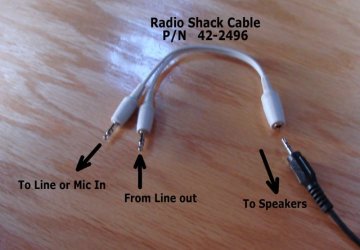
That splitter seems unnecessary.. just a cable from speaker to line in would do. Why are you running line-out INTO the speaker out?
 
Last edited:

My Computer

Computer Manufacturer/Model Number
Home-Built and has been slowly upgraded since 1999
OS
Windows 7 RC (Build 7100)
CPU
AMD Athlon XP 2400+
Motherboard
ECS L7S7A2
Memory
1.25 GB
Graphics Card(s)
ATI Radeon
Sound Card
SoundBlaster Live! Platinum (w/ Live! Drive)
Monitor(s) Displays
ViewSonic 19" LCD
Screen Resolution
1440x900
Hard Drives
320GB PATA
250GB external USB Backup
PSU
500W
Case
Generic Beige Box
Cooling
A bunch of Fans
Keyboard
Old one with the keys pried off that I don't use
Mouse
Microsoft Optical Mouse I found at Unclaimed baggage for $10
Internet Speed
Knology Cable Internet (~6-7Mbps)
Line Out >> Line In .. will work ...
But it helps to also hear what you're working with ... so you know when to Start/Stop recording.

I don't use Speaker Outs .. don't have any - and not needed with my amplified Bose.
 

My Computer

Computer Manufacturer/Model Number
HP d4996t (upgraded)
OS
XP MCE .... XP Pro 64 .... W7 U x64
CPU
E6750, 2.67GHz C2D
Memory
4GB, PC2 6400
Graphics Card(s)
GeForce 9400GT
Monitor(s) Displays
Twin Samsung 2443BWT
Screen Resolution
1920x1200
Hard Drives
Many .. 3 Installed
PSU
460W
Internet Speed
Cable
I used a browser helper object called "Freecorder" to record "what I heard". I am not generally a fan of BHO's but this one has yet to cause problems for me. I used Sonar 8 to "dress up" my captures, but any audio editing software will do, including the freely available "Audacity"

Happy stream capturing
 

My Computer

OS
windows 7 build 7100
It's isn't stereo if your mic input is mono, though.

In XP, there was no issue with sound cards. If the sound card had a Wave Out, XP could use that device to record from as well. I'm pretty sure the sound card doesn't need a separate device on it.

Googling turned up an interesting thing to try, though (I'll have to wait til I get home to try this):


from Windows 7 Trick: How To Enable Recording in Windows Vista And Windows 7

Could it really be that easy??

This is the proper way to get all or your sound devices to show up so you can mix and record from them in Windows 7. Yes it's that easy.:)
 

My Computer

Computer type
PC/Desktop
Computer Manufacturer/Model Number
Home built
OS
Windows 7 Ult, Windows 8.1 Pro,
CPU
Q9650-4.275GHz, E8600 4.5GHz, E6750-3.8GHz
Motherboard
Evga 780i FTW
Memory
G.Skill PC2 9600 1200Mhz 5 5 5 15 2T
Graphics Card(s)
GTX480
Sound Card
Asus Xonar D2
Monitor(s) Displays
HannsG
Screen Resolution
1680X1050
Hard Drives
GSkill Phoenix Pro 120GB SSD
PSU
ThermalTake Toughpower 1000Watt modular
Case
ThermalTake XaserV
Cooling
Xigmatek S1283
Keyboard
Logitech G15
Mouse
Logitech G9
Internet Speed
T1
I did nothing other than load up Audacity and press record. It's that easy. When finished, hit export to MP3 (or whichever file type you choose). It really is that simple.

*edit: I did have to go into the Options of Audacity and change from Mono to Stereo recording. Also, I did nothing with the Recording options of Win7. Did not change andy of the "What you hear" settings.

Win7 RC1
 
Last edited:

My Computer

OS
Windows 7 Premium x64
CPU
AMD Athlon 64 X2 Dual Core 5200+ 2.61GHz
Memory
4GB
Back
Top