Recording Share History

brandon22

New member
Local time
2:16 PM
Messages
20
Is there a way to create a log that records any activity when someone (including network Admin) accesses or at least tries to access a shared folder or drive on your computer? It would be nice to be able to log all the activity that takes places with Shared folders and any possible Remote Desktop connection that takes place without my knowledge.
 

My Computer

OS
Windows 7 64-bit
This is possible using Windows 7 built-in Group Policy Editor, included in Seven Professional, Ultimate and Enterprise editions. There are also several third party alternatives, for instance ShareAlarmPro.


Here's how to audit network access:
  1. Open Group Policy Editor by typing gpedit.msc to Start menu's search field or Run dialog window and hit Enter
    .
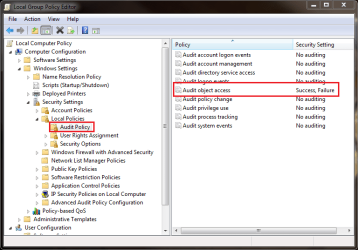
  2. Go to Local Computer Policy > Computer Configuration > Windows Settings > Security Settings > Local Policies Audit Policy, double click to open Audit Object Access

    audit_1.png
    .
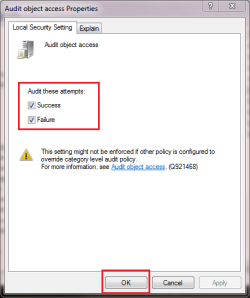
  3. Check both options (Success and Failure) under Audit these objects, click OK

    audit_2.png
    .
  4. Close Group Policy Editor
    .
  5. Open the Properties of a shared folder you want to audit, choose Security tab, click Advanced

    audit_3.png
    .
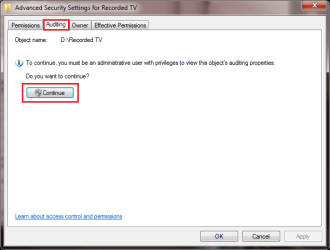
  6. Choose Audit tab, click Continue

    audit_4.png
    .
  7. Click Add, click Locations to choose from which location you want to audit, write the computer name and name of a user or group you want to audit, for instance PC-3\Administrators or XPPro-upstairs\Kari. Click Check names to "spellcheck", to check validity of your input

    audit_5.png
    .
  8. Click OK to close Select User or Group dialog, click OK to close Advanced Security Settings, click OK to close Folder Properties
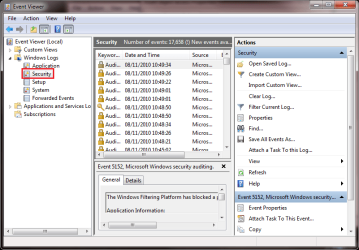
That's it. To read audit log, open Event Viewer by typing Event Viewer to Start menu's search field or Run dialog window and hit Enter. Go to Windows Logs > Security

audit_6.png

Any further questions, don't hesitate to ask.

Kari

EDIT: I thought this is an important enough issue to make a tutorial. Please post all possible questions directly to the tutorial thread to keep it concentrated in a place. Tutorial is here: Audit (log) access to shared folders
 
Last edited:

My Computer

Computer type
Laptop
Computer Manufacturer/Model Number
HP ENVY 17-1150eg
OS
Windows 10 Pro x64 EN-GB
CPU
1.6 GHz Intel Core i7-720QM Processor
Memory
6 GB
Graphics Card(s)
ATI Mobility Radeon HD 5850 Graphics
Sound Card
Beats sound system with integrated subwoofer
Monitor(s) Displays
17" laptop display, 22" LED and 32" Full HD TV through HDMI
Screen Resolution
1600*900 (1), 1920*1080 (2&3)
Hard Drives
Internal: 2 x 500 GB SATA Hard Disk Drive 7200 rpm
External: 2TB for backups, 3TB USB3 network drive for media
Cooling
As Envy runs a bit warm, I have it on a Cooler Master pad
Keyboard
Logitech diNovo Media Desktop Laser (bluetooth)
Mouse
Logitech Performance Mouse MX
Internet Speed
50/10 Mbps VDSL
Antivirus
Windows Defender 4.3.9431.0
Browser
Maxthon 3.5.2., IE11
Thanks for getting back to me Kari, I really do appreciate it!

When I go to the Properties of the shared folder I want to audit I get the following error...."This has been shared for administrative purposes. The share permissions and file security cannot be set." Are there any workarounds to this problem? I have Admin network access, so maybe you can point me in the right direction as to where I should look to correct this problem?

Up to this point whenever I log into Windows I basically go into the default Shares and select Stop Sharing. I’ve assumed this has kept out anybody who wants to access my computer but I can’t be too sure.
 

My Computer

OS
Windows 7 64-bit
I'm not sure but could this be so simple that you answered your own question? If share service is stopped, you can not set permissions.
 

My Computer

Computer type
Laptop
Computer Manufacturer/Model Number
HP ENVY 17-1150eg
OS
Windows 10 Pro x64 EN-GB
CPU
1.6 GHz Intel Core i7-720QM Processor
Memory
6 GB
Graphics Card(s)
ATI Mobility Radeon HD 5850 Graphics
Sound Card
Beats sound system with integrated subwoofer
Monitor(s) Displays
17" laptop display, 22" LED and 32" Full HD TV through HDMI
Screen Resolution
1600*900 (1), 1920*1080 (2&3)
Hard Drives
Internal: 2 x 500 GB SATA Hard Disk Drive 7200 rpm
External: 2TB for backups, 3TB USB3 network drive for media
Cooling
As Envy runs a bit warm, I have it on a Cooler Master pad
Keyboard
Logitech diNovo Media Desktop Laser (bluetooth)
Mouse
Logitech Performance Mouse MX
Internet Speed
50/10 Mbps VDSL
Antivirus
Windows Defender 4.3.9431.0
Browser
Maxthon 3.5.2., IE11
I don’t think I’ve stopped the Shared Service, just the default drives that pop up every time the machine is rebooted. Can the Sharing Service be stopped? If so, where?
 

My Computer

OS
Windows 7 64-bit
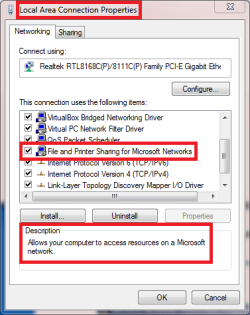
To stop sharing:

Stop_sharing.png

Of course you have to do this for every enabled NIC, for instance if you have both LAN and WiFi connected at the same time, you have to stop sharing in both of them.

I misread your post, I tought you were talking about this feature. Anyway, logically thinking there could be something in this procedure of yours, first stop sharing by turning it manually off folder by folder, then when you try to change global sharing or security settings there is nothing to share i.e. nothing to change.

Kari
 

My Computer

Computer type
Laptop
Computer Manufacturer/Model Number
HP ENVY 17-1150eg
OS
Windows 10 Pro x64 EN-GB
CPU
1.6 GHz Intel Core i7-720QM Processor
Memory
6 GB
Graphics Card(s)
ATI Mobility Radeon HD 5850 Graphics
Sound Card
Beats sound system with integrated subwoofer
Monitor(s) Displays
17" laptop display, 22" LED and 32" Full HD TV through HDMI
Screen Resolution
1600*900 (1), 1920*1080 (2&3)
Hard Drives
Internal: 2 x 500 GB SATA Hard Disk Drive 7200 rpm
External: 2TB for backups, 3TB USB3 network drive for media
Cooling
As Envy runs a bit warm, I have it on a Cooler Master pad
Keyboard
Logitech diNovo Media Desktop Laser (bluetooth)
Mouse
Logitech Performance Mouse MX
Internet Speed
50/10 Mbps VDSL
Antivirus
Windows Defender 4.3.9431.0
Browser
Maxthon 3.5.2., IE11
And simply by turning off the File and Print Sharing in the Properties, this eliminates someone connecting to your computer via Shared Folder or Remote Desktop?
 

My Computer

OS
Windows 7 64-bit
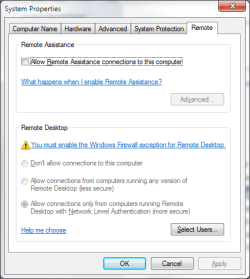
Sharing, yes. Remote Desktop, no, it's here:

Remote.png

Kari
 

My Computer

Computer type
Laptop
Computer Manufacturer/Model Number
HP ENVY 17-1150eg
OS
Windows 10 Pro x64 EN-GB
CPU
1.6 GHz Intel Core i7-720QM Processor
Memory
6 GB
Graphics Card(s)
ATI Mobility Radeon HD 5850 Graphics
Sound Card
Beats sound system with integrated subwoofer
Monitor(s) Displays
17" laptop display, 22" LED and 32" Full HD TV through HDMI
Screen Resolution
1600*900 (1), 1920*1080 (2&3)
Hard Drives
Internal: 2 x 500 GB SATA Hard Disk Drive 7200 rpm
External: 2TB for backups, 3TB USB3 network drive for media
Cooling
As Envy runs a bit warm, I have it on a Cooler Master pad
Keyboard
Logitech diNovo Media Desktop Laser (bluetooth)
Mouse
Logitech Performance Mouse MX
Internet Speed
50/10 Mbps VDSL
Antivirus
Windows Defender 4.3.9431.0
Browser
Maxthon 3.5.2., IE11
Here's what mean says. Any work arounds or things I can disable in the Group Policy to change this setting?
 

Attachments

  • screen_shot.png
    screen_shot.png
    15.5 KB · Views: 0

My Computer

OS
Windows 7 64-bit
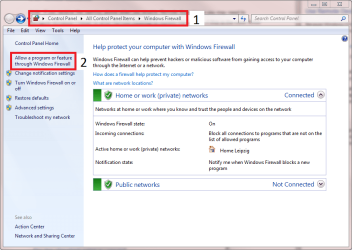
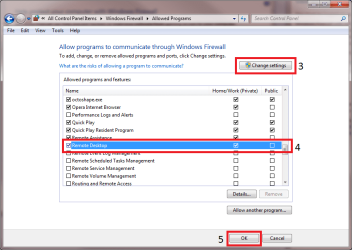
Here:

Firewall1.png

Firewall2.png
 

My Computer

Computer type
Laptop
Computer Manufacturer/Model Number
HP ENVY 17-1150eg
OS
Windows 10 Pro x64 EN-GB
CPU
1.6 GHz Intel Core i7-720QM Processor
Memory
6 GB
Graphics Card(s)
ATI Mobility Radeon HD 5850 Graphics
Sound Card
Beats sound system with integrated subwoofer
Monitor(s) Displays
17" laptop display, 22" LED and 32" Full HD TV through HDMI
Screen Resolution
1600*900 (1), 1920*1080 (2&3)
Hard Drives
Internal: 2 x 500 GB SATA Hard Disk Drive 7200 rpm
External: 2TB for backups, 3TB USB3 network drive for media
Cooling
As Envy runs a bit warm, I have it on a Cooler Master pad
Keyboard
Logitech diNovo Media Desktop Laser (bluetooth)
Mouse
Logitech Performance Mouse MX
Internet Speed
50/10 Mbps VDSL
Antivirus
Windows Defender 4.3.9431.0
Browser
Maxthon 3.5.2., IE11
It looks like it's not checked. So I'm good to go? :D
 

My Computer

OS
Windows 7 64-bit
Yes, you should be.

If access audit is on, checking security log every now and then reveals if everything works as you like. Logically thinking, if you stop sharing and deny remote connections, you should be OK.

Come back if there's a problem, though.

Kari
 

My Computer

Computer type
Laptop
Computer Manufacturer/Model Number
HP ENVY 17-1150eg
OS
Windows 10 Pro x64 EN-GB
CPU
1.6 GHz Intel Core i7-720QM Processor
Memory
6 GB
Graphics Card(s)
ATI Mobility Radeon HD 5850 Graphics
Sound Card
Beats sound system with integrated subwoofer
Monitor(s) Displays
17" laptop display, 22" LED and 32" Full HD TV through HDMI
Screen Resolution
1600*900 (1), 1920*1080 (2&3)
Hard Drives
Internal: 2 x 500 GB SATA Hard Disk Drive 7200 rpm
External: 2TB for backups, 3TB USB3 network drive for media
Cooling
As Envy runs a bit warm, I have it on a Cooler Master pad
Keyboard
Logitech diNovo Media Desktop Laser (bluetooth)
Mouse
Logitech Performance Mouse MX
Internet Speed
50/10 Mbps VDSL
Antivirus
Windows Defender 4.3.9431.0
Browser
Maxthon 3.5.2., IE11
Hmm, I'd love to turn the auditing on but if you can remember, for some reason it's grayed out and I don't know why.
 

My Computer

OS
Windows 7 64-bit
Sorry, I thought you solved that already.

I think it's grayed out because you have turned off sharing your shares, one by one. Nothing to share, no settings to change.

Have you tried to turn sharing ON on all your shares, then change the settings? Then turn the sharing service off as I told, and do this with Remote Desktop and Firewall?
 

My Computer

Computer type
Laptop
Computer Manufacturer/Model Number
HP ENVY 17-1150eg
OS
Windows 10 Pro x64 EN-GB
CPU
1.6 GHz Intel Core i7-720QM Processor
Memory
6 GB
Graphics Card(s)
ATI Mobility Radeon HD 5850 Graphics
Sound Card
Beats sound system with integrated subwoofer
Monitor(s) Displays
17" laptop display, 22" LED and 32" Full HD TV through HDMI
Screen Resolution
1600*900 (1), 1920*1080 (2&3)
Hard Drives
Internal: 2 x 500 GB SATA Hard Disk Drive 7200 rpm
External: 2TB for backups, 3TB USB3 network drive for media
Cooling
As Envy runs a bit warm, I have it on a Cooler Master pad
Keyboard
Logitech diNovo Media Desktop Laser (bluetooth)
Mouse
Logitech Performance Mouse MX
Internet Speed
50/10 Mbps VDSL
Antivirus
Windows Defender 4.3.9431.0
Browser
Maxthon 3.5.2., IE11
No, I haven't tried that yet but I'll have to soon. Thanks for the suggestion. I was just looking at my Windows Firewall list of Allowed Programs and I noticed Core Networking. Do you think I need to worry about that being one of the Allowed Programs?
 

My Computer

OS
Windows 7 64-bit
No, IMO it should be free to operate.
 

My Computer

Computer type
Laptop
Computer Manufacturer/Model Number
HP ENVY 17-1150eg
OS
Windows 10 Pro x64 EN-GB
CPU
1.6 GHz Intel Core i7-720QM Processor
Memory
6 GB
Graphics Card(s)
ATI Mobility Radeon HD 5850 Graphics
Sound Card
Beats sound system with integrated subwoofer
Monitor(s) Displays
17" laptop display, 22" LED and 32" Full HD TV through HDMI
Screen Resolution
1600*900 (1), 1920*1080 (2&3)
Hard Drives
Internal: 2 x 500 GB SATA Hard Disk Drive 7200 rpm
External: 2TB for backups, 3TB USB3 network drive for media
Cooling
As Envy runs a bit warm, I have it on a Cooler Master pad
Keyboard
Logitech diNovo Media Desktop Laser (bluetooth)
Mouse
Logitech Performance Mouse MX
Internet Speed
50/10 Mbps VDSL
Antivirus
Windows Defender 4.3.9431.0
Browser
Maxthon 3.5.2., IE11
Yes.
 

My Computer

Computer type
Laptop
Computer Manufacturer/Model Number
HP ENVY 17-1150eg
OS
Windows 10 Pro x64 EN-GB
CPU
1.6 GHz Intel Core i7-720QM Processor
Memory
6 GB
Graphics Card(s)
ATI Mobility Radeon HD 5850 Graphics
Sound Card
Beats sound system with integrated subwoofer
Monitor(s) Displays
17" laptop display, 22" LED and 32" Full HD TV through HDMI
Screen Resolution
1600*900 (1), 1920*1080 (2&3)
Hard Drives
Internal: 2 x 500 GB SATA Hard Disk Drive 7200 rpm
External: 2TB for backups, 3TB USB3 network drive for media
Cooling
As Envy runs a bit warm, I have it on a Cooler Master pad
Keyboard
Logitech diNovo Media Desktop Laser (bluetooth)
Mouse
Logitech Performance Mouse MX
Internet Speed
50/10 Mbps VDSL
Antivirus
Windows Defender 4.3.9431.0
Browser
Maxthon 3.5.2., IE11
Back
Top