recover Deleted folder

sargan

New member
Member
VIP
Local time
10:48 AM
Messages
164
I keep My Documents, My Videos etc. on a separate drive to OS (on E:\)

Today I noticed that My Documents folder was duplicated within the My pictures folder ... checked original still there - and then deleted what I thought was dup ... and both folder now gone.

I run RECUVA and saved all deleted files to separate HDD so they are at least safe.
Could not see option in RECUVA to actually recover a folder & its file structure.

However it would take long time to recreate structure & copy back.

I understand W7 has a feature in it to recover a deleted folder ... I looked at info and it seemed to say select folder and the right click ............. can't do that as folder no longer shows.

Is there a neat way to recover folder none of the files will have been overwritten.
 
Last edited:

My Computer

Computer type
PC/Desktop
Computer Manufacturer/Model Number
custom build
OS
W7 64 bit ultimate
CPU
i5 3570 3.4G Ivybridge
Motherboard
ASUS P8Z77-V LE
Memory
16GB Ram – Corsair XMS
Graphics Card(s)
MSI GTX G650 Hawk - Frzr II
Sound Card
on-mobo
Monitor(s) Displays
26" Samsung digital
Hard Drives
OS on SSD – Crucial M4 120GB
programme & data on 1TB HDD (Caviar Black)
Pics & video on 1TB HDD (Caviar Black)
PSU
Cooler Master M2 Silent Pro PSU
Case
Fractal R3 case
Cooling
Coolermaster Hper 212 EVO + Artic silver paste
Internet Speed
3MB
Antivirus
KIS
Do you have system restore enabled? If so you can mount the system restore point and browse it to copy your documents folder back to where it should be. You'll only lose any cahnges that were made to it since the last system restore point before the folder was deleted was created. Let us know as there are a couple of free softwares that can recover folders using this method.
 

My Computer

Computer type
Laptop
Computer Manufacturer/Model Number
ASUS
OS
Microsoft Windows 7 Home Premium 64-bit 7601 Multiprocessor Free Service Pack 1
CPU
AMD C-60 APU with Radeon(tm) HD Graphics
Motherboard
ASUSTeK COMPUTER INC. X501U
Memory
4.00 GB
Graphics Card(s)
AMD Radeon HD 6290 Graphics
Sound Card
(1) AMD High Definition Audio Device (2) Realtek High Defi
Screen Resolution
1366 x 768 x 32 bits (4294967296 colors) @ 60 Hz
Hard Drives
Hitachi HTS545050A7E380 SATA Disk Device
Antivirus
Comodo CIS & FW, SecureAplus App Whitelisting, Threatfire
Browser
Cyberfox 64bit, Opera 64bit, Airfox
Other Info
Spy-The-Spy, HitmanPro.Alert, Norton Connect Safe, MJRegWatcher, BitDefender TrafficLight, Voodoo Shield, Zemana AntiMalware
Yes ... it shows the most recent restore point from 2 days ago

Can you advise how to proceed to restore just that folder ?
 

My Computer

Computer type
PC/Desktop
Computer Manufacturer/Model Number
custom build
OS
W7 64 bit ultimate
CPU
i5 3570 3.4G Ivybridge
Motherboard
ASUS P8Z77-V LE
Memory
16GB Ram – Corsair XMS
Graphics Card(s)
MSI GTX G650 Hawk - Frzr II
Sound Card
on-mobo
Monitor(s) Displays
26" Samsung digital
Hard Drives
OS on SSD – Crucial M4 120GB
programme & data on 1TB HDD (Caviar Black)
Pics & video on 1TB HDD (Caviar Black)
PSU
Cooler Master M2 Silent Pro PSU
Case
Fractal R3 case
Cooling
Coolermaster Hper 212 EVO + Artic silver paste
Internet Speed
3MB
Antivirus
KIS
Well you can download System Restore Explorer from the link provided. Note: It is a direct download link and clicking it will initiate a download. Please post a reply as soon as you've downloaded the software so that I can remove the link from the forum.

It's a hard to find link so that's why I've posted it:

[ Link Removed ]

If you install the software - I'll add nother post on ow to mount the system restore point and get your folder back.
 
Last edited:

My Computer

Computer type
Laptop
Computer Manufacturer/Model Number
ASUS
OS
Microsoft Windows 7 Home Premium 64-bit 7601 Multiprocessor Free Service Pack 1
CPU
AMD C-60 APU with Radeon(tm) HD Graphics
Motherboard
ASUSTeK COMPUTER INC. X501U
Memory
4.00 GB
Graphics Card(s)
AMD Radeon HD 6290 Graphics
Sound Card
(1) AMD High Definition Audio Device (2) Realtek High Defi
Screen Resolution
1366 x 768 x 32 bits (4294967296 colors) @ 60 Hz
Hard Drives
Hitachi HTS545050A7E380 SATA Disk Device
Antivirus
Comodo CIS & FW, SecureAplus App Whitelisting, Threatfire
Browser
Cyberfox 64bit, Opera 64bit, Airfox
Other Info
Spy-The-Spy, HitmanPro.Alert, Norton Connect Safe, MJRegWatcher, BitDefender TrafficLight, Voodoo Shield, Zemana AntiMalware
OK file downloaded ...

Its late here so I will check again tomorrow for next step .... Thanks
 

My Computer

Computer type
PC/Desktop
Computer Manufacturer/Model Number
custom build
OS
W7 64 bit ultimate
CPU
i5 3570 3.4G Ivybridge
Motherboard
ASUS P8Z77-V LE
Memory
16GB Ram – Corsair XMS
Graphics Card(s)
MSI GTX G650 Hawk - Frzr II
Sound Card
on-mobo
Monitor(s) Displays
26" Samsung digital
Hard Drives
OS on SSD – Crucial M4 120GB
programme & data on 1TB HDD (Caviar Black)
Pics & video on 1TB HDD (Caviar Black)
PSU
Cooler Master M2 Silent Pro PSU
Case
Fractal R3 case
Cooling
Coolermaster Hper 212 EVO + Artic silver paste
Internet Speed
3MB
Antivirus
KIS
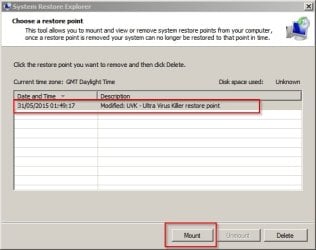
Okay so if you run the software a window will open up showing available system restore points. Choose one and mount it.

System Restore Explorer 1.jpg
 

My Computer

Computer type
Laptop
Computer Manufacturer/Model Number
ASUS
OS
Microsoft Windows 7 Home Premium 64-bit 7601 Multiprocessor Free Service Pack 1
CPU
AMD C-60 APU with Radeon(tm) HD Graphics
Motherboard
ASUSTeK COMPUTER INC. X501U
Memory
4.00 GB
Graphics Card(s)
AMD Radeon HD 6290 Graphics
Sound Card
(1) AMD High Definition Audio Device (2) Realtek High Defi
Screen Resolution
1366 x 768 x 32 bits (4294967296 colors) @ 60 Hz
Hard Drives
Hitachi HTS545050A7E380 SATA Disk Device
Antivirus
Comodo CIS & FW, SecureAplus App Whitelisting, Threatfire
Browser
Cyberfox 64bit, Opera 64bit, Airfox
Other Info
Spy-The-Spy, HitmanPro.Alert, Norton Connect Safe, MJRegWatcher, BitDefender TrafficLight, Voodoo Shield, Zemana AntiMalware
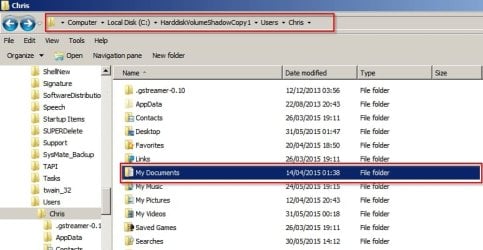
The next window will open the mounted system retore point. Navigate to

System Restore Explorer 2.jpg

C:\HarddiskVolumeShadowCopy1\Users\UserName\ and copy your My Documents folder and then in a new Explorer window navigate to:

C:\Users\UserName and paste the folder into that window.
 

My Computer

Computer type
Laptop
Computer Manufacturer/Model Number
ASUS
OS
Microsoft Windows 7 Home Premium 64-bit 7601 Multiprocessor Free Service Pack 1
CPU
AMD C-60 APU with Radeon(tm) HD Graphics
Motherboard
ASUSTeK COMPUTER INC. X501U
Memory
4.00 GB
Graphics Card(s)
AMD Radeon HD 6290 Graphics
Sound Card
(1) AMD High Definition Audio Device (2) Realtek High Defi
Screen Resolution
1366 x 768 x 32 bits (4294967296 colors) @ 60 Hz
Hard Drives
Hitachi HTS545050A7E380 SATA Disk Device
Antivirus
Comodo CIS & FW, SecureAplus App Whitelisting, Threatfire
Browser
Cyberfox 64bit, Opera 64bit, Airfox
Other Info
Spy-The-Spy, HitmanPro.Alert, Norton Connect Safe, MJRegWatcher, BitDefender TrafficLight, Voodoo Shield, Zemana AntiMalware
When the copy has been pasted:

Exit all Explorer windows and go back to the System Restore Explorer window and choose "unmount"

System Restore Explorer 3.jpg

Then exit the window. That should do the trick.
 

My Computer

Computer type
Laptop
Computer Manufacturer/Model Number
ASUS
OS
Microsoft Windows 7 Home Premium 64-bit 7601 Multiprocessor Free Service Pack 1
CPU
AMD C-60 APU with Radeon(tm) HD Graphics
Motherboard
ASUSTeK COMPUTER INC. X501U
Memory
4.00 GB
Graphics Card(s)
AMD Radeon HD 6290 Graphics
Sound Card
(1) AMD High Definition Audio Device (2) Realtek High Defi
Screen Resolution
1366 x 768 x 32 bits (4294967296 colors) @ 60 Hz
Hard Drives
Hitachi HTS545050A7E380 SATA Disk Device
Antivirus
Comodo CIS & FW, SecureAplus App Whitelisting, Threatfire
Browser
Cyberfox 64bit, Opera 64bit, Airfox
Other Info
Spy-The-Spy, HitmanPro.Alert, Norton Connect Safe, MJRegWatcher, BitDefender TrafficLight, Voodoo Shield, Zemana AntiMalware
Okay I've just read your original post again and I'm not sure how the instuctions will work if you've moved My Documents to another drive - I missed that part. If the system restore point didn't keep the files within it via a hardlink to that folder then you will probably need to resort to recovery software. There is software that can recover folder structure sometimes. There's also an alternative software "Shadow Explorer" but I'm not sure how well it does when recovering files from shadow copies of non windows partitions. There are quite a few forums members who use it so perhaps one of them will comment.
 
Last edited:

My Computer

Computer type
Laptop
Computer Manufacturer/Model Number
ASUS
OS
Microsoft Windows 7 Home Premium 64-bit 7601 Multiprocessor Free Service Pack 1
CPU
AMD C-60 APU with Radeon(tm) HD Graphics
Motherboard
ASUSTeK COMPUTER INC. X501U
Memory
4.00 GB
Graphics Card(s)
AMD Radeon HD 6290 Graphics
Sound Card
(1) AMD High Definition Audio Device (2) Realtek High Defi
Screen Resolution
1366 x 768 x 32 bits (4294967296 colors) @ 60 Hz
Hard Drives
Hitachi HTS545050A7E380 SATA Disk Device
Antivirus
Comodo CIS & FW, SecureAplus App Whitelisting, Threatfire
Browser
Cyberfox 64bit, Opera 64bit, Airfox
Other Info
Spy-The-Spy, HitmanPro.Alert, Norton Connect Safe, MJRegWatcher, BitDefender TrafficLight, Voodoo Shield, Zemana AntiMalware
Doesn't work ... all the 'My xxx' folders are not shown.

Do you know of system recover / undelete that will restore files and keep folder structure ?

RECUVA found all files ... but just seems to dump them into single folder.
 

My Computer

Computer type
PC/Desktop
Computer Manufacturer/Model Number
custom build
OS
W7 64 bit ultimate
CPU
i5 3570 3.4G Ivybridge
Motherboard
ASUS P8Z77-V LE
Memory
16GB Ram – Corsair XMS
Graphics Card(s)
MSI GTX G650 Hawk - Frzr II
Sound Card
on-mobo
Monitor(s) Displays
26" Samsung digital
Hard Drives
OS on SSD – Crucial M4 120GB
programme & data on 1TB HDD (Caviar Black)
Pics & video on 1TB HDD (Caviar Black)
PSU
Cooler Master M2 Silent Pro PSU
Case
Fractal R3 case
Cooling
Coolermaster Hper 212 EVO + Artic silver paste
Internet Speed
3MB
Antivirus
KIS
update: found out there is an option to get RECUVA to maintain original folder structure.
Recovered to a separate HDD and all files no back in place
 

My Computer

Computer type
PC/Desktop
Computer Manufacturer/Model Number
custom build
OS
W7 64 bit ultimate
CPU
i5 3570 3.4G Ivybridge
Motherboard
ASUS P8Z77-V LE
Memory
16GB Ram – Corsair XMS
Graphics Card(s)
MSI GTX G650 Hawk - Frzr II
Sound Card
on-mobo
Monitor(s) Displays
26" Samsung digital
Hard Drives
OS on SSD – Crucial M4 120GB
programme & data on 1TB HDD (Caviar Black)
Pics & video on 1TB HDD (Caviar Black)
PSU
Cooler Master M2 Silent Pro PSU
Case
Fractal R3 case
Cooling
Coolermaster Hper 212 EVO + Artic silver paste
Internet Speed
3MB
Antivirus
KIS
Disk Drill

Doesn't work ... all the 'My xxx' folders are not shown.

Do you know of system recover / undelete that will restore files and keep folder structure ?

RECUVA found all files ... but just seems to dump them into single folder.

Yes I know of a couple of programs. Sorry for the delay in replying. Sleep was needed!

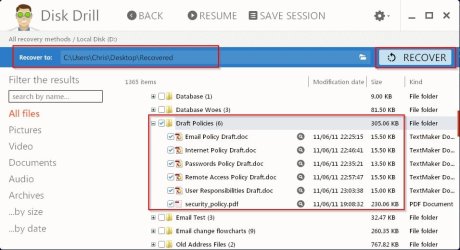
You can try Disk Drill - hopefully you can work out how to use the software.

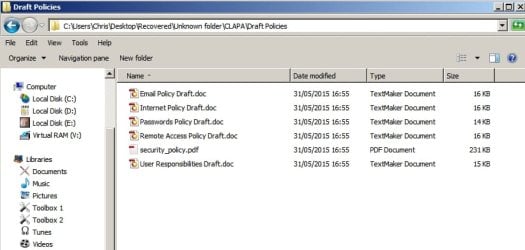
Here's screenshots showing recovered documents and folder structure. Note - you may end up with a different folder name and need to cut and paste and rename recovered folders back to their original names.

Deleted files (and folders) available to be recovered:
Disk Drill.jpg

Deleted files and folder actually recovered.
Recovered.jpg

Will post more details soon.
 
Last edited:

My Computer

Computer type
Laptop
Computer Manufacturer/Model Number
ASUS
OS
Microsoft Windows 7 Home Premium 64-bit 7601 Multiprocessor Free Service Pack 1
CPU
AMD C-60 APU with Radeon(tm) HD Graphics
Motherboard
ASUSTeK COMPUTER INC. X501U
Memory
4.00 GB
Graphics Card(s)
AMD Radeon HD 6290 Graphics
Sound Card
(1) AMD High Definition Audio Device (2) Realtek High Defi
Screen Resolution
1366 x 768 x 32 bits (4294967296 colors) @ 60 Hz
Hard Drives
Hitachi HTS545050A7E380 SATA Disk Device
Antivirus
Comodo CIS & FW, SecureAplus App Whitelisting, Threatfire
Browser
Cyberfox 64bit, Opera 64bit, Airfox
Other Info
Spy-The-Spy, HitmanPro.Alert, Norton Connect Safe, MJRegWatcher, BitDefender TrafficLight, Voodoo Shield, Zemana AntiMalware
Recover folders?

update: found out there is an option to get RECUVA to maintain original folder structure.
Recovered to a separate HDD and all files no back in place

Okay good news. I missed your last post. Perhaps you might like to mark this thread solved?

If anyone wants to try Disk Drill here's the link:

Totally Free data recovery software

Note: This link is for the Windows version - not the MAC version. Also recover drive images uses MAC format so that feature isn't great unless you have a .dmg to .iso convertor.

It's good at recovering folders/ files though!
 

My Computer

Computer type
Laptop
Computer Manufacturer/Model Number
ASUS
OS
Microsoft Windows 7 Home Premium 64-bit 7601 Multiprocessor Free Service Pack 1
CPU
AMD C-60 APU with Radeon(tm) HD Graphics
Motherboard
ASUSTeK COMPUTER INC. X501U
Memory
4.00 GB
Graphics Card(s)
AMD Radeon HD 6290 Graphics
Sound Card
(1) AMD High Definition Audio Device (2) Realtek High Defi
Screen Resolution
1366 x 768 x 32 bits (4294967296 colors) @ 60 Hz
Hard Drives
Hitachi HTS545050A7E380 SATA Disk Device
Antivirus
Comodo CIS & FW, SecureAplus App Whitelisting, Threatfire
Browser
Cyberfox 64bit, Opera 64bit, Airfox
Other Info
Spy-The-Spy, HitmanPro.Alert, Norton Connect Safe, MJRegWatcher, BitDefender TrafficLight, Voodoo Shield, Zemana AntiMalware
Back
Top