recover Lost Partition, Need true experts

unfogiven19

New member
Local time
9:10 AM
Messages
7
Hi Guys

This is my problem :

my SD CARD, 8GB .. 5 months ago, it become RAW, so there where I found out about Testdisk, it fix it.

Last week, same problem appeared, I tried TestDisk .. but nothing happened, after many times, I tried , this option in testdisk 7.0 -----> MBR code..... then It was fixed , and I was able to see my files .

however I just couldn't access to one particular folder, so I used CHKDSK, it deleted the whole folder
icon_eek.gif


then after a day , THE SD CARD, went RAW again.... I tried again TestDisk, it says that the CHS and LBA don't match , I tried again MBR code, but nothing happened,

So I thought maybe if I format it with ( My computer --> management ---> Disk Management ) I could recover my files .. so I format it with FAT32 .

Now I tried more than 20 software, none of them could recover a single file.

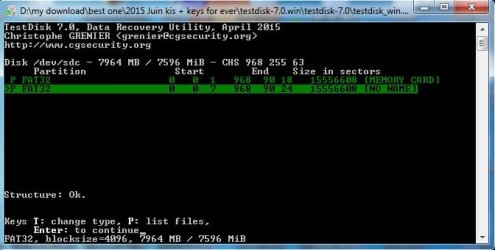
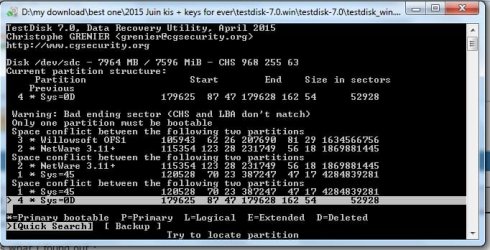
and this what I see in Testdisk :

1111.jpg

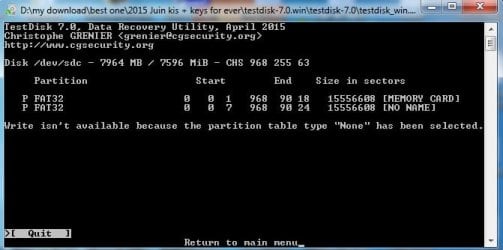
and also It said , NONE partition table has been detected o_O
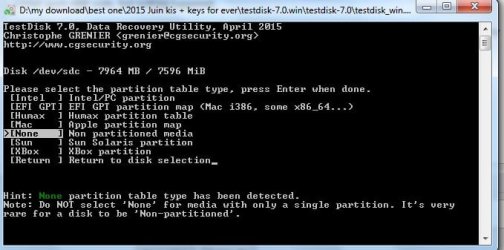
2222.jpg

Please help me ... I really need this SD card, more than anything, it contain all my studies files, my PHD dissertations, it's my life, and am really hopeless .

It least a way I could recover the RAW .. as it was before I format it.
Thank you
 

My Computer My Computer

Computer type
PC/Desktop
OS
Windows 7 32 bit
and this is the lost one .. called ( NO NAME )

0333.jpg

but this is what happend after I continue

4444.jpg
 

My Computer My Computer

Computer type
PC/Desktop
OS
Windows 7 32 bit
When you say true experts, it puts me out of reckoning.:D

Nevertheless, I would say that you have already badly mauled your pendrive, trying things at random without really knowing what you are doing and how it will help in data recovery.

From the history I also have to conclude that you have been pulling out the pendrive without "safely removing " for that can cause to the repeated RAW condition.

If you are sure that " No. I was always removing the pendrive safely but yet it was turning RAW" then it sure was nearing its end of life and you should have forthwith copied all data elsewhere and stopped using the pen drive.You have perhaps taken it to a point of no return.

Your last action as you have enumerated was that you had formatted it to FAT32. By doing that you have lost the original file allocation table.

Also when TestDisk automatically selected "none" as the partition type, it means that it perhaps did not find a valid FAT32 partition. In spite, you should have manually selected Intel/PC Partition and gone ahead and should have checked whether it could list files after it found a valid partition.

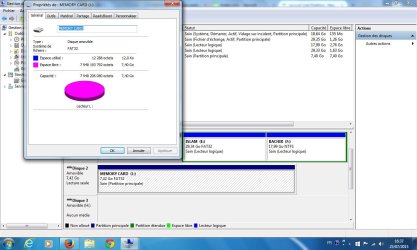
Anyway, before doing it again, post a screenshot of how your pendrive looks like now in Windows Disk Management. Please remove all other USB HDDs/pendrives from your system.

Also follow the guidelines here scrupulously to present the screenshot without any loss of information. http://www.sevenforums.com/tutorials/274797-disk-management-post-screen-capture-image.html

(If you are not currently located in USA, please change your time zone to show the correct local time in your posts)
 

My Computer My Computer

OS
Windows 7 Home Premium 32 bit
Thank you Master for your replay.

1st .. yes 1st time I removed it , and second time, I shutdown the pc without removing, so to it went RAW again.

This is the screenshoot , you asked for :

View attachment 366904
 

Attachments

  • 111Sans titre.jpg
    111Sans titre.jpg
    102.1 KB · Views: 3

My Computer My Computer

Computer type
PC/Desktop
OS
Windows 7 32 bit
OK. Since you have already used Test Disk, I shall only give short instructions.

No log
Select your pen drive
Intel/PC partition ( Even if none is highlighted, you should move to Intel/PC Partition and then press Enter)
Analyse.
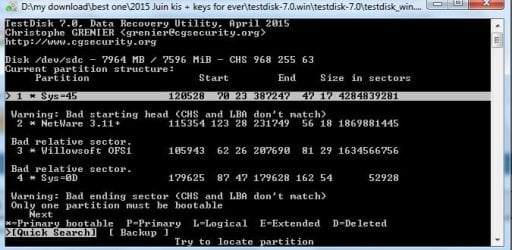
Is your partition shown with Quicksearch highlighted? Post a screenshot and wait for further instructions.
 

My Computer My Computer

OS
Windows 7 Home Premium 32 bit
jumanji is the closest I have found to a expert on this subject.

unfogiven19 I will not try to help you because it's way over my head.
I will give just a little advice.

1. Don't do anything until jumanji instructs you to do so.
2. Follow his instruction exactly as instructed by jumanji.

Following 1 and 2 will give you the best chance of solving your problem. Sometimes the only repair is a new thumb drive and loose your data.

I will go back to watching the thread.
 

My Computer My Computer

Computer type
PC/Desktop
Computer Manufacturer/Model Number
Home made Desktop
OS
Windows 10 Pro. 64/ version 1709 Windows 7 Pro/64
CPU
Intel i7-6800K @ 4.3
Motherboard
ASUS X-99 Deluxe II
Memory
Corsair Platinum 16 gig @2400
Graphics Card(s)
EVGA GTX 1070 OC
Monitor(s) Displays
Asus 27" LED LCD/VE278Q
Screen Resolution
1920-1080 or 1280-720 HDMI
Hard Drives
INTEL SSD 730-240 Gb Sata 3.0/
PSU
EVGA Platium 1200W
Case
Phanteks Luxe Tempered Glass 8 fans/ one radiator
Cooling
XSPC/ Water Cooled CPU
Keyboard
Das 4 Professional
Mouse
Logitech M705/MX Anywhere 2-S
Internet Speed
100 mbits
Antivirus
Microsoft Security Essentials/ Malwarebytes Premium 3.0/ SAS
Browser
I.E. 11 default/Firefox/ ISP Time Warner Cable/Spectrum
Other Info
LG BluRay Burner/
Sound system-KLipsch-THX/
Icy Dock ssd Hot Swap bays.
hi , sorry master for being late ..

this is what I found out :

instruction1.jpg

instruction2.jpg
 

My Computer My Computer

Computer type
PC/Desktop
OS
Windows 7 32 bit
Honestly, I don't see much scope or hope in recovering data. Last you said was FAT32 with Disk Management. It hadn't gone well somehow for whatever reason - may be a bad pen drive. Had it gone well, you should only be able to see one current FAT32 partition. Now its all jumbled up.

We have to try and see whether PhotoRec is able to reconstruct the files ab initio. (PhotoRec does not require a valid file system to be present. It tries to reconstruct the files from the file format signature and characteristics.)

So instead of TestDisk try PhotoRec. When you come to the screen to select the file formats select the file formats you wish to recover.
http://www.sevenforums.com/software/193467-guide-using-photorec-recovery-software.html

Don't format your drive again. In that experiment, I formatted the pendrive just to show that PhotoRec can recover the files even after formatting the drive - yes it can, provided all is well with the drive otherwise. You have already formatted it :)

Let us know how it went.
 

My Computer My Computer

OS
Windows 7 Home Premium 32 bit
I tired it over and over , but nothing happend . :cry:
 

My Computer My Computer

Computer type
PC/Desktop
OS
Windows 7 32 bit
where are master ?
 

My Computer My Computer

Computer type
PC/Desktop
OS
Windows 7 32 bit
maaaaaaaaster !!

LUCKY FOR ME I DID .. and I found a image.dd ...


what can I do now ?
 

My Computer My Computer

Computer type
PC/Desktop
OS
Windows 7 32 bit
Back
Top