
Recovery and OEM Partition didn't clone?

GrandmaGlowWorm

New member
Local time
4:40 AM
Messages
3
So I finally broke down and bought an SSD to use as my boot drive, and after looking at reviews, I settled on a Samsung 860 EVO 500GB. I used Samsung's Migration software (which was really fast surprisingly, even though I only had to clone about 200 GB) and the reboot worked flawlessly.

When I went to format my old HDD, I realized the once hidden Recovery (DELL) and OEM Partitions were now visible and, you guessed it, still on my old drive! After reading the manual on the Migration Tool, of course I now see that Samsung warns that it doesn't clone recovery/system reserve partitions.

So my questions are:

Is there anyway to move the Recovery and OEM Partitions over to my new SSD? Without doing a clean install of Windows 7?

Could I just keep the Recovery and OEM Partitions on the old HDD, and use them to recover Windows - even though the OS is longer attached to the drive?


Thank you for any help!
 

Attachments
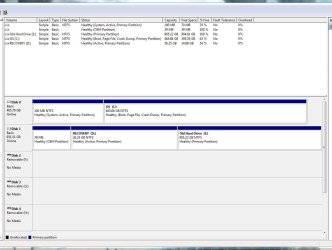
  • After Clone and Format Both Drives Hooked Up Disk Management.JPG
    After Clone and Format Both Drives Hooked Up Disk Management.JPG
    92.6 KB · Views: 3

My Computer My Computer

At a glance

Windows 7 Home Premium 64bit
Computer type
PC/Desktop
Computer Manufacturer/Model Number
Dell XPS 8500
OS
Windows 7 Home Premium 64bit
Hello, and welcome to Seven Forums


I am afraid the Samsung Migration software does not copy the OEM partition. You can create a System Repair Disk for Emergencies, if you are happy with that. Of course you can clone your SSD and use that to restore your computer.

Alternatively people have been using Aomei Backupper or Acronis True Image to migrate the OEM partition with the System Image.
 

My Computer My Computer

At a glance

Windows 7 x64, Vista x64, 8.1 smartphoneIntel E8400 65W 64-bitDDR2 2 x 2GB, 1GB x 2XFX Radeon HD5750
Computer type
PC/Desktop
OS
Windows 7 x64, Vista x64, 8.1 smartphone
CPU
Intel E8400 65W 64-bit
Motherboard
Gigabyte EP45-UD3LR
Memory
DDR2 2 x 2GB, 1GB x 2
Graphics Card(s)
XFX Radeon HD5750
Sound Card
AMD High Definition Audio; Realtek High Definition Audio
Monitor(s) Displays
iiyama prolite X2377HDS
Screen Resolution
1920 x 1080
Hard Drives
500GB 7200 rpm Seagate ST3500413AS 16MB, 500GB 5400 rpm Toshiba MQ02ABF050H 32MB, 200GB 7200 rpm Seagate ST3200820AS 8MB, 2TB 7200 rpm Western Digital WD20EZRX 64MB
PSU
Enermax Liberty Modular
Case
Antec P193 Midi Tower
Keyboard
Mionix ZIBAL 60
Mouse
Razer USB 2.0 Diamondback Mouse or Huion Graphics Tablet
Browser
Internet Explorer, Lunascape, Firefox, Opera, Avast Safezone
Thanks for the reply!

So - could I potentially use True Image or Backupper to move the OEM and Recovery partitions to my new C Drive, even though its already partitioned and has the OS on it?

If not, I will probably just create a System Repair Disk.
 

My Computer My Computer

At a glance

Windows 7 Home Premium 64bit
Computer type
PC/Desktop
Computer Manufacturer/Model Number
Dell XPS 8500
OS
Windows 7 Home Premium 64bit

My Computer My Computer

At a glance

Win 7 Ultimate 64 bitIntel i7-3930KKingston HyperX Genesis 32GB Kit (8x4GB Modul...MSI R7850 Twin Frozr 2GD5/OC Radeon HD 7850 2...
Computer type
PC/Desktop
Computer Manufacturer/Model Number
Custom Build
OS
Win 7 Ultimate 64 bit
CPU
Intel i7-3930K
Motherboard
ASUS P9X79 WS
Memory
Kingston HyperX Genesis 32GB Kit (8x4GB Modules) 1600MHz DDR
Graphics Card(s)
MSI R7850 Twin Frozr 2GD5/OC Radeon HD 7850 2GB 256-bit GDDR
Sound Card
Asus Xonar Essence STX
Monitor(s) Displays
3x Asus VG248QE 24", Vizio 32" TV
Screen Resolution
1920 x 1080, ?
Hard Drives
Samsung 128GB 840 Pro SSD (1),
Samsung 4TB 850 EVO SSDs (4)
Samsung 4TB 850 EVO SSDs (16) external backup drives used in 2.5" hot swap bays in the computer.
PSU
Corsair HX750w
Case
Antec Two Hundred v2 (modified)
Cooling
Cooler Master GeminII S524 120mm (fan replaced with a 140mm)
Keyboard
Logitech G510s
Mouse
Logitech M525 (two in use)
Internet Speed
=< 32Mbps down, 8Mbps up
Antivirus
AVAST!, MBAM, SAS, Spybot S&D (all but MBAM free) Glary Util
Browser
IE11
Other Info
LSI 9211-8i HBA card (8 SATA III ports), 2.5" & 3.5" Hot Swap Bays, HooToo HT-CR001 PCI-E to USB 3.0 Internal Hub + 6 Slot Card Reader, and LG Model CH12LS28 BD-ROM Optical Drive. Also, ScanSnap S1500 ADF duplexing scanner, Canon 9000F flat bed scanner, Corsair SP2500 2.1 speakers, Samsung CLP 415nw laser color printer, Cyberpower PP2200SW UPS
Funnily enough, I intended on using Macrium Reflect before realizing Samsung had its own Cloning software. Thought it would be best to use the company's own product for their SSD, but I guess not haha.

Thanks for your reply!
 

My Computer My Computer

At a glance

Windows 7 Home Premium 64bit
Computer type
PC/Desktop
Computer Manufacturer/Model Number
Dell XPS 8500
OS
Windows 7 Home Premium 64bit
There are plenty of 3rd party imaging cloning tools with free versions. Aomei, macrium, Easeus, paragon, etc

They are still doing O&O DiskImage Pro 11 ( usually not free - but is on giveaway ). It is good for advanced users - lots of options and functions.

If you are looking for something simple to operate, I suggest Aomei Standard (free) edition
Best Windows Backup and Restore Software | AOMEI Backupper
 

My Computers My Computers

  • At a glance

    7 X64i5 84002x8gb 3200mhz
    Computer type
    PC/Desktop
    OS
    7 X64
    CPU
    i5 8400
    Motherboard
    gigabyte b365m ds3h
    Memory
    2x8gb 3200mhz
    Hard Drives
    various
    PSU
    pure power 11 400w cm
    Case
    Coolermaster
    Cooling
    cryorig m9i
  • At a glance

    7x64g54008gb ddr4 2400
    Computer type
    PC/Desktop
    OS
    7x64
    CPU
    g5400
    Motherboard
    ga b365m ds3h
    Memory
    8gb ddr4 2400
    PSU
    xfx pro 450w
Back
Top