Recovery option windows 7

hiram1986

New member
Member
Local time
1:09 PM
Messages
38
I HAVE A HEWLET PACKARD NETBOOK THAT CAME PR INSTALLED WITH WINDOWS 7 HOME PREMIUM. I then upgraded to windows 8. I now want to go back to windows 7. I plugged the laptop hard drive into my pc and have noticed that there is a 20gb recovery partition. I cant boot from this when hard drive is in the laptop. Is there anything I can do
 

My Computer My Computer

Computer type
PC/Desktop
Computer Manufacturer/Model Number
ASUS
OS
windows pro 64 bit
CPU
INTEL CORE I7 920
Motherboard
P6TD DELUX
Memory
12 DDR3
Graphics Card(s)
ATI RADEON HD 5850
Hard Drives
1 X 2TB
1 X 1 TB SAMSUNG
Antivirus
MSE
Browser
EXPLORER
Upgrading to W8 must have changed the HD partitions to GPT. You may find something in the Tutorials section how to change the settings to allow W7 to boot and install. But as for the discs you could order the recovery set for W7 from HP or if you still have your original product key for W7 Home Premium it should work with a W7 Home Premium iso that you burn to DVD or use to create a bootable USB installer.

There are probably links to the iso downloads on the forum if you have broadband.

Maybe someone will chime in with the settings changes that will allow you to boot the W7 media. Partition Wizard should allow you to change GPT partitions to MBR type.
 

My Computer My Computer

Computer Manufacturer/Model Number
HP Media Center
OS
Windows 7 32 bit
CPU
AMD 5200+ dual core
Memory
2 GB
Graphics Card(s)
NVidia GeForce 6150SE 128 MB
Monitor(s) Displays
CRT
Screen Resolution
1280x1024
Hard Drives
500 GB Sata internal :

SIIG USB 3.0 docking stations w/WD Caviar Black 6 Gb/s drives
Keyboard
PS/2
Mouse
PS/2 Wheel Mouse
Other Info
SIIG USB 3.0 PCIexpress card.
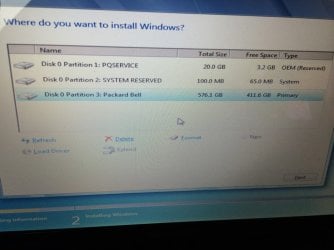
Ok so iv got a bootable USB to install windows 7. Can I delete the OEM reserved?
 

Attachments

  • ImageUploadedBySeven Forums1401381509.795044.jpg
    ImageUploadedBySeven Forums1401381509.795044.jpg
    63.2 KB · Views: 0

My Computer My Computer

Computer type
PC/Desktop
Computer Manufacturer/Model Number
ASUS
OS
windows pro 64 bit
CPU
INTEL CORE I7 920
Motherboard
P6TD DELUX
Memory
12 DDR3
Graphics Card(s)
ATI RADEON HD 5850
Hard Drives
1 X 2TB
1 X 1 TB SAMSUNG
Antivirus
MSE
Browser
EXPLORER
Yes delete all partitions as it suggests in tutorial. If you follow that tutorial you will have a perfect install.
 
Back
Top