Solved $RECYCLE.BIN Issues

Snick

New member
Guru
VIP
Local time
12:00 PM
Messages
3,615
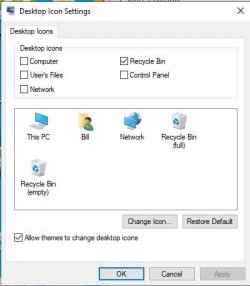
My recycle bin folder is missing from C drive. When I go to desktop icon setting I see full and empty recycle bin. Any ideas?
Capture.JPG
 

My Computer

Computer type
PC/Desktop
Computer Manufacturer/Model Number
HP Desktop & Compaq Laptop
OS
Win 10 x64, Linux Lite, Win 7 x64, BlackArch, & Kali
Hard Drives
Samsung 850 Pro 256Gb,
Hitachi HDD 1Tb,
Crucial MX SSD 250Gb
Segate 3Tb USB 3.0 Ext. Backup HDD
Internet Speed
150Mbps dn, 20Mbps up
Antivirus
Avast Free, Malwarebytes Anti-Exploit & Anti-Ransomware
Browser
Firefox, Chrome, Opera, & VPN
presumably you have already tried unticking, tickinig it again, set defaults, reboot

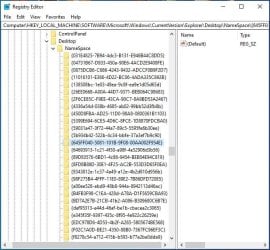
you can have alook in the registry and see if there something odd about

HKEY_LOCAL_MACHINE\SOFTWARE\Microsoft\Windows\CurrentVersion\Explorer\Desktop\NameSpace\{645FF040-5081-101B-9F08-00AA002F954E}
 

My Computers

System One System Two

  • Computer type
    PC/Desktop
    OS
    7 X64
    CPU
    i5 8400
    Motherboard
    gigabyte b365m ds3h
    Memory
    2x8gb 3200mhz
    Hard Drives
    various
    PSU
    pure power 11 400w cm
    Case
    Coolermaster
    Cooling
    cryorig m9i
  • Computer type
    PC/Desktop
    OS
    7x64
    CPU
    g5400
    Motherboard
    ga b365m ds3h
    Memory
    8gb ddr4 2400
    PSU
    xfx pro 450w
Thank you SIW2

Yes, already tried unticking, tickinig it again, set defaults, reboot. Actually several times.

Key folder looks OK, same as you posted. Stumping me so far! Always enjoy reading your posts. You are a plethora of knowledge.

!Capture.JPG
 
Last edited:

My Computer

Computer type
PC/Desktop
Computer Manufacturer/Model Number
HP Desktop & Compaq Laptop
OS
Win 10 x64, Linux Lite, Win 7 x64, BlackArch, & Kali
Hard Drives
Samsung 850 Pro 256Gb,
Hitachi HDD 1Tb,
Crucial MX SSD 250Gb
Segate 3Tb USB 3.0 Ext. Backup HDD
Internet Speed
150Mbps dn, 20Mbps up
Antivirus
Avast Free, Malwarebytes Anti-Exploit & Anti-Ransomware
Browser
Firefox, Chrome, Opera, & VPN

My Computers

System One System Two

Out of curiosity, try this once:

Make sure the "My Documents" folder is on the desktop. Now right click "My Documents" and create a shortcut to the desktop. Now delete the shortcut that was created.

Does the recycle bin work?

- - - Updated - - -

If the actual $RECYCLE.BIN is missing from C drive, you have a few options.

1) System restore

2) Dig into the shadow copies for the $RECYCLE.BIN file

3) Repair install or try a sfc /scannow

With #2, try Shadow Copy View. ShadowCopyView - Shadow copy viewer for Windows 10/8/7/Vista

With #1, you can actually look inside the system restore files for just the one thing you want with SystemRestoreExplorer. System Restore Explorer | Nic's Blog
 

My Computer

Computer type
PC/Desktop
OS
Windows 7 Ultimate x64
This is win 10. Yes I tried most everything in your link Townsbg. Didn't help unfortunately.
Recycle bin works as it should along with all other OS and app features. I'll live with how it is. Don't fix it if it ain't broke.
Thanks for all your informative replies. Always learn something on this site.
Snick
 

My Computer

Computer type
PC/Desktop
Computer Manufacturer/Model Number
HP Desktop & Compaq Laptop
OS
Win 10 x64, Linux Lite, Win 7 x64, BlackArch, & Kali
Hard Drives
Samsung 850 Pro 256Gb,
Hitachi HDD 1Tb,
Crucial MX SSD 250Gb
Segate 3Tb USB 3.0 Ext. Backup HDD
Internet Speed
150Mbps dn, 20Mbps up
Antivirus
Avast Free, Malwarebytes Anti-Exploit & Anti-Ransomware
Browser
Firefox, Chrome, Opera, & VPN
Is this happening on one profile or multiple profiles? If one start using a separate one. You might try 10 forums. They like 10 there.
 

My Computers

System One System Two

Back
Top