Recycle Bin - Permanently Delete Items Automatically

Set Recycle Bin to Permanently Delete Items Immediately in Windows

   Information
The Recycle Bin provides a safety net when deleting files or folders. When you delete any of these items from your hard disk, Windows places it in the Recycle Bin and the Recycle Bin icon changes from empty to full.

This tutorial will show you how to set the Recycle Bin to permanently delete files automatically instead for selected drives in Windows.

   Note
Removable drives do not use or have a Recycyle Bin. Files deleted from removable drives are permanently deleted instead.

You could also right click on a file, press and hold Shift, and click on Delete to permanently delete the file.

   Warning
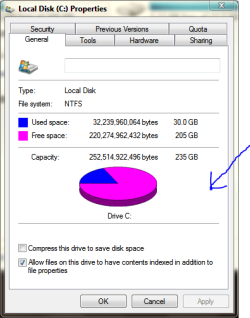
If you set this option for bypassing sending files to the recycle bin, you will no longer have the Disk Cleanup option from that drive's properties window, as posted here: post


Here's How:
1. Right click on the Recycle Bin on the desktop, and select Properties

2. Select a listed HDD (ex: Local Disk (C: )) under the Recycle Bin Location column that you would like to set step 3 or 4 below for.
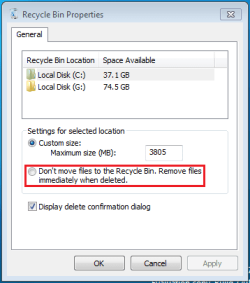
Capture.PNG
3. To Set the Recycle Bin to Permanently Delete Files
A) Select (dot) Don't move files to the recycle bin..., and click on Apply.
4. To Set the Recycle Bin to Not Permanently Delete Files
NOTE: This is the default setting.
A) Select Custom size, and click on Apply.
5. Repeat steps 2-4 above for any other listed HDD that you would like to set this for.

6. when finished, click on OK. (see screenshot below step 2)
   Tip
If you like, you can also disable the confirmation dialog if you wish


That's all there is to it.

 
Last edited by a moderator:
And... what if this does not resolve, that is, the files never go to the Recycle Bin??
 

My Computer

OS
SEVEN ultimate 64bits
CPU
AMD Phenom II
Motherboard
M5A78
Memory
4G
Graphics Card(s)
NVidia 9500
Internet Speed
1M
Hello Jaca,

I'm not sure what you mean, but be sure to have the option selected (dotted) in the tutorial instead to have them placed in the Recycle Bin.
 

My Computer

Computer type
PC/Desktop
Computer Manufacturer/Model Number
Self built custom
OS
64-bit Windows 11 Pro for Workstations
CPU
Intel i7-8700K OC'd to 5 GHz
Motherboard
ASUS ROG Maximus XI Formula Z390
Memory
64 GB (4x16GB) G.SKILL TridentZ RGB DDR4 3600 MHz
Graphics Card(s)
ASUS ROG-STRIX-GTX1080TI-O11G-GAMING
Sound Card
Integrated
Monitor(s) Displays
2 x Samsung Odyssey G7 27"
Screen Resolution
2560x1440
Hard Drives
1TB Samsung 990 PRO M.2,
4TB Samsung 990 PRO PRO M.2,
TerraMaster F8 SSD Plus NAS
PSU
Seasonic Prime Titanium 850W
Case
Thermaltake Core P3
Cooling
Corsair Hydro H115i
Keyboard
Logitech wireless K800
Mouse
Logitech MX Master 4
Internet Speed
2 Gb/s Download and 100 Mb/s Upload
Antivirus
Malwarebyte Anti-Malware Premium
Browser
Google Chrome
Other Info
Logitech Z625 speaker system,
Logitech BRIO 4K Pro webcam,
HP Color LaserJet Pro MFP M477fdn,
APC SMART-UPS RT 1000 XL - SURT1000XLI,
Galaxy S23 Plus phone
I have performed exactly according to the tutorial by selecting the Custom Size box.

Just in time: this behavior is present in User Accounts only, not in the Administrator one! Is it normal?
 
Last edited by a moderator:

My Computer

OS
SEVEN ultimate 64bits
CPU
AMD Phenom II
Motherboard
M5A78
Memory
4G
Graphics Card(s)
NVidia 9500
Internet Speed
1M
Jaca,

Did you also check this setting in each user account? Each user account has it's own settings for this.
 

My Computer

Computer type
PC/Desktop
Computer Manufacturer/Model Number
Self built custom
OS
64-bit Windows 11 Pro for Workstations
CPU
Intel i7-8700K OC'd to 5 GHz
Motherboard
ASUS ROG Maximus XI Formula Z390
Memory
64 GB (4x16GB) G.SKILL TridentZ RGB DDR4 3600 MHz
Graphics Card(s)
ASUS ROG-STRIX-GTX1080TI-O11G-GAMING
Sound Card
Integrated
Monitor(s) Displays
2 x Samsung Odyssey G7 27"
Screen Resolution
2560x1440
Hard Drives
1TB Samsung 990 PRO M.2,
4TB Samsung 990 PRO PRO M.2,
TerraMaster F8 SSD Plus NAS
PSU
Seasonic Prime Titanium 850W
Case
Thermaltake Core P3
Cooling
Corsair Hydro H115i
Keyboard
Logitech wireless K800
Mouse
Logitech MX Master 4
Internet Speed
2 Gb/s Download and 100 Mb/s Upload
Antivirus
Malwarebyte Anti-Malware Premium
Browser
Google Chrome
Other Info
Logitech Z625 speaker system,
Logitech BRIO 4K Pro webcam,
HP Color LaserJet Pro MFP M477fdn,
APC SMART-UPS RT 1000 XL - SURT1000XLI,
Galaxy S23 Plus phone
Yes, I did. I'm thinking Seven is corrupted, for some reason. I've tried to make a repair with the original DVD, no success
 

My Computer

OS
SEVEN ultimate 64bits
CPU
AMD Phenom II
Motherboard
M5A78
Memory
4G
Graphics Card(s)
NVidia 9500
Internet Speed
1M
Ok, since it works in the administrator account, see if when you create a new user account it works in it to try and avoid doing a clean reinstall. If it does, then you can copy the files you want from the old user account's C:\Users\(user-name) folders into the corresponding new user account's C:\Users\(user-name) folders. After everything checks out, you can delete the old user account from within the new one or Administrator account. Repeat for each old user account that the Recycle Bin does not work in.
 

My Computer

Computer type
PC/Desktop
Computer Manufacturer/Model Number
Self built custom
OS
64-bit Windows 11 Pro for Workstations
CPU
Intel i7-8700K OC'd to 5 GHz
Motherboard
ASUS ROG Maximus XI Formula Z390
Memory
64 GB (4x16GB) G.SKILL TridentZ RGB DDR4 3600 MHz
Graphics Card(s)
ASUS ROG-STRIX-GTX1080TI-O11G-GAMING
Sound Card
Integrated
Monitor(s) Displays
2 x Samsung Odyssey G7 27"
Screen Resolution
2560x1440
Hard Drives
1TB Samsung 990 PRO M.2,
4TB Samsung 990 PRO PRO M.2,
TerraMaster F8 SSD Plus NAS
PSU
Seasonic Prime Titanium 850W
Case
Thermaltake Core P3
Cooling
Corsair Hydro H115i
Keyboard
Logitech wireless K800
Mouse
Logitech MX Master 4
Internet Speed
2 Gb/s Download and 100 Mb/s Upload
Antivirus
Malwarebyte Anti-Malware Premium
Browser
Google Chrome
Other Info
Logitech Z625 speaker system,
Logitech BRIO 4K Pro webcam,
HP Color LaserJet Pro MFP M477fdn,
APC SMART-UPS RT 1000 XL - SURT1000XLI,
Galaxy S23 Plus phone
I forgot to tell you:in every user account the Recycle Bin does not work in. :confused:
 

My Computer

OS
SEVEN ultimate 64bits
CPU
AMD Phenom II
Motherboard
M5A78
Memory
4G
Graphics Card(s)
NVidia 9500
Internet Speed
1M

My Computer

Computer type
PC/Desktop
Computer Manufacturer/Model Number
Self built custom
OS
64-bit Windows 11 Pro for Workstations
CPU
Intel i7-8700K OC'd to 5 GHz
Motherboard
ASUS ROG Maximus XI Formula Z390
Memory
64 GB (4x16GB) G.SKILL TridentZ RGB DDR4 3600 MHz
Graphics Card(s)
ASUS ROG-STRIX-GTX1080TI-O11G-GAMING
Sound Card
Integrated
Monitor(s) Displays
2 x Samsung Odyssey G7 27"
Screen Resolution
2560x1440
Hard Drives
1TB Samsung 990 PRO M.2,
4TB Samsung 990 PRO PRO M.2,
TerraMaster F8 SSD Plus NAS
PSU
Seasonic Prime Titanium 850W
Case
Thermaltake Core P3
Cooling
Corsair Hydro H115i
Keyboard
Logitech wireless K800
Mouse
Logitech MX Master 4
Internet Speed
2 Gb/s Download and 100 Mb/s Upload
Antivirus
Malwarebyte Anti-Malware Premium
Browser
Google Chrome
Other Info
Logitech Z625 speaker system,
Logitech BRIO 4K Pro webcam,
HP Color LaserJet Pro MFP M477fdn,
APC SMART-UPS RT 1000 XL - SURT1000XLI,
Galaxy S23 Plus phone
That's what I was afraid of ... But I'll leave that way, trying to remember that the Recycle Bin does not work well. Thanks:(
 

My Computer

OS
SEVEN ultimate 64bits
CPU
AMD Phenom II
Motherboard
M5A78
Memory
4G
Graphics Card(s)
NVidia 9500
Internet Speed
1M
If you choose to use the option to delete immediately delete files without going into the recycle bin, remember you will no longer have the "disk clean-up" option for that drive in drive properties. It took me a long time to figurre out why my "disk clean-up" button was missing. This was why. Just for everyones information.

nocleanup.PNG
 

My Computer

Computer Manufacturer/Model Number
Keeps changing - (Custom)
OS
Windows 7 Professional x64
CPU
Intel Core i7 860
Motherboard
Gigabyte GA-P55-UD4P
Memory
4GB DDR3 Mushkin 1600Mhz @ 7-8-7-20
Graphics Card(s)
MSI GTS250 1GB DDR3 Twin Frozr
Sound Card
Onboard realtek
Monitor(s) Displays
Samsung SyncMaster 24" P2450 + Samsung 20" 2033
Screen Resolution
1920 X 1080 and 1600 X 900 (#2 system 1440 X 900)
Hard Drives
Patriot Inferno 120GB SSD + 3 WD Blue 640GB drives
PSU
Corsair 750 HX Modular
Case
Lancool PC-K62
Cooling
Cooler Master TX3 CPU cooler and 4-140mm and 1-120mm case
Keyboard
Gigabyte USB keyboard
Mouse
Microsoft wireless laser mouse 5000
Internet Speed
7 Mb down 1.5 up
Other Info
System #2: AMD Phenom II X6 1055T (Freezer 7 Pro cooler) - Gigabyte 880GMA-UD2H - WD 500GB Black - 9500GT (1GB) 500W OCZ modular PSU - Antec 200 case. System #3 (LapTop) Core 2 Duo T6670 - 320GB 7200RPM HD - 4GB DDR3 RAM.
Is there anyway to control by folder - eg if something is deleted from within my Playground folder (or its subfolders) then trash it immediately, otherwise send to the recycle bin

pjd
 

My Computer

Computer type
PC/Desktop
Computer Manufacturer/Model Number
generic - made to spec
OS
Win 7 Professional 64bit
CPU
I5 650 @ 3.2GHz
Motherboard
Gigabyte H55M-UD2H
Memory
6G
Graphics Card(s)
AMD Radeon R7 200 Series
Sound Card
whatever is on mobo
Monitor(s) Displays
1 x 24" Samsung
Screen Resolution
1920x1200
Hard Drives
Internal 1x256GB Toshiba SSD
Internal 1x2TB
External 2 slot USB 3.0 dock (various drives)
External 1 500GB USB 2.0 drive
PSU
850W Antech Modular
Case
Shiny Black Aluminium
Cooling
extra fans - sucker in front, blower at back - noisy & cool
Keyboard
Microsoft USB Dual Receiver Wireless Keyboard
Mouse
Microsoft USB Dual Receiver Wireless Mouse
Internet Speed
20/1Mbps down/up
Antivirus
MSE
Browser
Firefox and Chrome
Other Info
Hitachi USB 3.0 adapter
Hello PJD,

If you like, you could press and hold the Shift key, right click on a file/folder, and click on Delete to permanently delete only that file/folder. :)
 

My Computer

Computer type
PC/Desktop
Computer Manufacturer/Model Number
Self built custom
OS
64-bit Windows 11 Pro for Workstations
CPU
Intel i7-8700K OC'd to 5 GHz
Motherboard
ASUS ROG Maximus XI Formula Z390
Memory
64 GB (4x16GB) G.SKILL TridentZ RGB DDR4 3600 MHz
Graphics Card(s)
ASUS ROG-STRIX-GTX1080TI-O11G-GAMING
Sound Card
Integrated
Monitor(s) Displays
2 x Samsung Odyssey G7 27"
Screen Resolution
2560x1440
Hard Drives
1TB Samsung 990 PRO M.2,
4TB Samsung 990 PRO PRO M.2,
TerraMaster F8 SSD Plus NAS
PSU
Seasonic Prime Titanium 850W
Case
Thermaltake Core P3
Cooling
Corsair Hydro H115i
Keyboard
Logitech wireless K800
Mouse
Logitech MX Master 4
Internet Speed
2 Gb/s Download and 100 Mb/s Upload
Antivirus
Malwarebyte Anti-Malware Premium
Browser
Google Chrome
Other Info
Logitech Z625 speaker system,
Logitech BRIO 4K Pro webcam,
HP Color LaserJet Pro MFP M477fdn,
APC SMART-UPS RT 1000 XL - SURT1000XLI,
Galaxy S23 Plus phone
Back
Top