
Recycle Bin Won't Show Confirmation Dialog...

Daddyman

New member
Member
Local time
6:41 PM
Messages
40
The Recycle Bin in my copy of Windows 7 x64 won't show the confirmation dialog, even though "Display delete confirmation dialog" is checked. Instead, my files are being permanently deleted. How can I restore the confirmation dialog?

The problem began after I ran this command:

rd /s <drive_letter:>\$Recycle.bin

on all my drives to fix a problem where the Recycle Bin was very slow to empty.
 

Attachments
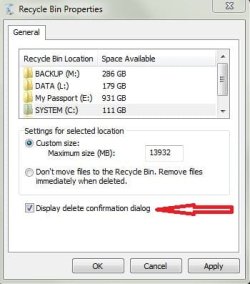
  • Recycle_Bin.JPG
    Recycle_Bin.JPG
    29.1 KB · Views: 3

My Computer My Computer

At a glance

Windows 7 Professional x64
Computer Manufacturer/Model Number
Dell Studio XPS 8100
OS
Windows 7 Professional x64

My Computer My Computer

At a glance

64-bit Windows 11 Pro for WorkstationsIntel i7-8700K OC'd to 5 GHz64 GB (4x16GB) G.SKILL TridentZ RGB DDR4 3600...ASUS ROG-STRIX-GTX1080TI-O11G-GAMING
Computer type
PC/Desktop
Computer Manufacturer/Model Number
Self built custom
OS
64-bit Windows 11 Pro for Workstations
CPU
Intel i7-8700K OC'd to 5 GHz
Motherboard
ASUS ROG Maximus XI Formula Z390
Memory
64 GB (4x16GB) G.SKILL TridentZ RGB DDR4 3600 MHz
Graphics Card(s)
ASUS ROG-STRIX-GTX1080TI-O11G-GAMING
Sound Card
Integrated
Monitor(s) Displays
2 x Samsung Odyssey G7 27"
Screen Resolution
2560x1440
Hard Drives
1TB Samsung 990 PRO M.2,
4TB Samsung 990 PRO PRO M.2,
TerraMaster F8 SSD Plus NAS
PSU
Seasonic Prime Titanium 850W
Case
Thermaltake Core P3
Cooling
Corsair Hydro H115i
Keyboard
Logitech wireless K800
Mouse
Logitech MX Master 4
Internet Speed
2 Gb/s Download and 100 Mb/s Upload
Antivirus
Malwarebyte Anti-Malware Premium
Browser
Google Chrome
Other Info
Logitech Z625 speaker system,
Logitech BRIO 4K Pro webcam,
HP Color LaserJet Pro MFP M477fdn,
APC SMART-UPS RT 1000 XL - SURT1000XLI,
Galaxy S23 Plus phone
Thanks for your help.

Even with the group policy enabled...I still get no confirmation dialog! (It seems that the group policy only affects the ability of users to make a change.)

Perhaps this will help you solve my problem.

EDIT: I just now tried to delete and recreate the Recycle Bin, which also made no difference.

[To delete and re-create: In Safe Mode with Command Prompt I issued -

attrib -s -h C:\$Recycle.Bin
del C:\$Recycle.Bin

and re-started normally.]
 
Last edited:

My Computer My Computer

At a glance

Windows 7 Professional x64
Computer Manufacturer/Model Number
Dell Studio XPS 8100
OS
Windows 7 Professional x64
As a test, does it do this with other or new user accounts on the PC?
 

My Computer My Computer

At a glance

64-bit Windows 11 Pro for WorkstationsIntel i7-8700K OC'd to 5 GHz64 GB (4x16GB) G.SKILL TridentZ RGB DDR4 3600...ASUS ROG-STRIX-GTX1080TI-O11G-GAMING
Computer type
PC/Desktop
Computer Manufacturer/Model Number
Self built custom
OS
64-bit Windows 11 Pro for Workstations
CPU
Intel i7-8700K OC'd to 5 GHz
Motherboard
ASUS ROG Maximus XI Formula Z390
Memory
64 GB (4x16GB) G.SKILL TridentZ RGB DDR4 3600 MHz
Graphics Card(s)
ASUS ROG-STRIX-GTX1080TI-O11G-GAMING
Sound Card
Integrated
Monitor(s) Displays
2 x Samsung Odyssey G7 27"
Screen Resolution
2560x1440
Hard Drives
1TB Samsung 990 PRO M.2,
4TB Samsung 990 PRO PRO M.2,
TerraMaster F8 SSD Plus NAS
PSU
Seasonic Prime Titanium 850W
Case
Thermaltake Core P3
Cooling
Corsair Hydro H115i
Keyboard
Logitech wireless K800
Mouse
Logitech MX Master 4
Internet Speed
2 Gb/s Download and 100 Mb/s Upload
Antivirus
Malwarebyte Anti-Malware Premium
Browser
Google Chrome
Other Info
Logitech Z625 speaker system,
Logitech BRIO 4K Pro webcam,
HP Color LaserJet Pro MFP M477fdn,
APC SMART-UPS RT 1000 XL - SURT1000XLI,
Galaxy S23 Plus phone
You sir are a genius.

I noticed that I get the confirmation dialog with some user accounts, but not with other user accounts. Light bulb!

The user accounts that don't see the confirmation dialog were moved off the C: drive onto a separate partition. On this separate partition there is no Recycle Bin. In other words, there is no $RECYCLE.BIN folder.

To put a finer point to it: These user accounts do have a Recycle Bin icon on the desktop, but there is no $RECYCLE.BIN folder in the partition.

So my real problem is: How do I re-create the Recycle Bin on this partition?

EDIT: This one was easy: Restart in Safe Mode, un-hide hidden files, delete the $RECYCLE.BIN folder from each partition, re-hide hidden files and re-start Windows normally. Windows recreated perfectly good Recycle Bins on all partitions.
 
Last edited:

My Computer My Computer

At a glance

Windows 7 Professional x64
Computer Manufacturer/Model Number
Dell Studio XPS 8100
OS
Windows 7 Professional x64
I'm happy hear to hear that you got it sorted out. Thank you for posting back with your results. :)
 

My Computer My Computer

At a glance

64-bit Windows 11 Pro for WorkstationsIntel i7-8700K OC'd to 5 GHz64 GB (4x16GB) G.SKILL TridentZ RGB DDR4 3600...ASUS ROG-STRIX-GTX1080TI-O11G-GAMING
Computer type
PC/Desktop
Computer Manufacturer/Model Number
Self built custom
OS
64-bit Windows 11 Pro for Workstations
CPU
Intel i7-8700K OC'd to 5 GHz
Motherboard
ASUS ROG Maximus XI Formula Z390
Memory
64 GB (4x16GB) G.SKILL TridentZ RGB DDR4 3600 MHz
Graphics Card(s)
ASUS ROG-STRIX-GTX1080TI-O11G-GAMING
Sound Card
Integrated
Monitor(s) Displays
2 x Samsung Odyssey G7 27"
Screen Resolution
2560x1440
Hard Drives
1TB Samsung 990 PRO M.2,
4TB Samsung 990 PRO PRO M.2,
TerraMaster F8 SSD Plus NAS
PSU
Seasonic Prime Titanium 850W
Case
Thermaltake Core P3
Cooling
Corsair Hydro H115i
Keyboard
Logitech wireless K800
Mouse
Logitech MX Master 4
Internet Speed
2 Gb/s Download and 100 Mb/s Upload
Antivirus
Malwarebyte Anti-Malware Premium
Browser
Google Chrome
Other Info
Logitech Z625 speaker system,
Logitech BRIO 4K Pro webcam,
HP Color LaserJet Pro MFP M477fdn,
APC SMART-UPS RT 1000 XL - SURT1000XLI,
Galaxy S23 Plus phone
Back
Top