Recycling Bin is seemingly self-emptying

acerman64

New member
Local time
10:54 PM
Messages
43
Of late, I find that if there is anything I have dropped in to my Recycle Bin and I log off, when I log back in again, the Recycle Bin is empty!! This odd behavior began quite recently and I've not found any reference to reversing the way it's getting handled. While others might be happy to have it work this way, I prefer to irreversibly delete a file when I feel like it to be the way to go: I like the idea of having the ability to 'restore' files which have been 'deleted' (find themselves in the Recycle Bin) when'er I like.
 

My Computer My Computer

Computer type
PC/Desktop
Computer Manufacturer/Model Number
Acer
OS
Microsoft Windows 7 Professional , Service Pack 1 64 bit
CPU
Intel(R) Core(TM) i7-3770S CPU @ 3.10GHz
Motherboard
Chipset
Memory
8192 MB
Graphics Card(s)
Intel(R) HD Graphics 4000
Sound Card
Realtek High Definition Audio
Monitor(s) Displays
Samsung SyncMaster 204B
Hard Drives
ST1000DM003-1CH162, 931.51 GB
Keyboard
Acer
Mouse
Acer
Antivirus
Norton 360
Browser
IE, Firefox, Chrome
Other Info
Malwarebytes installed
Delete a file (so move to recycle bin), logoff and logon. Is recycle bin really empty afterwards?
But you can move new files to recycle bin afterwards?
 

My Computer My Computer

Computer type
Laptop
Computer Manufacturer/Model Number
ACER ASPIRE 5742G
OS
Microsoft Windows 7 Home Premium 64-bits 7601 Multiprocessor Free Service Pack 1
CPU
Intel(R) Core(TM) i3 CPU M 370 @ 2.40GHz
Motherboard
Acer Aspire 5742G
Memory
4,00 GB
Graphics Card(s)
ATI Mobility Radeon HD 5400 Series
Sound Card
(1) AMD High Definition Audio Device (2) Realtek High Defi
Screen Resolution
1366 x 768 x 32 bits (4294967296 colors) @ 60 Hz
Hard Drives
WDC WD5000BEVT-22ZAT0
Hi,

Do you have 'System Mechanic' installed or any other clean-up/tuning software installed?
There is a post on another forum i have seen that mentions this same problem and after uninstalling 'System Mechanic' the issue was gone.

Regards,
Jamie
 

My Computer My Computer

Computer type
PC/Desktop
Computer Manufacturer/Model Number
Self Built
OS
Windows 8.1 Pro x64
CPU
Intel Core i5-2500K @ 3.30GHz - S1155
Motherboard
Asus P8P67 LE Rev3, Intel P67, S115
Memory
8GB Corsair DDR3 XMS3, PC3-12800
Graphics Card(s)
NVIDIA GeForce GTX 650
Sound Card
On-Board
Monitor(s) Displays
3 x 24" {Extended Display}
Screen Resolution
1920 x 1080
Hard Drives
300GB Seagate Barracuda 7200
PSU
550W Coolermaster GX550
Case
Silverstone Precision PS04B
Cooling
Stock
Keyboard
Logitech K120
Mouse
World of Warcraft Cataclysm MMO Gaming Mouse
Internet Speed
80 MB
Antivirus
MSE / Windows Defender
Browser
Chrome
Hi Jamie,

No, no sign of 'System Mechanic' amongst the programs installed. I have recently installed a few security type software: Spyware Blaster, Panda and have been running Norton 360 and Malwarebytes for a long time, but I see no sign of their involvement with this.
 

My Computer My Computer

Computer type
PC/Desktop
Computer Manufacturer/Model Number
Acer
OS
Microsoft Windows 7 Professional , Service Pack 1 64 bit
CPU
Intel(R) Core(TM) i7-3770S CPU @ 3.10GHz
Motherboard
Chipset
Memory
8192 MB
Graphics Card(s)
Intel(R) HD Graphics 4000
Sound Card
Realtek High Definition Audio
Monitor(s) Displays
Samsung SyncMaster 204B
Hard Drives
ST1000DM003-1CH162, 931.51 GB
Keyboard
Acer
Mouse
Acer
Antivirus
Norton 360
Browser
IE, Firefox, Chrome
Other Info
Malwarebytes installed

My Computer My Computer

Computer type
PC/Desktop
Computer Manufacturer/Model Number
Self Built
OS
Windows 8.1 Pro x64
CPU
Intel Core i5-2500K @ 3.30GHz - S1155
Motherboard
Asus P8P67 LE Rev3, Intel P67, S115
Memory
8GB Corsair DDR3 XMS3, PC3-12800
Graphics Card(s)
NVIDIA GeForce GTX 650
Sound Card
On-Board
Monitor(s) Displays
3 x 24" {Extended Display}
Screen Resolution
1920 x 1080
Hard Drives
300GB Seagate Barracuda 7200
PSU
550W Coolermaster GX550
Case
Silverstone Precision PS04B
Cooling
Stock
Keyboard
Logitech K120
Mouse
World of Warcraft Cataclysm MMO Gaming Mouse
Internet Speed
80 MB
Antivirus
MSE / Windows Defender
Browser
Chrome
Hi - I thought I would see whether this was STILL going on and a) logged off and on again and b)tried 'sleep' mode and then logging back. The good news is the files are still in the Recycle Bin. However, I would have to think the litany files that actually have disappeared, have disappeared for good. Am I correct?
 

My Computer My Computer

Computer type
PC/Desktop
Computer Manufacturer/Model Number
Acer
OS
Microsoft Windows 7 Professional , Service Pack 1 64 bit
CPU
Intel(R) Core(TM) i7-3770S CPU @ 3.10GHz
Motherboard
Chipset
Memory
8192 MB
Graphics Card(s)
Intel(R) HD Graphics 4000
Sound Card
Realtek High Definition Audio
Monitor(s) Displays
Samsung SyncMaster 204B
Hard Drives
ST1000DM003-1CH162, 931.51 GB
Keyboard
Acer
Mouse
Acer
Antivirus
Norton 360
Browser
IE, Firefox, Chrome
Other Info
Malwarebytes installed
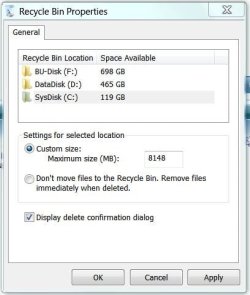
I checked the 'properties' of the RB and it's not selected, so I guess not.
 

My Computer My Computer

Computer type
PC/Desktop
Computer Manufacturer/Model Number
Acer
OS
Microsoft Windows 7 Professional , Service Pack 1 64 bit
CPU
Intel(R) Core(TM) i7-3770S CPU @ 3.10GHz
Motherboard
Chipset
Memory
8192 MB
Graphics Card(s)
Intel(R) HD Graphics 4000
Sound Card
Realtek High Definition Audio
Monitor(s) Displays
Samsung SyncMaster 204B
Hard Drives
ST1000DM003-1CH162, 931.51 GB
Keyboard
Acer
Mouse
Acer
Antivirus
Norton 360
Browser
IE, Firefox, Chrome
Other Info
Malwarebytes installed
In RB Properties, make sure the file size isn't set too small.
 

Attachments

  • Recycle Bin Properties.JPG
    Recycle Bin Properties.JPG
    31.7 KB · Views: 14

My Computer My Computer

Computer type
PC/Desktop
Computer Manufacturer/Model Number
Built 2/11/2011
OS
Windows 7 Pro-x64
CPU
i7-2600 3.4GHz - 3.8GHz Turbo
Motherboard
Intel DH67BL-B3
Memory
8Gb - 2x4GB, Muskin 991770 PC3-1333
Graphics Card(s)
Integrated Intel HD 2000
Sound Card
Integrated Intel 10.1 HD, RealTek ALC892
Monitor(s) Displays
Asus LCD VH222H, Haier HL24XSL2a
Screen Resolution
1920x1080, 1920x1080
Hard Drives
Crucial SSD C300-128Gb,
Western Digital WD5002AALX - 500Gb,
Western Digital WD7501AALS - 750Gb
PSU
Seasonic 650W 80+ Gold Modular
Case
Rosewill Defender
Cooling
Stock CPU, Four 120mm case fans, PCH fan added
Keyboard
Logitech EX100 Y-RBH94 Wireless
Mouse
Logitech EX100 M-RCE95 Wireless
Internet Speed
3.0/1.5 Mbs
Antivirus
Microsoft Security Essentials
Browser
Microsoft Internet Explorer 11
Other Info
Antec Veris Premier-Multimedia IR Station,
Cyber Accoustics-3602 Speakers,
AFT XM-5U Card Reader,
Hauppauge TV-HVR-2250,
Sony LX300 USB Turntable
Using your reference number, it seems adequate.
After I totally powered down and then powered up again (as the final experiment), the files were still in the RB. So I guess I would also write the problem seems to have resolved either on its own of who knows?
 

Attachments

  • ScreenShot001.jpg
    ScreenShot001.jpg
    17.6 KB · Views: 12

My Computer My Computer

Computer type
PC/Desktop
Computer Manufacturer/Model Number
Acer
OS
Microsoft Windows 7 Professional , Service Pack 1 64 bit
CPU
Intel(R) Core(TM) i7-3770S CPU @ 3.10GHz
Motherboard
Chipset
Memory
8192 MB
Graphics Card(s)
Intel(R) HD Graphics 4000
Sound Card
Realtek High Definition Audio
Monitor(s) Displays
Samsung SyncMaster 204B
Hard Drives
ST1000DM003-1CH162, 931.51 GB
Keyboard
Acer
Mouse
Acer
Antivirus
Norton 360
Browser
IE, Firefox, Chrome
Other Info
Malwarebytes installed
Back
Top