Folder Recovery-Where is Recycle Bin

wear08

New member
Local time
6:23 AM
Messages
11
Location
Richmond, VA
I hope you will forgive my ignorance if this is indeed the case, but, I thought I could access the Recycle Bin to recover mistakingly deleted files and/or Folders. Is this incorrect? Is access to this still available and I just can't find it. I'm running Windows 7 SP2. I accidentally deleted a folder yesterday and see offers to purchase programs/software to restore deleted info. Is this my only option? Suggestions, Instructions?! Thanks!
 

My Computer

Computer type
PC/Desktop
Computer Manufacturer/Model Number
HP
OS
Windows 7 Home Premium x64
CPU
HP p7-1010
Motherboard
?
Memory
6 GB
Graphics Card(s)
ATI Radeon HD 4200
Hard Drives
ST 3100005 28AS
Antivirus
Vipre
Browser
Chrome
Hi wear08,
When you delete a file, it isn't actually deleted, the index entry is removed and the data is still there, provided you have not added/written anything to the disk. If that is the case it may be there and not over-written with new data.
Relevant questions, and yes it makes a difference!
What did you delete?
How did you delete it?
Where did you delete it from?
If you haven't emptied the Recycle Bin it MAY be in there. Depending on where you delete a file/folder from, or the file size very large) it sometimes is not placed in the Recycle Bin.
If you don't add anything to the drive you deleted the file/folder from you may get lucky
Piriform Recuva is an excellent free file/folder recovery program.

Nic
 

My Computer

Computer type
PC/Desktop
Computer Manufacturer/Model Number
HP Desktop & Compaq Laptop
OS
Win 10 x64, Linux Lite, Win 7 x64, BlackArch, & Kali
Hard Drives
Samsung 850 Pro 256Gb,
Hitachi HDD 1Tb,
Crucial MX SSD 250Gb
Segate 3Tb USB 3.0 Ext. Backup HDD
Internet Speed
150Mbps dn, 20Mbps up
Antivirus
Avast Free, Malwarebytes Anti-Exploit & Anti-Ransomware
Browser
Firefox, Chrome, Opera, & VPN
I deleted a folder several layers down in a master folder.
I deleted it by accident. I really don't know. I tried to access the folder and saw a message saying something like "this folder is currently not available".
The file was deleted from my Documents.
Thanks for the feedback. If you have further questions or if this information helps isolate or define what my options are, please let me know.
 

My Computer

Computer type
PC/Desktop
Computer Manufacturer/Model Number
HP
OS
Windows 7 Home Premium x64
CPU
HP p7-1010
Motherboard
?
Memory
6 GB
Graphics Card(s)
ATI Radeon HD 4200
Hard Drives
ST 3100005 28AS
Antivirus
Vipre
Browser
Chrome
Files and folders deleted from Documents should be in the Recycle Bin.
Do you have access to your Recycle Bin? Via your desktop Icon.
Is it in the recycle bin?
If it's not there, can you recreate the error message by trying to access that file again?
Please post the exact wording of the error message.
You may have unintentionally changed the folder permissions and the file is still in the folder.
Do you have a restore point, or backup just prior to your miscue?
 

My Computer

Computer type
PC/Desktop
Computer Manufacturer/Model Number
HP Desktop & Compaq Laptop
OS
Win 10 x64, Linux Lite, Win 7 x64, BlackArch, & Kali
Hard Drives
Samsung 850 Pro 256Gb,
Hitachi HDD 1Tb,
Crucial MX SSD 250Gb
Segate 3Tb USB 3.0 Ext. Backup HDD
Internet Speed
150Mbps dn, 20Mbps up
Antivirus
Avast Free, Malwarebytes Anti-Exploit & Anti-Ransomware
Browser
Firefox, Chrome, Opera, & VPN
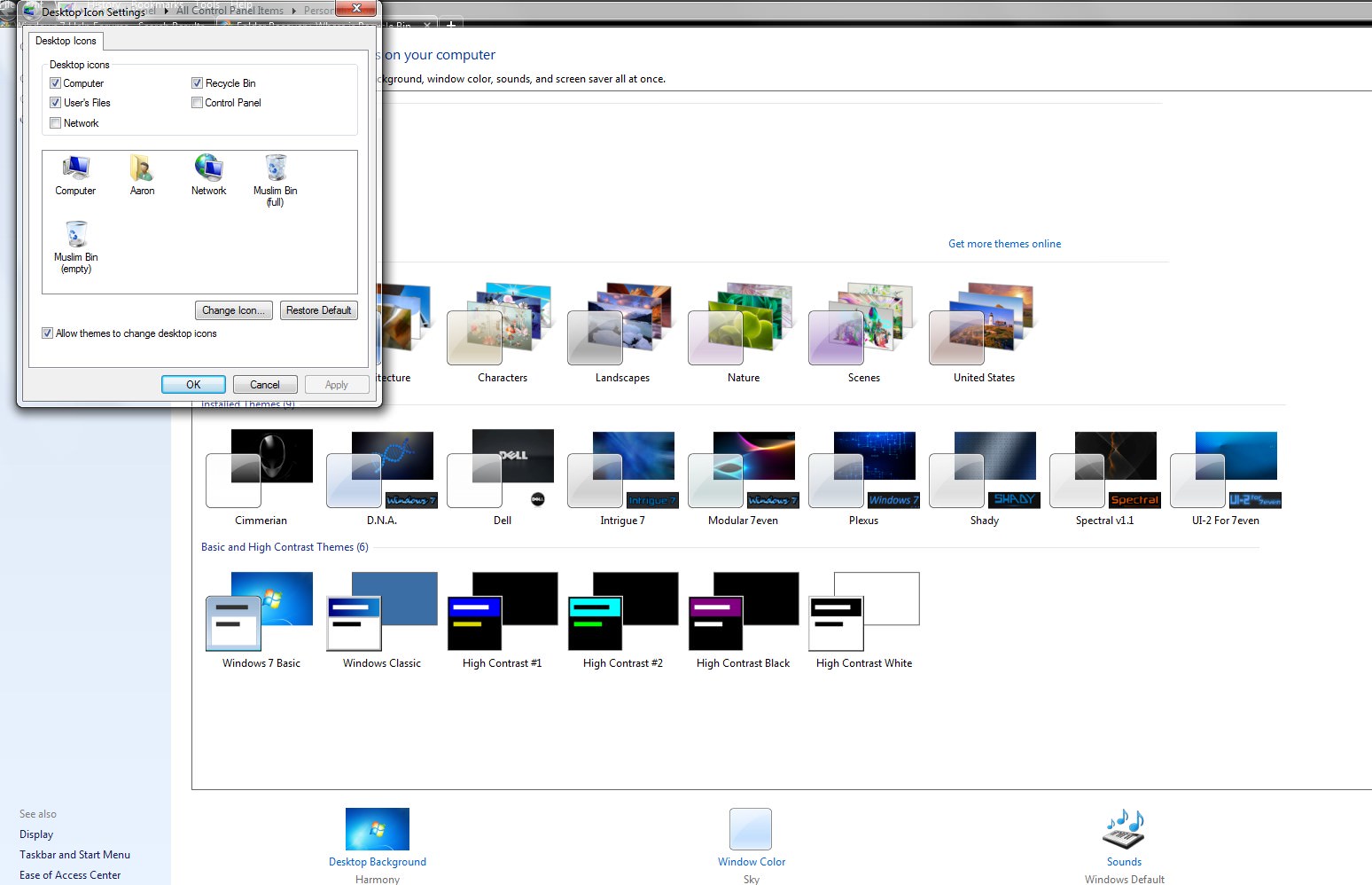
Is the recycle bin on your desktop? If not, right click the desktop and chose Personalize | Change desktop items and select the recycle bin.


3VetqI4.jpg


Once the recycle bin is on the desktop, right click it, select properties and make sure "display delete confirmation" is ticked.


If you do have a recycle bin on the desktop, and your folder is gone, DO NOT delete anything else or run any clean up programs. You can try and run Recuva to get the folder back. Download Recuva | Recover deleted files, free! The free version should work for you.


Also mentioned above was a system restore point. Try that before running Recuva. To use system restore, go to the Start orb on the left bottom side on the computer in the task bar. In the search box enter "system restore."
 

My Computer

Computer type
PC/Desktop
OS
Windows 7 Ultimate x64

My Computers

System One System Two

  • Computer type
    PC/Desktop
    OS
    7 X64
    CPU
    i5 8400
    Motherboard
    gigabyte b365m ds3h
    Memory
    2x8gb 3200mhz
    Hard Drives
    various
    PSU
    pure power 11 400w cm
    Case
    Coolermaster
    Cooling
    cryorig m9i
  • Computer type
    PC/Desktop
    OS
    7x64
    CPU
    g5400
    Motherboard
    ga b365m ds3h
    Memory
    8gb ddr4 2400
    PSU
    xfx pro 450w
Thanks for the recommendation SIW2, forgot about that in NirSoft's tools!
 

My Computer

Computer type
PC/Desktop
Computer Manufacturer/Model Number
HP Desktop & Compaq Laptop
OS
Win 10 x64, Linux Lite, Win 7 x64, BlackArch, & Kali
Hard Drives
Samsung 850 Pro 256Gb,
Hitachi HDD 1Tb,
Crucial MX SSD 250Gb
Segate 3Tb USB 3.0 Ext. Backup HDD
Internet Speed
150Mbps dn, 20Mbps up
Antivirus
Avast Free, Malwarebytes Anti-Exploit & Anti-Ransomware
Browser
Firefox, Chrome, Opera, & VPN
Going forward, I think Resplendence still has a free copy of Undeluxe available. It "flags" almost any/all deletions with a tiny text-files, pointers, that it keeps track of. It will not prevent partial or whole over-writes, it will sort of give you green yellow, red on what it finds that have been deleted. Setting Undeluxe up is a little geeky, usage is a little geeky, however, such just might bring back some stuff for you in the future.
 

My Computer

Computer type
PC/Desktop
Computer Manufacturer/Model Number
Antec desktop; Acer Aspire laptops
OS
Windows 7 Professional 64-bit
CPU
Desktop i5; Acers i5 & i7
Memory
desktop 16GB; 1 Acer 8GB & 1 Acer 16GB
Hard Drives
1TB split into 2 equal partitions [OS and data] usable by RJS
Internet Speed
AT&T DSL
Browser
FF, GChrome, msIE
Other Info
Windows 7 Firewall, Emsisoft AM/AV, MSE [scan-only], SpywareBlaster, Ruiware/BillP combine
Back
Top