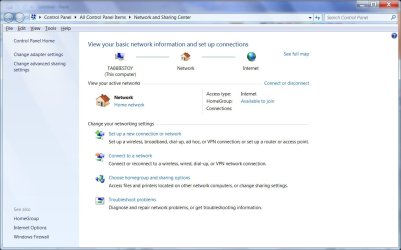
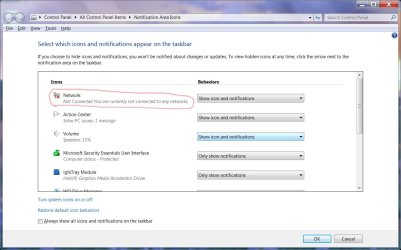
All of a sedden a red x appeared on network icon om my wife's computer. It is running windows 7 pro 64bit. It still has internet and network acess. I can acess the other two computers on network from this computer. When you point to icon it says network and internet. But if you go to customize notifications there it says not connected to network or internet even though it is. Also if you go to sharing center it does not show local area connection like it does on my computer also running windows 7 pro 64bit. I have updated driver and released and renewed ip address but still have red x on network icon. It has not really affected anything other than I know it is not supposed to be there. Any help will be greately appreciated.
I cannot find network and internet in control panel I have networking and sharing center and when I go there local area connection is not there. I will try to reset icons and let you know if this helps.
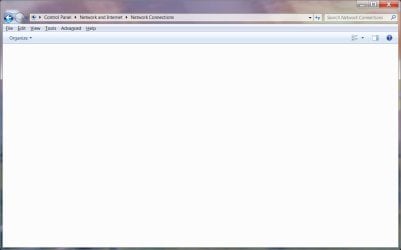
I tried resetting notifications no luck. Also I created the network connections shortcut and when I go to it at top it says Control panel<all control panel items<network connections but it is blank nothing there.
Thanks for your ideas if you think of anything else let me know. I have 2 computers hooked up to same router wired and one laptop all running windows 7 and this is the only one that I am having this problem with. It goes online and I can see other computers when I go to network it just has the red X on the network icon.
Is it connected via wireless or ethernet to your computer?
If wireless, then you could left click on the Network icon on the taskbar to select your network connection and click on Disconnect/Connect to toggle it instead.
Last edited:
My Computer
Computer type
PC/Desktop
Computer Manufacturer/Model Number
Self built custom
OS
64-bit Windows 11 Pro for Workstations
CPU
Intel i7-8700K OC'd to 5 GHz
Motherboard
ASUS ROG Maximus XI Formula Z390
Memory
64 GB (4x16GB) G.SKILL TridentZ RGB DDR4 3600 MHz
Graphics Card(s)
ASUS ROG-STRIX-GTX1080TI-O11G-GAMING
Sound Card
Integrated
Monitor(s) Displays
2 x Samsung Odyssey G7 27"
Screen Resolution
2560x1440
Hard Drives
1TB Samsung 990 PRO M.2,
4TB Samsung 990 PRO PRO M.2,
TerraMaster F8 SSD Plus NAS
PSU
Seasonic Prime Titanium 850W
Case
Thermaltake Core P3
Cooling
Corsair Hydro H115i
Keyboard
Logitech wireless K800
Mouse
Logitech MX Master 4
Internet Speed
2 Gb/s Download and 100 Mb/s Upload
Antivirus
Malwarebyte Anti-Malware Premium
Browser
Google Chrome
Other Info
Logitech Z625 speaker system,
Logitech BRIO 4K Pro webcam,
HP Color LaserJet Pro MFP M477fdn,
APC SMART-UPS RT 1000 XL - SURT1000XLI,
Galaxy S23 Plus phone
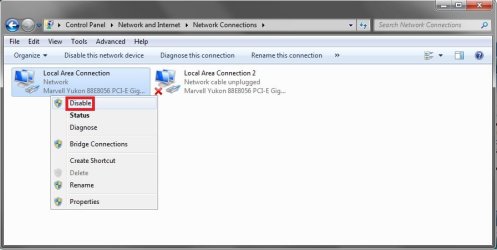
Umm, I'm not sure why Network Connections would be blank since it's connected to your computer's ethernet port. You should have one on there like my screenshot above.
Could you post a screenshot of your Networking and Sharing Center to see what it may say here?
My Computer
Computer type
PC/Desktop
Computer Manufacturer/Model Number
Self built custom
OS
64-bit Windows 11 Pro for Workstations
CPU
Intel i7-8700K OC'd to 5 GHz
Motherboard
ASUS ROG Maximus XI Formula Z390
Memory
64 GB (4x16GB) G.SKILL TridentZ RGB DDR4 3600 MHz
Graphics Card(s)
ASUS ROG-STRIX-GTX1080TI-O11G-GAMING
Sound Card
Integrated
Monitor(s) Displays
2 x Samsung Odyssey G7 27"
Screen Resolution
2560x1440
Hard Drives
1TB Samsung 990 PRO M.2,
4TB Samsung 990 PRO PRO M.2,
TerraMaster F8 SSD Plus NAS
PSU
Seasonic Prime Titanium 850W
Case
Thermaltake Core P3
Cooling
Corsair Hydro H115i
Keyboard
Logitech wireless K800
Mouse
Logitech MX Master 4
Internet Speed
2 Gb/s Download and 100 Mb/s Upload
Antivirus
Malwarebyte Anti-Malware Premium
Browser
Google Chrome
Other Info
Logitech Z625 speaker system,
Logitech BRIO 4K Pro webcam,
HP Color LaserJet Pro MFP M477fdn,
APC SMART-UPS RT 1000 XL - SURT1000XLI,
Galaxy S23 Plus phone
I have the same problem, but in my case there's a "Class not registered" and "network unknown issues".
I'll post up some screenshots if you wanna compare. My sound is also being rather odd and isn't working properly. Also, I tried system restoring but it doesn't allow me to..
Hey Shawn
I had already tried the system restore, should have mentioned that. I hope you keep thinking about this and let me know if you come up with any other things I might try. Here is another intresting screenshot, notice how in notification area it says no connection. How does windows determine if you have connection or not?
Eric I would like to see your screen shots to compare.
Double check to see if you have the Network Connections, Network List Service, Network Location Awareness, and Network Store Interface ServiceServices set to Started and Automatic.
My Computer
Computer type
PC/Desktop
Computer Manufacturer/Model Number
Self built custom
OS
64-bit Windows 11 Pro for Workstations
CPU
Intel i7-8700K OC'd to 5 GHz
Motherboard
ASUS ROG Maximus XI Formula Z390
Memory
64 GB (4x16GB) G.SKILL TridentZ RGB DDR4 3600 MHz
Graphics Card(s)
ASUS ROG-STRIX-GTX1080TI-O11G-GAMING
Sound Card
Integrated
Monitor(s) Displays
2 x Samsung Odyssey G7 27"
Screen Resolution
2560x1440
Hard Drives
1TB Samsung 990 PRO M.2,
4TB Samsung 990 PRO PRO M.2,
TerraMaster F8 SSD Plus NAS
PSU
Seasonic Prime Titanium 850W
Case
Thermaltake Core P3
Cooling
Corsair Hydro H115i
Keyboard
Logitech wireless K800
Mouse
Logitech MX Master 4
Internet Speed
2 Gb/s Download and 100 Mb/s Upload
Antivirus
Malwarebyte Anti-Malware Premium
Browser
Google Chrome
Other Info
Logitech Z625 speaker system,
Logitech BRIO 4K Pro webcam,
HP Color LaserJet Pro MFP M477fdn,
APC SMART-UPS RT 1000 XL - SURT1000XLI,
Galaxy S23 Plus phone
Hey Shawn
Just letting you know that I have reinstalled windows 7 and all is good. Just got tired of messing with this error. Wanted to thank your for you help.