Reduce brightness of Screen (Not whole screen)

Sadiqeen

New member
Local time
12:50 PM
Messages
10
I want to reduce brightness of screen. NOT whole screen but only white pixels of screen.

Or a software that can force the graphic card to show grey or light grey or any other color instead of white. And all those pixels in screen that has other color remains unchanged. Is there any software available for such purpose? Or is it impossible to make such software? so i stop searching

I have windows 7, 32 bit
 

My Computer My Computer

At a glance

Windows 7 32 bit
Computer type
Laptop
Computer Manufacturer/Model Number
Dell
OS
Windows 7 32 bit
White is created by every component colour (i.e. Red, Green & Blue) being displayed at maximum brightness.

If you reduce the brightness of White, every other colour will (by definition) be less bright. :(
 

My Computer My Computer

At a glance

W7 Ultimate SP1, LM19.2 MATE, W10 Home 1703, ...AMD Phenom II x6 1100T, 3.3 GHz12GB DDR3 1333 G-Skill (4GB x 2), G-Skill (2G...NVIDIA GeForce GTX 660
Computer type
PC/Desktop
Computer Manufacturer/Model Number
n/a
OS
W7 Ultimate SP1, LM19.2 MATE, W10 Home 1703, W10 Pro 1703 VM, #All 64 bit
CPU
AMD Phenom II x6 1100T, 3.3 GHz
Motherboard
ASUS M4A88T-M/USB3 (AM3)
Memory
12GB DDR3 1333 G-Skill (4GB x 2), G-Skill (2GB x 2)
Graphics Card(s)
NVIDIA GeForce GTX 660
Sound Card
Realtek?
Monitor(s) Displays
Samsung S23B350
Screen Resolution
1920x1080
Hard Drives
WD Green 2TB (SATA), WD Green 3TB (SATA), WD Blue 4TB (SATA), WD Blue 6TB (SATA)
PSU
Cooler Master
Case
Antec GX300 Tower
Cooling
3x Antec TRICOOL 120mm Fans
Mouse
Wired Optical
Internet Speed
DSL
Antivirus
Avast
Browser
Pale Moon (64 bit)
Other Info
2018-12-27 Upgraded HDDs
2015-12-10 Upgraded case, graphics card, storage
2015-08-15 Upgraded motherboard & RAM
2015-07-15 Upgraded LM17.1 to LM17.2
White is created by every component colour (i.e. Red, Green & Blue) being displayed at maximum brightness.

If you reduce the brightness of White, every other colour will (by definition) be less bright. :(

isn't it possible for a software to figure out the white pixels and make it grey forcefully?. Or isn't there a way to trick the display driver to show grey instead of white color on screen?
 

My Computer My Computer

At a glance

Windows 7 32 bit
Computer type
Laptop
Computer Manufacturer/Model Number
Dell
OS
Windows 7 32 bit
White is created by every component colour (i.e. Red, Green & Blue) being displayed at maximum brightness.

If you reduce the brightness of White, every other colour will (by definition) be less bright. :(

isn't it possible for a software to figure out the white pixels and make it grey forcefully?. Or isn't there a way to trick the display driver to show grey instead of white color on screen?
You can definitely do that in image editors (e.g. Photoshop, GIMP, etc.).

It might be possible to configure "fancy" graphics cards to do what you want, but if it is possible I don't know how to do it. :(
 
Last edited:

My Computer My Computer

At a glance

W7 Ultimate SP1, LM19.2 MATE, W10 Home 1703, ...AMD Phenom II x6 1100T, 3.3 GHz12GB DDR3 1333 G-Skill (4GB x 2), G-Skill (2G...NVIDIA GeForce GTX 660
Computer type
PC/Desktop
Computer Manufacturer/Model Number
n/a
OS
W7 Ultimate SP1, LM19.2 MATE, W10 Home 1703, W10 Pro 1703 VM, #All 64 bit
CPU
AMD Phenom II x6 1100T, 3.3 GHz
Motherboard
ASUS M4A88T-M/USB3 (AM3)
Memory
12GB DDR3 1333 G-Skill (4GB x 2), G-Skill (2GB x 2)
Graphics Card(s)
NVIDIA GeForce GTX 660
Sound Card
Realtek?
Monitor(s) Displays
Samsung S23B350
Screen Resolution
1920x1080
Hard Drives
WD Green 2TB (SATA), WD Green 3TB (SATA), WD Blue 4TB (SATA), WD Blue 6TB (SATA)
PSU
Cooler Master
Case
Antec GX300 Tower
Cooling
3x Antec TRICOOL 120mm Fans
Mouse
Wired Optical
Internet Speed
DSL
Antivirus
Avast
Browser
Pale Moon (64 bit)
Other Info
2018-12-27 Upgraded HDDs
2015-12-10 Upgraded case, graphics card, storage
2015-08-15 Upgraded motherboard & RAM
2015-07-15 Upgraded LM17.1 to LM17.2

My Computer My Computer

At a glance

Microsoft Windows 7 Home Premium 64-bit 7601 ...AMD C-60 APU with Radeon(tm) HD Graphics4.00 GBAMD Radeon HD 6290 Graphics
Computer type
Laptop
Computer Manufacturer/Model Number
ASUS
OS
Microsoft Windows 7 Home Premium 64-bit 7601 Multiprocessor Free Service Pack 1
CPU
AMD C-60 APU with Radeon(tm) HD Graphics
Motherboard
ASUSTeK COMPUTER INC. X501U
Memory
4.00 GB
Graphics Card(s)
AMD Radeon HD 6290 Graphics
Sound Card
(1) AMD High Definition Audio Device (2) Realtek High Defi
Screen Resolution
1366 x 768 x 32 bits (4294967296 colors) @ 60 Hz
Hard Drives
Hitachi HTS545050A7E380 SATA Disk Device
Antivirus
Comodo CIS & FW, SecureAplus App Whitelisting, Threatfire
Browser
Cyberfox 64bit, Opera 64bit, Airfox
Other Info
Spy-The-Spy, HitmanPro.Alert, Norton Connect Safe, MJRegWatcher, BitDefender TrafficLight, Voodoo Shield, Zemana AntiMalware
White is created by every component colour (i.e. Red, Green & Blue) being displayed at maximum brightness.

If you reduce the brightness of White, every other colour will (by definition) be less bright. :(

isn't it possible for a software to figure out the white pixels and make it grey forcefully?. Or isn't there a way to trick the display driver to show grey instead of white color on screen?
You can definitely do that in image editors (e.g. Photoshop, GIMP, etc.).

It might be possible to configure "fancy" graphics cards to do what you want, but if it is possible I don't know how to do it. :(

well again the same disappointment. But i hope there is some one in the world who knows the solution, most probably by doing something in graphics card driver or display driver or something like that.

And please don't tell any solution that is not related to question. #photoshop #Gimp
 

My Computer My Computer

At a glance

Windows 7 32 bit
Computer type
Laptop
Computer Manufacturer/Model Number
Dell
OS
Windows 7 32 bit
Suggest reading the entire thread here:

http://www.sevenforums.com/customization/336693-how-change-background-color-folders-windows-7-a.html

Note: That was some time ago and I've forgotten most of it!

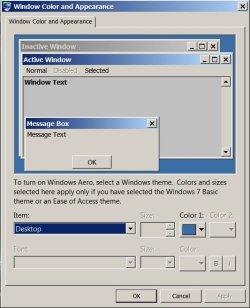
i read the thread. and it discuss about changing background of explorer. I already achieved this by changing theme to classic and windows color. #Not_registry
color.jpg

Callender Actually i want a software/driver that changes white pixel to grey, all other colors remain same on screen. I am not talking about a particular window. i am talking about each and every thing that come to display on screen, photos/videos/window/browser/etc. Callender, i hope you have my answer
 

My Computer My Computer

At a glance

Windows 7 32 bit
Computer type
Laptop
Computer Manufacturer/Model Number
Dell
OS
Windows 7 32 bit
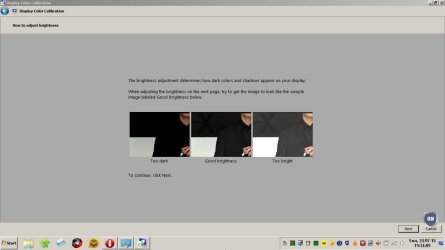
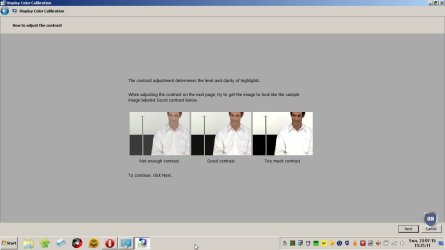
The only way I know is to use a custom color profile - that's not something that I'm expert on.

Color1.jpg

Color2.jpg

Color3.jpg
 

My Computer My Computer

At a glance

Microsoft Windows 7 Home Premium 64-bit 7601 ...AMD C-60 APU with Radeon(tm) HD Graphics4.00 GBAMD Radeon HD 6290 Graphics
Computer type
Laptop
Computer Manufacturer/Model Number
ASUS
OS
Microsoft Windows 7 Home Premium 64-bit 7601 Multiprocessor Free Service Pack 1
CPU
AMD C-60 APU with Radeon(tm) HD Graphics
Motherboard
ASUSTeK COMPUTER INC. X501U
Memory
4.00 GB
Graphics Card(s)
AMD Radeon HD 6290 Graphics
Sound Card
(1) AMD High Definition Audio Device (2) Realtek High Defi
Screen Resolution
1366 x 768 x 32 bits (4294967296 colors) @ 60 Hz
Hard Drives
Hitachi HTS545050A7E380 SATA Disk Device
Antivirus
Comodo CIS & FW, SecureAplus App Whitelisting, Threatfire
Browser
Cyberfox 64bit, Opera 64bit, Airfox
Other Info
Spy-The-Spy, HitmanPro.Alert, Norton Connect Safe, MJRegWatcher, BitDefender TrafficLight, Voodoo Shield, Zemana AntiMalware

My Computer My Computer

At a glance

Microsoft Windows 7 Home Premium 64-bit 7601 ...AMD C-60 APU with Radeon(tm) HD Graphics4.00 GBAMD Radeon HD 6290 Graphics
Computer type
Laptop
Computer Manufacturer/Model Number
ASUS
OS
Microsoft Windows 7 Home Premium 64-bit 7601 Multiprocessor Free Service Pack 1
CPU
AMD C-60 APU with Radeon(tm) HD Graphics
Motherboard
ASUSTeK COMPUTER INC. X501U
Memory
4.00 GB
Graphics Card(s)
AMD Radeon HD 6290 Graphics
Sound Card
(1) AMD High Definition Audio Device (2) Realtek High Defi
Screen Resolution
1366 x 768 x 32 bits (4294967296 colors) @ 60 Hz
Hard Drives
Hitachi HTS545050A7E380 SATA Disk Device
Antivirus
Comodo CIS & FW, SecureAplus App Whitelisting, Threatfire
Browser
Cyberfox 64bit, Opera 64bit, Airfox
Other Info
Spy-The-Spy, HitmanPro.Alert, Norton Connect Safe, MJRegWatcher, BitDefender TrafficLight, Voodoo Shield, Zemana AntiMalware
Also if you change settings below the white shown will be more pleasant.

[HKEY_CURRENT_USER\Control Panel\Desktop\Colors]

"InfoWindow"="237 237 237"
"Window"="237 237 237"

[HKEY_CURRENT_USER\Control Panel\Colors]

"Window"="237 237 237"
"InfoWindow"="237 237 237"
 

My Computer My Computer

At a glance

Microsoft Windows 7 Home Premium 64-bit 7601 ...AMD C-60 APU with Radeon(tm) HD Graphics4.00 GBAMD Radeon HD 6290 Graphics
Computer type
Laptop
Computer Manufacturer/Model Number
ASUS
OS
Microsoft Windows 7 Home Premium 64-bit 7601 Multiprocessor Free Service Pack 1
CPU
AMD C-60 APU with Radeon(tm) HD Graphics
Motherboard
ASUSTeK COMPUTER INC. X501U
Memory
4.00 GB
Graphics Card(s)
AMD Radeon HD 6290 Graphics
Sound Card
(1) AMD High Definition Audio Device (2) Realtek High Defi
Screen Resolution
1366 x 768 x 32 bits (4294967296 colors) @ 60 Hz
Hard Drives
Hitachi HTS545050A7E380 SATA Disk Device
Antivirus
Comodo CIS & FW, SecureAplus App Whitelisting, Threatfire
Browser
Cyberfox 64bit, Opera 64bit, Airfox
Other Info
Spy-The-Spy, HitmanPro.Alert, Norton Connect Safe, MJRegWatcher, BitDefender TrafficLight, Voodoo Shield, Zemana AntiMalware

My Computer My Computer

At a glance

Windows 7 32 bit
Computer type
Laptop
Computer Manufacturer/Model Number
Dell
OS
Windows 7 32 bit
Define a white pixel. How many shades of white exist?

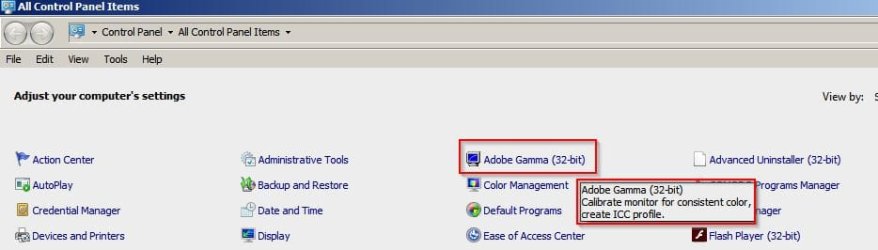
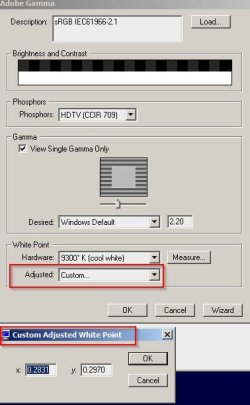
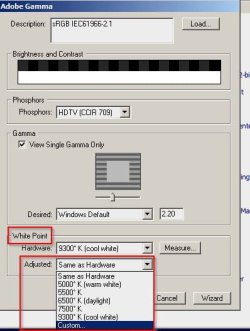
Anyway the closest I've got so far is using Adobe Gamma and I didn't even know that I had it. As far as I know you can only get it with old versions of Photoshop.

Adobe Gamma Control Panel.jpg

White Point.jpg

White Point 2.jpg

See more about "White Points" here:

ColorWiki - Monitors Part Two

Anyway it allows a custom white point to be defined. White still looks white but less white if you know what I mean. It seems to mean spending a lot of money for an old version of Photoshop in order to get Adobe Gamma and even then you might find that it is not exactly what you are looking for.

I still stay your best bet is some sort of monitor color calibration software.

As far as I can work out monitor uses a color profile that uses a color lookup table based on RGB values and not individual shade pixels.

Monitor Calibration for Photography

So yes you can swap specific pixels in images but I can't see how it can be done with colors that are displayed by graphics cards/ monitors.
 

My Computer My Computer

At a glance

Microsoft Windows 7 Home Premium 64-bit 7601 ...AMD C-60 APU with Radeon(tm) HD Graphics4.00 GBAMD Radeon HD 6290 Graphics
Computer type
Laptop
Computer Manufacturer/Model Number
ASUS
OS
Microsoft Windows 7 Home Premium 64-bit 7601 Multiprocessor Free Service Pack 1
CPU
AMD C-60 APU with Radeon(tm) HD Graphics
Motherboard
ASUSTeK COMPUTER INC. X501U
Memory
4.00 GB
Graphics Card(s)
AMD Radeon HD 6290 Graphics
Sound Card
(1) AMD High Definition Audio Device (2) Realtek High Defi
Screen Resolution
1366 x 768 x 32 bits (4294967296 colors) @ 60 Hz
Hard Drives
Hitachi HTS545050A7E380 SATA Disk Device
Antivirus
Comodo CIS & FW, SecureAplus App Whitelisting, Threatfire
Browser
Cyberfox 64bit, Opera 64bit, Airfox
Other Info
Spy-The-Spy, HitmanPro.Alert, Norton Connect Safe, MJRegWatcher, BitDefender TrafficLight, Voodoo Shield, Zemana AntiMalware
Well i have adobe gamma, i tried it and i found that the calibration of WARM and COLD thing applies to whole screen, it works similar to f.lux software. Adobe gamma is not the thing i want.

I use a software called Twilight, this software reduces the brightness of whole screen no matter what is on screen, whether i am playing a game, or browsing, or watching video or whatever. It reduces the brightness of all colors (all pixels) in screen. what i know is that the screen usually run on 60 fps, this means that this software (twilight) does this thing 60 times each second. It reduces the brightness of all pixels (all colors/all shades/warm/cold/all) of screen 60 times in each second.

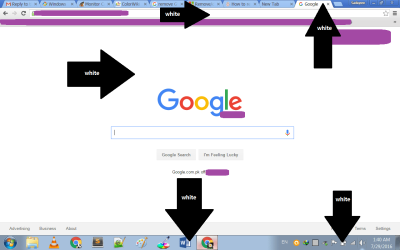
Isn't is possible to make a software which does exactly same thing but not to whole screen, only the white pixels, i mean that it find out the white pixels (or shades closer to white whatever degree kelvin it has) and changes it to some other color, say grey color

for example when this window white 2.png come on screen, it changes all the marked while pixels to grey. there are some other unmarked white pixels, in icons
 

My Computer My Computer

At a glance

Windows 7 32 bit
Computer type
Laptop
Computer Manufacturer/Model Number
Dell
OS
Windows 7 32 bit
I don't think that it's possible to change specific pixels. It's certainly possible when working with images. If there's a way to adjust only specific pixels as displayed on a monitor then I don't know of it.

The closest thing I've found so far is software to adjust the LUT (Look Up Table) that is used when applying color profiles.

I cannot give decent advice on this and my ideas are untested. I did find software that can make changes to the LUT and apply on boot. Howvever I have not been brave enough to test.

So the theory goes:

A Look Up Table is used by default. Software might be able to be configured to use a different Look Up Table on boot.

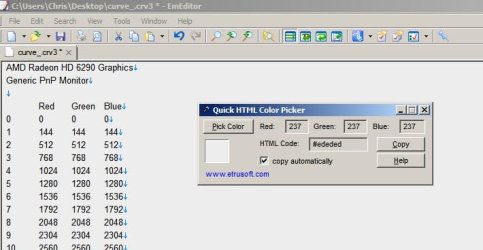
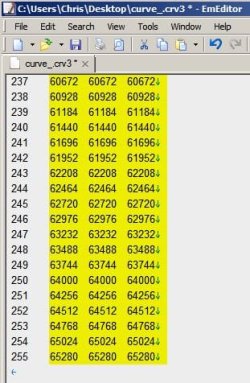
Here's a custom LUT that I saved.
curve_cr3.jpg

In theory 255 255 255 is whitest and numbers below 255 are lesser shades of white as you see in the earlier screenshot that shows 237 237 237 is used in my text editor as the background color.

So in theory if we modify the LUT with lower numbers being used against white 255 and lower it should result in less bright white being shown. However I have no idea if this is actually the case.
curve_cr3_2.jpg

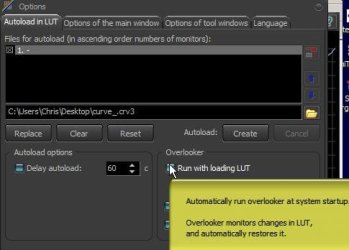
If the modified file is loaded in LUT on boot then it should work.
LUT.jpg

That's as far as I am willing to test. I'm not actually going to make the changes needed to load a modified LUT on boot - at least not until I decide to make my next system image backup.
 

My Computer My Computer

At a glance

Microsoft Windows 7 Home Premium 64-bit 7601 ...AMD C-60 APU with Radeon(tm) HD Graphics4.00 GBAMD Radeon HD 6290 Graphics
Computer type
Laptop
Computer Manufacturer/Model Number
ASUS
OS
Microsoft Windows 7 Home Premium 64-bit 7601 Multiprocessor Free Service Pack 1
CPU
AMD C-60 APU with Radeon(tm) HD Graphics
Motherboard
ASUSTeK COMPUTER INC. X501U
Memory
4.00 GB
Graphics Card(s)
AMD Radeon HD 6290 Graphics
Sound Card
(1) AMD High Definition Audio Device (2) Realtek High Defi
Screen Resolution
1366 x 768 x 32 bits (4294967296 colors) @ 60 Hz
Hard Drives
Hitachi HTS545050A7E380 SATA Disk Device
Antivirus
Comodo CIS & FW, SecureAplus App Whitelisting, Threatfire
Browser
Cyberfox 64bit, Opera 64bit, Airfox
Other Info
Spy-The-Spy, HitmanPro.Alert, Norton Connect Safe, MJRegWatcher, BitDefender TrafficLight, Voodoo Shield, Zemana AntiMalware
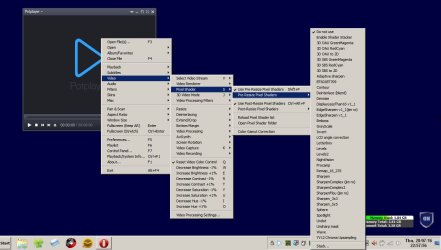
Also re: video

The video player that I use does have "pixel shaders" but again they just change the overall color/ brightness/ saturation and shades rather than specific pixels.

Video Pixel.jpg
 

My Computer My Computer

At a glance

Microsoft Windows 7 Home Premium 64-bit 7601 ...AMD C-60 APU with Radeon(tm) HD Graphics4.00 GBAMD Radeon HD 6290 Graphics
Computer type
Laptop
Computer Manufacturer/Model Number
ASUS
OS
Microsoft Windows 7 Home Premium 64-bit 7601 Multiprocessor Free Service Pack 1
CPU
AMD C-60 APU with Radeon(tm) HD Graphics
Motherboard
ASUSTeK COMPUTER INC. X501U
Memory
4.00 GB
Graphics Card(s)
AMD Radeon HD 6290 Graphics
Sound Card
(1) AMD High Definition Audio Device (2) Realtek High Defi
Screen Resolution
1366 x 768 x 32 bits (4294967296 colors) @ 60 Hz
Hard Drives
Hitachi HTS545050A7E380 SATA Disk Device
Antivirus
Comodo CIS & FW, SecureAplus App Whitelisting, Threatfire
Browser
Cyberfox 64bit, Opera 64bit, Airfox
Other Info
Spy-The-Spy, HitmanPro.Alert, Norton Connect Safe, MJRegWatcher, BitDefender TrafficLight, Voodoo Shield, Zemana AntiMalware
I don't think that it's possible to change specific pixels. It's certainly possible when working with images. If there's a way to adjust only specific pixels as displayed on a monitor then I don't know of it.

The closest thing I've found so far is software to adjust the LUT (Look Up Table) that is used when applying color profiles.

I cannot give decent advice on this and my ideas are untested. I did find software that can make changes to the LUT and apply on boot. Howvever I have not been brave enough to test.

So the theory goes:

A Look Up Table is used by default. Software might be able to be configured to use a different Look Up Table on boot.

Here's a custom LUT that I saved.

In theory 255 255 255 is whitest and numbers below 255 are lesser shades of white as you see in the earlier screenshot that shows 237 237 237 is used in my text editor as the background color.

So in theory if we modify the LUT with lower numbers being used against white 255 and lower it should result in less bright white being shown. However I have no idea if this is actually the case.

If the modified file is loaded in LUT on boot then it should work.

That's as far as I am willing to test. I'm not actually going to make the changes needed to load a modified LUT on boot - at least not until I decide to make my next system image backup.

This one may work, but it requires Boot to load :(
Thank you Callender and others for all your help, If ever in future you find such software (like twilight), then please tell me here in forum.
 
Last edited:

My Computer My Computer

At a glance

Windows 7 32 bit
Computer type
Laptop
Computer Manufacturer/Model Number
Dell
OS
Windows 7 32 bit
No worries. I plan to test with a modified LUT sometime in the not too distant future. If you want to do you own testing:

Calibrilla Download

The problem is with knowing which values to write to the LUT. For me it will be a question of trial and error. There is no way I would attempt LUT modification without creating a system image backup first.
 

My Computer My Computer

At a glance

Microsoft Windows 7 Home Premium 64-bit 7601 ...AMD C-60 APU with Radeon(tm) HD Graphics4.00 GBAMD Radeon HD 6290 Graphics
Computer type
Laptop
Computer Manufacturer/Model Number
ASUS
OS
Microsoft Windows 7 Home Premium 64-bit 7601 Multiprocessor Free Service Pack 1
CPU
AMD C-60 APU with Radeon(tm) HD Graphics
Motherboard
ASUSTeK COMPUTER INC. X501U
Memory
4.00 GB
Graphics Card(s)
AMD Radeon HD 6290 Graphics
Sound Card
(1) AMD High Definition Audio Device (2) Realtek High Defi
Screen Resolution
1366 x 768 x 32 bits (4294967296 colors) @ 60 Hz
Hard Drives
Hitachi HTS545050A7E380 SATA Disk Device
Antivirus
Comodo CIS & FW, SecureAplus App Whitelisting, Threatfire
Browser
Cyberfox 64bit, Opera 64bit, Airfox
Other Info
Spy-The-Spy, HitmanPro.Alert, Norton Connect Safe, MJRegWatcher, BitDefender TrafficLight, Voodoo Shield, Zemana AntiMalware
No worries. I plan to test with a modified LUT sometime in the not too distant future. If you want to do you own testing:

Calibrilla Download

The problem is with knowing which values to write to the LUT. For me it will be a question of trial and error. There is no way I would attempt LUT modification without creating a system image backup first.

Yes, system image is first option. Another and biggest problem is that, to apply changes it requires boot :(
 

My Computer My Computer

At a glance

Windows 7 32 bit
Computer type
Laptop
Computer Manufacturer/Model Number
Dell
OS
Windows 7 32 bit
So you need something to change white to "less white" on demand then. Obviously modifying LUT would not allow on demand switching.
 

My Computer My Computer

At a glance

Microsoft Windows 7 Home Premium 64-bit 7601 ...AMD C-60 APU with Radeon(tm) HD Graphics4.00 GBAMD Radeon HD 6290 Graphics
Computer type
Laptop
Computer Manufacturer/Model Number
ASUS
OS
Microsoft Windows 7 Home Premium 64-bit 7601 Multiprocessor Free Service Pack 1
CPU
AMD C-60 APU with Radeon(tm) HD Graphics
Motherboard
ASUSTeK COMPUTER INC. X501U
Memory
4.00 GB
Graphics Card(s)
AMD Radeon HD 6290 Graphics
Sound Card
(1) AMD High Definition Audio Device (2) Realtek High Defi
Screen Resolution
1366 x 768 x 32 bits (4294967296 colors) @ 60 Hz
Hard Drives
Hitachi HTS545050A7E380 SATA Disk Device
Antivirus
Comodo CIS & FW, SecureAplus App Whitelisting, Threatfire
Browser
Cyberfox 64bit, Opera 64bit, Airfox
Other Info
Spy-The-Spy, HitmanPro.Alert, Norton Connect Safe, MJRegWatcher, BitDefender TrafficLight, Voodoo Shield, Zemana AntiMalware
So you need something to change white to "less white" on demand then. Obviously modifying LUT would not allow on demand switching.

yes, thanks for all your help. if i found something, i'll post here
 

My Computer My Computer

At a glance

Windows 7 32 bit
Computer type
Laptop
Computer Manufacturer/Model Number
Dell
OS
Windows 7 32 bit
Back
Top