Solved Reducing the amount of processes running

Roman5

New member
Member
VIP
Local time
3:23 PM
Messages
111
Location
London UK
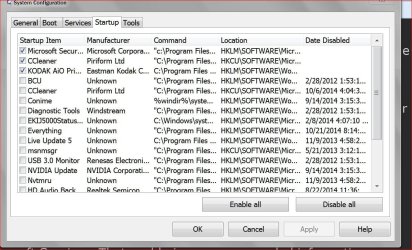
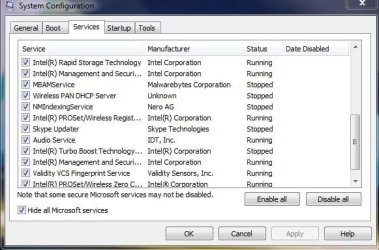
Hi. I've got a clean new reinstall on my laptop from my Dell installation disc of Windows 7 Pro x64, with all the stuff installed that I mostly use and everything is running nice and smooth. I'd like to be able to reduce my task manager processes down to early 60's, like it was at the MS Updates stage and before I started installing my programs. My boot time, while it will never be SSD fast like my desktop, is not too bad, around 49 to 55 seconds. It's a Dell Vostro 3550 with i5 2410M, 4GB ram and I replaced the factory harddrive with a WD black 500GB about a year or so ago. It had slowed down to 4 minutes before I formatted! But I'd like to speed it up more. I've disabled all but the most necessary things in msconfig/startup. 10 things enabled, 13 disabled.

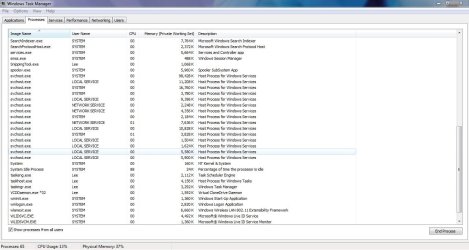
There's always about 75 or so processes running. Perhaps that's perfectly normal and acceptable, I don't really know?

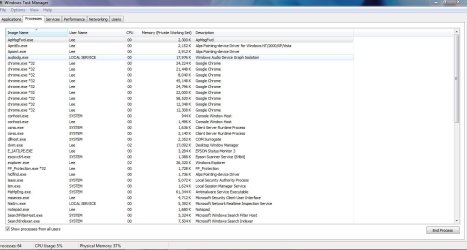
With Google Chrome open with only one tab, that shows 5 processes of Chrome.exe. Two tabs shows 7 processes.

svchost.exe, always 15 instances running (system, local service and network service).

conhost.exe, 2 instances.

csrss.exe, 2 instances.

All other processes seem to have just one instance each.

I know that svchost shouldn't be messed with. Is it really necessary to have them all running though and can any of them be terminated or stopped from running in the first place? And Chrome, I don't understand why there are so many.

If there are any suggestions here I can try which might be regarded as risky, I don't mind tinkering because if anything goes wrong, I have Acronis incremental backups of the whole system as of last night, that I can easily restore in 10 minutes. Thanks for any help.
 

My Computer My Computer

Computer type
PC/Desktop
OS
Windows 7 HP x64 SP1
CPU
Phenom II x2 550BE @3.1Ghz
Motherboard
GA-MA770-UD3 rev 2.0
Memory
Patriot Viper 2x2GB DDR2 6400
Graphics Card(s)
Sapphire HD5850 Extreme 1GB
Sound Card
Onboard Realtek
Monitor(s) Displays
Samsung 23" S23A700D * 120Hz * 3D * 2ms response
Screen Resolution
1920x1080
Hard Drives
SSD Samsung 830 128GB/Seagate 2TB (2 x single platter)/ WD 1TB Cav Black/ WD RE3 1TB /WD 320GB IDE/IBM 120GB IDE
PSU
XFX Pro 650w Core Edition
Case
Coolermaster CM690 Dominator
Cooling
TRUE Rev.C + Arctic Cooling MX-2 + various 12cm fans
Keyboard
Razer Lycosa
Mouse
Logitech MX518
Internet Speed
Fibre Optic 100MB Down * 6MB Up
Each instance of svchost.exe hosts one or more system services. You have no control over which instance hosts which service. I would avoid messing with this. The benefits are low and the risks are high. Many services do more than the documentation states.

In Chrome tabs showing pages on the same website will share a process. Those on different websites will have a separate process. Plusg ins etc will also have their own process. This was a design decision to improve stability.

Aside from controlling startup programs there isn't much you can do.
 

My Computer My Computer

Computer type
PC/Desktop
Computer Manufacturer/Model Number
HP
OS
Windows 7 Pro 64 bit
CPU
Xeon W3520
Memory
8 GB
Graphics Card(s)
Nvidia Geforce 210
Hi. I've got a clean new reinstall on my laptop from my Dell installation disc of Windows 7 Pro x64, with all the stuff installed that I mostly use and everything is running nice and smooth. I'd like to be able to reduce my task manager processes down to early 60's, like it was at the MS Updates stage and before I started installing my programs. My boot time, while it will never be SSD fast like my desktop, is not too bad, around 49 to 55 seconds. It's a Dell Vostro 3550 with i5 2410M, 4GB ram and I replaced the factory harddrive with a WD black 500GB about a year or so ago. It had slowed down to 4 minutes before I formatted! But I'd like to speed it up more. I've disabled all but the most necessary things in msconfig/startup. 10 things enabled, 13 disabled.

There's always about 75 or so processes running. Perhaps that's perfectly normal and acceptable, I don't really know?

With Google Chrome open with only one tab, that shows 5 processes of Chrome.exe. Two tabs shows 7 processes.

svchost.exe, always 15 instances running (system, local service and network service).

conhost.exe, 2 instances.

csrss.exe, 2 instances.

All other processes seem to have just one instance each.

I know that svchost shouldn't be messed with. Is it really necessary to have them all running though and can any of them be terminated or stopped from running in the first place? And Chrome, I don't understand why there are so many.

If there are any suggestions here I can try which might be regarded as risky, I don't mind tinkering because if anything goes wrong, I have Acronis incremental backups of the whole system as of last night, that I can easily restore in 10 minutes. Thanks for any help.

Nothing increases the boot up time more than start-up programs.You should disable as many of them as you can.
As LMiller7 said,you should not mess with the processes that belong to system,that may get your system crashed. But there are several services in those 70,that can be freely "ended" .Any software has its own process(processes), If you have enabled 10 things in start up ,then there will be at least 10 processes that can be "ended", in those 70. So simple,end those processes when you don't need them
 

My Computer My Computer

Computer type
PC/Desktop
OS
Win7 Ultimate/X84
CPU
Intel Celeron 336/2.8Ghz
Motherboard
MS-7592
Memory
DDR3/2GB
Hard Drives
ATA-100/160GB
Browser
FirefoX
Alright then, thanks. Well, it was easy enough to disable non essential startups, but I looked through processes and services and am a bit lost as to what to fiddle with. Guess I'll leave those.
 

My Computer My Computer

Computer type
PC/Desktop
OS
Windows 7 HP x64 SP1
CPU
Phenom II x2 550BE @3.1Ghz
Motherboard
GA-MA770-UD3 rev 2.0
Memory
Patriot Viper 2x2GB DDR2 6400
Graphics Card(s)
Sapphire HD5850 Extreme 1GB
Sound Card
Onboard Realtek
Monitor(s) Displays
Samsung 23" S23A700D * 120Hz * 3D * 2ms response
Screen Resolution
1920x1080
Hard Drives
SSD Samsung 830 128GB/Seagate 2TB (2 x single platter)/ WD 1TB Cav Black/ WD RE3 1TB /WD 320GB IDE/IBM 120GB IDE
PSU
XFX Pro 650w Core Edition
Case
Coolermaster CM690 Dominator
Cooling
TRUE Rev.C + Arctic Cooling MX-2 + various 12cm fans
Keyboard
Razer Lycosa
Mouse
Logitech MX518
Internet Speed
Fibre Optic 100MB Down * 6MB Up
Attachments

  • Start Ups.JPG
    Start Ups.JPG
    159.7 KB · Views: 0

My Computer My Computer

Computer type
PC/Desktop
Computer Manufacturer/Model Number
Home made Desktop
OS
Windows 10 Pro. 64/ version 1709 Windows 7 Pro/64
CPU
Intel i7-6800K @ 4.3
Motherboard
ASUS X-99 Deluxe II
Memory
Corsair Platinum 16 gig @2400
Graphics Card(s)
EVGA GTX 1070 OC
Monitor(s) Displays
Asus 27" LED LCD/VE278Q
Screen Resolution
1920-1080 or 1280-720 HDMI
Hard Drives
INTEL SSD 730-240 Gb Sata 3.0/
PSU
EVGA Platium 1200W
Case
Phanteks Luxe Tempered Glass 8 fans/ one radiator
Cooling
XSPC/ Water Cooled CPU
Keyboard
Das 4 Professional
Mouse
Logitech M705/MX Anywhere 2-S
Internet Speed
100 mbits
Antivirus
Microsoft Security Essentials/ Malwarebytes Premium 3.0/ SAS
Browser
I.E. 11 default/Firefox/ ISP Time Warner Cable/Spectrum
Other Info
LG BluRay Burner/
Sound system-KLipsch-THX/
Icy Dock ssd Hot Swap bays.
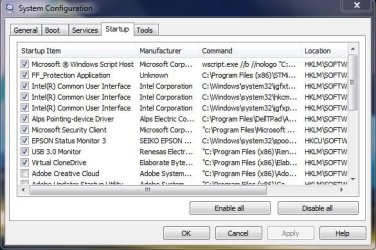
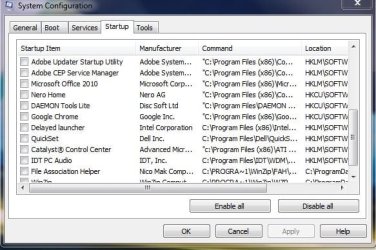
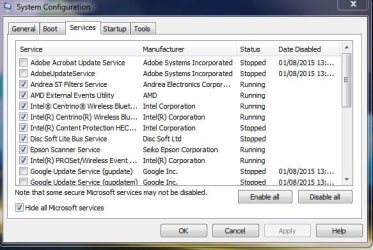
Hi Layback Bear. Here you go. In Services, I'd already unticked a couple of Adobe and Google updaters.
Be interested to know if you think I can untick anything else that might make some noticeable improvement. Or if you tbink there's something that needs to be re-ticked.
 

Attachments

  • Startup 1.JPG
    Startup 1.JPG
    59.6 KB · Views: 30
  • Startup 2.JPG
    Startup 2.JPG
    55.6 KB · Views: 29
  • Services 1.JPG
    Services 1.JPG
    52.8 KB · Views: 30
  • Services 2.JPG
    Services 2.JPG
    48.2 KB · Views: 31

My Computer My Computer

Computer type
PC/Desktop
OS
Windows 7 HP x64 SP1
CPU
Phenom II x2 550BE @3.1Ghz
Motherboard
GA-MA770-UD3 rev 2.0
Memory
Patriot Viper 2x2GB DDR2 6400
Graphics Card(s)
Sapphire HD5850 Extreme 1GB
Sound Card
Onboard Realtek
Monitor(s) Displays
Samsung 23" S23A700D * 120Hz * 3D * 2ms response
Screen Resolution
1920x1080
Hard Drives
SSD Samsung 830 128GB/Seagate 2TB (2 x single platter)/ WD 1TB Cav Black/ WD RE3 1TB /WD 320GB IDE/IBM 120GB IDE
PSU
XFX Pro 650w Core Edition
Case
Coolermaster CM690 Dominator
Cooling
TRUE Rev.C + Arctic Cooling MX-2 + various 12cm fans
Keyboard
Razer Lycosa
Mouse
Logitech MX518
Internet Speed
Fibre Optic 100MB Down * 6MB Up
Just as I thought.

Way to many things checked marked.
I would suggest un-checking everything except your security programs and reboot.

Those thing you un-check will start when need but not until.
You have got them running in the background all the time even when not needed or used.
 

My Computer My Computer

Computer type
PC/Desktop
Computer Manufacturer/Model Number
Home made Desktop
OS
Windows 10 Pro. 64/ version 1709 Windows 7 Pro/64
CPU
Intel i7-6800K @ 4.3
Motherboard
ASUS X-99 Deluxe II
Memory
Corsair Platinum 16 gig @2400
Graphics Card(s)
EVGA GTX 1070 OC
Monitor(s) Displays
Asus 27" LED LCD/VE278Q
Screen Resolution
1920-1080 or 1280-720 HDMI
Hard Drives
INTEL SSD 730-240 Gb Sata 3.0/
PSU
EVGA Platium 1200W
Case
Phanteks Luxe Tempered Glass 8 fans/ one radiator
Cooling
XSPC/ Water Cooled CPU
Keyboard
Das 4 Professional
Mouse
Logitech M705/MX Anywhere 2-S
Internet Speed
100 mbits
Antivirus
Microsoft Security Essentials/ Malwarebytes Premium 3.0/ SAS
Browser
I.E. 11 default/Firefox/ ISP Time Warner Cable/Spectrum
Other Info
LG BluRay Burner/
Sound system-KLipsch-THX/
Icy Dock ssd Hot Swap bays.
Hi Layback Bear. Here you go. In Services, I'd already unticked a couple of Adobe and Google updaters.
Be interested to know if you think I can untick anything else that might make some noticeable improvement. Or if you tbink there's something that needs to be re-ticked.

Open Task Manager,go to "Processes" and click (Memory(private working set)) ,this will get your processes sorted by memory consumption.Now you will be able to simply identify the services,that consume much RAM.
In these services,you might be able to find a process/processes that can be freely ended without causing any issue. For example,disabling a service that uses 100.000k RAM could free up your system much more than disabling a meaningless process that uses 500K RAM.
So ,I'd suggest you to check your services in Task Manager or post the screen here and I'll try to find those "useless" services,good luck!
 

My Computer My Computer

Computer type
PC/Desktop
OS
Win7 Ultimate/X84
CPU
Intel Celeron 336/2.8Ghz
Motherboard
MS-7592
Memory
DDR3/2GB
Hard Drives
ATA-100/160GB
Browser
FirefoX
Avoid modification of system services. The benefits of doing this are very limited and the risks high.
Many services do more than the documentation states. Disabling a so called "useless" service may end up disabling important functionality.

It is very difficult to determine the memory used by an individual service hosted by svchost.exe.

Edit: I have had unpleasant experiences with disabling services and do not wish to repeat them.
 

My Computer My Computer

Computer type
PC/Desktop
Computer Manufacturer/Model Number
HP
OS
Windows 7 Pro 64 bit
CPU
Xeon W3520
Memory
8 GB
Graphics Card(s)
Nvidia Geforce 210
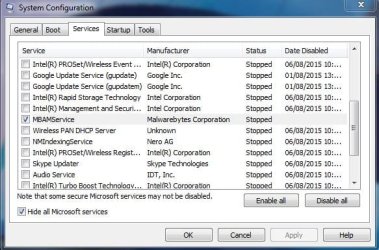
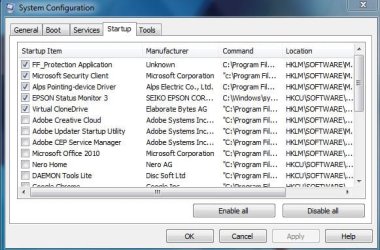
Thanks for the help guys. Ok, here's what I have for you. Updated screenshots of my startup, services, processes and Memory (private working set).

Startup things I think need to stay ticked:

FF Protection Application, tells laptop to tell harddrive if the laptop is falling.

Microsoft security client.

Alps pointing device because it disabled my Dell touchpad software completely when I unticked it. Still worked, but no touchpad settings.

Epson status monitor, otherwise it never shows up in my notification area icons.

Virtual Clone Drive, otherwise my ISO's keeps dismounting on boot up.


More Startup things I've just disabled:

Disabled Microsoft Windows Script Host. Not needed at startup?

Disabled Intel Common User Interface, 3 instances.

Disabled USB 3.0.


Services:

Left alone and hid all Microsoft services.

Disabled everything except Malwarebytes. Maybe even that can be disabled?


What I've noticed. Processes are far less now so that's good.

Reboot time hasn't changed really, always between 50 and 54 seconds. Sometimes longer but that's dependent on the shutdown.

The problem seems to be in the shutdown.

With nothing to close, ie, straight after getting back to the desktop, I'll reboot, it goes straight to the shutting down screen but always hangs on that for 15 to 20 seconds. Sometimes much longer, even up to 45 seconds, but mostly 15 to 20 seconds. I don't know if there's a way to cut down that shutdown time? It certainly seems to takes longer to get past the shutting down screen just after I've made any adjustment in msconfig. But I think there have been other times where it randomly seems to take too long to get past that screen. I timed booting from cold and that is about 35 seconds give or take. So if it was possible to shave 10 second off the shutdown time, that could make my reboot time about 45 seconds or less. But I suspect that's not doable. Very, very occassionally I've had 47 to 49 seconds.
 

Attachments

  • Capture4.JPG
    Capture4.JPG
    118.2 KB · Views: 2
  • Capture3.JPG
    Capture3.JPG
    108 KB · Views: 2
  • Capture.JPG
    Capture.JPG
    63.7 KB · Views: 20
  • Capture2.JPG
    Capture2.JPG
    56.2 KB · Views: 21
  • Capture1.JPG
    Capture1.JPG
    55.6 KB · Views: 20
Last edited:

My Computer My Computer

Computer type
PC/Desktop
OS
Windows 7 HP x64 SP1
CPU
Phenom II x2 550BE @3.1Ghz
Motherboard
GA-MA770-UD3 rev 2.0
Memory
Patriot Viper 2x2GB DDR2 6400
Graphics Card(s)
Sapphire HD5850 Extreme 1GB
Sound Card
Onboard Realtek
Monitor(s) Displays
Samsung 23" S23A700D * 120Hz * 3D * 2ms response
Screen Resolution
1920x1080
Hard Drives
SSD Samsung 830 128GB/Seagate 2TB (2 x single platter)/ WD 1TB Cav Black/ WD RE3 1TB /WD 320GB IDE/IBM 120GB IDE
PSU
XFX Pro 650w Core Edition
Case
Coolermaster CM690 Dominator
Cooling
TRUE Rev.C + Arctic Cooling MX-2 + various 12cm fans
Keyboard
Razer Lycosa
Mouse
Logitech MX518
Internet Speed
Fibre Optic 100MB Down * 6MB Up
Your specs show a desktop but yet you seem to be using a touch pad???

From your post #10
FF Protection Application, tells laptop to tell harddrive if the laptop is falling.

Your page file and processes running look good now.
Leave Malwarebytes checked.

**Remember**
Your updates of programs will have to be done manually now.
It's easy to do. I check my security programs several times a day.
It only takes a few seconds and be done when doing other things on your computer.
------------

A varied shut down time by a few seconds can be very difficult to figure out because their are so many things that can cause this to happen and they can vary from shut down to shut down. It happens on my systems and I have never figured it out. To me it's not worth worrying about.
Sometimes my shut downs are only 4 to 6 sec and other times it 30 to 40 sec. In my life a few seconds one way or the other is not earth shattering.

My systems setting are probably different than yours and I shut down or reboot a few times a day. I do not use Sleep/Hibernation and they are turned off.
 

My Computer My Computer

Computer type
PC/Desktop
Computer Manufacturer/Model Number
Home made Desktop
OS
Windows 10 Pro. 64/ version 1709 Windows 7 Pro/64
CPU
Intel i7-6800K @ 4.3
Motherboard
ASUS X-99 Deluxe II
Memory
Corsair Platinum 16 gig @2400
Graphics Card(s)
EVGA GTX 1070 OC
Monitor(s) Displays
Asus 27" LED LCD/VE278Q
Screen Resolution
1920-1080 or 1280-720 HDMI
Hard Drives
INTEL SSD 730-240 Gb Sata 3.0/
PSU
EVGA Platium 1200W
Case
Phanteks Luxe Tempered Glass 8 fans/ one radiator
Cooling
XSPC/ Water Cooled CPU
Keyboard
Das 4 Professional
Mouse
Logitech M705/MX Anywhere 2-S
Internet Speed
100 mbits
Antivirus
Microsoft Security Essentials/ Malwarebytes Premium 3.0/ SAS
Browser
I.E. 11 default/Firefox/ ISP Time Warner Cable/Spectrum
Other Info
LG BluRay Burner/
Sound system-KLipsch-THX/
Icy Dock ssd Hot Swap bays.
Yeah sorry, my system specs are misleading. I added those ages ago when I was still using my desktop. I've been using my laptop mostly these days.

I guess you're right about varying shutdowns. I won't worry too much about it, but it's a bit annoying at times. Like just now I got home, cold booted, no problem, about 35 seconds. Then used restart-time.vbs to reboot with, and it hung on the shutting down screen for the best part of a minute. By the time it got back to the desktop, it was 118 seconds. Rebooted again, was about 80 seconds. Just don't get it.

edit: rebooted just now after posting this reply and got 48 seconds, lol. 'Shutting down' screen was about 12 seconds. It kinda looks like it reboots faster after it's all settled down rather than immediate rebooting.

edit: just got 45 seconds reboot time. Seems like goal achieved! Thanks guys for the help, much appreciated.
 
Last edited:

My Computer My Computer

Computer type
PC/Desktop
OS
Windows 7 HP x64 SP1
CPU
Phenom II x2 550BE @3.1Ghz
Motherboard
GA-MA770-UD3 rev 2.0
Memory
Patriot Viper 2x2GB DDR2 6400
Graphics Card(s)
Sapphire HD5850 Extreme 1GB
Sound Card
Onboard Realtek
Monitor(s) Displays
Samsung 23" S23A700D * 120Hz * 3D * 2ms response
Screen Resolution
1920x1080
Hard Drives
SSD Samsung 830 128GB/Seagate 2TB (2 x single platter)/ WD 1TB Cav Black/ WD RE3 1TB /WD 320GB IDE/IBM 120GB IDE
PSU
XFX Pro 650w Core Edition
Case
Coolermaster CM690 Dominator
Cooling
TRUE Rev.C + Arctic Cooling MX-2 + various 12cm fans
Keyboard
Razer Lycosa
Mouse
Logitech MX518
Internet Speed
Fibre Optic 100MB Down * 6MB Up
My Computer My Computer

Computer type
PC/Desktop
Computer Manufacturer/Model Number
Custom Build
OS
Windows 7 Ultimate x64 SP1
CPU
AMD Phenom 2 1090T
Motherboard
Gigabyte GA-890FXA-UD5
Memory
2x8GB Kingston HyperX Fury Black 1600Mhz Unganged
Graphics Card(s)
MSI GTX 970 Gaming 4G
Sound Card
Realtek On-Board HD 7.1 Audio / Logitech G35
Monitor(s) Displays
3xAcer GD245HQ
Screen Resolution
1920x1080
Hard Drives
Samsung 850 Pro 512GB SSD - OS /
WD Caviar Black SATA 3 - 1 TBx2 - Dynamic RAID 0 /
WD Caviar Green SATA 2 - 640GBx2 - Dynamic RAID 0 /
WD Caviar Green SATA 2 - 640GB - Internal Backup /
Seagate Barracude SATA 3 - 3TB - External Backup/ Sync
PSU
HighPower 1000W
Case
Cooler Master HAF 932
Cooling
Noctua NH-D14
Keyboard
Logitech G19
Mouse
Logitech G500
Internet Speed
100/4 Mbit Cable (100GB quota)
Antivirus
ZoneAlarm Extreme Security / MBAM Pro / MBAE Free / SAS Free
Browser
IE 11 - Firefox - Chrome
Other Info
Logitech F710/ G27/ G940/ Z5500 // TrackIR 5 // Nvidia 3D Surround Vision
See if this speeds up the shutdown - http://www.sevenforums.com/tutorials/717-shut-down-speed-up.html.

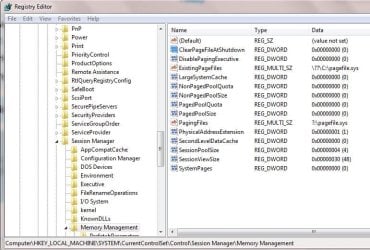
Also check this registry key (1 - means to clear it, will increase time):
HKEY_LOCAL_MACHINE\SYSTEM\CurrentControlSet\Control\Session Manager\Memory Management
"ClearPageFileAtShutdown = 0"


Thanks! Will read through that link.

About the regedit, can you clarify. Mine is already at 0. Did you mean I should change it to 1 or leave it at 0?
 

Attachments

  • Capture.JPG
    Capture.JPG
    78.5 KB · Views: 0

My Computer My Computer

Computer type
PC/Desktop
OS
Windows 7 HP x64 SP1
CPU
Phenom II x2 550BE @3.1Ghz
Motherboard
GA-MA770-UD3 rev 2.0
Memory
Patriot Viper 2x2GB DDR2 6400
Graphics Card(s)
Sapphire HD5850 Extreme 1GB
Sound Card
Onboard Realtek
Monitor(s) Displays
Samsung 23" S23A700D * 120Hz * 3D * 2ms response
Screen Resolution
1920x1080
Hard Drives
SSD Samsung 830 128GB/Seagate 2TB (2 x single platter)/ WD 1TB Cav Black/ WD RE3 1TB /WD 320GB IDE/IBM 120GB IDE
PSU
XFX Pro 650w Core Edition
Case
Coolermaster CM690 Dominator
Cooling
TRUE Rev.C + Arctic Cooling MX-2 + various 12cm fans
Keyboard
Razer Lycosa
Mouse
Logitech MX518
Internet Speed
Fibre Optic 100MB Down * 6MB Up
Leave it at 0, just needed to check.
 

My Computer My Computer

Computer type
PC/Desktop
Computer Manufacturer/Model Number
Custom Build
OS
Windows 7 Ultimate x64 SP1
CPU
AMD Phenom 2 1090T
Motherboard
Gigabyte GA-890FXA-UD5
Memory
2x8GB Kingston HyperX Fury Black 1600Mhz Unganged
Graphics Card(s)
MSI GTX 970 Gaming 4G
Sound Card
Realtek On-Board HD 7.1 Audio / Logitech G35
Monitor(s) Displays
3xAcer GD245HQ
Screen Resolution
1920x1080
Hard Drives
Samsung 850 Pro 512GB SSD - OS /
WD Caviar Black SATA 3 - 1 TBx2 - Dynamic RAID 0 /
WD Caviar Green SATA 2 - 640GBx2 - Dynamic RAID 0 /
WD Caviar Green SATA 2 - 640GB - Internal Backup /
Seagate Barracude SATA 3 - 3TB - External Backup/ Sync
PSU
HighPower 1000W
Case
Cooler Master HAF 932
Cooling
Noctua NH-D14
Keyboard
Logitech G19
Mouse
Logitech G500
Internet Speed
100/4 Mbit Cable (100GB quota)
Antivirus
ZoneAlarm Extreme Security / MBAM Pro / MBAE Free / SAS Free
Browser
IE 11 - Firefox - Chrome
Other Info
Logitech F710/ G27/ G940/ Z5500 // TrackIR 5 // Nvidia 3D Surround Vision
Back
Top