Hi there all!
This tutorial was great reading to me! I'm currently having a situation with one BIG storage unit of mine (it happened to me before, so it might be the 3rd time, despite my increasing carefulness).
However, I humbly admit that my knowledge in these matters is thus limited that I still don't feel confident in rescuing with TestDisk on my own, especially given the situation seems to appear different than presented in the tutorial.
So I resort to come bothering you people, since this very nasty accident hit me and I'm in need of more knowledgeable minds than my own to make the right decisions... Here's my story so far:
I was browsing files on my external WesternDigital 3,5" HD (3 Tib) that I use for storage. It was connected via a big HUB: 13 ports, but it's backed up by it's own external power, not just USB-powered, plus only 2 ports were then switched on -- the 2nd port was for another 2,5" external HD of 750 Gib. So I thought everything would go smooth, but after some hours, suddenly for no apparent reason the 3Tib drive got disconnected on its own (no USB cable was moved or anything of the sort!). I should add that I wasn't doing any writing, copying or moving anything to nor from that hard-drive at the time. Well, what Windows was doing on its side is another matter...
Once reconnected, the result was (unfortunately as expected) that the drive was corrupt!
Here is now the state of things:
The drive when turned on reads for about a full minute (external enclosure's LED blinks and all) before Windows finally detects it. It then appears WITH ITS CORRECT LETTER (O:\) STILL ASSIGNED, but also tells me "O:\ Unknown Filesystem", and advise me to format it in order to use it.
In the disk manager, the volume appears, with its letter of course, with its space correctly allocated ("O:\2794,39 Gib - sane volume, main partition") but filesystem is listed as "RAW"!
I should also note that I'm at my parents' and all I can use here is an old laptop HP/Compaq Presario C750 with bad old Vista installed on it
I'm asked to format it. I'm all the more upset by this situation that Ihad already about 2,5 Tib filled with very valuable contents on that HD...
Using "EaseUS Data Recovery Wizard" latest version (which I bought a while ago as I've had such issues before), the software does seem to detect many things from the original NTFS filesystem on that HD, since it shows the original Label I gave it ("O:\AudioContent") and lists me all the main directories/file structure (although ther are a few odd things, like a couple folders detected that are actually from another HD I use to connect with the same external enclosure, etc.).
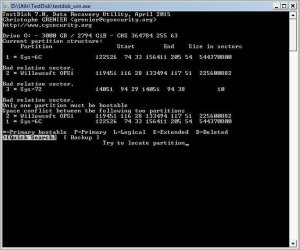
Now, using TestDisk following the indications given in Jumanji's tutorial, I get peculiar (to me anyway) results:
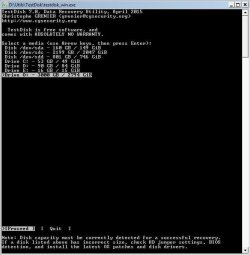
- Media is detected with correct space ("Drive O: - 3000GB / 2794 Gib)
I "Proceed", and gets in the bottom this Hint: "None partition table type has been detected".
I then "choose "Intel/PC partition", then "Analyse", and I get the screen I attached to this post.
That's about where I'm at right now, so as you may gather, ANY informed and skilfull help with the whole thing would be greatly appreciated! Please tell me how to proceed, what I should try, and ask me for any further information you may need to help figure what way to go with the recovery process...
Thank you so much in advance to anyone willing and able to help me!
-- Angar



 .
.