I am afraid you can have only 4 active partitions on one disk.
Probably just a typo here... you surely meant to say "you can have only 4
primary partitions on one disk".
What exactly are you trying to do here?
Exactly.
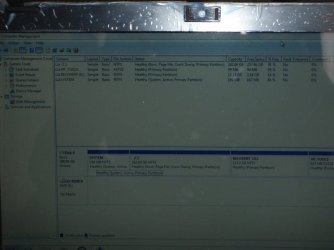
It's very difficult to see that photo clearly, but since there is currently (1) HP Tools, no doubt from the vendor, and (2) Recovery, (3) "system reserved" and (4) the one large C partition, the only potential real option I see is to shrink C (which I can barely see the size of, but looks like about 280GB) and add a "data partition" to the now released unallocated space.
Unfortunately, all four primary partitions are currently in use, so a fifth partition of any kind (either "logical" or "primary") is impossible... unless in addition to shrinking C that either the HP Tools or Recovery partitions are disappeared, partitions resized/moved to make room for an "extended partition" and thus "logical" partitions inside it, etc.. This is significant surgery, but straightforward and possible... if one of the four existing primary partitions is disappeared.
But with current four primary partitions, it doesn't seem like there's much hope.
For sure, downloading and burning the ISO for standalone boot CD of Partition Wizard in order to do anything to the C partition seems absolutely necessary. Also
download and install the standard Partition Wizard for use under Win7 where there's no requirement to boot and run standalone (as there is when working on C resize/move).