Regarding Bootable CD Creation

bigreid

New member
Local time
10:10 AM
Messages
16
My question is not HOW to create a bootable CD.

My question deals with a dilemma that I am encountering while creating one.

I have no problem creating bootable CD's, but, using two different creation softwares, I run into the same problem.

My end goal is to end up with a bootable DOS 6.22 CD, which I can create with no issues.

Both of these creation softwares, (PowerISO, and Nero), allow you to create a bootable CD, providing you have the original boot disk, and I do, I have the three original Microsoft DOS 6.22 install floppies.

Now, as part of the creation, your allowed to add additional files/folders to the final burn, being that it will end up on a CD, which offers ample room for additional content.

So, I put Disk 1 of 6.22 into the floppy, and in the creation software, I drag and drop the additional files and folders, (in DOS ISO9600, non Joliet 8 character format), and burn the boot disk.

Boot disk works, I can boot from it, and am in the DOS 6.22 environment.

However, I can only see the "files" that I dragged and dropped into the compilation, NOT the "folders" that I dragged and dropped into the compilation.

Both creation softwares have this same identical drawback.

Now if I look at that boot disk in Windows 7 Windows Explorer, I can not only see the files I added, but I can ALSO see the folders I added. But when I boot from the CD, I can only see the files I added, NOT the folders.

To boot, (no pun intended), the folders that I am adding are from DOS. They are DOS created folders, with DOS created text files in them.

Being that both softwares fail at this, there must be some logic behind it.

What gives?
 

My Computer

Computer type
PC/Desktop
Computer Manufacturer/Model Number
Custom Build
OS
Microsoft Windows 7 Ultimate x64 / 6.1.7601 Service Pack 1 Build 7601
CPU
Intel(R) Core(TM)2 Extreme CPU X9650
Motherboard
Asus P5K Deluxe
Memory
8 GB
Graphics Card(s)
EVGA Nvidia GeForce GTX 580 (3842) 3GB GF110
Hard Drives
Western Digital WDC WD1001FALS-00J7B1 1TB SATA
Antivirus
Kaspersky Anti Virus v14.0.0.4651(a)
Browser
Internet Explorer / Firefox
it's been a while since I used DOS, but here it goes:
As you say, the folders are on the CD, the first thing you need to do is switch to the drive the CD is in and then type "DIR" and hit enter. that should show all that is on the cd.
If you type DIR from the dos prompt, you only get the files that DOS loaded
Hope that helps
Sven
 

My Computer

Computer type
PC/Desktop
Computer Manufacturer/Model Number
Custom Build
OS
windows 7 ultimate x64
CPU
AMD FX 6 CORE PROCESSOR
Memory
16 GB
Graphics Card(s)
on MB
Sound Card
on MB
Monitor(s) Displays
Acer
Screen Resolution
1920x1080
Hard Drives
Seagate ( C:\)
Case
mini tower
Keyboard
Logitech wireless
Mouse
Logitech wireless
Antivirus
MSE
Browser
IE11
Sven is right. To clarify a bit more, when you boot the CD you're not actually booting a "CD", per se, you're booting an image of a floppy disk. In fact, when you boot MS-DOS from the CD disc you should end up at an "A:>" prompt, which is a gentle reminder that you've booted from a virtual floppy disk.

The additional files you added to the CD are on the CD portion, not the floppy image, so you won't see them on the A: drive. You'll find them under whatever drive letter is assigned to the CD drive.

And therein lies the rub: DOS is not a plug-and-play OS so does not auto-magically discover and load a CD driver like Windows does, so you have to specifically do that with commands in your DOS startup files--usually by loading a CD driver in config.sys and MSCDEX in autoexec.bat. If you don't do that, you'll never "see" the CD portion of the disc from DOS.

Read up on how to build and troubleshoot a bootable floppy disk with CD support, and when you've got that working then use that floppy for your boot image when creating the CD in Nero or PowerISO.
 

My Computer

Computer type
PC/Desktop
Computer Manufacturer/Model Number
Dell Optiplex 7050
OS
Windows 7/8.1/10 multiboot
CPU
Intel Core i7-7700
Motherboard
Dell, Intel Q270 chipset
Memory
48GB (2x16GB Crucial DDR4-3200 + 2x8GB Hynix DDR4-2400)
Graphics Card(s)
Intel HD630 + AMD Radeon R7 450 PCIe
Monitor(s) Displays
Asus VC279 (27")
Screen Resolution
1920x1080
Hard Drives
Toshiba M.2 NVMe (256GB),
Samsung 960 Evo (500GB),
WD Red Plus 80EFBX (8TB)
You could get a floppy drive. If you don't have room for an internal one or you are using a laptop then you can get an external drive.
 

My Computers

System One System Two

DOS had an 8.3 naming convention. At one point, Windows added the ability to use long file names. There could be an issue with DOS not being able to read the long file names. There may be a difference in the way folder names were stored in DOS vs Windows, which if true could explain why you can see the files but not the folders.

If you're trying to run DOS, perhaps it would be better if you loaded it into a "virtual" environment such as DOSBox rather than trying to run it straight off of a modern computer.
 

My Computer

Computer type
PC/Desktop
Computer Manufacturer/Model Number
Dell
OS
Linux Mint 18.2 xfce 64-bit (VMWare host) / Windows 8.1 Pro 32-bit (VMWare guest)
CPU
Haswell
Memory
4 GB
Monitor(s) Displays
Acer 23"
Screen Resolution
1920 x 1080
Hard Drives
Two hard drives, 1TB each: One for Linux, one for my data.
Keyboard
IBM Model M
Antivirus
Sophos (Linux), Trend Micro (Windows)
Browser
Firefox, Opera
Other Info
I use Samba to share my data drive with the other computers at my house and with my guest session in VMWare Workstation Player.
First, and foremost, I want to thank everyone for their attempt at assisting me.

First, the way I was attempting to achieve my goal, as I had stated above, was the incorrect approach.

You CAN make a bootable CD by using the original boot floppy, and then drag all the files you want into the compilation, but, at that point, once you boot from the CD, all you will see is what was on the floppy.

Now I COULD argue the point as to why any software package would lead you to believe that such a process will work that way, when it doesn't, ...but, that point is probably moot.

So, given my new found knowledge, I said to myself, if when making a bootable CD from a floppy, all that will be seen on the CD is what was on the floppy, then, I need a "bootable" source, that is bigger than a floppy.

I then thought, if you can make a bootable CD from a bootable floppy, then there should be no reason why you cant make a bootable CD from a bootable Hard Drive, (as long as everything you are encompassing stays under 680 or so MB).

Long and short, I was right.

Fully installed DOS 6.22 onto an old 100 MB Hard Drive.

Attached the DOS Hard Drive to my Windows 7 system.

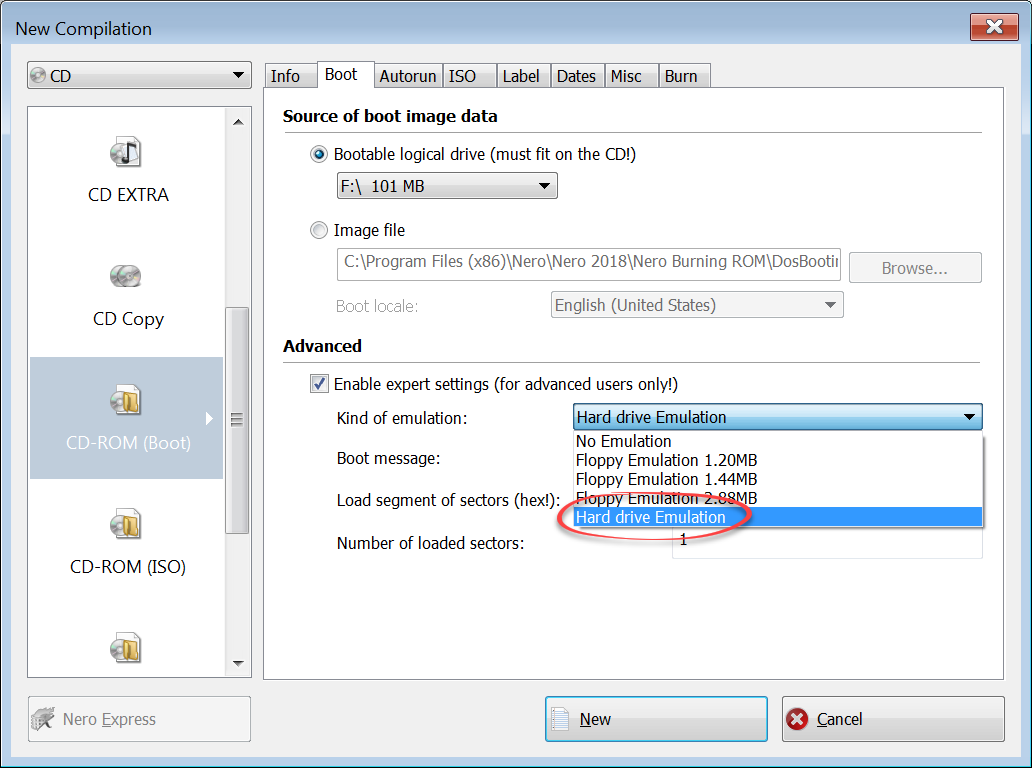
Booted in Windows 7, started Nero, and INSTEAD of the default Floppy emulation, which limits your size from 1.20MB - 2.88MB, I now chose Hard Drive Emulation and, as the logical drive to gather the boot info from, I chose the DOS FAT formatted Hard Drive. (See attachment photo).


M8HTRr3.png


Worked perfectly.

I now have a bootable DOS 6.22 CD, that encompasses the entire DOS install environment, including all of the files and folders. And to boot, (no pun intended), the CD assumes drive "C" when booted, so, I didn't need to change any settings in DOS, such as PATH, etc., because on the DOS Hard Drive, DOS is assigned to look for everything on "C" this, or "C" that to begin with, so it worked out perfect.


Now of course there will still be times when DOS will need to do writes, and I suppose I could still adjust a few environment variables to have it do its writing to A:, a Floppy, but, ...I'll cross that bridge when I come to it.


Last edited:

My Computer

Computer type
PC/Desktop
Computer Manufacturer/Model Number
Custom Build
OS
Microsoft Windows 7 Ultimate x64 / 6.1.7601 Service Pack 1 Build 7601
CPU
Intel(R) Core(TM)2 Extreme CPU X9650
Motherboard
Asus P5K Deluxe
Memory
8 GB
Graphics Card(s)
EVGA Nvidia GeForce GTX 580 (3842) 3GB GF110
Hard Drives
Western Digital WDC WD1001FALS-00J7B1 1TB SATA
Antivirus
Kaspersky Anti Virus v14.0.0.4651(a)
Browser
Internet Explorer / Firefox
Excellent!
 

My Computer

Computer type
PC/Desktop
Computer Manufacturer/Model Number
Dell
OS
Linux Mint 18.2 xfce 64-bit (VMWare host) / Windows 8.1 Pro 32-bit (VMWare guest)
CPU
Haswell
Memory
4 GB
Monitor(s) Displays
Acer 23"
Screen Resolution
1920 x 1080
Hard Drives
Two hard drives, 1TB each: One for Linux, one for my data.
Keyboard
IBM Model M
Antivirus
Sophos (Linux), Trend Micro (Windows)
Browser
Firefox, Opera
Other Info
I use Samba to share my data drive with the other computers at my house and with my guest session in VMWare Workstation Player.
Back
Top