regarding running a portable OS

Virtualbox limits you to 800x600, 1024x768 and some larger unless you use scale mode which is awful. If you install guest additions you can drag to whatever size you want.
 

My Computer

Computer type
Laptop
Computer Manufacturer/Model Number
Hewlett-Packard/G62-107SA Notebook
OS
Microsoft Windows 7 Home Premium 64-bit Service Pack 1
CPU
Intel(R) Core(TM) i3 CPU M 330 @ 2.13GHz
Motherboard
Hewlett-Packard 1425
Memory
8 GB DDR3
Graphics Card(s)
Intel(R) HD Graphics
Sound Card
Realtek High Definition Audio
Monitor(s) Displays
Builtin
Screen Resolution
1366 x 768 x 32 bits (4294967296 colors) @ 60 Hz
Hard Drives
250 GB SATA Hard Disk Drive 7200 rpm
2TB Seagate GoFlex USB 2 Drive
1TB Iomega Prestige USB 2 Drive
1.5TB Iomega Prestige USB 2 Drive (Samsung)
2TB WD MyBook Live NAS.
Mouse
Logitech Anywhere MX
Internet Speed
152 Mbs download 10 Mbs upload
Antivirus
Norton 360
Browser
Chrome
Virtualbox limits you to 800x600, 1024x768 and some larger unless you use scale mode which is awful. If you install guest additions you can drag to whatever size you want.
Understand, he's on vBox. I did not get that part. I am now always in VMware Player. They don't seem to have that restriction.
 

My Computer

Computer Manufacturer/Model Number
HP, Dell, Gateway, Toshiba - 4 laptops and 2 desktops
OS
Vista, Windows7, Mint Mate, Zorin, Windows 8
CPU
from 1.6GHz Duo to i7
Monitor(s) Displays
2x HP w2207
Hard Drives
5x HDD, 7x SSD, 12x Externals
Keyboard
with trackball - no mices
Mouse
Trackball mice
Internet Speed
DSL 6000
I went the other way. I am now all vBox, mostly because of snapshots which can restore your VM almost instantly.
 

My Computer

Computer type
Laptop
Computer Manufacturer/Model Number
Hewlett-Packard/G62-107SA Notebook
OS
Microsoft Windows 7 Home Premium 64-bit Service Pack 1
CPU
Intel(R) Core(TM) i3 CPU M 330 @ 2.13GHz
Motherboard
Hewlett-Packard 1425
Memory
8 GB DDR3
Graphics Card(s)
Intel(R) HD Graphics
Sound Card
Realtek High Definition Audio
Monitor(s) Displays
Builtin
Screen Resolution
1366 x 768 x 32 bits (4294967296 colors) @ 60 Hz
Hard Drives
250 GB SATA Hard Disk Drive 7200 rpm
2TB Seagate GoFlex USB 2 Drive
1TB Iomega Prestige USB 2 Drive
1.5TB Iomega Prestige USB 2 Drive (Samsung)
2TB WD MyBook Live NAS.
Mouse
Logitech Anywhere MX
Internet Speed
152 Mbs download 10 Mbs upload
Antivirus
Norton 360
Browser
Chrome
I have guest additions installed. I just wanted to do a quick test. I currently have default installations of Windows 7 Pro and Windows 8 Pro in addition to partially configured Server 2008 R2 Enterprise. I'm not ready to customize quite yet. After my final exams wrap up, I'll have time to dedicate to details.

The current state of the project is all three OSes installed in VBox on the host with default installation vdi files saved to an external drive. I'm guessing that it will serve me better to configure baseline configurations on the host before running from the external drive. I'll post more complete information with a few observations and questions before moving on to detailed configuration.

My biggest issue at present is having only one monitor (15.6" on a laptop). Running the host and all three guests at the same time makes for a very cluttered view. Tinkering with window sizes is something I will optimize as time rolls forward.

drpepper
 
Last edited:

My Computer

Computer type
PC/Desktop
Computer Manufacturer/Model Number
Lenovo 1068AHU B570 (laptop)
OS
Windows 7 Home Premium SP1 64bit
CPU
Intel Core i3
Motherboard
Lenovo Emerald Lake
Memory
8GB DDR3
Graphics Card(s)
Intel HD graphics family
Sound Card
Realtek HD audio
Monitor(s) Displays
ThinkPad Display 1366x768 (15.6")
Hard Drives
WD 320GB WDC WD3200BPVT
Internet Speed
80Kbs maximum -->speed is a misnomer
Other Info
Logitech MK550 wireless mouse/keyboard combo used when at home.
I went the other way. I am now all vBox, mostly because of snapshots which can restore your VM almost instantly.
I just make periodic copies of the VMware folder(s) and roll those in when there is any trouble. A lot easier than an image.

When I used vBox, I was not aware of the snapshot facility. Maybe that is something more recent.
 

My Computer

Computer Manufacturer/Model Number
HP, Dell, Gateway, Toshiba - 4 laptops and 2 desktops
OS
Vista, Windows7, Mint Mate, Zorin, Windows 8
CPU
from 1.6GHz Duo to i7
Monitor(s) Displays
2x HP w2207
Hard Drives
5x HDD, 7x SSD, 12x Externals
Keyboard
with trackball - no mices
Mouse
Trackball mice
Internet Speed
DSL 6000
It has been there for some time. I first used it on the early Win 8 betas.
 

My Computer

Computer type
Laptop
Computer Manufacturer/Model Number
Hewlett-Packard/G62-107SA Notebook
OS
Microsoft Windows 7 Home Premium 64-bit Service Pack 1
CPU
Intel(R) Core(TM) i3 CPU M 330 @ 2.13GHz
Motherboard
Hewlett-Packard 1425
Memory
8 GB DDR3
Graphics Card(s)
Intel(R) HD Graphics
Sound Card
Realtek High Definition Audio
Monitor(s) Displays
Builtin
Screen Resolution
1366 x 768 x 32 bits (4294967296 colors) @ 60 Hz
Hard Drives
250 GB SATA Hard Disk Drive 7200 rpm
2TB Seagate GoFlex USB 2 Drive
1TB Iomega Prestige USB 2 Drive
1.5TB Iomega Prestige USB 2 Drive (Samsung)
2TB WD MyBook Live NAS.
Mouse
Logitech Anywhere MX
Internet Speed
152 Mbs download 10 Mbs upload
Antivirus
Norton 360
Browser
Chrome
recap:
Vbox extension pack and guest additions installed
Server 2008 R2 Enterprise installed in Vbox, fully updated, partially configured
Win 7 Pro installed in Vbox, fully updated
Win 8 Pro installed in VBox, fully updated
all three still on host system

I ran into a few issues during the installation/updating process:

  • Win 7 would not install from physical DVD or USB. I attempted to use iso burned to DVD with Active @ ISO Burner packaged with the download from Dream Spark (formerly Academic Alliance). Error message: no bootable media found - corrupt files. Using DVD burned with Image Burn and USB burned with Windows 7 USB DVD Download Tool failed also. Error message: windows failed to start 0xc0000225. Research recommended changing settings>system to chipset:ICH9. Problem not solved. To achieve successful installation, I had to mount the saved file to the optical drive to install the OS. (I experienced no problems installing the other two OSes form DVD. I found this to be odd.) On every reboot after a round of updates, I received the message: press any key to boot from CD or DVD. (The same "press any key" message apears on every launch of the OS now that it is up and running.) This message timed out, and normal VM start up resumed.
  • Win 8 would freeze on reboot following a reboot after a round of updates. I had to close manually using the red X and sending shutdown signal. I found this to be odd because the other two OSes did not freeze on reboot.
I examined settings>system for comparison and found: (I attemted to construct a table for comparison within the confines of formatting for the forum.)

........................server 2008......win 8........win7
MOBO tab
chipset...............PIIX3..............PIIX3........ICH9
enable IO APIC....enabled...........enabled....enabled
processor tab
enable PAE/NX....disabled...........enabled....disabled

Should I modify any of these settings?

More to follow after addressing this...

drpepper
 

My Computer

Computer type
PC/Desktop
Computer Manufacturer/Model Number
Lenovo 1068AHU B570 (laptop)
OS
Windows 7 Home Premium SP1 64bit
CPU
Intel Core i3
Motherboard
Lenovo Emerald Lake
Memory
8GB DDR3
Graphics Card(s)
Intel HD graphics family
Sound Card
Realtek HD audio
Monitor(s) Displays
ThinkPad Display 1366x768 (15.6")
Hard Drives
WD 320GB WDC WD3200BPVT
Internet Speed
80Kbs maximum -->speed is a misnomer
Other Info
Logitech MK550 wireless mouse/keyboard combo used when at home.
You won't be able to install from USB as VBox can't boot from USB. I find it simplest to install using an ISO rather than physical media.

I have never had to play with the mobo settings except that I usually enable PAE/NX.
 

My Computer

Computer type
Laptop
Computer Manufacturer/Model Number
Hewlett-Packard/G62-107SA Notebook
OS
Microsoft Windows 7 Home Premium 64-bit Service Pack 1
CPU
Intel(R) Core(TM) i3 CPU M 330 @ 2.13GHz
Motherboard
Hewlett-Packard 1425
Memory
8 GB DDR3
Graphics Card(s)
Intel(R) HD Graphics
Sound Card
Realtek High Definition Audio
Monitor(s) Displays
Builtin
Screen Resolution
1366 x 768 x 32 bits (4294967296 colors) @ 60 Hz
Hard Drives
250 GB SATA Hard Disk Drive 7200 rpm
2TB Seagate GoFlex USB 2 Drive
1TB Iomega Prestige USB 2 Drive
1.5TB Iomega Prestige USB 2 Drive (Samsung)
2TB WD MyBook Live NAS.
Mouse
Logitech Anywhere MX
Internet Speed
152 Mbs download 10 Mbs upload
Antivirus
Norton 360
Browser
Chrome
I was getting a little tunnel visioned with the comb of final exam prep and this project. I spent all day at the the races yesterday and cleared my mind. I attacked the problems using research and a little peeking into the nooks and crannies of VBox settings. The result is that the problems with the Win7 and Win8 guests have been resolved. I have decided to add details in case some of the viewers of this thread may find the details useful.

Here is the step-wise process I used and the results following each modification. Using the mindset of make one change at a time which I learned in my racing days, I preceded with tinkering with the VBox settings.

I attacked Win 7 Pro guest first. With a fresh mind, it was obvious that the "press any key ..." message was pointing toward boot order. The OS was looking for a CD/DVD to boot from and waiting for user input. Exploring VBox settings>system>motherboard>boot order, I found (as suspected) that CD/DVD was first in the order. I changed the boot order to HDD first. A test proved that this was the issue. Win 7 booted normally.

While still in Win 7, I decided th check out other settings. The first thing I checked out was settings>system Motherboard >chipset. The other two OSes are set to PIIX3, and Win 7 was set to ICH9. I had no idea what that meant; so I researched and found info relevant to Vbox. I found that PIIX3 is an older technology than ICH9. The recommendation was to stay with PIIX3 unless there were problems. There was an indication that ICH9 may not be stable. The article was dated a few years back; so I didn't let this worry me. The ICH9 chipset has revealed no problems to date; so I decided to use the adage,"if it ain't broke, don't fix it." ... no change ...

Using kado897's feedback about enabling PAE/NX, I decided to check that out. This is found in settings>system>processor. I had to research once again. I found that PAE enables 32-bit processors to access more than 4GB memory. This did not apply to me because I am using a 64-bit processor and am not attempting to access more than 2GB memory in this VM. NX helps guard from malware attacks. I'm all for that extra level of security protection; so I enabled it.

The bottom line for the Win 7 guest is that the nag screen is gone, and everything works to my satisfaction.

Next on my list was the Win 8 Pro guest. Since the Win 7 guest reacted so favorably to the change in boot order, I decided to check out the Win 8 guest boot order. Navigating the same path as described in the Win 7 modifications above, I found the boot order to be floppy, CD/DVD, and HDD. Not only was this the order, but the boxes for all three were checked. I cleared the check box for floppy and changed the boot order to HDD followed by D/DVD.

Because I am new to Win 8, I couldn't figure out how to restart. Research provided me with this jewel which I am including for those not familiar with Win 8. Use the key combination of Win+C>select settings>power>restart. The problem of VBox freezing up in my previous post was not repeated; however, I encountered a different failure. I encountered a VBox window stating that VBox manager had stopped. Closing the VBox window shut the VM down. The VBox main window showed the state of the Win 8 guest to be aborted. Research pointed me to settings>storage>controller. The setting for Win 8 was PIIX 4. I had to wonder if this was incompatible with the PIIX3 chipset setting. I changed to PIIX3 and decided to check one other setting while I was there. The recommended setting for CD/DVD dirve is IDE secondary master. That is what my setting was; so it was time to attempt a reboot again. Success!!

The bottom line for the Win 8 guest is that restart works properly, and everything works to my satisfaction.

The final thing on my list was the Server 2008 R2 guest. Once again using kado897's feedback, I enabled PAE/NX.

One thing caught my eye when exploring the settings. The default for settings>system>acceleration had both enable VT-X/AMD-V and nested paging checked. The first enables virtualization, which I had already done on the host machine. I guess VBox does this just to make sure. Nested paging provides a performance gain on hardware. I'm all for that. I did not modify that either.

This post is pretty long. See my next post to see how things work with all four OSes running at the same time.

drpepper
 

My Computer

Computer type
PC/Desktop
Computer Manufacturer/Model Number
Lenovo 1068AHU B570 (laptop)
OS
Windows 7 Home Premium SP1 64bit
CPU
Intel Core i3
Motherboard
Lenovo Emerald Lake
Memory
8GB DDR3
Graphics Card(s)
Intel HD graphics family
Sound Card
Realtek HD audio
Monitor(s) Displays
ThinkPad Display 1366x768 (15.6")
Hard Drives
WD 320GB WDC WD3200BPVT
Internet Speed
80Kbs maximum -->speed is a misnomer
Other Info
Logitech MK550 wireless mouse/keyboard combo used when at home.
It is mandatory to enable VT-X etc to run a 64bit guest on a 32bit host. Not sure it is necessary for a 64bit host but I always leave it enabled anyway.
 

My Computer

Computer type
Laptop
Computer Manufacturer/Model Number
Hewlett-Packard/G62-107SA Notebook
OS
Microsoft Windows 7 Home Premium 64-bit Service Pack 1
CPU
Intel(R) Core(TM) i3 CPU M 330 @ 2.13GHz
Motherboard
Hewlett-Packard 1425
Memory
8 GB DDR3
Graphics Card(s)
Intel(R) HD Graphics
Sound Card
Realtek High Definition Audio
Monitor(s) Displays
Builtin
Screen Resolution
1366 x 768 x 32 bits (4294967296 colors) @ 60 Hz
Hard Drives
250 GB SATA Hard Disk Drive 7200 rpm
2TB Seagate GoFlex USB 2 Drive
1TB Iomega Prestige USB 2 Drive
1.5TB Iomega Prestige USB 2 Drive (Samsung)
2TB WD MyBook Live NAS.
Mouse
Logitech Anywhere MX
Internet Speed
152 Mbs download 10 Mbs upload
Antivirus
Norton 360
Browser
Chrome
If you have just selected the last post, see my previous post detailing resolution of problems i encountered with the Win 7 and Win 8 guests.

Here is how my setup works and where I am headed next.

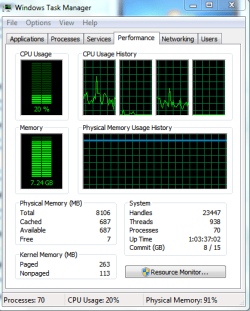
Because the updating process is time consuming and can be unattended with the exception of restarts, I decided to push this machine a little while prepping for finals. I launched all three guests and began updating all of them while doing exam prep on the host. I had Task Manager open in the performance tab so it would catch my peripheral vision if there were any big changes. The highest meory usage I observed was around 7.5GB. Processor usage stayed around 40-50% most of the time. Update installations at reboot sometimes jumped to the 70-80% range. It seems that my machine can handle my project well.

Here is the resource usage with all four OSes open to the desktop with no programs running. I am pleased with the outcome.

task manager.PNG

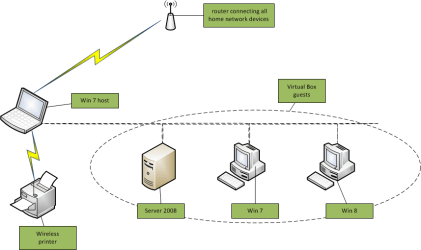
My next step is going to be configuring the guest server. I am thinking that my best bet will be to use a bus topology at first to avoid extra virtual hardware (switches, etc.) before I have had an opportunity to learn how to configure and use the three NICs on the guest systems and introduce the guests to the server. I have previewed the methods. I just need a little time to get the details straight in my mind and test them.

...anyway... This is how I see the initial network topology. This is the first time I have used MS Visio; so please excuse the quality. I will get better at it.

topology.png

That's it for now.

drpepper
 
Last edited:

My Computer

Computer type
PC/Desktop
Computer Manufacturer/Model Number
Lenovo 1068AHU B570 (laptop)
OS
Windows 7 Home Premium SP1 64bit
CPU
Intel Core i3
Motherboard
Lenovo Emerald Lake
Memory
8GB DDR3
Graphics Card(s)
Intel HD graphics family
Sound Card
Realtek HD audio
Monitor(s) Displays
ThinkPad Display 1366x768 (15.6")
Hard Drives
WD 320GB WDC WD3200BPVT
Internet Speed
80Kbs maximum -->speed is a misnomer
Other Info
Logitech MK550 wireless mouse/keyboard combo used when at home.
drpepper I do have a question. You have 4 Windows systems. Do you have to have 4 different COA to use all 4 of them at the same time?
1 Host Windows 7
1 Server (VM)
1 Windows 7 (VM)
1 Windowd 8 (VM)
 

My Computer

Computer type
PC/Desktop
Computer Manufacturer/Model Number
Home made Desktop
OS
Windows 10 Pro. 64/ version 1709 Windows 7 Pro/64
CPU
Intel i7-6800K @ 4.3
Motherboard
ASUS X-99 Deluxe II
Memory
Corsair Platinum 16 gig @2400
Graphics Card(s)
EVGA GTX 1070 OC
Monitor(s) Displays
Asus 27" LED LCD/VE278Q
Screen Resolution
1920-1080 or 1280-720 HDMI
Hard Drives
INTEL SSD 730-240 Gb Sata 3.0/
PSU
EVGA Platium 1200W
Case
Phanteks Luxe Tempered Glass 8 fans/ one radiator
Cooling
XSPC/ Water Cooled CPU
Keyboard
Das 4 Professional
Mouse
Logitech M705/MX Anywhere 2-S
Internet Speed
100 mbits
Antivirus
Microsoft Security Essentials/ Malwarebytes Premium 3.0/ SAS
Browser
I.E. 11 default/Firefox/ ISP Time Warner Cable/Spectrum
Other Info
LG BluRay Burner/
Sound system-KLipsch-THX/
Icy Dock ssd Hot Swap bays.
Layback Bear,

good question ... The answer is not exactly ... The OSes are genuine and activated ...

As defined here, What is the Windows Certificate of Authenticity? , the COA is a physical label on the device or on the box or sleeve containing the physical installation media. Downloaded installation files cannot, by their electronic nature, have the physical label. With that said, here is the scoop on the "genuine" (using Microsoft's jargon) nature of my licensing.

The host Win 7 is activated using the COA on the computer. The three guest OSes were downloaded from Dream Spark (formerly known as Academic Alliance). Dream Spark is a partnership of sorts between Microsoft and academic institutions which have entered the partnership with Microsoft to allow students to obtain free MS software. I don't know if partnership is the technically correct term or not, but it is descriptive. The terms for the downloaded software include permanent licensing and a 24 month grace period to allow for use on a new (or other) computer at a later date. These are single machine licenses by terms of the EULA.

Some of the software I downloaded is in the form of plugins for MS Office or requires no activation. The remainder of the software includes an activation key in the standard 25 character format. (five characters-five characters-five characters-five characters-five characters). The OSes do require activation. I successfully activated each of the guest OSes online during the creation of the respective VMs in VBox. In the past I have encountered problems when activating online because of changes in system hardware. I had to call Microsoft to activate the software in question. I encountered no such problems.

One of the virtualization gurus is welcome to clarify this, but here is my understanding. One of the design purposes of virtual machines is to allow for the running of an OS in a virtual machine at the same time the host is running. This eliminates the necessity of dual (or more) booting. I chose virtualization for this exact purpose. I can move my cursor with the mouse to any of the open windows and click to make that window active.

Why did I choose this method? The topics of virtualization, networking, server/client relationships, and the Windows 8 OS are all new to me. This represents my own personal lab for learning and testing. The testing aspect of a virtual machine is another of the design purposes of virtual machines. As I run into questions or stumbling blocks in a VM, I can make the host window active to research answers and/or solutions without modifying the state of the VM in question. Once I start building the network by introducing the guests to the server or start modifying various configurations of the server after the network has been built, I can monitor the results by making the window of my choice active. It is like having multiple physical machines and seeing in more or less real time what is happening on all of them.

drpepper
 

My Computer

Computer type
PC/Desktop
Computer Manufacturer/Model Number
Lenovo 1068AHU B570 (laptop)
OS
Windows 7 Home Premium SP1 64bit
CPU
Intel Core i3
Motherboard
Lenovo Emerald Lake
Memory
8GB DDR3
Graphics Card(s)
Intel HD graphics family
Sound Card
Realtek HD audio
Monitor(s) Displays
ThinkPad Display 1366x768 (15.6")
Hard Drives
WD 320GB WDC WD3200BPVT
Internet Speed
80Kbs maximum -->speed is a misnomer
Other Info
Logitech MK550 wireless mouse/keyboard combo used when at home.
kado897,

Sorry, I missed your reply because it was on a previous page of the thread. Thanks for the heads-up on the 32-bit host running a 64-bit guest. I probably missed that because all four OSes are 64-bit.

drpepper
 

My Computer

Computer type
PC/Desktop
Computer Manufacturer/Model Number
Lenovo 1068AHU B570 (laptop)
OS
Windows 7 Home Premium SP1 64bit
CPU
Intel Core i3
Motherboard
Lenovo Emerald Lake
Memory
8GB DDR3
Graphics Card(s)
Intel HD graphics family
Sound Card
Realtek HD audio
Monitor(s) Displays
ThinkPad Display 1366x768 (15.6")
Hard Drives
WD 320GB WDC WD3200BPVT
Internet Speed
80Kbs maximum -->speed is a misnomer
Other Info
Logitech MK550 wireless mouse/keyboard combo used when at home.

My Computer

Computer type
PC/Desktop
Computer Manufacturer/Model Number
Home made Desktop
OS
Windows 10 Pro. 64/ version 1709 Windows 7 Pro/64
CPU
Intel i7-6800K @ 4.3
Motherboard
ASUS X-99 Deluxe II
Memory
Corsair Platinum 16 gig @2400
Graphics Card(s)
EVGA GTX 1070 OC
Monitor(s) Displays
Asus 27" LED LCD/VE278Q
Screen Resolution
1920-1080 or 1280-720 HDMI
Hard Drives
INTEL SSD 730-240 Gb Sata 3.0/
PSU
EVGA Platium 1200W
Case
Phanteks Luxe Tempered Glass 8 fans/ one radiator
Cooling
XSPC/ Water Cooled CPU
Keyboard
Das 4 Professional
Mouse
Logitech M705/MX Anywhere 2-S
Internet Speed
100 mbits
Antivirus
Microsoft Security Essentials/ Malwarebytes Premium 3.0/ SAS
Browser
I.E. 11 default/Firefox/ ISP Time Warner Cable/Spectrum
Other Info
LG BluRay Burner/
Sound system-KLipsch-THX/
Icy Dock ssd Hot Swap bays.
You're welcome, Layback Bear.

If things go as I envision them, this will be a chronicle of all steps, successes, and failures. Maybe it should be called a blog of sorts. I am hopeful that I am not the only one who learns in the process. The way I see it, sharing the learning experience is just as worthwhile as the successful completion of my project.

Feel free to ask questions as they arise. I can learn from your questions. Answering them will reinforce the topics in my mind.

drpepper
 

My Computer

Computer type
PC/Desktop
Computer Manufacturer/Model Number
Lenovo 1068AHU B570 (laptop)
OS
Windows 7 Home Premium SP1 64bit
CPU
Intel Core i3
Motherboard
Lenovo Emerald Lake
Memory
8GB DDR3
Graphics Card(s)
Intel HD graphics family
Sound Card
Realtek HD audio
Monitor(s) Displays
ThinkPad Display 1366x768 (15.6")
Hard Drives
WD 320GB WDC WD3200BPVT
Internet Speed
80Kbs maximum -->speed is a misnomer
Other Info
Logitech MK550 wireless mouse/keyboard combo used when at home.
I would like some feedback from someone with a good understanding of networking.

Networking is one of the topics which my project will help me understand better. Before moving on to configuring the guest server, I thought it may be wise to examine network connections via ipconfig /all. I enabled shared clipboard to simplify viewing of the network connections side-by-side on the host.

I found the following connection details to be identical for all three guests.
Code:
Ethernet adapter Local Area Connection:

   Connection-specific DNS Suffix  . : gateway.2wire.net
   Description . . . . . . . . . . . : Intel(R) PRO/1000 MT Desktop Adapter 
   DHCP Enabled. . . . . . . . . . . : Yes
   Autoconfiguration Enabled . . . . : Yes 
   IPv4 Address. . . . . . . . . . . : 10.0.2.15(Preferred)
   Subnet Mask . . . . . . . . . . . : 255.255.255.0
   Default Gateway . . . . . . . . . : 10.0.2.2
   DHCP Server . . . . . . . . . . . : 10.0.2.2 
   DNS Servers . . . . . . . . . . . : 192.168.1.254
   NetBIOS over Tcpip. . . . . . . . : Enabled
Everything looks good to me except the IPv4 address/subnet mask combo is identical. I am thinking that I need to establish subnetting to before attempting to create the network. Is that correct? If yes, should I do that before starting to configure the guest server?

I was concerned that the NICs may have had identical MAC addresses. The following excerpts put that concern to rest while adding another question.

Code:
Physical Address. . . . . . . . . : 08-00-27-D5-9F-77 (win7 guest)
Physical Address. . . . . . . . . : 08-00-27-91-8A-0C (win8 guest)
Physical Address. . . . . . . . . : 08-00-27-D0-FC-60 (server guest)
These addresses post no potential conflicts. However, I found NIC options in VBox. In the user manual (6.1 Virtual networking hardware) two server versions are listed: Intel PRO/1000 T Server (82543GC) and Intel Pro/1000 MT Server (82545EM). The T Server is described for use with Windows XP, and the MT Server is described for OVF imports from other platforms. I see no reason why I need either of these server NICs. I suspect that the Intel(R) PRO/1000 MT Desktop Adapter is sufficient for my purposes. Is that correct?

The DNS Servers' IP address in the guests is shared with the host, which is the default gateway for the host. I see no need to change this at present. I believe any needed changes (if any) will be made in the server configuration. Is that correct?

Thanks for your feedback.

drpepper
 

My Computer

Computer type
PC/Desktop
Computer Manufacturer/Model Number
Lenovo 1068AHU B570 (laptop)
OS
Windows 7 Home Premium SP1 64bit
CPU
Intel Core i3
Motherboard
Lenovo Emerald Lake
Memory
8GB DDR3
Graphics Card(s)
Intel HD graphics family
Sound Card
Realtek HD audio
Monitor(s) Displays
ThinkPad Display 1366x768 (15.6")
Hard Drives
WD 320GB WDC WD3200BPVT
Internet Speed
80Kbs maximum -->speed is a misnomer
Other Info
Logitech MK550 wireless mouse/keyboard combo used when at home.
I will ask if someone with networking knowledge can assist.
 

My Computer

Computer type
Laptop
Computer Manufacturer/Model Number
Hewlett-Packard/G62-107SA Notebook
OS
Microsoft Windows 7 Home Premium 64-bit Service Pack 1
CPU
Intel(R) Core(TM) i3 CPU M 330 @ 2.13GHz
Motherboard
Hewlett-Packard 1425
Memory
8 GB DDR3
Graphics Card(s)
Intel(R) HD Graphics
Sound Card
Realtek High Definition Audio
Monitor(s) Displays
Builtin
Screen Resolution
1366 x 768 x 32 bits (4294967296 colors) @ 60 Hz
Hard Drives
250 GB SATA Hard Disk Drive 7200 rpm
2TB Seagate GoFlex USB 2 Drive
1TB Iomega Prestige USB 2 Drive
1.5TB Iomega Prestige USB 2 Drive (Samsung)
2TB WD MyBook Live NAS.
Mouse
Logitech Anywhere MX
Internet Speed
152 Mbs download 10 Mbs upload
Antivirus
Norton 360
Browser
Chrome
thanks ... much appreciated!
 

My Computer

Computer type
PC/Desktop
Computer Manufacturer/Model Number
Lenovo 1068AHU B570 (laptop)
OS
Windows 7 Home Premium SP1 64bit
CPU
Intel Core i3
Motherboard
Lenovo Emerald Lake
Memory
8GB DDR3
Graphics Card(s)
Intel HD graphics family
Sound Card
Realtek HD audio
Monitor(s) Displays
ThinkPad Display 1366x768 (15.6")
Hard Drives
WD 320GB WDC WD3200BPVT
Internet Speed
80Kbs maximum -->speed is a misnomer
Other Info
Logitech MK550 wireless mouse/keyboard combo used when at home.
Several hours of research online and in books has given me tentative answers to the questions posed in my earlier post. I think a little time spent in preliminary note taking and calculating subnet options will at least give me a viable foundation for proceeding.

here is what I believe I need to do in a nutshell:
1) spend some time researching domain name options for the FQDN (Fully Qualified Domain Name) requirement to establish the server as a domain controller --> don't know yet if I have to lease a domain name, or if I can get away with using a unique available domain name without a lease.
2) use existing NICs as is
3) perform some more configurations (active directory, etc.) on the server before worrying about the clients
4) decide on subnetting and IP address assignment for clients --> configuration to be performed when joining the network
5) DNS and DCHP configuration to be performed when joining each client to the network
6) add win7 client to network
7) add win 8 client to network --> more difficult, some additional requirements for compatibility with the server

Details will follow after mapping out a strategy for my next steps. I'm not sure at this point whether I will be ready to move the guests to the external drive after performing the steps above. I have found virtually no information about running a network inside a VM. There is an overabundance of information (information overload) about networking and virtualization as separate topics. Initial reading suggests that remaining configurations and testing can be performed when running the network from the external drive. I can't be sure until I try it. As I observe behavior I should be able to confirm or deny that theory.

If anyone can shoot holes in my plan, feel free to do so. Receiving correction is part of the learning process.

drpepper
 

My Computer

Computer type
PC/Desktop
Computer Manufacturer/Model Number
Lenovo 1068AHU B570 (laptop)
OS
Windows 7 Home Premium SP1 64bit
CPU
Intel Core i3
Motherboard
Lenovo Emerald Lake
Memory
8GB DDR3
Graphics Card(s)
Intel HD graphics family
Sound Card
Realtek HD audio
Monitor(s) Displays
ThinkPad Display 1366x768 (15.6")
Hard Drives
WD 320GB WDC WD3200BPVT
Internet Speed
80Kbs maximum -->speed is a misnomer
Other Info
Logitech MK550 wireless mouse/keyboard combo used when at home.
Back
Top