Registry - Backup and Restore

How to Backup and Restore the Registry in Windows 7 and Vista

   Information
This will show you a few options on how to export the registry as a .reg file backup, and how to import the .reg file to restore to the registry in Windows 7 and Vista.
   Warning
Importing or merging a .reg file backup will only restore the keys and values that were included in the exported backup. If you have added new keys and values since the .reg file backup was created, then these items will not be affected or restored when you import or merge the older exported .reg file backup to the registry. If you wanted to replace the registry completely with a backup, then System Restore (see Method One in OPTION ONE & TWO below) will allow you to do this instead.


OPTION ONE

Backup Registry


METHOD ONE

Using System Restore


NOTE: This is the best method to use since it will replace the current registry with the contents of the registry as it was on the date the restore point was created. These restore points contain information about registry settings and other system information that Windows 7 uses. System Restore points do not include the personal user files.
1. Create a restore point.
NOTE: See information at that link for more details on this.
   Tip
Creating a restore point before making any changes to Windows 7 is the recommended method to use to have the registry backed up.


METHOD TWO

Export Only Part of the Registry as a Backup


NOTE: This will allow you to only export a HKEY or key branch in the registry to a .reg file as a backup.
1. Open the Start menu and type regedit in the search line, then press Enter. (See screenshot below)
Search_Box.jpg
2. If prompted by UAC, click on Yes to approve.

3. To Export a Registry HKEY Branch
NOTE: This will allow you to backup the entire selected HKEY branch with all of it's subkeys and key values to a .reg file as a backup.
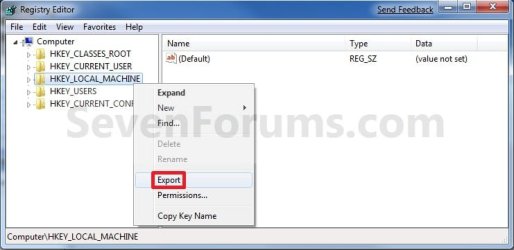
A) Right click on a HKEY branch that you want to backup, and click on Export. (See screenshot below)
Export-2.jpg
B) Select where you want to save the exported .reg file to, type in a name for the .reg file, and click on the Save button. (See screenshot below)
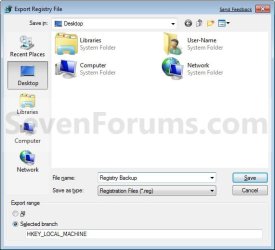
HKEY_Export_Location.jpg
4. To Export a Registry KEY Branch
NOTE: This will allow you to backup the entire selected KEY branch under a HKEY with all of it's subkeys and key values to a .reg file as a backup.
A) Right click on a KEY branch under the HKEY that you want to backup, and click on Export. (See screenshot below)
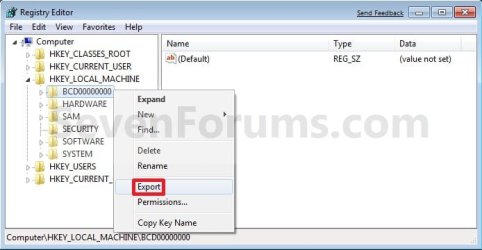
Export_Key.jpg
B) Select where you want to save the exported .reg file to, type in a name for the .reg file, and click on the Save button. (See screenshot below step 3B)


OPTION TWO

Restore Registry


METHOD ONE

From a System Restore Point


NOTE: This will replace your current registry and system files in Windows by restoring the registry and system files in Windows back to how they were on the date the restore point (Option One, Method One) was created.
1. Do a System Restore using a restore point with the date you want to restore you Windows 7 registry and system files back to.
NOTE: See information at link for more details on this.
   Tip
Doing a system restore is the recommended method to use to undo any changes made to Windows with a restore point dated before you made the changes.


METHOD TWO

Restore a REG File to the Registry in Windows


NOTE: Any new keys and values added to the registry not included in the .reg file at the date it was created will not be affected.
1. Merge from the REG File
A) Right click on the backup .reg file and click on Merge. (See screenshot below)
Import-2.jpg
B) Click on Yes and Yes to approve the merge.

C) Go to step 3.
OR

2. Import from Regedit
A) Open the Start menu and type regedit in the search line, then press Enter. (See screenshot below)
Search_Box.jpg
B) If prompted by UAC, click on Yes to approve.

C) Click on File on the menu bar, then click on Import. (See screenshot below)
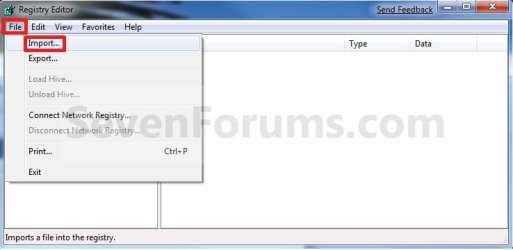
Import.jpg
D) Navigate to where you saved the backup .reg file and select it, then click on the Save button. (See screenshot below)
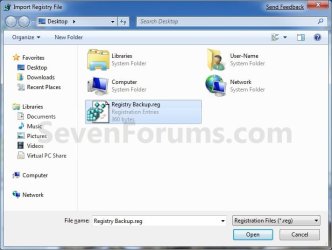
Import_Location.jpg
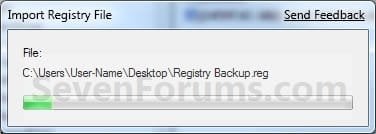
E) You will now see the import progress window. (See screenshot below)
Import_Progress.jpg
3. Click on OK.

   Tip
If you get the error below, then you will need to do a system restore instead since the keys are in use.

Error.jpg

That's it,
Shawn


Attachments

  • Command.jpg
    Command.jpg
    37.3 KB · Views: 1,684
  • Export.jpg
    Export.jpg
    25.5 KB · Views: 482
  • Export_Location.jpg
    Export_Location.jpg
    31.8 KB · Views: 581
  • Command-1.jpg
    Command-1.jpg
    51.6 KB · Views: 2,553
Last edited:
Hey John,

It's most certainly faster to just export the whole registry. You could still copy and paste what you want from the .reg file to create other .reg to import only what you want from it.

Of course, a system image is the best backup though.
 

My Computer My Computer

Computer type
PC/Desktop
Computer Manufacturer/Model Number
Self built custom
OS
64-bit Windows 11 Pro for Workstations
CPU
Intel i7-8700K OC'd to 5 GHz
Motherboard
ASUS ROG Maximus XI Formula Z390
Memory
64 GB (4x16GB) G.SKILL TridentZ RGB DDR4 3600 MHz
Graphics Card(s)
ASUS ROG-STRIX-GTX1080TI-O11G-GAMING
Sound Card
Integrated
Monitor(s) Displays
2 x Samsung Odyssey G7 27"
Screen Resolution
2560x1440
Hard Drives
1TB Samsung 990 PRO M.2,
4TB Samsung 990 PRO PRO M.2,
TerraMaster F8 SSD Plus NAS
PSU
Seasonic Prime Titanium 850W
Case
Thermaltake Core P3
Cooling
Corsair Hydro H115i
Keyboard
Logitech wireless K800
Mouse
Logitech MX Master 4
Internet Speed
2 Gb/s Download and 100 Mb/s Upload
Antivirus
Malwarebyte Anti-Malware Premium
Browser
Google Chrome
Other Info
Logitech Z625 speaker system,
Logitech BRIO 4K Pro webcam,
HP Color LaserJet Pro MFP M477fdn,
APC SMART-UPS RT 1000 XL - SURT1000XLI,
Galaxy S23 Plus phone
Thanks Shawn was just curious and I do a weekly image or extras if feel something is going south:)
 

My Computer My Computer

Computer type
PC/Desktop
Computer Manufacturer/Model Number
Own build (new) Desk1 / Asus ROG Win 7 / Desk2 1st build
OS
Desk1 7 Home Prem / Desk2 10 Pro / Main lap Asus ROG 10 Pro 2 laptop Toshiba 7 Pro Asus P2520 7 & 10
CPU
Desk1 i5 3750K / Laptop i7 GTX 860M / Desk2 i5 2500
Motherboard
Desk1 Asus P877-V / Desk2 Gigabyte H67 UD3H / Laptop ?
Memory
Desk1 8GB (1866) / Desk2 16GB (1333) / Laptop 8Gb DDR3
Graphics Card(s)
Desk 1& 2NVidia GTX 650 & Laptops on board Intel
Sound Card
Desk 1 & 2 -XONAR DG Realtek High Def audio Laptop
Monitor(s) Displays
Desk 1 Benq HD 2450 / Desk2 Philips 24" / Laptop 17.5"
Screen Resolution
1920x1080 D1 & D2 & Laptop 1
Hard Drives
Desk1 Samsung 120GB 830 SSD
Asus ROG 256GB 850 Pro SSD
Desk2 Samsung 840 256 SSD
Toshiba 120GB EVO
PSU
Desk 1 Corsair HX 1050/ Laptop ? / Desk 2 Corsair HX 650
Case
Desk 1 Cooler HAF XM ? Toshiba laptop / Desk2 Coolermaster
Cooling
Fans on all Desk1 -2 Desk2 - all Coolermasters 5 Laptop ?
Keyboard
Desk 1 MS Sidewinder X6 Desk 2 MS Sidewinder X 4
Mouse
Desk 1&2 - Gigabyte MS 900 gamer - laptop - Logitec wireless
Internet Speed
ADSL2+
Other Info
One other Desktop (tester) and spare Toshba laptop both with SSD's
Running Kaspersky 2016 ISS on all machines config'd identically
Logitec audio stereo systems on each machine (x3)
Canon MG5250MFC
Router/modem TP-Link running WPA2SK
I backed-up the entire registry (In the navigation pane (the left pane) of Registry Editor, right-click Computer, and then click Export).
Can I merge that file to get back to where I started (before I started manually uninstalling MS Security Essentials)?
This thread seems to imply to use a file that has only part of the registry.
 

My Computer My Computer

Computer type
Laptop
Computer Manufacturer/Model Number
ASUS
OS
Windows 7 Home Premium 64 bit
CPU
Pentium Dual-Core T4300 2.1GHZ
Hello Matt,

Sorry, but no. Most of it would not merge.

You could do a system restore using a restore point dated before to undo it though.
 

My Computer My Computer

Computer type
PC/Desktop
Computer Manufacturer/Model Number
Self built custom
OS
64-bit Windows 11 Pro for Workstations
CPU
Intel i7-8700K OC'd to 5 GHz
Motherboard
ASUS ROG Maximus XI Formula Z390
Memory
64 GB (4x16GB) G.SKILL TridentZ RGB DDR4 3600 MHz
Graphics Card(s)
ASUS ROG-STRIX-GTX1080TI-O11G-GAMING
Sound Card
Integrated
Monitor(s) Displays
2 x Samsung Odyssey G7 27"
Screen Resolution
2560x1440
Hard Drives
1TB Samsung 990 PRO M.2,
4TB Samsung 990 PRO PRO M.2,
TerraMaster F8 SSD Plus NAS
PSU
Seasonic Prime Titanium 850W
Case
Thermaltake Core P3
Cooling
Corsair Hydro H115i
Keyboard
Logitech wireless K800
Mouse
Logitech MX Master 4
Internet Speed
2 Gb/s Download and 100 Mb/s Upload
Antivirus
Malwarebyte Anti-Malware Premium
Browser
Google Chrome
Other Info
Logitech Z625 speaker system,
Logitech BRIO 4K Pro webcam,
HP Color LaserJet Pro MFP M477fdn,
APC SMART-UPS RT 1000 XL - SURT1000XLI,
Galaxy S23 Plus phone
Thanks for the quick response!
There is only one restore point shown even though I checked "show more restore points" and I need to go back to earlier today.
I have seen other advice/instructions that recommend to import the the reg file that I saved before starting. What is your opinion on that?
 

My Computer My Computer

Computer type
Laptop
Computer Manufacturer/Model Number
ASUS
OS
Windows 7 Home Premium 64 bit
CPU
Pentium Dual-Core T4300 2.1GHZ
You could give it a try, but it won't merge any part of the registry that's in use by the system. You'll need to restart the PC afterwards to fully apply.
 

My Computer My Computer

Computer type
PC/Desktop
Computer Manufacturer/Model Number
Self built custom
OS
64-bit Windows 11 Pro for Workstations
CPU
Intel i7-8700K OC'd to 5 GHz
Motherboard
ASUS ROG Maximus XI Formula Z390
Memory
64 GB (4x16GB) G.SKILL TridentZ RGB DDR4 3600 MHz
Graphics Card(s)
ASUS ROG-STRIX-GTX1080TI-O11G-GAMING
Sound Card
Integrated
Monitor(s) Displays
2 x Samsung Odyssey G7 27"
Screen Resolution
2560x1440
Hard Drives
1TB Samsung 990 PRO M.2,
4TB Samsung 990 PRO PRO M.2,
TerraMaster F8 SSD Plus NAS
PSU
Seasonic Prime Titanium 850W
Case
Thermaltake Core P3
Cooling
Corsair Hydro H115i
Keyboard
Logitech wireless K800
Mouse
Logitech MX Master 4
Internet Speed
2 Gb/s Download and 100 Mb/s Upload
Antivirus
Malwarebyte Anti-Malware Premium
Browser
Google Chrome
Other Info
Logitech Z625 speaker system,
Logitech BRIO 4K Pro webcam,
HP Color LaserJet Pro MFP M477fdn,
APC SMART-UPS RT 1000 XL - SURT1000XLI,
Galaxy S23 Plus phone
Isn't there a less convoluted way to do this? Just opening a backed up registry file (NTUSER.DAT, SOFTWARE, etc) I don't know everything that I'll need to restore beforehand.
Maybe a third party app?

I'm aware of the attach hive thing but that's horrible. You need too attach it somewhere, then export then search and replace the the path, then import...
 

My Computer My Computer

OS
Windows 7 amd64
All, I am a new member and got here by surfing for solution to an issue I got myself into but cannot figure out how to fix. My PC woldn't start and was looping. I found all kinds of answers from tons of web pages and literally tried them all 2-3 even 5times, over 2 weeks of intermittent access - rebooting after each attempt without any success at all. In the end, I just reinstalled Win7 x64 ULT on the same HDD and now, as many others have discovered, all of my Prgs and Apps are no longer listed or clickable. Like others I foound a Windows.Old with everything inside, but unlike others I also had made a backup of my registry before I started trying to fix this PC, thinking maybe I could try a 'trick' that an old crusty Win2003 Server builder and migration expert had showed me. Once. I just cannot recall the HOW :-) The story is, we got a stack of brand new servers and a box of tapes and disks. We installed Win 2003 Server on the boxes, then installed the tape backup software to each one, plugged in an LTO-3 tape drive, popped in a tape marked 001 of 3, and restored all the apps for the next 2 days to that 1 server. This was repeated again and again for the next 1500 or so boxes until 3yrs later the job was complete.

At the end of any server build, we'd reboot, and grab the server name, MAC address, IP and THEN, while still on that server, call a number and the person on the other end would give us an IP address to go to (on their corporate server farm) and a client name where the ORIGINAL servers registry snapshots were. He'd facititate access, issue a temp PW and we'd remote over, locate the Reg Key file in their server farm with the same name as the server we just finished, login to IT using the temporary credentials, access its registry and export a copy to the root\temp dir of that share. Then back at our site, we'd launch the registry tool on our server, point to that directory of that same share and 'import' it across the web to OUR machines registry. (Yikes!) Dead simple right? Anyway, when we restarted the server, BANG! all apps and data were linked, desktop Icons were functional and it was basically a bigger, better, faster, exact duplicate of the original build they made our tapes from - inclusing all accounts, logins etc for their team back at source. Now THEY could go in remotely and tweak everything they needed for their purposes and future use. Does this 'Reg-trick' sound familiar to any of you, and if so can I use it to import the copy of my registry to do the same? I ask b/c IF this trick is specific to Win 2003 Servers - I'll probably totally hose my machine and never get it right again. It is booting 100% now, but I've lost use of over 100 installed apps and such that I'd dearly miss and would take me years to replace and reinstall. Thanks!
 
Last edited:

My Computers My Computers

System One System Two

  • Computer type
    Laptop
    Computer Manufacturer/Model Number
    Dell
    OS
    win7 x64 ULT
    CPU
    Centrino Duo
    Motherboard
    Yes
    Memory
    4Gb
    Graphics Card(s)
    Intel
    Hard Drives
    750Gb
    Antivirus
    Avast
    Browser
    FF or WF
  • Computer type
    PC/Desktop
Back
Top