Registry Cleaners

There is no question that most computers will run with a level of unwanted registry keys on them without ill effects, the same is true for unwanted files, the question is do I want them on my computer, the answer is no.

That question and answer is an individual one, while I am sure that some people would agree with that view I am equally sure that others do not, what I would not do is tell other people what they should and shouldn't do.
I have offered an objective opinion based on personal experience, by and large that is all any of us can do.

Are registry cleaners dangerous? They can be.
How can you avoid the danger? Backup everything before you use one and make sure that you can restore the backup in the event that the OS becomes unbootable.

Are registry cleaners necessary on Windows 7? I will answer that with what has happened since I last posted:
After making both registry and partition backups I ran RFA again with the intention of removing the unwanted items, to my surprise (based on previous use of v7 with XP) I found that nearly 300 of them could not be moved in spite of the fact that they were all shown as 'safe to remove', the reason given was that I did not have the necessary permissions.
I have not looked any further into this yet but at the moment I can see 2 options:
1. Leave them where they are, which for me is not an option
2. Use regedit (possibly in Safe Mode) and remove them one at a time, which is not an option I relish so I will look for an alternative.
What caught my attention about the remaining items is what they relate to, the majority of them are for MS IME files which are no longer on my computer so they will never serve any purpose.

There are two underlying issues at the bottom of this and many other things, one is what I shall call the 'technical' issue; are certain things essential/necessary?
The other is the 'personal' issue; what do I want on my computer, how do I want it to run?
For me the second will always take precedence over the first.
 

My Computer

Computer Manufacturer/Model Number
ME!
OS
Windows 7 Professional SP1 x64
CPU
Intel i5-2500K (Cooler Master Hyper 212 EVO with 2 fans)
Motherboard
Asus P8Z68-V/GEN3
Memory
Corsair CMZ16GX3M4A1600C9B
Monitor(s) Displays
Asus VE278Q
Screen Resolution
1920 x 1080
Hard Drives
Corsair Force Series GT 120GB SATA 3 6GB/s

2xWD Caviar Black 500GB 6GB/s 32MB (WD5000AALX)
PSU
Enermax MODU82+ 625w (EMD625AWT)
Case
Cooler Master Elite 335U
Cooling
2XCooler Master Excalibur 120mm - 1xStandard Case Fan 120mm
Keyboard
Logitech K200
Mouse
Logitech M100
Internet Speed
8 mbps
Last edited:

My Computer

Computer Manufacturer/Model Number
LAPTOP. HP Pavilion dv7-4010TX .
OS
Win 7 Ultimate 64-bit. SP1.
CPU
Intel i7 -720QM.[1.6GHz Turbo Boost 2.8GHz. 6MB Cache.]
Memory
8 DDR 3 RAM. 1066MHZ
Graphics Card(s)
ATI 1024 MB. DDR3. Radeon HD5650
Monitor(s) Displays
17.3" High Definition Brightview LCD. LED Backlit.
Screen Resolution
1600 x 900.
Hard Drives
640GB
Case
Laptop / notebook.
Mouse
Logitech Anywhere mouse. MX.
Internet Speed
ADSL [ but too slow ]
There are two underlying issues at the bottom of this and many other things, one is what I shall call the 'technical' issue; are certain things essential/necessary?
The other is the 'personal' issue; what do I want on my computer, how do I want it to run?
For me the second will always take precedence over the first.

That's all fine. I'm not one to tell people how to maintain their PC.
I've got my own PC festishes, as does everybody.
I used to use reg cleaners with no ill effect for years. Also saw no benefits.
Also hacked many reg entries with no ill effects. Just have to be careful.
I'm sure some folks screw up with that.
When I learned - either with XP or Win 7 - that reg cleaners miss a whole lot, and imaging became practical, I stopped using them.
I'm not a reg expert, but I'm pretty sure that reg cleaners don't pick up keys.
Think I found out by doing before and after reg compares with install/uninstalls.
That found a lot of junk that a reg cleaner didn't.
If you could see some of the useless junk in the registry it would make your skin crawl. Unless you adjust your attitude, and don't let it bother you.
Somebody here said even a clean install puts a lot of "junk" in the registry - or at least entries a reg cleaner wants to delete.
Anyway, I don't worry about the registry anymore, since I'm already crazy about having a "clean" system image.
Only real "maintainence" I've done on Win 7, beyond the normal file cleanups, is run the SP1 cleanup.
http://www.sevenforums.com/tutorials/122262-windows-7-sp1-disk-cleanup-tool.html
Think I got about a 4gb reduction in image size from that.
That's a tangible result showing up every time I image/restore.
Might consider putting a Sysprepped image as "image maintainence," and I do that now, but don't have a schedule for it yet.
http://www.sevenforums.com/tutorials/135077-windows-7-installation-transfer-new-computer.html
Everybody has their own and other peoples' experience to go by, then they decide what suits them.

 

My Computer

Computer Manufacturer/Model Number
Home Built
OS
Windows 7 Ultimate x64
CPU
QuadCore Intel Core i7 920, 2666 MHz (20 x 133)
Motherboard
Asus P6T
Memory
6134 MB (DDR3-1333 DDR3 SDRAM)
Graphics Card(s)
(2 - SLI) NVIDIA GeForce GTS 250 (1024 MB)
Sound Card
Onboard Realtek ALC888/1200 @ Intel 82801JB IC
Monitor(s) Displays
HDMII
Screen Resolution
1280 x 800
Hard Drives
Crucial M4 (64 GB SSD)
WD Caviar Blacks
WD5001AALS-00J7B1 ATA Device (465 GB)
WD5001AALS-00L3B2 ATA Device (465 GB)
WD Elements USB External (250 GB)
PSU
Corsair 550
Case
iStarUSA S-10000BL Black
Victor S,

Just had a look at your first link, I use the 'slimming system' option in Wise Disk Cleaner after all MS updates, does the same thing.

As for the second link, I created a number of images using the OS and when I checked the recovery option it could not find them, that was before I 'cleaned' anything. I'll stick with third party imaging software.
 

My Computer

Computer Manufacturer/Model Number
ME!
OS
Windows 7 Professional SP1 x64
CPU
Intel i5-2500K (Cooler Master Hyper 212 EVO with 2 fans)
Motherboard
Asus P8Z68-V/GEN3
Memory
Corsair CMZ16GX3M4A1600C9B
Monitor(s) Displays
Asus VE278Q
Screen Resolution
1920 x 1080
Hard Drives
Corsair Force Series GT 120GB SATA 3 6GB/s

2xWD Caviar Black 500GB 6GB/s 32MB (WD5000AALX)
PSU
Enermax MODU82+ 625w (EMD625AWT)
Case
Cooler Master Elite 335U
Cooling
2XCooler Master Excalibur 120mm - 1xStandard Case Fan 120mm
Keyboard
Logitech K200
Mouse
Logitech M100
Internet Speed
8 mbps
Back in the XP days, I used a third party registry cleaner once, with tragic results. Since then, particularly now with Win 7, I don't bother. Besides, I usually do a fresh install once a year, so, the whole topic of registry cleaners is a non-starter for me.
 

My Computer

Computer type
Laptop
OS
Windows 7 Home Premium 64-bit
I use CCleaner once every 4 months or if I've uninstalled something and it's left Shell extentions, Autoplay entries that the uninstaller failed to remove. I wouldn't use any other reg cleaner, from past experience they have just created more problems.
 

My Computer

Computer type
PC/Desktop
Computer Manufacturer/Model Number
Custom Build
OS
Win 7 Ultimate, Win 8.1 Pro, Linux Mint 19 Cinnamon (All 64-Bit)
CPU
Intel i5 4690K
Motherboard
Gigabyte Z97X-UD3H
Memory
Corsair Vengeance LP 32GB DDR3
Graphics Card(s)
MSI GTX 1060 GAMING X 6GB
Sound Card
Onboard
Hard Drives
Samsung 850 EVO 250GB SSD (x2)
Samsung 860 EVO 1TB SSD (x2)
Crucial MX300 525GB SSD
WD Blue 2TB 5400rpm Intellipark Disabled (x2)
PSU
Corsair HX750i
Case
Phanteks Enthoo Pro
Cooling
CM Hyper 212 EVO on CPU, Noctua Redux NF-P14S 1500rpm (x6)
Keyboard
Corsair K70 RGB LUX
Mouse
Corsair Sabre RGB
Antivirus
Avast Free, MalwareBytes, SAS & CryptoPrevent
Browser
Chrome
Other Info
StarTech PEXESAT322I 2 Port PCI-E SATA Card
ASUS PCE-AC56 Dual-band AC1300 Wireless Card
Akasa FC.Six Manual Fan Controller
And a Partridge in a Pear Tree!
Victor S,

As for the second link, I created a number of images using the OS and when I checked the recovery option it could not find them, that was before I 'cleaned' anything. I'll stick with third party imaging software.

You may have misunderstood that. I use Ghost 15 myself for imaging.
It's the Sysprep, and having a sysprepped image that I find important.
That may be a bridge too far for many, but not for me.
 

My Computer

Computer Manufacturer/Model Number
Home Built
OS
Windows 7 Ultimate x64
CPU
QuadCore Intel Core i7 920, 2666 MHz (20 x 133)
Motherboard
Asus P6T
Memory
6134 MB (DDR3-1333 DDR3 SDRAM)
Graphics Card(s)
(2 - SLI) NVIDIA GeForce GTS 250 (1024 MB)
Sound Card
Onboard Realtek ALC888/1200 @ Intel 82801JB IC
Monitor(s) Displays
HDMII
Screen Resolution
1280 x 800
Hard Drives
Crucial M4 (64 GB SSD)
WD Caviar Blacks
WD5001AALS-00J7B1 ATA Device (465 GB)
WD5001AALS-00L3B2 ATA Device (465 GB)
WD Elements USB External (250 GB)
PSU
Corsair 550
Case
iStarUSA S-10000BL Black
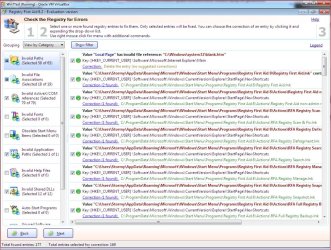
Since my previous post I installed the trial version of RFA and ran a scan, it found 509 keys that it considers unnecessary

Try this test:

Install Windows 7 on a clean drive.

Install nothing else.

Then install RFA or some other cleaner and see how many unnecessary keys it finds on this virgin Windows install.

Then ponder the results.

OK I'll bite,

cleaninstallregistry.JPG

Clean install about 15 minutes ago at the time of posting. No Windows Updates run, no drivers or anything else other than RFA installed.
 

My Computer

Computer type
PC/Desktop
Computer Manufacturer/Model Number
Me
OS
Win 7 Ultimate x64
CPU
FX-8350 @ 4.6 GHz so far
Motherboard
Asus M5A97 EVO
Memory
ADATA XPG V1 Series Black 8GB DDR3 1600
Graphics Card(s)
Sapphire R9 270x Dual-X
Sound Card
Xonar DGX w/ Corsair Vengence 1300
Monitor(s) Displays
Acer S232HL Abid
Screen Resolution
1920x1080
Hard Drives
120 GB OCZ Vertex 3
500 GB Seagate 7200.12
PSU
Antec Earthwatts 650W Green
Case
Antec Three Hundred
Cooling
Cooler Master 212 EVO
Keyboard
Logitech G510
Mouse
Logitech G500s
Internet Speed
35000/3000
Looks like the keys it's finding are it's own.

Almost all of these are sales scams.
 
As I accept the right of others to their own opinions and long since gave up on the idea of finding a consensus on this issue I will make this my last post on the subject.

Looks like the keys it's finding are it's own.

Of the keys that it found the small number shown in the image relate mostly to start menu shortcuts which is what I would expect after installing most programs.
Perhaps the fact that it shows its own unnecessary keys is actually a sign of its effectiveness rather than anything else?
If they had not been found the only way anybody would have known is if they ran a different registry cleaner and that found them.

Almost all of these are sales scams.
The word 'almost' implies exceptions which surprises me but perhaps this is one of them.
 

My Computer

Computer Manufacturer/Model Number
ME!
OS
Windows 7 Professional SP1 x64
CPU
Intel i5-2500K (Cooler Master Hyper 212 EVO with 2 fans)
Motherboard
Asus P8Z68-V/GEN3
Memory
Corsair CMZ16GX3M4A1600C9B
Monitor(s) Displays
Asus VE278Q
Screen Resolution
1920 x 1080
Hard Drives
Corsair Force Series GT 120GB SATA 3 6GB/s

2xWD Caviar Black 500GB 6GB/s 32MB (WD5000AALX)
PSU
Enermax MODU82+ 625w (EMD625AWT)
Case
Cooler Master Elite 335U
Cooling
2XCooler Master Excalibur 120mm - 1xStandard Case Fan 120mm
Keyboard
Logitech K200
Mouse
Logitech M100
Internet Speed
8 mbps
Pilgrim, I'm slightly confused at your answer about it finding it's own keys.

If the keys are unnecessary then it shouldn't install them in the first place, should it?
 

My Computer

Computer type
PC/Desktop
Computer Manufacturer/Model Number
Custom Build
OS
Win 7 Ultimate, Win 8.1 Pro, Linux Mint 19 Cinnamon (All 64-Bit)
CPU
Intel i5 4690K
Motherboard
Gigabyte Z97X-UD3H
Memory
Corsair Vengeance LP 32GB DDR3
Graphics Card(s)
MSI GTX 1060 GAMING X 6GB
Sound Card
Onboard
Hard Drives
Samsung 850 EVO 250GB SSD (x2)
Samsung 860 EVO 1TB SSD (x2)
Crucial MX300 525GB SSD
WD Blue 2TB 5400rpm Intellipark Disabled (x2)
PSU
Corsair HX750i
Case
Phanteks Enthoo Pro
Cooling
CM Hyper 212 EVO on CPU, Noctua Redux NF-P14S 1500rpm (x6)
Keyboard
Corsair K70 RGB LUX
Mouse
Corsair Sabre RGB
Antivirus
Avast Free, MalwareBytes, SAS & CryptoPrevent
Browser
Chrome
Other Info
StarTech PEXESAT322I 2 Port PCI-E SATA Card
ASUS PCE-AC56 Dual-band AC1300 Wireless Card
Akasa FC.Six Manual Fan Controller
And a Partridge in a Pear Tree!
If the keys are unnecessary then it shouldn't install them in the first place, should it?

You would certainly think so wouldn't you.

May be why a lot of refer to most registry cleaners as Snake oil, at least those that have a price tag attached to them.
 

My Computer

Computer type
PC/Desktop
Computer Manufacturer/Model Number
Me
OS
Win 7 Ultimate x64
CPU
FX-8350 @ 4.6 GHz so far
Motherboard
Asus M5A97 EVO
Memory
ADATA XPG V1 Series Black 8GB DDR3 1600
Graphics Card(s)
Sapphire R9 270x Dual-X
Sound Card
Xonar DGX w/ Corsair Vengence 1300
Monitor(s) Displays
Acer S232HL Abid
Screen Resolution
1920x1080
Hard Drives
120 GB OCZ Vertex 3
500 GB Seagate 7200.12
PSU
Antec Earthwatts 650W Green
Case
Antec Three Hundred
Cooling
Cooler Master 212 EVO
Keyboard
Logitech G510
Mouse
Logitech G500s
Internet Speed
35000/3000
Snake oil :roflmao: I like it.

It's a pity a lot of these paid ones can't take a leaf out of CCleaners book.

It's great when free products are better than the ones you have to pay for! :)
 

My Computer

Computer type
PC/Desktop
Computer Manufacturer/Model Number
Custom Build
OS
Win 7 Ultimate, Win 8.1 Pro, Linux Mint 19 Cinnamon (All 64-Bit)
CPU
Intel i5 4690K
Motherboard
Gigabyte Z97X-UD3H
Memory
Corsair Vengeance LP 32GB DDR3
Graphics Card(s)
MSI GTX 1060 GAMING X 6GB
Sound Card
Onboard
Hard Drives
Samsung 850 EVO 250GB SSD (x2)
Samsung 860 EVO 1TB SSD (x2)
Crucial MX300 525GB SSD
WD Blue 2TB 5400rpm Intellipark Disabled (x2)
PSU
Corsair HX750i
Case
Phanteks Enthoo Pro
Cooling
CM Hyper 212 EVO on CPU, Noctua Redux NF-P14S 1500rpm (x6)
Keyboard
Corsair K70 RGB LUX
Mouse
Corsair Sabre RGB
Antivirus
Avast Free, MalwareBytes, SAS & CryptoPrevent
Browser
Chrome
Other Info
StarTech PEXESAT322I 2 Port PCI-E SATA Card
ASUS PCE-AC56 Dual-band AC1300 Wireless Card
Akasa FC.Six Manual Fan Controller
And a Partridge in a Pear Tree!
I use most of those except puran defrag. I haven't seen the usb universal installer before. I'll have a look at that.

Most of mine are free with the odd exception.
 

My Computer

Computer type
PC/Desktop
Computer Manufacturer/Model Number
Custom Build
OS
Win 7 Ultimate, Win 8.1 Pro, Linux Mint 19 Cinnamon (All 64-Bit)
CPU
Intel i5 4690K
Motherboard
Gigabyte Z97X-UD3H
Memory
Corsair Vengeance LP 32GB DDR3
Graphics Card(s)
MSI GTX 1060 GAMING X 6GB
Sound Card
Onboard
Hard Drives
Samsung 850 EVO 250GB SSD (x2)
Samsung 860 EVO 1TB SSD (x2)
Crucial MX300 525GB SSD
WD Blue 2TB 5400rpm Intellipark Disabled (x2)
PSU
Corsair HX750i
Case
Phanteks Enthoo Pro
Cooling
CM Hyper 212 EVO on CPU, Noctua Redux NF-P14S 1500rpm (x6)
Keyboard
Corsair K70 RGB LUX
Mouse
Corsair Sabre RGB
Antivirus
Avast Free, MalwareBytes, SAS & CryptoPrevent
Browser
Chrome
Other Info
StarTech PEXESAT322I 2 Port PCI-E SATA Card
ASUS PCE-AC56 Dual-band AC1300 Wireless Card
Akasa FC.Six Manual Fan Controller
And a Partridge in a Pear Tree!
Puran gives you a free boot time defrag which you can couple with Disk Check. I run it a few times per year.

Just because it's free is not the point. This is freeware that is the best in its class, like CCleaner.
 
I agree with you I don't just use them because they're free but also because I know they do a good job.
I use Raxco PerfectDisk for defrag. Although that's only because I bought the home version years ago.
 

My Computer

Computer type
PC/Desktop
Computer Manufacturer/Model Number
Custom Build
OS
Win 7 Ultimate, Win 8.1 Pro, Linux Mint 19 Cinnamon (All 64-Bit)
CPU
Intel i5 4690K
Motherboard
Gigabyte Z97X-UD3H
Memory
Corsair Vengeance LP 32GB DDR3
Graphics Card(s)
MSI GTX 1060 GAMING X 6GB
Sound Card
Onboard
Hard Drives
Samsung 850 EVO 250GB SSD (x2)
Samsung 860 EVO 1TB SSD (x2)
Crucial MX300 525GB SSD
WD Blue 2TB 5400rpm Intellipark Disabled (x2)
PSU
Corsair HX750i
Case
Phanteks Enthoo Pro
Cooling
CM Hyper 212 EVO on CPU, Noctua Redux NF-P14S 1500rpm (x6)
Keyboard
Corsair K70 RGB LUX
Mouse
Corsair Sabre RGB
Antivirus
Avast Free, MalwareBytes, SAS & CryptoPrevent
Browser
Chrome
Other Info
StarTech PEXESAT322I 2 Port PCI-E SATA Card
ASUS PCE-AC56 Dual-band AC1300 Wireless Card
Akasa FC.Six Manual Fan Controller
And a Partridge in a Pear Tree!
Did you come here to give advice or seek advice?

I came here because the forum has the largest collection of information on Windows 7 that I have found in one place and after being referred here many times from elsewhere I decided to register.

The reason I have not asked any questions is that I have been reading through the forums and found answers to most of the questions that I started out with without needing to ask them.

My comments on this thread were not intended as advice but as opinions, if I have somehow caused offence it was not intended.

Pilgrim, I'm slightly confused at your answer about it finding it's own keys.
If the keys are unnecessary then it shouldn't install them in the first place, should it?

Speaking as someone who both runs registry cleaners and installs software on a regular basis I have rarely installed a program that did not add something that was not necessary, be it registry keys or temporary files which do not get removed.
Even Microsoft programs and updates do it.
 

My Computer

Computer Manufacturer/Model Number
ME!
OS
Windows 7 Professional SP1 x64
CPU
Intel i5-2500K (Cooler Master Hyper 212 EVO with 2 fans)
Motherboard
Asus P8Z68-V/GEN3
Memory
Corsair CMZ16GX3M4A1600C9B
Monitor(s) Displays
Asus VE278Q
Screen Resolution
1920 x 1080
Hard Drives
Corsair Force Series GT 120GB SATA 3 6GB/s

2xWD Caviar Black 500GB 6GB/s 32MB (WD5000AALX)
PSU
Enermax MODU82+ 625w (EMD625AWT)
Case
Cooler Master Elite 335U
Cooling
2XCooler Master Excalibur 120mm - 1xStandard Case Fan 120mm
Keyboard
Logitech K200
Mouse
Logitech M100
Internet Speed
8 mbps
Back
Top