Registry Editing for Dummies

Hiker Guy

New member
Member
Local time
12:35 PM
Messages
58
A few weeks ago I experienced a problem that is still not resolved, with videos on my WMP12 being impossible to view, even though audio is fine. I am still trying to figure this out. Not sure what triggered this.


Decided to deactivate WMP12 in Windows 7 for the time being, so it is not active at the moment.


Now, before anyone goes hyper on the next area, please realize that I am a "tourist" in the registry area. These are innocent questions. I really need a "Registry Editing for Dummies"....


Was poking around (and not changing anything) in the registry, and found the Media Player section, and have wondered if it would help or harm things to delete this entire section out of the registry. It is not "installed" on the computer (turned off). Wouldn't this be rebuilt when I reactivate WMP12? Or, are there particular values I should modify/remove, to get the setup back to OEM type condition? I thought perhaps there is a corrupted value in this section causing my video playback to not work correctly.


I also found, surprisingly, evidence of the xvid codec and also ffdshow, which I believe are evidences of codec pkgs installed at some time ago. (I used to have a FLV player and VLC player, both since removed). Still see a reference to VLC media player in the registry, though. Actually, I see references to other older software not on my system anymore.


I am trying to remove all traces of xvid and ffdshow from the PC, in case this is the cause of my problems. I do see a few registry entries mentioning ffdshow and xvid. When I look at my list of installed codecs, however, I only show xvid. I just can't figure out how to find it, much less remove it.

Definitely would like a higher comfort level before messing around in the registry.

So...where to start?

:rolleyes:

thx!
 

My Computer

Computer Manufacturer/Model Number
Self Build
OS
Windows 7 Pro 64
CPU
i7 940
Motherboard
Asus P6T Delux
Memory
6 GB
Graphics Card(s)
4870
Sound Card
N/A
Monitor(s) Displays
Samsung
Hard Drives
Velociraptor + WD 1 GB data backup
PSU
700 Coolermax UPS
Case
Cooler Master Cosmos S
Cooling
Air
Keyboard
MS Wireless Ergon keyboard 7000
You didn't say what Anti-Virus program you are using but there have been reported problems with WMP using the most recent Avast release
 

My Computer

Computer Manufacturer/Model Number
Dell 570MT
OS
Windows 7 Home Premium 64bit
CPU
Athlon XII
Motherboard
?
Memory
4GB
Graphics Card(s)
ATI Radeon 4200
Sound Card
?
Monitor(s) Displays
Asus and Dell
Hard Drives
Unknown
PSU
unknown
Case
unknown
Cooling
unknown
Unless you pretty much know what you are doing, or are carefully following a tutorial or other trusted guide, you don't want to be messing with the registry. If you have an extra system that is expendable, you can experiment, knowing you have a good chance of trashing Windows and nedding to reinstall.

For WMP, have you tried installing Shark007 Codecs? I believe they automatically clean up your codec situation upon installation, and set you up for WMP with a couple of ticks in the Settings dialog.
 

My Computer

OS
Windows 7
Another reason for creating a system image on an external drive and a recovery disk.

rich
 

My Computer

Computer type
Laptop
Computer Manufacturer/Model Number
Toshiba Laptop Qosimo X870
OS
Windows 7 Pro x64 SP1
CPU
Intel Core I7
Motherboard
Toshiba Qosmio
Memory
16 Gigs
Graphics Card(s)
NVIDIA GeForce GTX 670M
Monitor(s) Displays
17.7" laptop
Screen Resolution
1600 x 900
Hard Drives
256 Gig SanDisk SSD for C
256 Gig Intel SSD for D
Internet Speed
50/25 FIOS
Antivirus
Vipre (all you can eat for 10 machines)
Browser
IE and FF
Other Info
I have dos 6.22, wfwg 3.11, win98, 2000 and xp VHD's available for testing. MS's Virtual PC works great.
You didn't say what Anti-Virus program you are using but there have been reported problems with WMP using the most recent Avast release

I am using Norton, so that should not be an issue.

If you want to clean up obsolete entries, use the reg clean feature of CCleaner.http://www.sevenforums.com/tutorials/57348-windows-media-player-troubleshooting-guide.html

I forgot about CCleaner and their registry cleaning capabilities. I just ran it this morning, and it did pick up a number of items. This is good, thx.

Unless you pretty much know what you are doing, or are carefully following a tutorial or other trusted guide, you don't want to be messing with the registry.

Which is precisely why I posted here. I trust you guys, to a point. :) Re-installing everything would be painful in many ways, but doable.

Before I go installing other codecs, I am trying to solve the core issue of WMP12 not working correctly. In my mind, and without diving completely into my older thread, I am not sure what exactly caused WMP12 not to work correctly.

In my mind, this is caused by either a bad setting in WMP12 (most likely), or a bad codec already on my computer (less likely). That is why I was wondering if I could "delete" the section in the registry on WMP12, and when I "reinstall it", it would come back as a fresh installation, and no corrupted settings. I have deleted the folders in the Program files for WMP12, but that did not seem to solve the issue.

Seriously, where does one find a good tutorial on editing the registry?

Thx
 

My Computer

Computer Manufacturer/Model Number
Self Build
OS
Windows 7 Pro 64
CPU
i7 940
Motherboard
Asus P6T Delux
Memory
6 GB
Graphics Card(s)
4870
Sound Card
N/A
Monitor(s) Displays
Samsung
Hard Drives
Velociraptor + WD 1 GB data backup
PSU
700 Coolermax UPS
Case
Cooler Master Cosmos S
Cooling
Air
Keyboard
MS Wireless Ergon keyboard 7000
If you really want to try editing the registry...

Open start menu, type in regedit, click enter. That should get you into the registry editor (screen shot 1.)

reg1.JPG

Click on File to access drop down menu, and select Export. This will let you save a copy of the current registry to a location of your choosing (the desktop is always a good choice so you can find it again.) If you mess up the registry you should theoretically be able to open regedit again and import that saved copy.

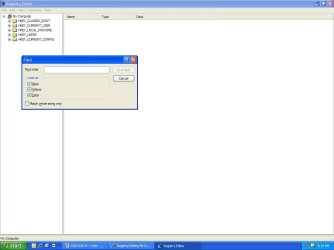
Once you've saved your exported copy of the registry you should be back at the main registry dialog box (screen shot 1.) Click Ctrl + F (hold down the control key and click the letter F key one time.) This should open the Find dialog box (screen shot 2.)

reg2.JPG

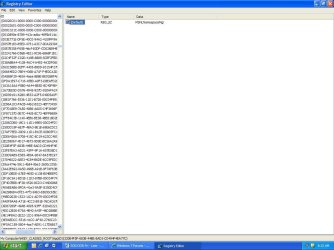
From here you can type in "ffdshow" (without the quotes) and click Find Next button. If the search finds any reference to ffdshow the scan will stop and the reference will be highlighted in either the left or right pane. In this example (screen shot 3) I searched for MSN.

reg3.JPG

You can then use the Delete key on your keyboard to delete that specific reference if you're absolutely sure you want to delete it. You'll get a prompt "are you sure". Click yes and reference will be deleted. Click the F3 key (top row of keyboard) to resume the scan and search for any other mention of ffdshow. If another reference is found you'd follow the same steps. Click the delete key, answer yes, click F3. Once there are no other references the scan will finish. You could run it a second time just to make sure all references were found and deleted. Sometimes you'll try to delete a reference and you'll get a prompt that it cannot be deleted. Just click F3 to resume the scan. You can use the same procedure to locate references to xvid or anything else you want to find.

I cannot stress this enough. Deleting something critical from the registry could turn your computer into a large paperweight. If in doubt, don't delete. Good luck.
 

My Computer

Computer type
Laptop
Computer Manufacturer/Model Number
Sony Vaio VPCEB47GM Laptop
OS
Win 7 Pro 64-bit
CPU
Intel i5 2.4 Ghz
Memory
8GB DDR3
Graphics Card(s)
Intel HD 3000
Sound Card
IDT High Definition
Monitor(s) Displays
15.6 WGXA Anti-Glare LED
Screen Resolution
1280x800
Hard Drives
640Gb 7200rpm
Antivirus
MSE
Browser
Opera (primary) with IE9 backup
Back
Top