Registry key to set default program for certain file type?

thx1139

New member
Power User
Local time
5:21 PM
Messages
110
I have Windows 7 at work and I am unable to set Inkscape as the default program to open .svg files. I browse to the Inkscape.exe and select it and click OK. That window closes, taking me to the previous Window where there is no mention of the program I just milliseconds ago confirmed that I wanted to use to open my gosh darn files. Someone from the IS department came to try to do it for me but was unable. I suggested there might be a registry key to do it but they didn't respond. Does anyone know of a registry key that could be changed to set the default file to open the program? I can then pass that information on and maybe they'll fix it. Thanks.
 

My Computer

OS
Win 7 Home Premium (OEM) - Install date: 02-2010
CPU
AMD X4 Phenom II 965
Motherboard
Gigabyte GA 790FXTA-UD5
Memory
OCZ Black Edition - 2x2GB DDR3-1600
Graphics Card(s)
Sapphire HD 5770 1GB GDDR5
Sound Card
Integrated
Monitor(s) Displays
Generic CRT
Screen Resolution
1024x7xx
Hard Drives
System: OCZ Vertex 2, 60 GB SSD
Data: Western Digital Caviar Black WD1002FAEX, 1TB HDD
PSU
Thermaltake w705 - 700 watt
Case
Fractal R2 Define
Cooling
Air
Keyboard
Generic
Mouse
Gigabyte Optical Gaming Mouse
Internet Speed
IDSL
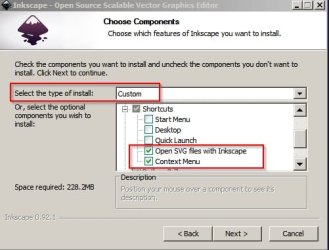
There might be a way to do what you ask but probably you should try uninstalling Inkscape then reboot and reinstall using custom install option.

Inkscape.jpg
 

My Computer

Computer type
Laptop
Computer Manufacturer/Model Number
ASUS
OS
Microsoft Windows 7 Home Premium 64-bit 7601 Multiprocessor Free Service Pack 1
CPU
AMD C-60 APU with Radeon(tm) HD Graphics
Motherboard
ASUSTeK COMPUTER INC. X501U
Memory
4.00 GB
Graphics Card(s)
AMD Radeon HD 6290 Graphics
Sound Card
(1) AMD High Definition Audio Device (2) Realtek High Defi
Screen Resolution
1366 x 768 x 32 bits (4294967296 colors) @ 60 Hz
Hard Drives
Hitachi HTS545050A7E380 SATA Disk Device
Antivirus
Comodo CIS & FW, SecureAplus App Whitelisting, Threatfire
Browser
Cyberfox 64bit, Opera 64bit, Airfox
Other Info
Spy-The-Spy, HitmanPro.Alert, Norton Connect Safe, MJRegWatcher, BitDefender TrafficLight, Voodoo Shield, Zemana AntiMalware
Okay I ran the default install without associating svg files then manually added association.

Here's what I see:

Code:
Windows Registry Editor Version 5.00

[HKEY_CLASSES_ROOT\Applications\inkscape.exe]

[HKEY_CLASSES_ROOT\Applications\inkscape.exe\shell]

[HKEY_CLASSES_ROOT\Applications\inkscape.exe\shell\open]

[HKEY_CLASSES_ROOT\Applications\inkscape.exe\shell\open\command]
@="\"C:\\Program Files\\Inkscape\\inkscape.exe\" \"%1\""

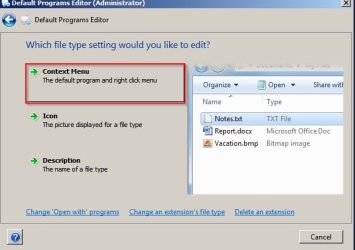
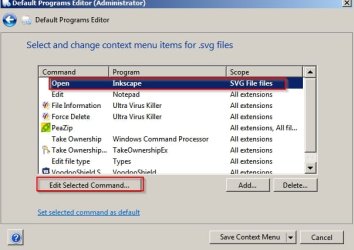
If you get stuck try Default Programs Editor and try these steps:

Default Programs Editor 1.jpg

Default Programs Editor 2.jpg

Default Programs Editor 3.jpg

Default Programs Editor 4.jpg

EDIT: Did you just install Inkscape then try to add to default programs for opening .svg files or has Inkscape been installed and used for some time previously?

Just asking because the first time the program launches it scans some stuff in the background and can take anywhere up to 10 minutes before you see anything on screen. If you haven't actually run the program before associating files that could be a problem.
 
Last edited:

My Computer

Computer type
Laptop
Computer Manufacturer/Model Number
ASUS
OS
Microsoft Windows 7 Home Premium 64-bit 7601 Multiprocessor Free Service Pack 1
CPU
AMD C-60 APU with Radeon(tm) HD Graphics
Motherboard
ASUSTeK COMPUTER INC. X501U
Memory
4.00 GB
Graphics Card(s)
AMD Radeon HD 6290 Graphics
Sound Card
(1) AMD High Definition Audio Device (2) Realtek High Defi
Screen Resolution
1366 x 768 x 32 bits (4294967296 colors) @ 60 Hz
Hard Drives
Hitachi HTS545050A7E380 SATA Disk Device
Antivirus
Comodo CIS & FW, SecureAplus App Whitelisting, Threatfire
Browser
Cyberfox 64bit, Opera 64bit, Airfox
Other Info
Spy-The-Spy, HitmanPro.Alert, Norton Connect Safe, MJRegWatcher, BitDefender TrafficLight, Voodoo Shield, Zemana AntiMalware
Back
Top