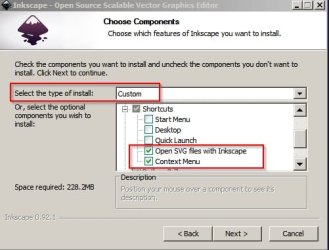
I have Windows 7 at work and I am unable to set Inkscape as the default program to open .svg files. I browse to the Inkscape.exe and select it and click OK. That window closes, taking me to the previous Window where there is no mention of the program I just milliseconds ago confirmed that I wanted to use to open my gosh darn files. Someone from the IS department came to try to do it for me but was unable. I suggested there might be a registry key to do it but they didn't respond. Does anyone know of a registry key that could be changed to set the default file to open the program? I can then pass that information on and maybe they'll fix it. Thanks.
My Computer
At a glance
Win 7 Home Premium (OEM) - Install date: 02-2010AMD X4 Phenom II 965OCZ Black Edition - 2x2GB DDR3-1600Sapphire HD 5770 1GB GDDR5
- OS
- Win 7 Home Premium (OEM) - Install date: 02-2010
- CPU
- AMD X4 Phenom II 965
- Motherboard
- Gigabyte GA 790FXTA-UD5
- Memory
- OCZ Black Edition - 2x2GB DDR3-1600
- Graphics Card(s)
- Sapphire HD 5770 1GB GDDR5
- Sound Card
- Integrated
- Monitor(s) Displays
- Generic CRT
- Screen Resolution
- 1024x7xx
- Hard Drives
- System: OCZ Vertex 2, 60 GB SSD
Data: Western Digital Caviar Black WD1002FAEX, 1TB HDD
- PSU
- Thermaltake w705 - 700 watt
- Case
- Fractal R2 Define
- Cooling
- Air
- Keyboard
- Generic
- Mouse
- Gigabyte Optical Gaming Mouse
- Internet Speed
- IDSL