
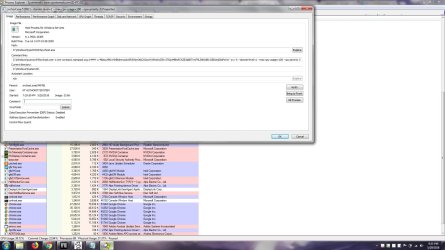
sorry for bad tittle cause idk really know into which categories my problem, the problem is my laptop processor lately running in high peak even though im just listening to music or browsing, after searching in process explorer i found it was REGSRVC32, RunDLL and svchost everytime i try to delete the service its keep changing its name and have no clue what background program running to run this service, i try Malwarebytes but its not detected any problem, im using laptop HP 14-r017tx, if u guys can't really see whats written in SS here it is
"C:\Windows\syswow64\svchost.exe -o xmr-us-east1.nanopool.org:14444 -u 49ptuU9Ktvr6rBkdmrsxdwiSR5WpViAkCXSzcAYWNmXcSZRv37GjwMBNzR7sZE3qBDTnwF9LZNKA8Er2JBiGcKjS6sPaYxY -p x -k --donate-level=1 --max-cpu-usage=100 --cpu-priority 3"
thanks in advance for any assistance
"C:\Windows\syswow64\svchost.exe -o xmr-us-east1.nanopool.org:14444 -u 49ptuU9Ktvr6rBkdmrsxdwiSR5WpViAkCXSzcAYWNmXcSZRv37GjwMBNzR7sZE3qBDTnwF9LZNKA8Er2JBiGcKjS6sPaYxY -p x -k --donate-level=1 --max-cpu-usage=100 --cpu-priority 3"
thanks in advance for any assistance
Attachments
My Computer
At a glance
Kalimantan Timur
- Computer type
- PC/Desktop
- Computer Manufacturer/Model Number
- HP
- OS
- Kalimantan Timur


