Reinstall Windows 7 without CD

When I try the Safe Mode Option I still get the blue screen unfortunately.

I forgot to mention that my netbook crashed when my brother tried to install Windows 7 Professional :mad::mad:


Ok just to make sure we know what happened, you had Win7 pre-install (Home Premium?) and your brother tried to install Win7 Pro?

Was the pro version an upgrade that he had available?
do you have a DVD drive on your netbook?
if not, how was he trying to install? through Win 7?

OEM upgrades are not interchangeable. you would only be able to upgrade from one version to another if you have the same OEM.

This might have caused the issue. When it crashed, what happened, as much detail as possible please.


I don't know if the attempted install would change any of your BIOS settings, but it is worth checking. You can probably reset the BIOS to its default settings.


I understand this must be very silly to you experts out here but I had Win7 Home Premium (pre-install) on my netbook and according my brother Win7 Professional would be better so I thought maybe he's right. Then the *** tried to install it using the Win7 install key drive since my netbook doesn't have a DVD drive.

When it crashed I got the blue screen with: *** STOP: 0x000000A5 (0X0001000b, 0x50434146,0xffd06200,0x00000000)) and that happens every time I put on my netbook.

I hope it still possible for me to reinstall the original Win7 Home Premium or is my HD broke now?


Thank you
 

My Computer

Computer Manufacturer/Model Number
Asus 1201HA (I think I better sell this thing asap)
OS
Windows 7
CPU
Intel Atom Z520 1.33GHz
Memory
2GB RAM
Graphics Card(s)
GMA 500 graphics
Monitor(s) Displays
12.1-inch LCD
Screen Resolution
1366 x 768
Hard Drives
250GB hard drive
1) Remove Power cable.
2) remove Battery.
3) remove HD & reseat HD.

4) Check BIOS to see if HD is showing.

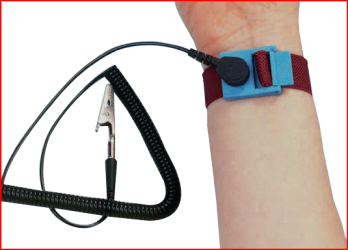
Make sure you are earthed.

Capture2.PNG
 

My Computer

OS
ME/XP/Vista/Win7
Its ok Sandra, its not silly, just every problem is different. The cause of the issue is important to know to help fix it. If the BIOS is not recognizing the Hard drive, then something got messed up somewhere.
Where did the win7 Pro version come from?
was it an upgrade that you downloaded?
did you then use a key he had? where did the key come from?
 

My Computer

Computer type
Laptop
Computer Manufacturer/Model Number
ASUS G60-RBBX05
OS
Win7 Home Premium 64x
CPU
Intel Core 2 Duo P7450 / 2.13 GHz (2.29 with Extreme Turbo)
Memory
4 GB PC-6400 Hyundai (2X2) at 800Mhz
Graphics Card(s)
NVIDIA GeForce GTX 260M 1GB DDR3 VRAM
Monitor(s) Displays
16" LED Backlit
Screen Resolution
1366 x 768 on laptop 1600x1050 max res on 22" external mon
Hard Drives
OCZ Agility 3 60GB SSD / 320 GB - Serial ATA-150 - 7200 rpm
PSU
6-cell Lithium ion { lasts 1.5 hours }
Case
ASUS G60 Laptop
Keyboard
Chicklet type back-lit (white light) keyboard
Mouse
Logitech G9 Laser Mouse 3200dpi and 1000 reports per minute
Internet Speed
Comcast 8.60mb/s up - 3.11mb/s down
Antivirus
MSE
Browser
Firefox
Other Info
General mid-budget gaming Comp. Low batterylife - High FrameRates - currently overheating problems :(

2nd Rig: Case: Rosewill BLACKHAWK Gaming ATX Mid Tower Computer Case

Mobo: GIGABYTE GA-990FXA-UD3
CPU: AMD FX-6200 Zambezi 3.8GHz (4.1GHz Turbo)
Heatsink: COOLER MASTER V8 CPU Cooler
RAM: Patriot Viper 3 8GB (2 x 4GB) 240-Pin DDR3 SDRAM 1866 (PC3 15000)
GPU: SAPPHIRE Radeon HD 6850 1GB 2
Im curious, If you dont have a DVD/CD, where did your brother get the Professional ISO from??
 

My Computer

Computer type
PC/Desktop
Computer Manufacturer/Model Number
LENOVO K450 @3.0GHZ
OS
64-bit Windows 8.1 Pro
CPU
Core(TM) i5 CPU 4330 Haswell @ 3.20GHz
Motherboard
LENOVO
Memory
12.00 GB
Graphics Card(s)
Intel(R) HD Graphics
Sound Card
Intel HD integtrated
Monitor(s) Displays
HP 25' ISP Monitor
Screen Resolution
1900/1020
Hard Drives
(1) ST1000DM003-1CH162 (2) Generic STORAGE DEVICE USB Device (3) Generic STORAGE DEVICE USB Device
Internet Speed
100mb down/10mb up
Only thing I can think of is Ultimate Boot CD: Ultimate Boot CD - Overview

You can also put this on a USB drive and boot from it. You can test the Hard drive with one of the programs on the CD.

I dont know as much about this, there are a lot of programs for troubleshooting in that program

Edit(just saw your post): Ok thanks Theog, I was wondering about that.


Must I download Ultimate Boot CD?
 

My Computer

Computer Manufacturer/Model Number
Asus 1201HA (I think I better sell this thing asap)
OS
Windows 7
CPU
Intel Atom Z520 1.33GHz
Memory
2GB RAM
Graphics Card(s)
GMA 500 graphics
Monitor(s) Displays
12.1-inch LCD
Screen Resolution
1366 x 768
Hard Drives
250GB hard drive
Only thing I can think of is Ultimate Boot CD: Ultimate Boot CD - Overview

You can also put this on a USB drive and boot from it. You can test the Hard drive with one of the programs on the CD.

I dont know as much about this, there are a lot of programs for troubleshooting in that program

Edit(just saw your post): Ok thanks Theog, I was wondering about that.


Must I download Ultimate Boot CD?

I dont know Sandra, I was suggesting it as a test to check the HD, but if its not showing up in the BIOS, then I dont think this program will catch it either. Not sure.

For now, follow Theog's advice to open up case and reseat the HD. If it is under warrentee still, then call Asus and have them on the phone to assist you opening case and reseating HD.
 

My Computer

Computer type
Laptop
Computer Manufacturer/Model Number
ASUS G60-RBBX05
OS
Win7 Home Premium 64x
CPU
Intel Core 2 Duo P7450 / 2.13 GHz (2.29 with Extreme Turbo)
Memory
4 GB PC-6400 Hyundai (2X2) at 800Mhz
Graphics Card(s)
NVIDIA GeForce GTX 260M 1GB DDR3 VRAM
Monitor(s) Displays
16" LED Backlit
Screen Resolution
1366 x 768 on laptop 1600x1050 max res on 22" external mon
Hard Drives
OCZ Agility 3 60GB SSD / 320 GB - Serial ATA-150 - 7200 rpm
PSU
6-cell Lithium ion { lasts 1.5 hours }
Case
ASUS G60 Laptop
Keyboard
Chicklet type back-lit (white light) keyboard
Mouse
Logitech G9 Laser Mouse 3200dpi and 1000 reports per minute
Internet Speed
Comcast 8.60mb/s up - 3.11mb/s down
Antivirus
MSE
Browser
Firefox
Other Info
General mid-budget gaming Comp. Low batterylife - High FrameRates - currently overheating problems :(

2nd Rig: Case: Rosewill BLACKHAWK Gaming ATX Mid Tower Computer Case

Mobo: GIGABYTE GA-990FXA-UD3
CPU: AMD FX-6200 Zambezi 3.8GHz (4.1GHz Turbo)
Heatsink: COOLER MASTER V8 CPU Cooler
RAM: Patriot Viper 3 8GB (2 x 4GB) 240-Pin DDR3 SDRAM 1866 (PC3 15000)
GPU: SAPPHIRE Radeon HD 6850 1GB 2
Only thing I can think of is Ultimate Boot CD: Ultimate Boot CD - Overview

You can also put this on a USB drive and boot from it. You can test the Hard drive with one of the programs on the CD.

I dont know as much about this, there are a lot of programs for troubleshooting in that program

Edit(just saw your post): Ok thanks Theog, I was wondering about that.


Must I download Ultimate Boot CD?

NO, but you do need a Windows installer on a USB stick. Take a look at Post 8.
 

My Computer

OS
ME/XP/Vista/Win7
1) Remove Power cable.
2) remove Battery.
3) remove HD & reseat HD.

4) Check BIOS to see if HD is showing.

Make sure you are earthed.

View attachment 83985


I will but I don't have such a thing like on the photo, is it very dangerous if I do without it?
 

My Computer

Computer Manufacturer/Model Number
Asus 1201HA (I think I better sell this thing asap)
OS
Windows 7
CPU
Intel Atom Z520 1.33GHz
Memory
2GB RAM
Graphics Card(s)
GMA 500 graphics
Monitor(s) Displays
12.1-inch LCD
Screen Resolution
1366 x 768
Hard Drives
250GB hard drive

My Computer

Computer type
Laptop
Computer Manufacturer/Model Number
ASUS G60-RBBX05
OS
Win7 Home Premium 64x
CPU
Intel Core 2 Duo P7450 / 2.13 GHz (2.29 with Extreme Turbo)
Memory
4 GB PC-6400 Hyundai (2X2) at 800Mhz
Graphics Card(s)
NVIDIA GeForce GTX 260M 1GB DDR3 VRAM
Monitor(s) Displays
16" LED Backlit
Screen Resolution
1366 x 768 on laptop 1600x1050 max res on 22" external mon
Hard Drives
OCZ Agility 3 60GB SSD / 320 GB - Serial ATA-150 - 7200 rpm
PSU
6-cell Lithium ion { lasts 1.5 hours }
Case
ASUS G60 Laptop
Keyboard
Chicklet type back-lit (white light) keyboard
Mouse
Logitech G9 Laser Mouse 3200dpi and 1000 reports per minute
Internet Speed
Comcast 8.60mb/s up - 3.11mb/s down
Antivirus
MSE
Browser
Firefox
Other Info
General mid-budget gaming Comp. Low batterylife - High FrameRates - currently overheating problems :(

2nd Rig: Case: Rosewill BLACKHAWK Gaming ATX Mid Tower Computer Case

Mobo: GIGABYTE GA-990FXA-UD3
CPU: AMD FX-6200 Zambezi 3.8GHz (4.1GHz Turbo)
Heatsink: COOLER MASTER V8 CPU Cooler
RAM: Patriot Viper 3 8GB (2 x 4GB) 240-Pin DDR3 SDRAM 1866 (PC3 15000)
GPU: SAPPHIRE Radeon HD 6850 1GB 2
Its ok Sandra, its not silly, just every problem is different. The cause of the issue is important to know to help fix it. If the BIOS is not recognizing the Hard drive, then something got messed up somewhere.
Where did the win7 Pro version come from?
was it an upgrade that you downloaded?
did you then use a key he had? where did the key come from?

I think from his own PC, I was there when he tried to set it on my netbook.
 

My Computer

Computer Manufacturer/Model Number
Asus 1201HA (I think I better sell this thing asap)
OS
Windows 7
CPU
Intel Atom Z520 1.33GHz
Memory
2GB RAM
Graphics Card(s)
GMA 500 graphics
Monitor(s) Displays
12.1-inch LCD
Screen Resolution
1366 x 768
Hard Drives
250GB hard drive

My Computer

OS
ME/XP/Vista/Win7
Only thing I can think of is Ultimate Boot CD: Ultimate Boot CD - Overview

You can also put this on a USB drive and boot from it. You can test the Hard drive with one of the programs on the CD.

I dont know as much about this, there are a lot of programs for troubleshooting in that program

Edit(just saw your post): Ok thanks Theog, I was wondering about that.


Must I download Ultimate Boot CD?

NO, but you do need a Windows installer on a USB stick. Take a look at Post 8.

Yes I've read post 8 and all the links
 

My Computer

Computer Manufacturer/Model Number
Asus 1201HA (I think I better sell this thing asap)
OS
Windows 7
CPU
Intel Atom Z520 1.33GHz
Memory
2GB RAM
Graphics Card(s)
GMA 500 graphics
Monitor(s) Displays
12.1-inch LCD
Screen Resolution
1366 x 768
Hard Drives
250GB hard drive
Are you able to create the USB installation disc? this is your best bet right now. If you have any questions or need help, just let us know.
 

My Computer

Computer type
Laptop
Computer Manufacturer/Model Number
ASUS G60-RBBX05
OS
Win7 Home Premium 64x
CPU
Intel Core 2 Duo P7450 / 2.13 GHz (2.29 with Extreme Turbo)
Memory
4 GB PC-6400 Hyundai (2X2) at 800Mhz
Graphics Card(s)
NVIDIA GeForce GTX 260M 1GB DDR3 VRAM
Monitor(s) Displays
16" LED Backlit
Screen Resolution
1366 x 768 on laptop 1600x1050 max res on 22" external mon
Hard Drives
OCZ Agility 3 60GB SSD / 320 GB - Serial ATA-150 - 7200 rpm
PSU
6-cell Lithium ion { lasts 1.5 hours }
Case
ASUS G60 Laptop
Keyboard
Chicklet type back-lit (white light) keyboard
Mouse
Logitech G9 Laser Mouse 3200dpi and 1000 reports per minute
Internet Speed
Comcast 8.60mb/s up - 3.11mb/s down
Antivirus
MSE
Browser
Firefox
Other Info
General mid-budget gaming Comp. Low batterylife - High FrameRates - currently overheating problems :(

2nd Rig: Case: Rosewill BLACKHAWK Gaming ATX Mid Tower Computer Case

Mobo: GIGABYTE GA-990FXA-UD3
CPU: AMD FX-6200 Zambezi 3.8GHz (4.1GHz Turbo)
Heatsink: COOLER MASTER V8 CPU Cooler
RAM: Patriot Viper 3 8GB (2 x 4GB) 240-Pin DDR3 SDRAM 1866 (PC3 15000)
GPU: SAPPHIRE Radeon HD 6850 1GB 2
I think from his own PC, I was there when he tried to set it on my netbook.


Shame on him.... your not supposed to use a key like this. One Key - One Comp. Thats the rule. MS puts checks in place to prevent this and either your computer or his or both would be invalidated once you installed successfully.


Edit: Apologies, I might have spoke out, I didn't think of this, but his key might have been an extra one he had, I assumed, he used his. I dont like piracy and using a key twice is still piracy even if you dont download a hacked OS or whatever. I shouldn't have assumed this.

If he did use the key from his comp, warn him of the possibilities and make sure you use your key and Home Premium on your comp when it gets to installing.
 
Last edited:

My Computer

Computer type
Laptop
Computer Manufacturer/Model Number
ASUS G60-RBBX05
OS
Win7 Home Premium 64x
CPU
Intel Core 2 Duo P7450 / 2.13 GHz (2.29 with Extreme Turbo)
Memory
4 GB PC-6400 Hyundai (2X2) at 800Mhz
Graphics Card(s)
NVIDIA GeForce GTX 260M 1GB DDR3 VRAM
Monitor(s) Displays
16" LED Backlit
Screen Resolution
1366 x 768 on laptop 1600x1050 max res on 22" external mon
Hard Drives
OCZ Agility 3 60GB SSD / 320 GB - Serial ATA-150 - 7200 rpm
PSU
6-cell Lithium ion { lasts 1.5 hours }
Case
ASUS G60 Laptop
Keyboard
Chicklet type back-lit (white light) keyboard
Mouse
Logitech G9 Laser Mouse 3200dpi and 1000 reports per minute
Internet Speed
Comcast 8.60mb/s up - 3.11mb/s down
Antivirus
MSE
Browser
Firefox
Other Info
General mid-budget gaming Comp. Low batterylife - High FrameRates - currently overheating problems :(

2nd Rig: Case: Rosewill BLACKHAWK Gaming ATX Mid Tower Computer Case

Mobo: GIGABYTE GA-990FXA-UD3
CPU: AMD FX-6200 Zambezi 3.8GHz (4.1GHz Turbo)
Heatsink: COOLER MASTER V8 CPU Cooler
RAM: Patriot Viper 3 8GB (2 x 4GB) 240-Pin DDR3 SDRAM 1866 (PC3 15000)
GPU: SAPPHIRE Radeon HD 6850 1GB 2
If the HD is not being seen , it often happens with lappies, nappies etc.

They are very sensitive to being dropped. If that is the case - take it to the repair shop/use the warranty - unless you are handy with fixing things yourself.

As a side note:

I'd like to get my hands on one those Acers, shouldn't be too hard to figure out how to make proper bootable reinstall media from the recovery partition.

I believe Acer ( at least with some models ) expect you to rely entirely on the recov partition - there is no facility to run off discs.
 

My Computers

System One System Two

  • Computer type
    PC/Desktop
    OS
    7 X64
    CPU
    i5 8400
    Motherboard
    gigabyte b365m ds3h
    Memory
    2x8gb 3200mhz
    Hard Drives
    various
    PSU
    pure power 11 400w cm
    Case
    Coolermaster
    Cooling
    cryorig m9i
  • Computer type
    PC/Desktop
    OS
    7x64
    CPU
    g5400
    Motherboard
    ga b365m ds3h
    Memory
    8gb ddr4 2400
    PSU
    xfx pro 450w
I'm sure I removed all the screws but I still can't open my netbook. Now I must bring it to a computer shop. That's really too bad..
 

My Computer

Computer Manufacturer/Model Number
Asus 1201HA (I think I better sell this thing asap)
OS
Windows 7
CPU
Intel Atom Z520 1.33GHz
Memory
2GB RAM
Graphics Card(s)
GMA 500 graphics
Monitor(s) Displays
12.1-inch LCD
Screen Resolution
1366 x 768
Hard Drives
250GB hard drive
I think from his own PC, I was there when he tried to set it on my netbook.


Shame on him.... your not supposed to use a key like this. One Key - One Comp. Thats the rule. MS puts checks in place to prevent this and either your computer or his or both would be invalidated once you installed successfully.


He was trying to help but he's not allowed to come near my netbook anymore:(
 

My Computer

Computer Manufacturer/Model Number
Asus 1201HA (I think I better sell this thing asap)
OS
Windows 7
CPU
Intel Atom Z520 1.33GHz
Memory
2GB RAM
Graphics Card(s)
GMA 500 graphics
Monitor(s) Displays
12.1-inch LCD
Screen Resolution
1366 x 768
Hard Drives
250GB hard drive

My Computer

Computer type
Laptop
Computer Manufacturer/Model Number
ASUS G60-RBBX05
OS
Win7 Home Premium 64x
CPU
Intel Core 2 Duo P7450 / 2.13 GHz (2.29 with Extreme Turbo)
Memory
4 GB PC-6400 Hyundai (2X2) at 800Mhz
Graphics Card(s)
NVIDIA GeForce GTX 260M 1GB DDR3 VRAM
Monitor(s) Displays
16" LED Backlit
Screen Resolution
1366 x 768 on laptop 1600x1050 max res on 22" external mon
Hard Drives
OCZ Agility 3 60GB SSD / 320 GB - Serial ATA-150 - 7200 rpm
PSU
6-cell Lithium ion { lasts 1.5 hours }
Case
ASUS G60 Laptop
Keyboard
Chicklet type back-lit (white light) keyboard
Mouse
Logitech G9 Laser Mouse 3200dpi and 1000 reports per minute
Internet Speed
Comcast 8.60mb/s up - 3.11mb/s down
Antivirus
MSE
Browser
Firefox
Other Info
General mid-budget gaming Comp. Low batterylife - High FrameRates - currently overheating problems :(

2nd Rig: Case: Rosewill BLACKHAWK Gaming ATX Mid Tower Computer Case

Mobo: GIGABYTE GA-990FXA-UD3
CPU: AMD FX-6200 Zambezi 3.8GHz (4.1GHz Turbo)
Heatsink: COOLER MASTER V8 CPU Cooler
RAM: Patriot Viper 3 8GB (2 x 4GB) 240-Pin DDR3 SDRAM 1866 (PC3 15000)
GPU: SAPPHIRE Radeon HD 6850 1GB 2
If the HD is not being seen , it often happens with lappies, nappies etc.

They are very sensitive to being dropped. If that is the case - take it to the repair shop/use the warranty - unless you are handy with fixing things yourself.

As a side note:

I'd like to get my hands on one those Acers, shouldn't be too hard to figure out how to make proper bootable reinstall media from the recovery partition.

I believe Acer ( at least with some models ) expect you to rely entirely on the recov partition - there is no facility to run off discs.

Hi SIW2
http://www.sevenforums.com/tutorials/663-backup-complete-computer-create-image-backup.html
Should be able save to USB stick http://www.sevenforums.com/tutorials/663-backup-complete-computer-create-image-backup.html
 

My Computer

OS
ME/XP/Vista/Win7
Back
Top