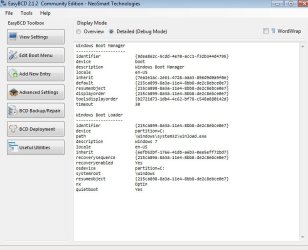
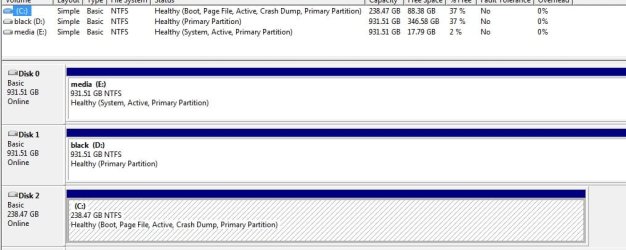
Last time I installed Win7 Ultimate 64, it was after I had erased all my hard drives and reformatted them. I always install Windows to my SSD (C), but last time my media drive (E) was empty so Windows put the "boot" folder in E but the rest of Windows in C as I wanted. Now that I have re-installed Windows again on C, whenever I boot up I get the dual boot screen, asking if I want to boot "Windows 7" or "Windows 7". I choose the first one and it takes me to my newly installed Windows. How can I get rid of the second dual boot option? I'm guessing it has to do with the fact that my E drive has a system tag on it in the Computer Management screen (see attachment). I don't mind if I have to reformat any of the drives, I can move my files around no problem.. just want to know what I need to do to fix this. I'm still in the early stages of setting up my apps/settings, so if I have to reinstall Windows I'd rather do it now.
thanks..
thanks..
Attachments
My Computer
At a glance
Win 7 Ultimate x64AMD Fx6200 Six CoreCorsair Vengeance 8 GB (2X4 GB) PC3-12800 160...Asus GTX 650 Ti Boost DirectCU II (2 GB)
- Computer type
- PC/Desktop
- Computer Manufacturer/Model Number
- Custom build
- OS
- Win 7 Ultimate x64
- CPU
- AMD Fx6200 Six Core
- Motherboard
- Asus M5A99x Evo
- Memory
- Corsair Vengeance 8 GB (2X4 GB) PC3-12800 1600mHz DDR3
- Graphics Card(s)
- Asus GTX 650 Ti Boost DirectCU II (2 GB)
- Hard Drives
- Crucial MX100 256G (boot)
Hitachi 1TB
WD Black 1TB
- Antivirus
- MSE
- Browser
- Chrome