- Local time
- 3:59 PM
- Messages
- 279
oh oh ........
Hi Snick!
Thanks for new links!
BOTH WORKED!!
I don't want to sound ungrateful or anything wrong....
When I see something that I am sure works and I have had experience with it before (Like Malwarebytes products of which I have one, Premium--paid each year version).... Then I'm more willing to take a jump and get more..
Just doing baby steps here... I know its not going to solve all the problems of my laptop...
But it will keep away more dangerous problems.
I did the first link first...Malwarebytes Anti-Exploit
Installed fine
Working now....
Free version for a while... then they will ask me fo $39.99 per year to continue using the premium version with help in case I need help etc etc other benefits...
THEN...
I tried to download the Malwarebytes Anti-Ransomware one.
It downloaded but...
I got this screen when I tried to install it..
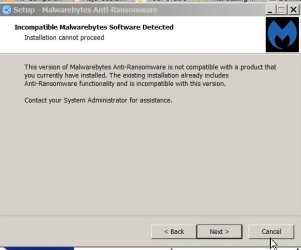
Seems I have TOO MANY AV/Ransomware products
In my stupid thinking.... you can't have TOO many AV or especially Ransomware products!
I can't even afford a single Ransomware attack!
And not yet made that expensive purchase of a bigger 1.5TB or 2 or 3 TB External HDD to make a current Mascrium save (and still having problems contacting AOMEI to get my PAID Serical and product number so I can install v. 4.0 as 2.2 will NOT copy over that information... you must "find" your oriignal Email with paid receipt attached and Product code
Sigh.....
And who is my "system administrator" anyway? I get that a LOT!
What should I do?
20 or more choices!
Just stay with my Paid Malwarebytes (it says it "has" Rnasomware protection) Premium.
But occasionally it reports it is NOT WORKING properly and I have to turn on and off computer and then it does work.... re-starting it does not turn the buttons green...
Took me 2 months of back and forth Emails for them to "give up" helping me.
I found solution by total luck...
Or take the new Malwarebytes Anti-Exploit instead?
Or remove all of those and put in Just the Malwarebytes Anti-Ransomware? But then what watches and scans everything else that the Premium version of Malwarebytes does for me?
(Or it claims it does)
I just got 5 medium items quarantined ..... I did not DO ANYTHING! I did not click anywhere but "MAJOR GEEKS" searching for the "freebie" downloads of products.
Now you know why I totally avoid any "free " stuff on computer!
I pay for everything!
That way I'm pretty certain that NO ONE will add in free stuff or bad stuff as then I will ask for my money back.. If you pay them money , they leave you alone!
Well that has been my personal computer experience so far...
Just wanted to write back quickly (ha!) shorter (ha!) and say what I did and show the screenshot and ask you politely... what do I do now?
Thanks again Snick!
XP VM User
Hi Snick!
Thanks for new links!
BOTH WORKED!!
I don't want to sound ungrateful or anything wrong....
When I see something that I am sure works and I have had experience with it before (Like Malwarebytes products of which I have one, Premium--paid each year version).... Then I'm more willing to take a jump and get more..
Just doing baby steps here... I know its not going to solve all the problems of my laptop...
But it will keep away more dangerous problems.
I did the first link first...Malwarebytes Anti-Exploit
Installed fine
Working now....
Free version for a while... then they will ask me fo $39.99 per year to continue using the premium version with help in case I need help etc etc other benefits...
THEN...
I tried to download the Malwarebytes Anti-Ransomware one.
It downloaded but...
I got this screen when I tried to install it..
Seems I have TOO MANY AV/Ransomware products
In my stupid thinking.... you can't have TOO many AV or especially Ransomware products!
I can't even afford a single Ransomware attack!
And not yet made that expensive purchase of a bigger 1.5TB or 2 or 3 TB External HDD to make a current Mascrium save (and still having problems contacting AOMEI to get my PAID Serical and product number so I can install v. 4.0 as 2.2 will NOT copy over that information... you must "find" your oriignal Email with paid receipt attached and Product code
Sigh.....
And who is my "system administrator" anyway? I get that a LOT!
What should I do?
20 or more choices!
Just stay with my Paid Malwarebytes (it says it "has" Rnasomware protection) Premium.
But occasionally it reports it is NOT WORKING properly and I have to turn on and off computer and then it does work.... re-starting it does not turn the buttons green...
Took me 2 months of back and forth Emails for them to "give up" helping me.
I found solution by total luck...
Or take the new Malwarebytes Anti-Exploit instead?
Or remove all of those and put in Just the Malwarebytes Anti-Ransomware? But then what watches and scans everything else that the Premium version of Malwarebytes does for me?
(Or it claims it does)
I just got 5 medium items quarantined ..... I did not DO ANYTHING! I did not click anywhere but "MAJOR GEEKS" searching for the "freebie" downloads of products.
Now you know why I totally avoid any "free " stuff on computer!
I pay for everything!
That way I'm pretty certain that NO ONE will add in free stuff or bad stuff as then I will ask for my money back.. If you pay them money , they leave you alone!
Well that has been my personal computer experience so far...
Just wanted to write back quickly (ha!) shorter (ha!) and say what I did and show the screenshot and ask you politely... what do I do now?
Thanks again Snick!
XP VM User
My Computer
At a glance
Windows7 Professional 64bitIntel(R) Core (TM) i5 CPU M 430 @2.27 Ghz8.0 GB
- Computer type
- Laptop
- Computer Manufacturer/Model Number
- SONY VAIO VPCS111FM
- OS
- Windows7 Professional 64bit
- CPU
- Intel(R) Core (TM) i5 CPU M 430 @2.27 Ghz
- Memory
- 8.0 GB
- Hard Drives
- Seagate 500GB Momentus
- Cooling
- Internal fan
- Mouse
- Logitech bluetooth trackball
- Browser
- Pale Moon Browser for x64