releasing USB in VMWare

Frank1

New member
Power User
VIP
Local time
3:35 AM
Messages
394
Location
Ohio
I'm trying to get VMWare figured out. I had a problem and I think I know what caused the problem, but I'm not sure if my thinking is right. I have Win7 on my desktop. I installed VMWare and put WIN XP on it. When I was in the guest machine (XP) I couldn't print. I finally found out that I had to connect the USB ports in order to use my printers. I did that and both printers worked in XP with no problems. I later shut down my virtual machine and was using WIN 7--the host machine. A few days later I tried to print while in Win 7 (host machine), but neither of my printers would print. I have an HP inject and an HP laser jet. I thought that maybe I didn't release those ports while in my guest machine, so I went back into XP and released them. (Well, at least I think I released them.) Back to my host machine but it still would not print. I reinstalled the software for my inkject and it took care of the problem--it printed. I did the same with my laser jet but it still would not print. So I thought that since it had to do with not releasing the printers while on VMWare, I un- installed VMWare. It still wouldn't print. Fortunately, a few days before I connected the printers in VMWare, I made a system image. I restored the image and both of the printers work. Here's what I think the problem was--but again--I'm not sure.
I think that somehow I never did release the printers when I was in the virtual machine. I also realize that when you un- install virtual machine, the un-install does a poor job and it is not entirely un-installed. I believe that the settings that I set when I was in the virtual machine were not completed removed. Is my thinking correct? If so, do you have any idea why I could not completely release them in the frist place. I know this is a long read and I thank you very much for your input.
Frank
 

My Computer

Computer type
Laptop
Computer Manufacturer/Model Number
HP Pavilion g7-1260us Notebook
OS
Desk Top with Win 7 Home Premium 64 bit and Lap Top with Windows 8.1 Pro 64 bit
Memory
8Gig
Screen Resolution
1600x900
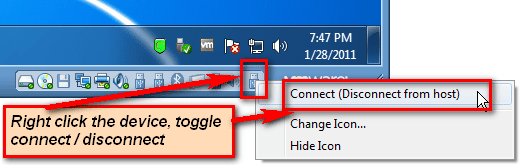
Devices that are not shared, which can be connected only to host or guest but not to both at the same time, are normally always released, disconnected from guest and reconnected to host when vm is closed.

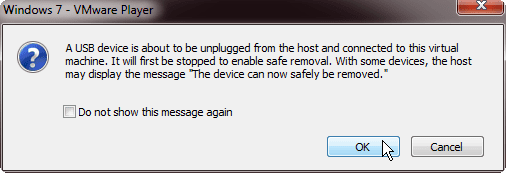
If you close a vm with some of these devices still connected, next time you start the vm they are again automatically disconnected from the host and reconnected to guest. In this case you get a warning:

VMware_devices_1.png

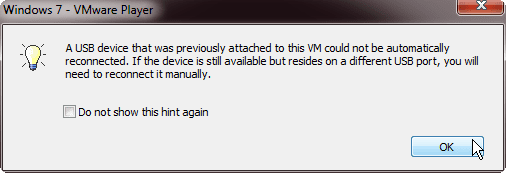
If you do not let vm to reconnect the device (click Cancel), you must manually reconnect it when needed:

VMware_devices_5.png

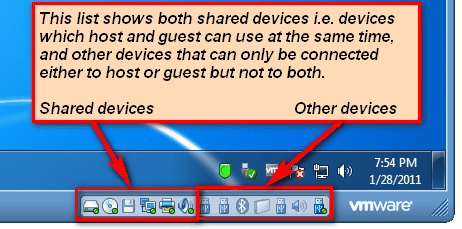
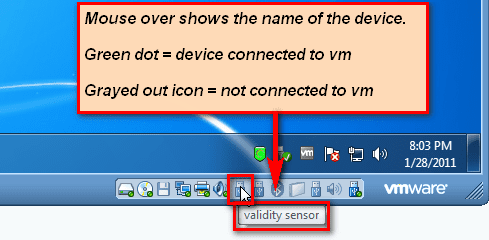
To monitor your device status, you use the statusbar icons as these images show:

VMware_devices_2.png

VMware_devices_3.png

VMware_devices.png

Kari
 

My Computer

Computer type
Laptop
Computer Manufacturer/Model Number
HP ENVY 17-1150eg
OS
Windows 10 Pro x64 EN-GB
CPU
1.6 GHz Intel Core i7-720QM Processor
Memory
6 GB
Graphics Card(s)
ATI Mobility Radeon HD 5850 Graphics
Sound Card
Beats sound system with integrated subwoofer
Monitor(s) Displays
17" laptop display, 22" LED and 32" Full HD TV through HDMI
Screen Resolution
1600*900 (1), 1920*1080 (2&3)
Hard Drives
Internal: 2 x 500 GB SATA Hard Disk Drive 7200 rpm
External: 2TB for backups, 3TB USB3 network drive for media
Cooling
As Envy runs a bit warm, I have it on a Cooler Master pad
Keyboard
Logitech diNovo Media Desktop Laser (bluetooth)
Mouse
Logitech Performance Mouse MX
Internet Speed
50/10 Mbps VDSL
Antivirus
Windows Defender 4.3.9431.0
Browser
Maxthon 3.5.2., IE11
Thanks for all of that information, Kari. I have a better understanding of it now and will work on it tomorrow.
 

My Computer

Computer type
Laptop
Computer Manufacturer/Model Number
HP Pavilion g7-1260us Notebook
OS
Desk Top with Win 7 Home Premium 64 bit and Lap Top with Windows 8.1 Pro 64 bit
Memory
8Gig
Screen Resolution
1600x900
If you have some issues with devices not reconnecting to host when vm is closed, it must not be a big problem. We can then look deeper in to settings.

Kari
 

My Computer

Computer type
Laptop
Computer Manufacturer/Model Number
HP ENVY 17-1150eg
OS
Windows 10 Pro x64 EN-GB
CPU
1.6 GHz Intel Core i7-720QM Processor
Memory
6 GB
Graphics Card(s)
ATI Mobility Radeon HD 5850 Graphics
Sound Card
Beats sound system with integrated subwoofer
Monitor(s) Displays
17" laptop display, 22" LED and 32" Full HD TV through HDMI
Screen Resolution
1600*900 (1), 1920*1080 (2&3)
Hard Drives
Internal: 2 x 500 GB SATA Hard Disk Drive 7200 rpm
External: 2TB for backups, 3TB USB3 network drive for media
Cooling
As Envy runs a bit warm, I have it on a Cooler Master pad
Keyboard
Logitech diNovo Media Desktop Laser (bluetooth)
Mouse
Logitech Performance Mouse MX
Internet Speed
50/10 Mbps VDSL
Antivirus
Windows Defender 4.3.9431.0
Browser
Maxthon 3.5.2., IE11
So far--so good! I reinstalled VMWare and put XP back on. Everything is working well. The information you send me helped to clear things up.:)
 

My Computer

Computer type
Laptop
Computer Manufacturer/Model Number
HP Pavilion g7-1260us Notebook
OS
Desk Top with Win 7 Home Premium 64 bit and Lap Top with Windows 8.1 Pro 64 bit
Memory
8Gig
Screen Resolution
1600x900
That's good to hear.

Kari
 

My Computer

Computer type
Laptop
Computer Manufacturer/Model Number
HP ENVY 17-1150eg
OS
Windows 10 Pro x64 EN-GB
CPU
1.6 GHz Intel Core i7-720QM Processor
Memory
6 GB
Graphics Card(s)
ATI Mobility Radeon HD 5850 Graphics
Sound Card
Beats sound system with integrated subwoofer
Monitor(s) Displays
17" laptop display, 22" LED and 32" Full HD TV through HDMI
Screen Resolution
1600*900 (1), 1920*1080 (2&3)
Hard Drives
Internal: 2 x 500 GB SATA Hard Disk Drive 7200 rpm
External: 2TB for backups, 3TB USB3 network drive for media
Cooling
As Envy runs a bit warm, I have it on a Cooler Master pad
Keyboard
Logitech diNovo Media Desktop Laser (bluetooth)
Mouse
Logitech Performance Mouse MX
Internet Speed
50/10 Mbps VDSL
Antivirus
Windows Defender 4.3.9431.0
Browser
Maxthon 3.5.2., IE11
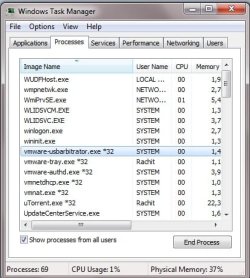
try to kill (end process) vmware-usbarbitrator.exe from the task manager in windows 7. (see the attached img)
 

Attachments

  • temp1.jpg
    temp1.jpg
    37.8 KB · Views: 2
Last edited:

My Computer

Computer Manufacturer/Model Number
Custom
OS
Windows 7 Ultimate x64
CPU
Core i5 760
Motherboard
HP
Memory
8GB ddr3 1333Mhz
Graphics Card(s)
6620g 1GB + 6750M
Sound Card
Realtek HD 5.1 Onboard
Monitor(s) Displays
hp 15.6
Screen Resolution
1366 768
Hard Drives
1 TB wd 7200rpm
+
750GB
Case
i ball
Keyboard
Logitech
Mouse
Logitech
Internet Speed
18 Mbps
Back
Top