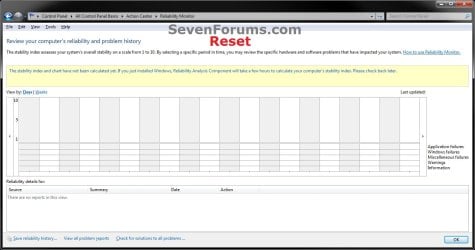
Reliability Monitor - Reset

How to Reset Reliability Monitor in Windows 7 and Windows 8


   Information
If you have fixed the errors or just want to clear the reported data in Reliabilty Monitor, then this will show you how to reset the Reliability Monitor back to a clean default state in Windows 7 and Windows 8.

You must be logged in as an administrator to be able to do this tutorial.

   Note
Reliability Monitor is an advanced tool that measures hardware and software problems and other changes to your computer. It collects 24 hours of data before it displays any results and calculates the stability index that ranges from 1 (the least stable) to 10 (the most stable). You can use the index to help evaluate the reliability of your computer by reviewing the reported application failures, Windows failures, Miscellaneous failures, Warnings, and Information. Any change you make to your computer or problem that occurs on your computer affects the stability index.

   Warning
If you reset the Reliability Monitor, then any previously displayed data will no longer be available unless you have backed it up in step 3 below to restore.

This does not work in Windows 8.1 Update.


EXAMPLE: Reliability Monitor
NOTE: You can tell your Index score (scales from 1 to 10, 10 is the best score) by looking at how the chart line ends in the upper right corner boxed in red below compared to the scale of 10 to 1 on the left upper corner boxed in red below.
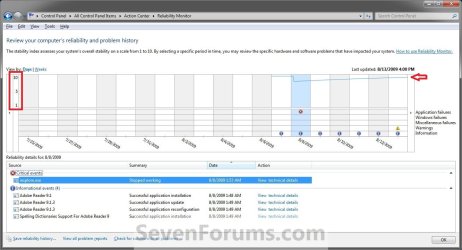
Before.jpg

Windows7-Reset.jpg

Here's How:

1. Click/tap on the Download button below to download the file below, and save it to your desktop.
NOTE: Special thanks to Zardoc for providing the part in the BAT file to clear the Event Viewer logs.
Reset_Reliability_Monitor.bat


Download


2. Unblock the .bat file.

3. Right click or press and hold on the downloaded .bat file and click/tap on Run as administrator.

4. If prompted, click/tap on Yes (UAC).

5. You will now see a command prompt open, run the commands to reset Reliability Monitor, then close.

6. If this is for Windows 8 and 8.1, then you must repeat steps 3-5 to run the .bat file a second time for this to work.

7. When finished, restart the computer to fully apply.


   Note
It may take Reliability Monitor a few to 24 hours to display results again after being reset.


That's it,
Shawn


Attachments

Last edited:
If it is not deleted log the error message is logged in the Reliability Monitor.
If there was a way to not lose anything, I'd refreshing Windows...:cry:
Hi
 

My Computer My Computer

At a glance

Windows 7 64 Bit Ultimate
Computer type
PC/Desktop
OS
Windows 7 64 Bit Ultimate
Luckily Reliability Monitor is not critical if you wanted to live with it, but you could back up anything that you do not want to lose before refreshing.
 

My Computer My Computer

At a glance

64-bit Windows 11 Pro for WorkstationsIntel i7-8700K OC'd to 5 GHz64 GB (4x16GB) G.SKILL TridentZ RGB DDR4 3600...ASUS ROG-STRIX-GTX1080TI-O11G-GAMING
Computer type
PC/Desktop
Computer Manufacturer/Model Number
Self built custom
OS
64-bit Windows 11 Pro for Workstations
CPU
Intel i7-8700K OC'd to 5 GHz
Motherboard
ASUS ROG Maximus XI Formula Z390
Memory
64 GB (4x16GB) G.SKILL TridentZ RGB DDR4 3600 MHz
Graphics Card(s)
ASUS ROG-STRIX-GTX1080TI-O11G-GAMING
Sound Card
Integrated
Monitor(s) Displays
2 x Samsung Odyssey G7 27"
Screen Resolution
2560x1440
Hard Drives
1TB Samsung 990 PRO M.2,
4TB Samsung 990 PRO PRO M.2,
TerraMaster F8 SSD Plus NAS
PSU
Seasonic Prime Titanium 850W
Case
Thermaltake Core P3
Cooling
Corsair Hydro H115i
Keyboard
Logitech wireless K800
Mouse
Logitech MX Master 4
Internet Speed
2 Gb/s Download and 100 Mb/s Upload
Antivirus
Malwarebyte Anti-Malware Premium
Browser
Google Chrome
Other Info
Logitech Z625 speaker system,
Logitech BRIO 4K Pro webcam,
HP Color LaserJet Pro MFP M477fdn,
APC SMART-UPS RT 1000 XL - SURT1000XLI,
Galaxy S23 Plus phone
Are not data that keep me interested, but the programs that I installed those and it is not possible to backup.
Thank you
 

My Computer My Computer

At a glance

Windows 7 64 Bit Ultimate
Computer type
PC/Desktop
OS
Windows 7 64 Bit Ultimate
Yeah, programs would have to be reinstalled. Do you not have their installation files or DVD?
 

My Computer My Computer

At a glance

64-bit Windows 11 Pro for WorkstationsIntel i7-8700K OC'd to 5 GHz64 GB (4x16GB) G.SKILL TridentZ RGB DDR4 3600...ASUS ROG-STRIX-GTX1080TI-O11G-GAMING
Computer type
PC/Desktop
Computer Manufacturer/Model Number
Self built custom
OS
64-bit Windows 11 Pro for Workstations
CPU
Intel i7-8700K OC'd to 5 GHz
Motherboard
ASUS ROG Maximus XI Formula Z390
Memory
64 GB (4x16GB) G.SKILL TridentZ RGB DDR4 3600 MHz
Graphics Card(s)
ASUS ROG-STRIX-GTX1080TI-O11G-GAMING
Sound Card
Integrated
Monitor(s) Displays
2 x Samsung Odyssey G7 27"
Screen Resolution
2560x1440
Hard Drives
1TB Samsung 990 PRO M.2,
4TB Samsung 990 PRO PRO M.2,
TerraMaster F8 SSD Plus NAS
PSU
Seasonic Prime Titanium 850W
Case
Thermaltake Core P3
Cooling
Corsair Hydro H115i
Keyboard
Logitech wireless K800
Mouse
Logitech MX Master 4
Internet Speed
2 Gb/s Download and 100 Mb/s Upload
Antivirus
Malwarebyte Anti-Malware Premium
Browser
Google Chrome
Other Info
Logitech Z625 speaker system,
Logitech BRIO 4K Pro webcam,
HP Color LaserJet Pro MFP M477fdn,
APC SMART-UPS RT 1000 XL - SURT1000XLI,
Galaxy S23 Plus phone
HI,
I tried to restore the PC with "CustomRefreshImages" to avoid losing everything and everything was fine until updates, after which the problem resurfaced.
At this point I set the PC to factory settings, no nothing else than the OS and everything was correct until I installed the updates Windows 8.1 Update (KB2919355) and Microsoft Silverlight 5.1.30214 and from there the problem has reappeared.
The deduction is only one: why do not check well before you send an update? :devil:
 

My Computer My Computer

At a glance

Windows 7 64 Bit Ultimate
Computer type
PC/Desktop
OS
Windows 7 64 Bit Ultimate
Remember that it usually takes up to 24 hours before Reliability Monitor starts reporting anything since Windows was reinstalled. You might give it a few days to see if may start working by then or not.
 

My Computer My Computer

At a glance

64-bit Windows 11 Pro for WorkstationsIntel i7-8700K OC'd to 5 GHz64 GB (4x16GB) G.SKILL TridentZ RGB DDR4 3600...ASUS ROG-STRIX-GTX1080TI-O11G-GAMING
Computer type
PC/Desktop
Computer Manufacturer/Model Number
Self built custom
OS
64-bit Windows 11 Pro for Workstations
CPU
Intel i7-8700K OC'd to 5 GHz
Motherboard
ASUS ROG Maximus XI Formula Z390
Memory
64 GB (4x16GB) G.SKILL TridentZ RGB DDR4 3600 MHz
Graphics Card(s)
ASUS ROG-STRIX-GTX1080TI-O11G-GAMING
Sound Card
Integrated
Monitor(s) Displays
2 x Samsung Odyssey G7 27"
Screen Resolution
2560x1440
Hard Drives
1TB Samsung 990 PRO M.2,
4TB Samsung 990 PRO PRO M.2,
TerraMaster F8 SSD Plus NAS
PSU
Seasonic Prime Titanium 850W
Case
Thermaltake Core P3
Cooling
Corsair Hydro H115i
Keyboard
Logitech wireless K800
Mouse
Logitech MX Master 4
Internet Speed
2 Gb/s Download and 100 Mb/s Upload
Antivirus
Malwarebyte Anti-Malware Premium
Browser
Google Chrome
Other Info
Logitech Z625 speaker system,
Logitech BRIO 4K Pro webcam,
HP Color LaserJet Pro MFP M477fdn,
APC SMART-UPS RT 1000 XL - SURT1000XLI,
Galaxy S23 Plus phone
But maybe I have not explained well, the problem is that at the beginning the errors are marked in the graph, and by deleting in "System" of Event Viewer the errors, it automatically reset even those on the graph, as from image, with the blue line above and empty where there was reporting.
Hi
 

My Computer My Computer

At a glance

Windows 7 64 Bit Ultimate
Computer type
PC/Desktop
OS
Windows 7 64 Bit Ultimate
That's normal when the event logs have been cleared and the Reliability Monitor reset.

Since you reinstalled, give it two days to see if Reliability Monitor starts reporting again.
 

My Computer My Computer

At a glance

64-bit Windows 11 Pro for WorkstationsIntel i7-8700K OC'd to 5 GHz64 GB (4x16GB) G.SKILL TridentZ RGB DDR4 3600...ASUS ROG-STRIX-GTX1080TI-O11G-GAMING
Computer type
PC/Desktop
Computer Manufacturer/Model Number
Self built custom
OS
64-bit Windows 11 Pro for Workstations
CPU
Intel i7-8700K OC'd to 5 GHz
Motherboard
ASUS ROG Maximus XI Formula Z390
Memory
64 GB (4x16GB) G.SKILL TridentZ RGB DDR4 3600 MHz
Graphics Card(s)
ASUS ROG-STRIX-GTX1080TI-O11G-GAMING
Sound Card
Integrated
Monitor(s) Displays
2 x Samsung Odyssey G7 27"
Screen Resolution
2560x1440
Hard Drives
1TB Samsung 990 PRO M.2,
4TB Samsung 990 PRO PRO M.2,
TerraMaster F8 SSD Plus NAS
PSU
Seasonic Prime Titanium 850W
Case
Thermaltake Core P3
Cooling
Corsair Hydro H115i
Keyboard
Logitech wireless K800
Mouse
Logitech MX Master 4
Internet Speed
2 Gb/s Download and 100 Mb/s Upload
Antivirus
Malwarebyte Anti-Malware Premium
Browser
Google Chrome
Other Info
Logitech Z625 speaker system,
Logitech BRIO 4K Pro webcam,
HP Color LaserJet Pro MFP M477fdn,
APC SMART-UPS RT 1000 XL - SURT1000XLI,
Galaxy S23 Plus phone
Before the update was not so .......
No, I had made a bakup system image and I restored the previous one.
hello
 

My Computer My Computer

At a glance

Windows 7 64 Bit Ultimate
Computer type
PC/Desktop
OS
Windows 7 64 Bit Ultimate
Yes, the update may have reset it, so it would be worth to see if it may work again after two days.
 

My Computer My Computer

At a glance

64-bit Windows 11 Pro for WorkstationsIntel i7-8700K OC'd to 5 GHz64 GB (4x16GB) G.SKILL TridentZ RGB DDR4 3600...ASUS ROG-STRIX-GTX1080TI-O11G-GAMING
Computer type
PC/Desktop
Computer Manufacturer/Model Number
Self built custom
OS
64-bit Windows 11 Pro for Workstations
CPU
Intel i7-8700K OC'd to 5 GHz
Motherboard
ASUS ROG Maximus XI Formula Z390
Memory
64 GB (4x16GB) G.SKILL TridentZ RGB DDR4 3600 MHz
Graphics Card(s)
ASUS ROG-STRIX-GTX1080TI-O11G-GAMING
Sound Card
Integrated
Monitor(s) Displays
2 x Samsung Odyssey G7 27"
Screen Resolution
2560x1440
Hard Drives
1TB Samsung 990 PRO M.2,
4TB Samsung 990 PRO PRO M.2,
TerraMaster F8 SSD Plus NAS
PSU
Seasonic Prime Titanium 850W
Case
Thermaltake Core P3
Cooling
Corsair Hydro H115i
Keyboard
Logitech wireless K800
Mouse
Logitech MX Master 4
Internet Speed
2 Gb/s Download and 100 Mb/s Upload
Antivirus
Malwarebyte Anti-Malware Premium
Browser
Google Chrome
Other Info
Logitech Z625 speaker system,
Logitech BRIO 4K Pro webcam,
HP Color LaserJet Pro MFP M477fdn,
APC SMART-UPS RT 1000 XL - SURT1000XLI,
Galaxy S23 Plus phone
Hi,
I restored the system image saved with virgin SO, I did some tests and see the results in the following images.
Hello

http://1drv.ms/1oAHYjK


New: SO performed the basic configuration 05/luglio/2014, Update "Windows Update 8.1 (KB2919355)" removed on 07/luglio/2014 h:10:00 before and after clearing all the errors in the Event Viewer!
New1: This appears when I press "View reliability history"
New2: Installed update "Windows Update 8.1 (KB2919355)" to h 10:15: and this is the result.
New3: h:10:30 The image "New1" no longer appears by pressing the "View reliability history", and after clearing all the errors in the Event Viewer this is the result!!!
Is that clear?
 
Last edited:

My Computer My Computer

At a glance

Windows 7 64 Bit Ultimate
Computer type
PC/Desktop
OS
Windows 7 64 Bit Ultimate
alpha45,

The New1 image at your link is just the quick "generating report" screen to let you know. Since you cleared all your Event Viewer logs, there's nothing to load anymore, so the New1 screenshot probably opens and closes so fast that it's no longer noticeable.

The New3 image at your link is perfectly normal when there's not any problem history available due to the Event Viewer logs being cleared.

Hope this helps to clear it up for you as well. :)
 

My Computer My Computer

At a glance

64-bit Windows 11 Pro for WorkstationsIntel i7-8700K OC'd to 5 GHz64 GB (4x16GB) G.SKILL TridentZ RGB DDR4 3600...ASUS ROG-STRIX-GTX1080TI-O11G-GAMING
Computer type
PC/Desktop
Computer Manufacturer/Model Number
Self built custom
OS
64-bit Windows 11 Pro for Workstations
CPU
Intel i7-8700K OC'd to 5 GHz
Motherboard
ASUS ROG Maximus XI Formula Z390
Memory
64 GB (4x16GB) G.SKILL TridentZ RGB DDR4 3600 MHz
Graphics Card(s)
ASUS ROG-STRIX-GTX1080TI-O11G-GAMING
Sound Card
Integrated
Monitor(s) Displays
2 x Samsung Odyssey G7 27"
Screen Resolution
2560x1440
Hard Drives
1TB Samsung 990 PRO M.2,
4TB Samsung 990 PRO PRO M.2,
TerraMaster F8 SSD Plus NAS
PSU
Seasonic Prime Titanium 850W
Case
Thermaltake Core P3
Cooling
Corsair Hydro H115i
Keyboard
Logitech wireless K800
Mouse
Logitech MX Master 4
Internet Speed
2 Gb/s Download and 100 Mb/s Upload
Antivirus
Malwarebyte Anti-Malware Premium
Browser
Google Chrome
Other Info
Logitech Z625 speaker system,
Logitech BRIO 4K Pro webcam,
HP Color LaserJet Pro MFP M477fdn,
APC SMART-UPS RT 1000 XL - SURT1000XLI,
Galaxy S23 Plus phone
What they do not convince me, because if you do not install the update "Windows Update 8.1 (KB2919355)", even if I delete the errors in the Event Viewer is not reset "Reliability history"; as happens with the update installed?
Thank you and hello.
 

My Computer My Computer

At a glance

Windows 7 64 Bit Ultimate
Computer type
PC/Desktop
OS
Windows 7 64 Bit Ultimate
That's why I've been saying that most likely the update may have cleared it.

Does your Reliability Monitor report anything again after a few days of using your PC after installing the update?
 

My Computer My Computer

At a glance

64-bit Windows 11 Pro for WorkstationsIntel i7-8700K OC'd to 5 GHz64 GB (4x16GB) G.SKILL TridentZ RGB DDR4 3600...ASUS ROG-STRIX-GTX1080TI-O11G-GAMING
Computer type
PC/Desktop
Computer Manufacturer/Model Number
Self built custom
OS
64-bit Windows 11 Pro for Workstations
CPU
Intel i7-8700K OC'd to 5 GHz
Motherboard
ASUS ROG Maximus XI Formula Z390
Memory
64 GB (4x16GB) G.SKILL TridentZ RGB DDR4 3600 MHz
Graphics Card(s)
ASUS ROG-STRIX-GTX1080TI-O11G-GAMING
Sound Card
Integrated
Monitor(s) Displays
2 x Samsung Odyssey G7 27"
Screen Resolution
2560x1440
Hard Drives
1TB Samsung 990 PRO M.2,
4TB Samsung 990 PRO PRO M.2,
TerraMaster F8 SSD Plus NAS
PSU
Seasonic Prime Titanium 850W
Case
Thermaltake Core P3
Cooling
Corsair Hydro H115i
Keyboard
Logitech wireless K800
Mouse
Logitech MX Master 4
Internet Speed
2 Gb/s Download and 100 Mb/s Upload
Antivirus
Malwarebyte Anti-Malware Premium
Browser
Google Chrome
Other Info
Logitech Z625 speaker system,
Logitech BRIO 4K Pro webcam,
HP Color LaserJet Pro MFP M477fdn,
APC SMART-UPS RT 1000 XL - SURT1000XLI,
Galaxy S23 Plus phone
Yes, errors are reported as "new2" image, but if you use the file.bat "Reset Reliability Monitor", you do not like the "new" figure, but as the figure "new3".
All this with the update installed!
Hi
 

My Computer My Computer

At a glance

Windows 7 64 Bit Ultimate
Computer type
PC/Desktop
OS
Windows 7 64 Bit Ultimate
Ok. Now I understand what you are saying. It doesn't look like "New", but like "New3" instead after using the .bat file.

Just to clarify, the .bat file works if you have the (KB2919355) update uninstalled, but not with it?
 

My Computer My Computer

At a glance

64-bit Windows 11 Pro for WorkstationsIntel i7-8700K OC'd to 5 GHz64 GB (4x16GB) G.SKILL TridentZ RGB DDR4 3600...ASUS ROG-STRIX-GTX1080TI-O11G-GAMING
Computer type
PC/Desktop
Computer Manufacturer/Model Number
Self built custom
OS
64-bit Windows 11 Pro for Workstations
CPU
Intel i7-8700K OC'd to 5 GHz
Motherboard
ASUS ROG Maximus XI Formula Z390
Memory
64 GB (4x16GB) G.SKILL TridentZ RGB DDR4 3600 MHz
Graphics Card(s)
ASUS ROG-STRIX-GTX1080TI-O11G-GAMING
Sound Card
Integrated
Monitor(s) Displays
2 x Samsung Odyssey G7 27"
Screen Resolution
2560x1440
Hard Drives
1TB Samsung 990 PRO M.2,
4TB Samsung 990 PRO PRO M.2,
TerraMaster F8 SSD Plus NAS
PSU
Seasonic Prime Titanium 850W
Case
Thermaltake Core P3
Cooling
Corsair Hydro H115i
Keyboard
Logitech wireless K800
Mouse
Logitech MX Master 4
Internet Speed
2 Gb/s Download and 100 Mb/s Upload
Antivirus
Malwarebyte Anti-Malware Premium
Browser
Google Chrome
Other Info
Logitech Z625 speaker system,
Logitech BRIO 4K Pro webcam,
HP Color LaserJet Pro MFP M477fdn,
APC SMART-UPS RT 1000 XL - SURT1000XLI,
Galaxy S23 Plus phone
Just to clarify, the .bat file works if you have the (KB2919355) update uninstalled, but not with it?

finally, it is just so .......
Ciao
 

My Computer My Computer

At a glance

Windows 7 64 Bit Ultimate
Computer type
PC/Desktop
OS
Windows 7 64 Bit Ultimate
Ok. Now I understand what you are saying. It doesn't look like "New", but like "New3" instead after using the .bat file.

I just wanted to warn you that the folders Outbound, PublishedData, StateData and Temp, are still empty!
I also run SFC and DISM, but without any error.

Th
Ciao
 

My Computer My Computer

At a glance

Windows 7 64 Bit Ultimate
Computer type
PC/Desktop
OS
Windows 7 64 Bit Ultimate
Those will be empty until you get a problem, but mine just reported about a Windows Update after being reset.
 

My Computer My Computer

At a glance

64-bit Windows 11 Pro for WorkstationsIntel i7-8700K OC'd to 5 GHz64 GB (4x16GB) G.SKILL TridentZ RGB DDR4 3600...ASUS ROG-STRIX-GTX1080TI-O11G-GAMING
Computer type
PC/Desktop
Computer Manufacturer/Model Number
Self built custom
OS
64-bit Windows 11 Pro for Workstations
CPU
Intel i7-8700K OC'd to 5 GHz
Motherboard
ASUS ROG Maximus XI Formula Z390
Memory
64 GB (4x16GB) G.SKILL TridentZ RGB DDR4 3600 MHz
Graphics Card(s)
ASUS ROG-STRIX-GTX1080TI-O11G-GAMING
Sound Card
Integrated
Monitor(s) Displays
2 x Samsung Odyssey G7 27"
Screen Resolution
2560x1440
Hard Drives
1TB Samsung 990 PRO M.2,
4TB Samsung 990 PRO PRO M.2,
TerraMaster F8 SSD Plus NAS
PSU
Seasonic Prime Titanium 850W
Case
Thermaltake Core P3
Cooling
Corsair Hydro H115i
Keyboard
Logitech wireless K800
Mouse
Logitech MX Master 4
Internet Speed
2 Gb/s Download and 100 Mb/s Upload
Antivirus
Malwarebyte Anti-Malware Premium
Browser
Google Chrome
Other Info
Logitech Z625 speaker system,
Logitech BRIO 4K Pro webcam,
HP Color LaserJet Pro MFP M477fdn,
APC SMART-UPS RT 1000 XL - SURT1000XLI,
Galaxy S23 Plus phone
Hi,
the folders are still empty and I noticed that there is no file RACAgent.exe in system32.
is correct that does not exist?
Hello
 

My Computer My Computer

At a glance

Windows 7 64 Bit Ultimate
Computer type
PC/Desktop
OS
Windows 7 64 Bit Ultimate
Back
Top