Now that problem seems over I used Nvidia GeForce experience to optimize my game better graphics.
But when I play my game now it keeps lagging (sound and video).
So my question is, is Nvidia GeForce always right and my graphic card can still be in a bad shape or is Nvidia wrong.
How reliable is the software actually to optimize my games for my specific computer?
My Computer
Computer type
PC/Desktop
Computer Manufacturer/Model Number
Custom build
OS
Windows 7 Ultimate Edition (64-bit) Service Pack 1
It's been brilliant for me so far, I've used the majority of settings it's recommended. You could always use the recommended settings as a baseline and adjust until you get the best performance though.
My Computer
Computer type
PC/Desktop
Computer Manufacturer/Model Number
Custom Build
OS
W7 Pro x64 SP1 | W10 Pro IP x64 | W8.1 Pro x64 VM | Linux Mint VM
I use more the "if it ain't broken, don't fix it" method...
With that said, boozad is right, use the default or recommended and go up incrementally, if you do to many changes at a time, you won't know what cause the bad effect so, go slow or... just don't go at all (like me) seeing as patience is not one of my strong suits
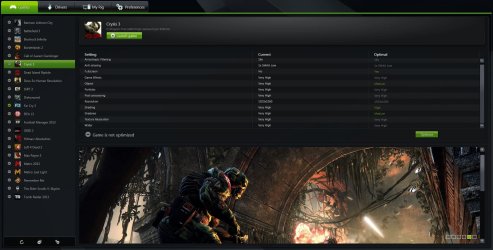
Just don't drop everything at once or a long way in one go. Like Asta said work in baby steps, it may take a while but getting the best performance versus the best possible visuals will be worth it in the end. Try toning down Anti Aliasing, textures, ambient lighting and tessellation as they can hog resources on your GPU. It's worth playing with every game's settings too as sometimes you can push your card a bit more for some less demanding games. Here's a shot below where I tried going higher than Experience recommended and everything's fine.
My Computer
Computer type
PC/Desktop
Computer Manufacturer/Model Number
Custom Build
OS
W7 Pro x64 SP1 | W10 Pro IP x64 | W8.1 Pro x64 VM | Linux Mint VM
It must be multiplayer as I haven't seen it in the game either. Mind you I only got about half way through and got a bit bored of it, I'll have to finish it off sometime. I've never even bothered with the multiplayer.
My Computer
Computer type
PC/Desktop
Computer Manufacturer/Model Number
Custom Build
OS
W7 Pro x64 SP1 | W10 Pro IP x64 | W8.1 Pro x64 VM | Linux Mint VM
Maybe you can look at the specs of my computer but I would think that i'm able to play some games with maximum settings.
Now I actually get the feeling that I'm below the performance that I should be at.
Like tomb raider 2013 I think it should be able for my specs to play it at ultra but to.play it good I need to be between normal and high.
Or am I just mistakenlyng my specs?
My Computer
Computer type
PC/Desktop
Computer Manufacturer/Model Number
Custom build
OS
Windows 7 Ultimate Edition (64-bit) Service Pack 1
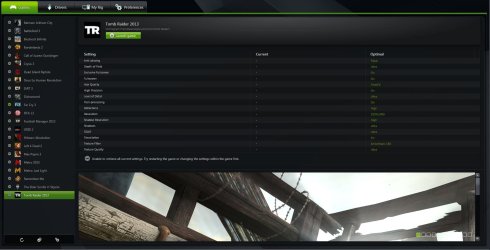
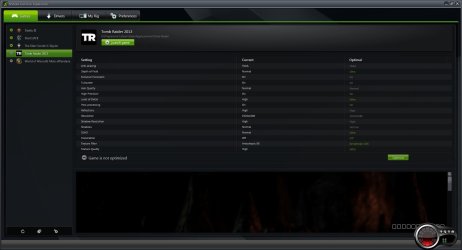
Here is what Experience recommends for my specs, give the specs and the settings a quick comparison. Also take a screenshot of your Experience recommendations for Tomb Raider with the Snipping Tool and upload it here for us to take a look at.
My Computer
Computer type
PC/Desktop
Computer Manufacturer/Model Number
Custom Build
OS
W7 Pro x64 SP1 | W10 Pro IP x64 | W8.1 Pro x64 VM | Linux Mint VM
I'd say that looks about right to be honest. There's a big difference between the 560ti and the 780, and the only real differences are Tessellation, Shadows and Hair Quality. These will put a fair amount of extra stress on the GPU so that looks like it is optimising your performance vs visuals pretty well.
Those settings are still high and more than acceptable though, they're nothing to sniff at.
My Computer
Computer type
PC/Desktop
Computer Manufacturer/Model Number
Custom Build
OS
W7 Pro x64 SP1 | W10 Pro IP x64 | W8.1 Pro x64 VM | Linux Mint VM
You also have to remember that, depending on how good (coded) the porting is to the PC, that's how good your GPU can help maximize your gaming experience. If the port is crap, like most of UBI's shooter games, there is only so much you can do... dedicated pc shooters are few and far between now a days.