
Relocate System Files on a Dual Boot

That was really a good idea, but it doesn't accept upgrading, giving back this message:

The following issues are preventing Windows from upgrading. Cancel the upgrade, complete each task, and then restart the upgrade to continue.

You can’t upgrade 64-bit Windows to a 32-bit version of Windows. To upgrade, obtain a 64-bit version of the installation disc, or go online to see how to install Windows 7 and keep your files and settings.

32-bit Windows cannot be upgraded to a 64-bit version of Windows. To upgrade, obtain a 32-bit version of the Windows installation disc.

Windows needs to be restarted so necessary changes to system files can be made before continuing.


This is not true because on System properties it is System Type: 64-bit Operating System. This is probably related to the issue I reported earlier, trying a repair with the DVD tells me that this repair is not for the installed system.

This installation is very recent, as I mentioned earlier. I never had issues, but the last years I have all sorts, even if permanently upgrading my computer.
 

My Computer My Computer

At a glance

Windows 7 Ultimate 64-bit SP1AMD Athlon 64 II X3 440Kingston kit 4GB DDR3 1333MHz (KVR1333D3N9K2/4)
Computer type
PC/Desktop
Computer Manufacturer/Model Number
Home assembled
OS
Windows 7 Ultimate 64-bit SP1
CPU
AMD Athlon 64 II X3 440
Motherboard
M4A785TD-V EVO
Memory
Kingston kit 4GB DDR3 1333MHz (KVR1333D3N9K2/4)
Monitor(s) Displays
ASUS AS VH198S
Screen Resolution
1440x900
Hard Drives
Crucial MX300 2.5" SSD SATA,
Western Digital Caviar Black WD1002FAEX SATA-III,
Samsung HD161HJ SATA-II,
Seagate Barracuda ST3120022A ATA,
Western Digital WD800BB ATA.
Case
Standard
Cooling
Standard
Keyboard
Safeway SW-20
Mouse
Logitech Anywhere, Logitech MX Anywhere 2S, Technet M006
Internet Speed
130 Mbs fiber
Antivirus
Avast Premier
Browser
Firefox, Ice Dragon and Opera
Other Info
PCI ATA-133 Adapter,
Parallel Port Card PCI - PU005V2.
Did you try unplugging all other HD's before attempting Repair Install, to eliminate any cross-drive corruption resulting from the attempts to create a Windows-managed Dual Boot you were advised against for this very reason?

You said you were ignoring our advice because you sometimes like to have a Windows Dual Boot menu when in Win7. Why is this? You don't have the menu from within the OS anyway, only at the BIOS level just as Windows is starting - when you can instead choose the HD to boot in BIOS Boot Menu without cross-contamination of boot sectors.

What I would do at this point is unplug all other HD's except Win7, reset the CMOS, wipe the HD and clean reinstall Win7. http://pcsupport.about.com/od/fixtheproblem/tp/clearcmos.htm
http://www.sevenforums.com/tutorials/91339-ssd-hdd-optimize-windows-reinstallation.html

Then i would unplug all other HD's except XP, run an XP Repair Install to correct it's boot files and config: Repair Windows XP - How To Perform a Repair Installation of Windows XP - Part 1 of 2

If I am missing anything important please explain in plain language.
 
Did you try unplugging all other HD's before attempting Repair Install, to eliminate any cross-drive corruption resulting from the attempts to create a Windows-managed Dual Boot you were advised against for this very reason?
No, I did just as you told me and I thought it was the simplest, quickest and best idea:
Run a Repair Install of Windows 7 from desktop since you report it will start. This will reinstall the OS to repair the irreparable System Files, and reconfigure the Dual Boot with XP if you leave XP HD plugged in
.
You said you were ignoring our advice because you sometimes like to have a Windows Dual Boot menu when in Windows 7.
Sorry, I was not ignoring at all and you are absolutely right, but the OS boot menu is much more convenient, and I could have it only temporarily when needed. I could export the Bcdedit with the menu, then clear the the boot menu and export it again. This way I would have both versions for when I needed frequent OS changing, what is not often but happens from time to time.

What I would do at this point is unplug all other HD's except Windows 7, reset the CMOS, wipe the HD and clean reinstall Windows 7.
Good advice, I will. I was just going to do it when I found your post, but now I'll have to leave for later or tomorrow. I'll follow the tutorial, which has some of the operations I used to installed the Win7 DVD on a USB flash. It is a pity having to restart all over again, but it is best now.
 
Last edited:

My Computer My Computer

At a glance

Windows 7 Ultimate 64-bit SP1AMD Athlon 64 II X3 440Kingston kit 4GB DDR3 1333MHz (KVR1333D3N9K2/4)
Computer type
PC/Desktop
Computer Manufacturer/Model Number
Home assembled
OS
Windows 7 Ultimate 64-bit SP1
CPU
AMD Athlon 64 II X3 440
Motherboard
M4A785TD-V EVO
Memory
Kingston kit 4GB DDR3 1333MHz (KVR1333D3N9K2/4)
Monitor(s) Displays
ASUS AS VH198S
Screen Resolution
1440x900
Hard Drives
Crucial MX300 2.5" SSD SATA,
Western Digital Caviar Black WD1002FAEX SATA-III,
Samsung HD161HJ SATA-II,
Seagate Barracuda ST3120022A ATA,
Western Digital WD800BB ATA.
Case
Standard
Cooling
Standard
Keyboard
Safeway SW-20
Mouse
Logitech Anywhere, Logitech MX Anywhere 2S, Technet M006
Internet Speed
130 Mbs fiber
Antivirus
Avast Premier
Browser
Firefox, Ice Dragon and Opera
Other Info
PCI ATA-133 Adapter,
Parallel Port Card PCI - PU005V2.
Try unplugging the XP HD to see if Repair Install will work. It might be confusing the installer.

Normally Win7 installer would autoconfigure the dual boot, but it appears there is corruption either at the BIOS or boot sector level which is interfering.

If you move directly to clean reinstall then you can try with the XP HD plugged in so that Win7 autoconfigures the Dual Boot, but I would move the XP boot files into its partition using the commands given earlier or via an XP Repair Install. This might be the problem in itself.

Or you can unplug XP HD and boot via BIOS, or install EasyBCD 2.0 to add XP to Dual Boot menu.
 
No way, not even unplugging the XP HD before trying the Repair Install. It acts as I were trying to instal a different version. This reminds of the startup recover also saying that I am trying to repair a non compatible version of Windows.

I have removed all boot files from all drives before repairing the boot. That was just after saved the old ones which I deleted too early. By the way, after so much work making a new boot.ini by hand, I found a small app to build them automatically.

I am going straight to the clean install following your instructions and links on your post before last.
 

My Computer My Computer

At a glance

Windows 7 Ultimate 64-bit SP1AMD Athlon 64 II X3 440Kingston kit 4GB DDR3 1333MHz (KVR1333D3N9K2/4)
Computer type
PC/Desktop
Computer Manufacturer/Model Number
Home assembled
OS
Windows 7 Ultimate 64-bit SP1
CPU
AMD Athlon 64 II X3 440
Motherboard
M4A785TD-V EVO
Memory
Kingston kit 4GB DDR3 1333MHz (KVR1333D3N9K2/4)
Monitor(s) Displays
ASUS AS VH198S
Screen Resolution
1440x900
Hard Drives
Crucial MX300 2.5" SSD SATA,
Western Digital Caviar Black WD1002FAEX SATA-III,
Samsung HD161HJ SATA-II,
Seagate Barracuda ST3120022A ATA,
Western Digital WD800BB ATA.
Case
Standard
Cooling
Standard
Keyboard
Safeway SW-20
Mouse
Logitech Anywhere, Logitech MX Anywhere 2S, Technet M006
Internet Speed
130 Mbs fiber
Antivirus
Avast Premier
Browser
Firefox, Ice Dragon and Opera
Other Info
PCI ATA-133 Adapter,
Parallel Port Card PCI - PU005V2.
I'll do that.

Just to see what the installation would do, I tried to upgrade my 64-bit OS with the 32-bit version. The result was exactly the same! But this time it was right.

Thanks again.
 

My Computer My Computer

At a glance

Windows 7 Ultimate 64-bit SP1AMD Athlon 64 II X3 440Kingston kit 4GB DDR3 1333MHz (KVR1333D3N9K2/4)
Computer type
PC/Desktop
Computer Manufacturer/Model Number
Home assembled
OS
Windows 7 Ultimate 64-bit SP1
CPU
AMD Athlon 64 II X3 440
Motherboard
M4A785TD-V EVO
Memory
Kingston kit 4GB DDR3 1333MHz (KVR1333D3N9K2/4)
Monitor(s) Displays
ASUS AS VH198S
Screen Resolution
1440x900
Hard Drives
Crucial MX300 2.5" SSD SATA,
Western Digital Caviar Black WD1002FAEX SATA-III,
Samsung HD161HJ SATA-II,
Seagate Barracuda ST3120022A ATA,
Western Digital WD800BB ATA.
Case
Standard
Cooling
Standard
Keyboard
Safeway SW-20
Mouse
Logitech Anywhere, Logitech MX Anywhere 2S, Technet M006
Internet Speed
130 Mbs fiber
Antivirus
Avast Premier
Browser
Firefox, Ice Dragon and Opera
Other Info
PCI ATA-133 Adapter,
Parallel Port Card PCI - PU005V2.
the OS boot menu is much more convenient

Yes I like it that way too.
 

My Computers My Computers

  • At a glance

    7 X64i5 84002x8gb 3200mhz
    Computer type
    PC/Desktop
    OS
    7 X64
    CPU
    i5 8400
    Motherboard
    gigabyte b365m ds3h
    Memory
    2x8gb 3200mhz
    Hard Drives
    various
    PSU
    pure power 11 400w cm
    Case
    Coolermaster
    Cooling
    cryorig m9i
  • At a glance

    7x64g54008gb ddr4 2400
    Computer type
    PC/Desktop
    OS
    7x64
    CPU
    g5400
    Motherboard
    ga b365m ds3h
    Memory
    8gb ddr4 2400
    PSU
    xfx pro 450w
SIW2, what could account for the installer erroring that it's the wrong bit version when trying to Repair Install or Startup Repair?
 
Probably because it is the wrong bit version.

But not necessarily 3
 

My Computers My Computers

  • At a glance

    7 X64i5 84002x8gb 3200mhz
    Computer type
    PC/Desktop
    OS
    7 X64
    CPU
    i5 8400
    Motherboard
    gigabyte b365m ds3h
    Memory
    2x8gb 3200mhz
    Hard Drives
    various
    PSU
    pure power 11 400w cm
    Case
    Coolermaster
    Cooling
    cryorig m9i
  • At a glance

    7x64g54008gb ddr4 2400
    Computer type
    PC/Desktop
    OS
    7x64
    CPU
    g5400
    Motherboard
    ga b365m ds3h
    Memory
    8gb ddr4 2400
    PSU
    xfx pro 450w
Probably because it is the wrong bit version.
It wasn't the wrong bit version if we believe on Control Panel >> System.


I am falling from a small hole into a bigger and deeper one.

I followed that tutorial. To be sure and not to make mistakes, I copied the commands from there to a text file which I opened when using the DVD (or USB flash) to prepare the installation.

I started installing and all went well until the first of the several automatic reboots during the installation. There, it was lost. it booted OK, but while loading Windows, right after the growing and shrinking logo there was a fast blue screen and rebooted. I tried a couple of time more, but as I can't set the OS not to reboot at a blue screen or even with the break button, it is impossible to reed.

I tried several times to install from the USB flash and from the DVD. Always the same. This is the first time I fail to install any OS. Then I even tried something really uncommon. I extracted the DVD to folders and files on the Backup HD (disk 1) and booted from there after starting with the DVD. No change. between trials I deleted the 200MB system reserved partition to change and because I thought it was too small to contain System Volume Information. All trials came to same result: after the first reboot the blue screen followed the Windows logo.

Trying to repair with the Windows installer DVD produces the same result as before: no compatibility between the recovery and the OS. Cant all this be because the system is on XP? If so, can it be moved to Windows 7?


- - - - - - - - - - / / / / / - - - - - - - - - - / / / / / - - - - - - - - - -


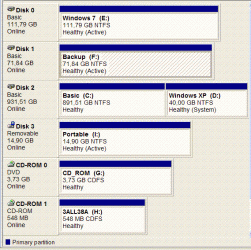
Here is the configuration, now as seen from XP. I hope it will help to understand the problem.

Disk # . . . . Size. . . . . . Type . . . .[Names]
------- . . . . -------- . . . ----- . . . .-----------------------------------
Disk 0 . . . . 112 GB . . . SCSI . . . E: Windows 7 /64-bit
Disk 1 . . . . . 72 GB . . . SCSI . . . F: Backup (No OS, no root files)
Disk 2 . . . . 963 GB . . . ATA . . . . D: Windows XP /32-bit & C: Basic


Windows Boot Manager
--------------------
identifier . . . . . . . {bootmgr}
device . . . . . . . . . .partition=I:
description . . . . . . .Windows Boot Manager
locale . . . . . . . . . . en-US
inherit. . . . . . . . . . {globalsettings}
default . . . . . . . . . {default}
resumeobject . . . . .{4d9053eb-3451-11e0-bc64-b316d04564c7}
displayorder . . . . . .{default}
toolsdisplayorder . . {memdiag}
timeout . . . . . . . . .3

Windows Boot Loader
-------------------
identifier . . . . . . . .{default}
device . . . . . . . . . .partition=I:
path . . . . . . . . . . .\Windows\system32\winload.exe
description . . . . . . Windows 7
locale . . . . . . . . . .en-US
inherit . . . . . . . . . {bootloadersettings}
osdevice . . . . . . . .partition=I:
systemroot . . . . . . \Windows
resumeobject . . . . {4d9053eb-3451-11e0-bc64-b316d04564c7}
nx . . . . . . . . . . . . OptIn
detecthal . . . . . . . .Yes


Disk Mgmt Snapshot
 

Attachments

  • CompManage.GIF
    CompManage.GIF
    46.2 KB · Views: 6
Last edited:

My Computer My Computer

At a glance

Windows 7 Ultimate 64-bit SP1AMD Athlon 64 II X3 440Kingston kit 4GB DDR3 1333MHz (KVR1333D3N9K2/4)
Computer type
PC/Desktop
Computer Manufacturer/Model Number
Home assembled
OS
Windows 7 Ultimate 64-bit SP1
CPU
AMD Athlon 64 II X3 440
Motherboard
M4A785TD-V EVO
Memory
Kingston kit 4GB DDR3 1333MHz (KVR1333D3N9K2/4)
Monitor(s) Displays
ASUS AS VH198S
Screen Resolution
1440x900
Hard Drives
Crucial MX300 2.5" SSD SATA,
Western Digital Caviar Black WD1002FAEX SATA-III,
Samsung HD161HJ SATA-II,
Seagate Barracuda ST3120022A ATA,
Western Digital WD800BB ATA.
Case
Standard
Cooling
Standard
Keyboard
Safeway SW-20
Mouse
Logitech Anywhere, Logitech MX Anywhere 2S, Technet M006
Internet Speed
130 Mbs fiber
Antivirus
Avast Premier
Browser
Firefox, Ice Dragon and Opera
Other Info
PCI ATA-133 Adapter,
Parallel Port Card PCI - PU005V2.
Only the System drive should be marked Active. Use free partition Wizard bootable CD or Diskpart to mark all drives except XP Inactive then mark XP Active.
Free Download Magic Partition Manager Software - Partition Wizard Online
http://www.sevenforums.com/tutorials/71432-partition-mark-active.html

Try install again using Custom>Drive Options to delete, repartition and format before install.

If this fails, try wiping the HD again and use Step 2.2 in tutorial to partition and mark Active to try install.

Next try unplugging all other HD's to try install.

Please don't leave the listings off the top fo the disk mgmt screenshots as these are important..
 
I have tried many times as you said and not only once each, also combining the procedures. Some times it didn't even boot, but it often does. The problem is that it stops with a blue screen while loading the OS just when the shrinking/growing logo should be followed by the "Please Waite" screen. I remembered that I could stop the blue screen with the OS F8 boot menu option. It shows always the same code no matter the way I installed as above. This is it:
0x0000007B (0xFFEFF880009A99428, 0xFFFFFFFFC0000034, 0x0000000000000000, 0x0000000000000000)

On the installations that didn't reboot I tried to recover with the DVD, but same notice about the OS compatibility with the recover version is always there. some times no OS is found after loading the SCSI adapter drivers, other times it founds 2, but the HDs show up always on the window to find the drivers and also on the command line window.

Some times I tried to rebuild the bootmanager. The command bootsect /fixbmbr worked, but fixboot gave an error Element not found. RebuildBCD answered Add (drive):\windows to bcd? and after the yes it gave the same error Element not found.

After so many installations I have made with the previous OSs through years without a single problem, this one now is driving me crazy because I can't find a reason. It seems unreal. I've tried all I know. So how can I do it? I can't see a way to get rid of this issue.


Sorry for forgetting to post the list before.
 

Attachments

  • List.GIF
    List.GIF
    25.3 KB · Views: 6

My Computer My Computer

At a glance

Windows 7 Ultimate 64-bit SP1AMD Athlon 64 II X3 440Kingston kit 4GB DDR3 1333MHz (KVR1333D3N9K2/4)
Computer type
PC/Desktop
Computer Manufacturer/Model Number
Home assembled
OS
Windows 7 Ultimate 64-bit SP1
CPU
AMD Athlon 64 II X3 440
Motherboard
M4A785TD-V EVO
Memory
Kingston kit 4GB DDR3 1333MHz (KVR1333D3N9K2/4)
Monitor(s) Displays
ASUS AS VH198S
Screen Resolution
1440x900
Hard Drives
Crucial MX300 2.5" SSD SATA,
Western Digital Caviar Black WD1002FAEX SATA-III,
Samsung HD161HJ SATA-II,
Seagate Barracuda ST3120022A ATA,
Western Digital WD800BB ATA.
Case
Standard
Cooling
Standard
Keyboard
Safeway SW-20
Mouse
Logitech Anywhere, Logitech MX Anywhere 2S, Technet M006
Internet Speed
130 Mbs fiber
Antivirus
Avast Premier
Browser
Firefox, Ice Dragon and Opera
Other Info
PCI ATA-133 Adapter,
Parallel Port Card PCI - PU005V2.
If your install ends in bluescreen, try accessing Device manager to uninstall drivers in error, especially Display driver, so that the OS can start up. http://www.sevenforums.com/tutorials/15856-device-manager-access-during-windows-7-installation.html

Then update the drivers from optional Windows Updates or the Support Downloads webpage for the device model.

You can also move the HD to another computer, install Win7, then SysPrep the HD to remove all drivers and prepare it to start on new hardware. http://www.sevenforums.com/tutorial...lation-transfer-new-computer.html#post1161038

Sometimes we have to get creative.
 
Thanks again.

I can't do the second option. With the first, to be sure it would start with right HD (because it does't always happens at that point of the installation) when it rebooted I guided it with the BIOS menu. After loading the files in Safe Mode it stopped for a while and then the blue screen again.

Crazy! Maybe you have another idea to work around, please.
 

My Computer My Computer

At a glance

Windows 7 Ultimate 64-bit SP1AMD Athlon 64 II X3 440Kingston kit 4GB DDR3 1333MHz (KVR1333D3N9K2/4)
Computer type
PC/Desktop
Computer Manufacturer/Model Number
Home assembled
OS
Windows 7 Ultimate 64-bit SP1
CPU
AMD Athlon 64 II X3 440
Motherboard
M4A785TD-V EVO
Memory
Kingston kit 4GB DDR3 1333MHz (KVR1333D3N9K2/4)
Monitor(s) Displays
ASUS AS VH198S
Screen Resolution
1440x900
Hard Drives
Crucial MX300 2.5" SSD SATA,
Western Digital Caviar Black WD1002FAEX SATA-III,
Samsung HD161HJ SATA-II,
Seagate Barracuda ST3120022A ATA,
Western Digital WD800BB ATA.
Case
Standard
Cooling
Standard
Keyboard
Safeway SW-20
Mouse
Logitech Anywhere, Logitech MX Anywhere 2S, Technet M006
Internet Speed
130 Mbs fiber
Antivirus
Avast Premier
Browser
Firefox, Ice Dragon and Opera
Other Info
PCI ATA-133 Adapter,
Parallel Port Card PCI - PU005V2.
Let's start over: Verify you have the latest BIOS version, install from XP with only XP and target HD plugged in.

Now try running the Win7 installer from XP to install to it's target HD.

If this fails, Unplug all other HD's. Plug target HD into Disk0 only.

Reset the CMOS: Clear CMOS - 3 Ways to Clear the CMOS - Reset BIOS

Set target HD as first to boot in BIOS setup.

Check the SATA controller setting, if it is in IDE mode leave it to try install. If install fails, try AHCI mode.

Now boot the Win7 DVD to wipe the HD: http://www.sevenforums.com/tutorials/91339-ssd-hdd-optimize-windows-reinstallation.html

After Cleaning HD, close CMD box and click Install Now, use Custom>Drive Options to create 100gb install partition, format it and Install.

Please post back result of each step and any error messages that result. If you get a blue screen try to get a camera snap of it to post back, if not get at least the first identifying number.
 
I'm back. Sorry if I couldn't post before because of the troubles I had as I explained below.

At some point of this thread I started having problems using my original installation DVD which I did not experiment before and had nothing to do with the subject of the thread. The results of many trials made me think that my DVD had gone bad. I tried to reinstall the OS, freshly installed just a couple of weeks ago, but always failed.

Then, I found a link to download a new ISO of the Windows 7 image to replace mine. It wasn't the version I had a license for, but I learned how to change it in a comment on a German site. After this I just had to follow the provided help on this thread to do what I needed and solved my issue. It is all there,

Thank you so much for the help from everyone and sorry for the difficulty after a certain point because of the failure of my DVD. I couldn't believe it failed just after a so recent and successful installation. I just wanted to change a little thing and it became a headache.
 
Last edited:

My Computer My Computer

At a glance

Windows 7 Ultimate 64-bit SP1AMD Athlon 64 II X3 440Kingston kit 4GB DDR3 1333MHz (KVR1333D3N9K2/4)
Computer type
PC/Desktop
Computer Manufacturer/Model Number
Home assembled
OS
Windows 7 Ultimate 64-bit SP1
CPU
AMD Athlon 64 II X3 440
Motherboard
M4A785TD-V EVO
Memory
Kingston kit 4GB DDR3 1333MHz (KVR1333D3N9K2/4)
Monitor(s) Displays
ASUS AS VH198S
Screen Resolution
1440x900
Hard Drives
Crucial MX300 2.5" SSD SATA,
Western Digital Caviar Black WD1002FAEX SATA-III,
Samsung HD161HJ SATA-II,
Seagate Barracuda ST3120022A ATA,
Western Digital WD800BB ATA.
Case
Standard
Cooling
Standard
Keyboard
Safeway SW-20
Mouse
Logitech Anywhere, Logitech MX Anywhere 2S, Technet M006
Internet Speed
130 Mbs fiber
Antivirus
Avast Premier
Browser
Firefox, Ice Dragon and Opera
Other Info
PCI ATA-133 Adapter,
Parallel Port Card PCI - PU005V2.
We're just glad you found a solution and thanks for the update.
 

My Computer My Computer

At a glance

W 7 64-bit UltimateIntel Q9550 Yorkfield8GB Dominator 8500C5DATI : XFX 5870
Computer Manufacturer/Model Number
* BFK Customs *
OS
W 7 64-bit Ultimate
CPU
Intel Q9550 Yorkfield
Motherboard
ASUS P5Q Pro
Memory
8GB Dominator 8500C5D
Graphics Card(s)
ATI : XFX 5870
Sound Card
Realtek HD Audio 7-1
Monitor(s) Displays
1x 47" LCD HDMI & 3x 26" LCD HDMI
Screen Resolution
1920x1080P & 1920x1200
Hard Drives
1x 80GB Intel X25-M G2 SSD : 1x 500GB & 1x 640GB WD Caviar Black(s)
PSU
Corsair 620HX
Case
Cooler Master RC-690
Cooling
Tuniq Tower 120, 2x 140mm and 3x 120mm case fans
Keyboard
Microsoft 500
Mouse
Razer Diamondback 3G
Internet Speed
14 Mb/s
Other Info
1x Koutech 3Gb/s SATA HDD Hot Swap Rack
Back
Top