

Indian
New member
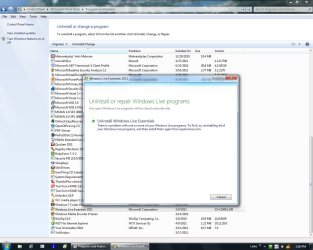
Control Panel/Programs & Features/Windows Live Essen[SIZE=+0]tials 2011 – when I double click WLE I get only the [SIZE=+0]U[/SIZE]ninstall option and not th[SIZE=+0]e[/SIZE] Repair option. The only WLE program I use is WLM. I deleted and uninstalled WLE and reinstalled it. I then had both option, Uninstall or Repair. Before I imported all my accounts, messages and contacts I ran the repair. Then, opening WLM I went to options/mail/advance tab/maintenance/store folder and I changed the location to my [SIZE=+0]D[/SIZE]:\ drive. It does a nice job of moving WLM where you want it. However, the next day the Repair option was gone. This also happened to a friend, we are both using Windows 7 Pro. Could the disappearance of the repair option have anything to do with moving WLM from Default to another drive? I wouldn’t think so since the mechanics to move it is built in to WLM. Any Ideas? Thanks.[/SIZE]
Attachments
Last edited:
My Computer
At a glance
Windows 7 Pro3 GB
- Computer Manufacturer/Model Number
- Home Built
- OS
- Windows 7 Pro
- Motherboard
- Intel DQ965GF
- Memory
- 3 GB
- Monitor(s) Displays
- Dell (1)
- Hard Drives
- 2


