CosmoSimianus
New member
- Local time
- 6:38 PM
- Messages
- 2
 Hello and be patient with me. This is my first.
 Computer A running Windows 7 Professional.. Desktop to be connected to from Home
Computer B running Windows 7 Home and Office..Laptop wanting to connect to Computer A
I would like to say I have configured it correctly as I have done this in the past, but obviously not
or I would not be seeking help.
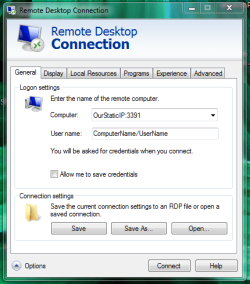
Anyway, The Remote Desktop on the laptop will allow me to connect with my password and BLANK password. I have that checked the registry to make sure the requires password is enbled. It allows me connect to a desktop remote screen but rejects both my password and the blank. This remote desktop does not reflect the user Picture Icon.
I have created the port forwarding to 3391 in my router. Went into registry on computer A and changed the port setting to reflect port 3391. I have tried the setup both as computer running any version and NAT Authentication.
My Computer
At a glance
Windows 7 home premium 64 bit
- Computer type
- PC/Desktop
- OS
- Windows 7 home premium 64 bit