Remote Desktop Connection on the same LAN

Bellzemos

New member
Member
VIP
Local time
4:55 AM
Messages
183
Hello,

I would like to establish a Remote Desktop Connection from my Windows 7 PC to my Windows XP PC. They are both on the same LAN but are not connected to any workgroup or domain.

Do they have to be in the same domain or workgroup in order for the RDC to work?

I have the RDC feature disabled on the Win7 PC since this is the one I will be on while connected to the XP PC (the XP PC has it enabled).

I am unable to get it to work though. Please tell me how do I go about it, I must be missing something.

Thank you.
 

My Computer

OS
Windows 7 Ultimate x64 SP1
Two or more networked computers that are not members of a domain are members of a workgroup. There is no other option. Having them all part of the same workgroup makes networking easier. What edition is the XP machine? Only XP Professional can host Remote Desktop but almost any computer can act as a client. Be sure to understand that Remote Assistance is not the same as Remote Desktop.
 

My Computer

Computer type
PC/Desktop
Computer Manufacturer/Model Number
HP
OS
Windows 7 Pro 64 bit
CPU
Xeon W3520
Memory
8 GB
Graphics Card(s)
Nvidia Geforce 210
That's not true, at least not in my case. The two PCs in question are on the same LAN but not in any Workgroup or Domain.


The problem was that I forgot that I disabled the Terminal Service on that particular XP machine quite some time ago. Anyway, the problem is solved, thank you anyway!
 

My Computer

OS
Windows 7 Ultimate x64 SP1
Two or more networked computers that are not members of a domain are members of a workgroup. There is no other option....

That's not true, at least not in my case. The two PCs in question are on the same LAN but not in any Workgroup or Domain....

That is Cool! Bellzemos

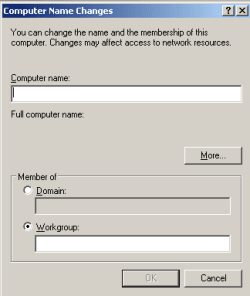
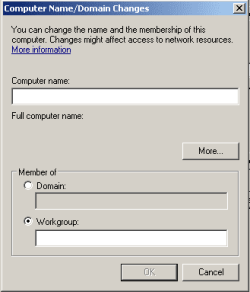
Care to show us a screenshot of how you managed not to put a computer into "any Workgroup or Domain"?

The question is rhetorical. I think that you misread the statements.

XP
XP.png

W7
W7.png
 

My Computer

Computer type
Laptop
Computer Manufacturer/Model Number
Employer provided Dell Latitude
OS
W7 Pro SP1 64bit
CPU
i7
Memory
8GB
Graphics Card(s)
Intel HD Graphics
Hard Drives
crappy SSD
Antivirus
Employer mandated Symantec Endpoint Protection
Browser
Pale Moon 64bit, IE11 64bit & Chrome 64bit
OK, I went to the Change Name dialog and there the radio button is set to Workgrop and it's called WORKGROUP. But under the System Properties (where the Windows version info etc. is) it says Workgroup: Not Available.

Anyway, the problem with RDP is gone. :)
 

My Computer

OS
Windows 7 Ultimate x64 SP1
Back
Top