
Hello,
I just spent like 2 hrs with no success to be able to access my Windows 8.1 machine (which I will call machine2) remotely using my Windows 7 machine (I will call it machine 1). Please help.
What I want to do: be able to access machine2 from machine1 remotely using remote desktop connection.
Step followed:
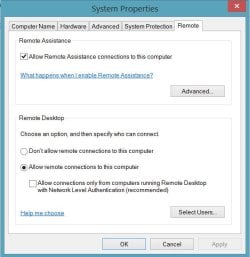
1- Enabled the Remote desktop connection on machine2 (image attached)
2- Disabled machine2 firewall (windows firewall)
3- Enabled DMZPlus mode on the router
4- Configured the Port number for machine2 in the router firewall section.
5- got the ip address of the router
6- tried to remotely connect from machine1 using the ip address to machine2, but didnt work.
I receive error image attached.
Please help. what should I do from here to make this work.
1. Who is your Internet Service Provider (ISP)?
US Providers - At&T
2. What type of Broadband connection are you using?
DSL
3. What is the exact Make and Model of your Modem, Router or Modem/Router Combo
Router AT&T Uverse 3801HGV
4. What is the Name of the Anti-Virus, Security or Firewall Software installed from the problematic computer?
Avira
thanks
I just spent like 2 hrs with no success to be able to access my Windows 8.1 machine (which I will call machine2) remotely using my Windows 7 machine (I will call it machine 1). Please help.
What I want to do: be able to access machine2 from machine1 remotely using remote desktop connection.
Step followed:
1- Enabled the Remote desktop connection on machine2 (image attached)
2- Disabled machine2 firewall (windows firewall)
3- Enabled DMZPlus mode on the router
4- Configured the Port number for machine2 in the router firewall section.
5- got the ip address of the router
6- tried to remotely connect from machine1 using the ip address to machine2, but didnt work.
I receive error image attached.
Please help. what should I do from here to make this work.
1. Who is your Internet Service Provider (ISP)?
US Providers - At&T
2. What type of Broadband connection are you using?
DSL
3. What is the exact Make and Model of your Modem, Router or Modem/Router Combo
Router AT&T Uverse 3801HGV
4. What is the Name of the Anti-Virus, Security or Firewall Software installed from the problematic computer?
Avira
thanks
Attachments

Last edited:
My Computer
- Computer type
- PC/Desktop
- Computer Manufacturer/Model Number
- Lenovo
- OS
- Windows 8.1
- Memory
- 32 gb
- Antivirus
- Avira
- Browser
- Chrome


