Remote Desktop not listing drives nor printers

dclausi

New member
Local time
9:57 AM
Messages
9
Hi! Never posted here before and I hope I can get some help.

I started using Windows 7 and I am getting some strange behaviour on my Remote Desktop.

After starting up RD for the first time, I noticed that all my drives on the local computer were accessible on the remote computer. At some point, the drive letters stopped appearing.

Also, I installed an HP laser printer and after installation, the printer could be accessed via the remote computer. For some strange reason, that stopped as well.

Can any one tell me how to resurrect my drives and printer on my remote machine?

Thanks,
David
 

My Computer My Computer

Computer Manufacturer/Model Number
HP
OS
windows7
So you are connecting to a computer that is Running Windows 7 Pro or higher correct?

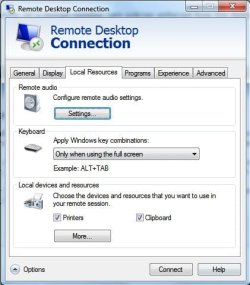
according to what i am seeing now becuase i am using remote desktop is that you activate everything in the local devices and resources under the Local rsources Tab, and then you click on MORE.

then that will show your printer and everything on the host comptuer is that correct.
 

My Computer My Computer

Computer Manufacturer/Model Number
HP Pavilion Elite HPE-410f
OS
Windows 7 Ultimate x64
CPU
AMD Phenom x6 1045t
Motherboard
N/A
Memory
8 GB
Graphics Card(s)
ATI Radeon HD 5570
Sound Card
Realtek Highdefinition Audio / 5.1 Dolby Setup
Monitor(s) Displays
HP w2207h Widescreen
Screen Resolution
1680*1050
Hard Drives
1 TB (fixed), 320 Portable maxtor, Server Hard drives
PSU
350 Watt
Case
HP CASE
Cooling
Bass
Keyboard
Logitech MX 5500
Mouse
Logitech MX 5500
Internet Speed
ROAD RUNNER 16MB D/512 U
Did you check the properties of the RDP connection?
Before Clicking on Connect look into the options and select the local resources. Here you can try to connect your local drives, printers, sound etc to the session.
Keep in mind that depending on the user rights and terminal server policies on the destionation server (might be a terminal server) this can be disabled.
 

My Computer My Computer

Computer Manufacturer/Model Number
Dell
OS
XP
CPU
P4
Memory
512
Hard Drives
2
For clarification, I am running Remote Desktop from a Windows 7 computer and then accessing an XP computer at the remote location. The Remote Desktop is working so I am able to access and use the remote computer. However:

1) The remote XP computer can not access the disk drives of the local W7 computer. This did work when I first started using the W7 computer and then for some strange unknown reason, I stopped having access to the local disk drives from the remote location. This just stopped all of a sudden. Yes, all the Options are set correctly to access the local disk drives. I have turned the Options off/on and rebooted to no avail.

2) The remote computer does not recognize the printer on the local machine. This is a great feature that I use extensively. I installed a new HP laserjet printer and the printer was available from the remote computer. Then, again without any explanation, the printer stopped being accessible from the remote computer. Yes, the Options are set to access the printers from the remote computer and I have turned them off/on and rebooted to no avail.

Any suggestions are welcomed - I am very frustrated by this and I have no idea what is going on.

Thanks,
David
 

My Computer My Computer

Computer Manufacturer/Model Number
HP
OS
windows7
1 assuming you mean you cannot connect to the Windows 7 drives from within the RDP session on the XP machine. And you expanded all of the trees in your explorer window (obviously , because u used it before)

- Did this behavior change after a security patch has been installed?
 

My Computer My Computer

Computer Manufacturer/Model Number
Dell
OS
XP
CPU
P4
Memory
512
Hard Drives
2
I do not know if there were any security patches added. I did not add any manually myself.
 

My Computer My Computer

Computer Manufacturer/Model Number
HP
OS
windows7
Security Patches from microsoft update are loaded if you sethis to automatic.
For XP did not find any generic policies inhibiting this behavior.
assuming you know the way in RDP during a session.

Within windows explorer
My NEtwork Places
+Entire Network
+Microsoft Terminal Service
+tsclient
+\tsclient\c

Is the Remote XP a domain member (are policies enforced from the domain)?
 

My Computer My Computer

Computer Manufacturer/Model Number
Dell
OS
XP
CPU
P4
Memory
512
Hard Drives
2
My apologies - I'm not clear on what you are asking.

Some clarification - the remote computer is an XP computer. I can run remote desktop from 2 other XP computers that I own and from those I am able to access the local drives and printers.

However, when I run remote desktop from my Windows7 computer and remotely access the same XP computer, I can not see via the remote computer the drives and printer connected to the local computer.

Quest21 - I do not know where to find the Microsoft Terminal Service on my W7 computer. I searched, but was unable to locate this path. Can you help me out?
 

My Computer My Computer

Computer Manufacturer/Model Number
HP
OS
windows7
Would you be needing to check if in your RDP prompt you have the Printers ticked, Click on the "More.." button for drives.
Noname.jpg
 

My Computer My Computer

Computer Manufacturer/Model Number
Lenovo ThinkPad T60
OS
Windows 7 Ultimate 64Bit
CPU
GenuineIntel Intel(R) Core(TM) DuoCore T2400 @ 1.83GHz
Motherboard
Intel(R) 82801G (ICH7 Family)
Memory
2.00 GB
Graphics Card(s)
Mobile Intel(R) 945 Express Chipset
Sound Card
SoundMAX Integrated Digital HD Audio
Monitor(s) Displays
ThinkPad Display
Screen Resolution
1400x1050
Hard Drives
100Gb SATA
Keyboard
Standard Keyboard
Mouse
HID-compliant Mouse
Internet Speed
Cable Broadband - 54Mbps
Other Info
Intel(R) PRO/1000 PL Network Connection
11a/b/g Wireless LAN Mini PCI Express Adapter
Yes - the RDC settings for both the Printers and the Drives are set. As mentioned above, everything was working ok (i.e., I was able to access the local printers and drives from the remote computer) and then all of a sudden I was not able to see the printers or drives from the remote computer. I have no idea what changed.

For example, after I installed the printer software, I was able to access this local printer from the remote printer and printed successfully. I was happy! Then, for some strange reason, the local printer was not apparent from the remote computer. I am trying to find a way to make this work again. No idea what changed and hopefully someone in this forum can give me some assistance.

Thanks,
David
 

My Computer My Computer

Computer Manufacturer/Model Number
HP
OS
windows7
I encountered this exact issue after some Windows 7 updates where installed

I was still able to access the drives from the remote session by going through:

My Network Places
- Entire Network
- Microsoft Terminal Services
- tsclient
 

My Computer My Computer

OS
Windows 7 Professional
I had the same problem. I couldn't see my local drives when connecting my home laptop running Windows 7 to my work computer running Windows XP using Remote Desktop Connection.

I finally fixed it by doing the following:

1) Open the Remote Desktop Connection on my local machine, click on the Local Resources tab, select the More button at the bottom, UNCHECK ALL local devices and resources and then click the OK button.
2) Click the General tab and then click the Save button.
3) Click the Connect button, sign on to the remote computer and then disconnect.
4) Repeat step 1 again except this time CHECK the local resources you want (I just checked my local disk drives) and save the changes.
5) Connect to the remote computer again and your local drives should appear.

I'm guessing the problem had something to do with the RDC settings on the local machine getting corrupted. Clearing the local resources, saving the changes, connecting to the remote host, disconnecting, selecting the local resources again and then saving the changes seems to have fixed the problem (for me anyway).
 

My Computer My Computer

Computer Manufacturer/Model Number
HP DV9700
OS
Windows 7
CPU
Centrino Duo
Memory
4GB
Graphics Card(s)
NVIDIA GeForce 8600M GS
Sound Card
Realtek
Back
Top