Remote Desktop - Only Connects With IP Not Computer Name?

A4orce84

New member
Member
Local time
2:42 PM
Messages
44
Hello Everyone,

I recently got my remote desktop working in my home LAN, but I can ONLY connect to to my machine via its IP address. It refuses to connect through the actual computer-name as I would prefer to.

I'm assuming here that there is a possible issue with the IP is tied to the computer-name, aka some type of DNS issue. Keep in mind I am not trying to access my computer "globally" I am just trying to connect to via its computer name when I am at home and connected to my home LAN.


If anyone can offer any suggestions or help, it would be greatly appreciated.

Thanks,


--Asif
 

My Computer My Computer

At a glance

windows vista
OS
windows vista
What operating systems are the the computers on your LAN running? Do they belong to the same workgroup? Do the all have the same octet (192.168.0.xxx)?
 

My Computer My Computer

At a glance

Windows 7 Ultimate x64 SP1Core i7-2670QM8GB DDR3 PC3-10600Intel HD Graphics 3000 + GeForce GT 540M
Computer Manufacturer/Model Number
Dell XPS 15 L502x
OS
Windows 7 Ultimate x64 SP1
CPU
Core i7-2670QM
Memory
8GB DDR3 PC3-10600
Graphics Card(s)
Intel HD Graphics 3000 + GeForce GT 540M
Screen Resolution
1920x1080
Hard Drives
1TB 5400RPM Seagate
Hey Kegobeer,

My Desktop is running Windows 7, and I am trying to connect from my Windows 7 work laptop (also tried from my Mac laptop using the Microsoft Remote Desktop client) with the same result on both machines. That they can only connect to my desktop via IP address and not the actual computer-name.

The Mac and the Desktop are on the same workgroup, and obviously my work laptop is on a different workgroup.

Yes, they all have the same "192.168.2.xxx" octet IP. As I said, my gut is my desktop computer-name is not mapped correctly, but I'm not familiar enough with ipconfig / ping / etc. to figure all that out easily.

If you have any other questions, please let me know! =)

Thanks!
 

My Computer My Computer

At a glance

windows vista
OS
windows vista
TTT
 

My Computer My Computer

At a glance

windows vista
OS
windows vista
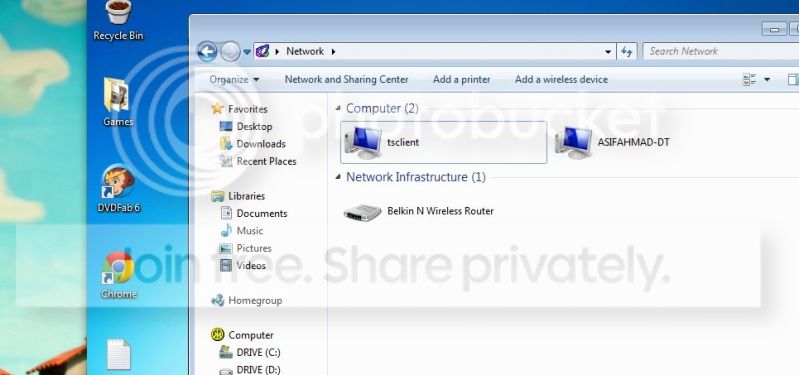
When you open the network browser, do the computer names show?
 

My Computer My Computer

At a glance

Windows 7 Ultimate x64 SP1Core i7-2670QM8GB DDR3 PC3-10600Intel HD Graphics 3000 + GeForce GT 540M
Computer Manufacturer/Model Number
Dell XPS 15 L502x
OS
Windows 7 Ultimate x64 SP1
CPU
Core i7-2670QM
Memory
8GB DDR3 PC3-10600
Graphics Card(s)
Intel HD Graphics 3000 + GeForce GT 540M
Screen Resolution
1920x1080
Hard Drives
1TB 5400RPM Seagate
Hey Kegobeer,

I see the following:
1921682101-1.jpg


tsclient from what I read is my RDP connection from my mac to my Windows 7 desktop, since I have file sharing turned on.

Again, I think its something with the general way the IP is assigned to my computer name (AsifAhmad-DT).

If you have any other questions, please let me know.

Thanks.
 

My Computer My Computer

At a glance

windows vista
OS
windows vista
TTT
 

My Computer My Computer

At a glance

windows vista
OS
windows vista
since there's no local dns server they're connecting to, they won't know how to resolve the names to the IP's. If you type "ping (yourpcname)" in a commandline (start>search>cmd and click the first result) on one of the clients does it resolve to an IP or just say "ping request could not find host"?

For a solution either way, you can do this:

Go to C:\windows\system32\drivers\etc and open the "hosts" file in notepad.

At the end of the text start a new line (don't include a star\asterisk in front this time) and type in the remote PC's IP, then a space and then the FQDN (which you can find by right-clicking Computer>properties and looking at "Full computer name"). Then save and exit and try RDP with the workstation name again.

You need to do this to each computer, but this is the best solution because you only have a few. There may be a full-on fix and some weird local-dns-emulation with homegroups but I'm far more familiar with domains, as "homegroups" are newer (usually temporary) implementations from Microsoft that seem to get phased out and completely redesigned with every new Windows.

Hopefully that helps.
 

My Computer My Computer

At a glance

Windows 7 Professional x64
OS
Windows 7 Professional x64
Back
Top