Remote has 2 Sets of Volume Buttons

DevourDarkness

New member
Member
Local time
9:43 AM
Messages
58
Hi, I know this is not exactly the right sort of forum but I thought someone might know why the remote that came with my 5.1 speakers has 2 volume up and volume down buttons. But pressing either 2 of the volume up buttons just does the same thing, increase the volume on the display by one, and same for volume down.

So why does it have 2 sets? Is it some special feature or something to do with surround? Or even just for looks lol? Pic:
20100925133814358.jpg
 

My Computer My Computer

At a glance

Windows 7 Ultimate 64-BitAMD Phenom II X4 955 BE OC to 3.62GhzG-Skill NT 4GBSapphire Radeon HD 4670
Computer Manufacturer/Model Number
My Own
OS
Windows 7 Ultimate 64-Bit
CPU
AMD Phenom II X4 955 BE OC to 3.62Ghz
Motherboard
Gigabyte MA770T-UD3
Memory
G-Skill NT 4GB
Graphics Card(s)
Sapphire Radeon HD 4670
Monitor(s) Displays
Dell 20' and some 16' inch Generic
Screen Resolution
1680x1050
Hard Drives
250GB ?
500GB Western Digital
PSU
Seasonic M12 II Bronze 520W
Case
NZXT Guardian 921
Cooling
Xigmatek S1283 Red Scorpion
Keyboard
Dell
Mouse
Dell
Internet Speed
6000Mbps
As a guess, I'd say that one set is for the front pair of speakers and the other is for the rear speakers. It could also be that one is actually a front-to-rear fader and the other is a left-right balance control.

What brand and model are the speakers?

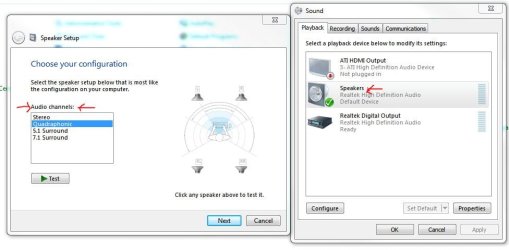
In Device Manager>>Sound, what do you see highlighted under "Set a playback device..." and what do you see selected when you press "Configure"? The fact that both sets of buttons do the exact same thing makes me think that Windows isn't sure what kind of speaker configuration you have.

Did the speakers come with any software? If so, is it properly installed?
 

Attachments

  • Speakers.JPG
    Speakers.JPG
    54.2 KB · Views: 4

My Computer My Computer

At a glance

Main - Windows 7 Pro SP1 64-Bit; 2nd - Window...Main - Core i7 2600K; 2nd - Core i7 920Main - 16GB Corsair Vengeance; 2nd - 12GB Cor...Main - XFX Radeon 6870 1GB; 2nd - XFX Radeon ...
Computer Manufacturer/Model Number
Self
OS
Main - Windows 7 Pro SP1 64-Bit; 2nd - Windows Server 2008 R2
CPU
Main - Core i7 2600K; 2nd - Core i7 920
Motherboard
Main - Asus P8Z68-V Pro/Gen3; 2nd - Gigabyte GA-EX58-UDR3
Memory
Main - 16GB Corsair Vengeance; 2nd - 12GB Corsair Vengeance
Graphics Card(s)
Main - XFX Radeon 6870 1GB; 2nd - XFX Radeon 4870 1GB
Sound Card
Both: Onboard Realtek Azalia
Monitor(s) Displays
Main - Hann 25" + I-INC 25" + Acer 23"; 2nd - Upgrading Soon
Screen Resolution
Main - 1920x1080 (All Three Monitors); 2nd - Upgrading Soon
Hard Drives
Main - (1) Crucial M4 128GB (Boot)
Main - (1) Seagate 2TB 64MB Cache (Data)
Main - (1) Seagate 2TB 64MB Cache (Data Backup)
2nd - (1) Intel X25-M SSD 80GB (Boot)
2nd - (3) Seagate 1TB 32MB Cache (Data Backup)
2nd - (1) Seagate 320GB (Because)
PSU
Main - OCZ 600W Modular; 2nd - OCZ 600W
Case
Main - Thermaltake Element G; 2nd - NZXT something or other
Cooling
Main - Corsair H80; 2nd - Prolimatech Megahalems
Keyboard
Main - Razer Reclusa; 2nd - Old MS Keyboard
Mouse
Main - Logitech MX Revolution; 2nd - Old MS Mouse
Internet Speed
20Mbps Time-Warner Cable
Its not about Windows. Everything in terms of software is set up correctly. It's the fact that the volume display on the subwoofer is affected equally by each button and I hear no difference between pressing one and another.
 

My Computer My Computer

At a glance

Windows 7 Ultimate 64-BitAMD Phenom II X4 955 BE OC to 3.62GhzG-Skill NT 4GBSapphire Radeon HD 4670
Computer Manufacturer/Model Number
My Own
OS
Windows 7 Ultimate 64-Bit
CPU
AMD Phenom II X4 955 BE OC to 3.62Ghz
Motherboard
Gigabyte MA770T-UD3
Memory
G-Skill NT 4GB
Graphics Card(s)
Sapphire Radeon HD 4670
Monitor(s) Displays
Dell 20' and some 16' inch Generic
Screen Resolution
1680x1050
Hard Drives
250GB ?
500GB Western Digital
PSU
Seasonic M12 II Bronze 520W
Case
NZXT Guardian 921
Cooling
Xigmatek S1283 Red Scorpion
Keyboard
Dell
Mouse
Dell
Internet Speed
6000Mbps
What brand and model number are the speakers?
 

My Computer My Computer

At a glance

Main - Windows 7 Pro SP1 64-Bit; 2nd - Window...Main - Core i7 2600K; 2nd - Core i7 920Main - 16GB Corsair Vengeance; 2nd - 12GB Cor...Main - XFX Radeon 6870 1GB; 2nd - XFX Radeon ...
Computer Manufacturer/Model Number
Self
OS
Main - Windows 7 Pro SP1 64-Bit; 2nd - Windows Server 2008 R2
CPU
Main - Core i7 2600K; 2nd - Core i7 920
Motherboard
Main - Asus P8Z68-V Pro/Gen3; 2nd - Gigabyte GA-EX58-UDR3
Memory
Main - 16GB Corsair Vengeance; 2nd - 12GB Corsair Vengeance
Graphics Card(s)
Main - XFX Radeon 6870 1GB; 2nd - XFX Radeon 4870 1GB
Sound Card
Both: Onboard Realtek Azalia
Monitor(s) Displays
Main - Hann 25" + I-INC 25" + Acer 23"; 2nd - Upgrading Soon
Screen Resolution
Main - 1920x1080 (All Three Monitors); 2nd - Upgrading Soon
Hard Drives
Main - (1) Crucial M4 128GB (Boot)
Main - (1) Seagate 2TB 64MB Cache (Data)
Main - (1) Seagate 2TB 64MB Cache (Data Backup)
2nd - (1) Intel X25-M SSD 80GB (Boot)
2nd - (3) Seagate 1TB 32MB Cache (Data Backup)
2nd - (1) Seagate 320GB (Because)
PSU
Main - OCZ 600W Modular; 2nd - OCZ 600W
Case
Main - Thermaltake Element G; 2nd - NZXT something or other
Cooling
Main - Corsair H80; 2nd - Prolimatech Megahalems
Keyboard
Main - Razer Reclusa; 2nd - Old MS Keyboard
Mouse
Main - Logitech MX Revolution; 2nd - Old MS Mouse
Internet Speed
20Mbps Time-Warner Cable
Edifier M2600
 

My Computer My Computer

At a glance

Windows 7 Ultimate 64-BitAMD Phenom II X4 955 BE OC to 3.62GhzG-Skill NT 4GBSapphire Radeon HD 4670
Computer Manufacturer/Model Number
My Own
OS
Windows 7 Ultimate 64-Bit
CPU
AMD Phenom II X4 955 BE OC to 3.62Ghz
Motherboard
Gigabyte MA770T-UD3
Memory
G-Skill NT 4GB
Graphics Card(s)
Sapphire Radeon HD 4670
Monitor(s) Displays
Dell 20' and some 16' inch Generic
Screen Resolution
1680x1050
Hard Drives
250GB ?
500GB Western Digital
PSU
Seasonic M12 II Bronze 520W
Case
NZXT Guardian 921
Cooling
Xigmatek S1283 Red Scorpion
Keyboard
Dell
Mouse
Dell
Internet Speed
6000Mbps
Back
Top