Solved remove 1st partition dual boot

lorddog

New member
Local time
6:38 PM
Messages
4
I have first install shown as D:\ drive = win7 32bit
second install (dual boot) as C:\ drive = win7 64bit

I want to move the system files to the C:\ drive and change to active. then delete D:\ drive and expand C:\ back to full size

I tried to copy the system files to the C drive which fails to copy. maybe because of the different 32bit vs 64bit? so i am afraid to change the "active" to C drive as there are no system on it (shown in the manager).

any advice on doing this? i really dont want to reinstall programs (games, photoshop etc.)

I want to go to 1 partition of win7 64bit because it is AWESOME!

Doug
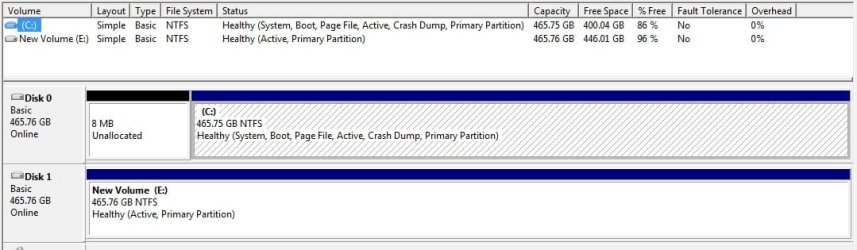
screenshot http://www.lorddog.com/dualboot.jpg
*i dont see how to show an image here*
 

My Computer

OS
windows 7 64bit
Hello lorddog, welcome to Seven Forums!


If C: is a primary partition it will work; start by having a look at this tutorial at the link below and be sure to post back with any further questions you may have and to keep us informed.


Partition : Recover Space Used by an Older OS
 

My Computer

Computer Manufacturer/Model Number
* BFK Customs *
OS
W 7 64-bit Ultimate
CPU
Intel Q9550 Yorkfield
Motherboard
ASUS P5Q Pro
Memory
8GB Dominator 8500C5D
Graphics Card(s)
ATI : XFX 5870
Sound Card
Realtek HD Audio 7-1
Monitor(s) Displays
1x 47" LCD HDMI & 3x 26" LCD HDMI
Screen Resolution
1920x1080P & 1920x1200
Hard Drives
1x 80GB Intel X25-M G2 SSD : 1x 500GB & 1x 640GB WD Caviar Black(s)
PSU
Corsair 620HX
Case
Cooler Master RC-690
Cooling
Tuniq Tower 120, 2x 140mm and 3x 120mm case fans
Keyboard
Microsoft 500
Mouse
Razer Diamondback 3G
Internet Speed
14 Mb/s
Other Info
1x Koutech 3Gb/s SATA HDD Hot Swap Rack
Mark WIn7 64 bit Active, then boot the DVD Repair console or Repair CD to run Startup Repair up to 3 separate times with reboots until 64 bit starts on its own. Partition - Mark as Active (Method Two)

If you want to recover the old Win7's disk space into the new Win7 at the same time, follow the link in the previous post.
 
ok after fiddling with that tutorial i got it threw the whole way.
partition magic left me 8M unallocated thou. 8M isnt that much but not sure why it didnt do the whole thing.

only issue i have left is this.
i had a 2nd drive that was a win xp install and the boot fix added its boot to the list. if i had know i could have gone into BIOS and disconnected that drive when i told windows repair to re-put the boot back on. (the initial dialog was blank with bootmgr missing and it asked me to add it back - all of them or nothing)

anyhow i would now like to remove the dual boot winxp showing (from my E:\ drive)

Doug
 

My Computer

OS
windows 7 64bit
Doug -

Please post back a screenshot of your full Disk Mgmt drive map with listings showing all columns, using SNipping Tool in Start Menu. We will give you the steps.

It wasn't clear in OP that you had two HD's nor was anything mentioned about an E drive. Do you still have XP on it? Do you want to delete XP as well as the XP listing from the Dual Boot?
 
yes in my screenshot is the disk 1 (E drive)
i converted it to just a data drive but it had a winxp install on it from a few years ago.
I have copied all the data back to my c drive so i can now just format the E drive.
I just want to remove the not needed dual partition booter.

thx for the help

Doug
 

My Computer

OS
windows 7 64bit
Looks good.

If you don't wipe E drive, be sure to mark it Inactive so no boot files can be written to it during a repair or reinstall.
 
Back
Top