
Solved Remove a boot option

April Raine

New member
Member
Local time
6:02 AM
Messages
78
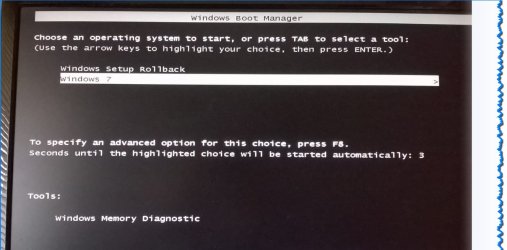
How can I remove the option windows setup roll back . it is from an error i made installing win 10. I was trying to install to a virtual disk under vmware and stopped as i was not sure if i was installing to the real system. I think that is what happened something distracted me.

I have changed so my win 7 is the first default option but want to get rid of the other rollback option

This also created a $Windows.~BT folder in my C:\ but i deleted it by booting from paragon boot cd

Apologies if this posted twice, I got a notice it was a duplicate
 

Attachments
  • os.jpg
    os.jpg
    71.1 KB · Views: 0

My Computer

Computer type
PC/Desktop
Computer Manufacturer/Model Number
Medion
OS
win 7 home premium 64 bit
Motherboard
ms 7616
Memory
16GB
Hard Drives
Two 1 TB
Last edited by a moderator:

My Computer

Computer type
PC/Desktop
Computer Manufacturer/Model Number
Custom Build
OS
Windows 7 Home Premium 32-Bit - Build 7600 SP1
CPU
Intel Core i3-2120 3.30Ghz
Motherboard
Asus P8Z68-V LX Intel Z68 Socket H2 ATX
Memory
Kingston 4 GB DDR3 1333 mhz
Graphics Card(s)
AMD Radeon HD6670
Sound Card
Sound Blaster Audigy SE 24-Bit
Monitor(s) Displays
Asus VE228
Screen Resolution
1440 X 900
Hard Drives
OCZ Vertex 3 120 GB Sata 3 SSD ==
Kingston SH103/S3 120 G Hyper X 120 GB SSD ==
Western Digital 500 GB Caviar Green 7200 RPM ==
PSU
Corsair CX600M == 600 Watt
Case
NZXT Apollo - Silver with Clear Side Panel
Cooling
Three 120 mm Fans
Keyboard
Microsoft Natural 4000
Mouse
Microsoft Custom Optical 3000
Internet Speed
AT&T Fiber Optic Wireless Network
Antivirus
Microsoft Security Essentials
Browser
Chrome
Other Info
120 mm Blue LED Fan -- Three Blue LED Lazer Light Sticks
You could got to System Configuration (msconfig) and delete it from the list (leaving you Windows 7 only). I've removed unwanted OS startups that way in the past and it worked.

Others may have move sophisticated ways of doing it.
 

My Computer

Computer type
PC/Desktop
Computer Manufacturer/Model Number
My Own Build
OS
Windows 10 64 bit
CPU
Intel i7 6700K
Motherboard
ASUS ROG Maximus VIII Hero
Memory
16GB Corsair Dominator
Graphics Card(s)
Intel CPU Graphics
Sound Card
RealTek
Monitor(s) Displays
27" Dell S2719dgf
Screen Resolution
2560X1440
Hard Drives
1 TB Samsung 850 EVO SSD for Win 10 Pro
500GB Samsung 850 EVO SSD for Win 10 Insider
2 TB drive for backup
PSU
EVGA Supernova 750G2
Case
BeQuiet Silent Base 600
Cooling
Deepcool Captain 120EX
Keyboard
Microsoft Wireless 2000
Mouse
Microsoft wireless
Internet Speed
100 MB/sec (Cable)
Antivirus
Microsoft Defender and Malwarebytes
Browser
Edge/Firefox
Other Info
Cakewalk (Sonar) by BandLab and Studio One 4.1 Pro recording studio software. MOTU 896Mk3 Hybrid recording interface, Frontier Tranzport wireless control unit, Behringer X-Touch Control Surface.
Five USB connected optical drives for CD Audio production using Nero BurningROM
Thanks both. I did not know it was under msconfig
 

My Computer

Computer type
PC/Desktop
Computer Manufacturer/Model Number
Medion
OS
win 7 home premium 64 bit
Motherboard
ms 7616
Memory
16GB
Hard Drives
Two 1 TB
Solved with msconfig. Thanks
 

My Computer

Computer type
PC/Desktop
Computer Manufacturer/Model Number
Medion
OS
win 7 home premium 64 bit
Motherboard
ms 7616
Memory
16GB
Hard Drives
Two 1 TB
Back
Top