Remove Address Bar From Folders

Danette

New member
Local time
10:33 PM
Messages
25
In Win 7 folders, just above the menu bar is the address bar which contains left and right buttons and an address bar. Is there some way to hide or remove this entire bar?
 

My Computer

Computer type
PC/Desktop
Computer Manufacturer/Model Number
Dell Optiplex
OS
Windows 7 Home Premium 32bit
No one has any idea how to do this?
 

My Computer

Computer type
PC/Desktop
Computer Manufacturer/Model Number
Dell Optiplex
OS
Windows 7 Home Premium 32bit
If you use Classic Shell, you can choose many folder, start menu and toolbar options. See if that option is under Classic Explorer Settings. The program is free. Don't worry about the end of development; Win 7 is 10 years old.

Classic Shell - Start menu and other Windows enhancements
 

My Computer

Computer type
PC/Desktop
Computer Manufacturer/Model Number
HP p6-2020t
OS
Win 7 Ult 64-bit
CPU
G620 2.6GHZ Pentium R
Memory
6 GB
Monitor(s) Displays
25" HPLV2311
Screen Resolution
1920 x 1200
Hard Drives
1 SATA, 1 exterior SATA
Case
HP
Cooling
PSU
Antivirus
Glasswire
Browser
Waterfox; Firefox; Chrome for work
Other Info
Firewall--Glasswire
Similar specs in Gateway DX4200
Verizon FIOS Wired network

1 other Win7 computer-- has SSD
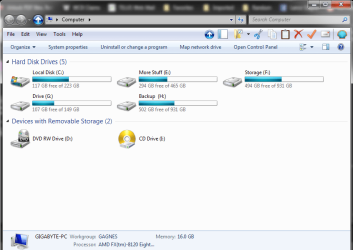
I've used this script a member of the Classic Shell Forum had written some time back. I read your post and remembered the script. So I just did a little video of me running the script on my system to show you what it does. Also all you have to do is restart the system and the address bar will return

Here's the link to download the script. AHK Script to remove Address bar

Here's the link to the YouTube Video I just made.


Just to show you that it dose come back at restart.
 

Attachments

  • Untitled.png
    Untitled.png
    34.8 KB · Views: 2
Last edited:

My Computer

Computer type
PC/Desktop
Computer Manufacturer/Model Number
Custom Built By Me.
OS
Windows 10 Pro 64 bit
CPU
AMD FX 9590 8 Core Black Edition
Motherboard
MSI 990FXA GAMING (MS-7893)
Memory
Corsair Vengeance 16GB DDR3
Graphics Card(s)
AMD Radeon (TM) R9 380 Gaming Series
Sound Card
AMD High Definition
Monitor(s) Displays
Samsung 32" 60Hz 4ms Curved PLS LED
Screen Resolution
1920 X 1080
Hard Drives
C: 223 GB SSD = E: 465 GB HDD = F: 931 GB HDD = G: 149 GB HDD = H: 931 GB HDD
PSU
EVGA Supernova NEX750B 750W ATX EPS12V 80PLUS Bronze
Case
Cool Master
Cooling
Noctua NH-D15 Premium Cooler with 2x NF-A15 PWM 140mm Fan
Internet Speed
Fiber Optic: Download 332.7 Mbps / Upload 331.5 Mbps
Antivirus
Windows Defender
Browser
Slimjet (64bit)
I love that you have named a drive "More Stuff." And it's a very nice video. So you're not recommending this script if the bar comes back.

Danette--I haven't explored every setting of ClassicExplorer for myself, but give it a try. You'll probably like some other settings too. I've made my Start Menu look like Win98.
 

My Computer

Computer type
PC/Desktop
Computer Manufacturer/Model Number
HP p6-2020t
OS
Win 7 Ult 64-bit
CPU
G620 2.6GHZ Pentium R
Memory
6 GB
Monitor(s) Displays
25" HPLV2311
Screen Resolution
1920 x 1200
Hard Drives
1 SATA, 1 exterior SATA
Case
HP
Cooling
PSU
Antivirus
Glasswire
Browser
Waterfox; Firefox; Chrome for work
Other Info
Firewall--Glasswire
Similar specs in Gateway DX4200
Verizon FIOS Wired network

1 other Win7 computer-- has SSD
Yes I do recommend it, it works! All you do is put the script in the startup and have it initiate on login every time you start your system and Voila! No address bar. And ya! More Stuff... I didn't know what ells to call it. :rolleyes:
 
Last edited:

My Computer

Computer type
PC/Desktop
Computer Manufacturer/Model Number
Custom Built By Me.
OS
Windows 10 Pro 64 bit
CPU
AMD FX 9590 8 Core Black Edition
Motherboard
MSI 990FXA GAMING (MS-7893)
Memory
Corsair Vengeance 16GB DDR3
Graphics Card(s)
AMD Radeon (TM) R9 380 Gaming Series
Sound Card
AMD High Definition
Monitor(s) Displays
Samsung 32" 60Hz 4ms Curved PLS LED
Screen Resolution
1920 X 1080
Hard Drives
C: 223 GB SSD = E: 465 GB HDD = F: 931 GB HDD = G: 149 GB HDD = H: 931 GB HDD
PSU
EVGA Supernova NEX750B 750W ATX EPS12V 80PLUS Bronze
Case
Cool Master
Cooling
Noctua NH-D15 Premium Cooler with 2x NF-A15 PWM 140mm Fan
Internet Speed
Fiber Optic: Download 332.7 Mbps / Upload 331.5 Mbps
Antivirus
Windows Defender
Browser
Slimjet (64bit)
I've used the this script that a member of the Classic Shell Forum had written some time back. I read your post and remembered the script. So I just did a little video of me running the script on my system to show you what it does. Also all you have to do is restart the system and the address bar will return

Just to show you that it dose come back at restart.

YES! Thank you!

That works. I just put it in my Startup folder, right next to Classic Shell and no more address bar. Too bad that feature isn't incorporated into Classic Shell. it is certainly a prominent feature of the classic folder.
 

My Computer

Computer type
PC/Desktop
Computer Manufacturer/Model Number
Dell Optiplex
OS
Windows 7 Home Premium 32bit
You are most welcome Danette. Just as a side note, you don't have to put Classic Shell in the startup, it'll run on startup on it's own.
 

My Computer

Computer type
PC/Desktop
Computer Manufacturer/Model Number
Custom Built By Me.
OS
Windows 10 Pro 64 bit
CPU
AMD FX 9590 8 Core Black Edition
Motherboard
MSI 990FXA GAMING (MS-7893)
Memory
Corsair Vengeance 16GB DDR3
Graphics Card(s)
AMD Radeon (TM) R9 380 Gaming Series
Sound Card
AMD High Definition
Monitor(s) Displays
Samsung 32" 60Hz 4ms Curved PLS LED
Screen Resolution
1920 X 1080
Hard Drives
C: 223 GB SSD = E: 465 GB HDD = F: 931 GB HDD = G: 149 GB HDD = H: 931 GB HDD
PSU
EVGA Supernova NEX750B 750W ATX EPS12V 80PLUS Bronze
Case
Cool Master
Cooling
Noctua NH-D15 Premium Cooler with 2x NF-A15 PWM 140mm Fan
Internet Speed
Fiber Optic: Download 332.7 Mbps / Upload 331.5 Mbps
Antivirus
Windows Defender
Browser
Slimjet (64bit)
Amazing how wide open Windows is to user mod. Me? With my modus operandi I cannot live without that address bar and l/r arrows. Unfortunately, with this flexibility comes the often reported destruction of a system in the hands of the incompetent, careless or risk taker.

I wonder if a MAC (apple) product provides this level of customization and/or susceptibility to careless user destruction. I ask this due to a possible transition to it after W7 support is terminated.
 

My Computer

Computer type
PC/Desktop
Computer Manufacturer/Model Number
HP (HP-P6212F)
OS
Microsoft Windows 7 Home Premium 64-bit 7601 Multiprocessor Free Service Pack 1
CPU
Pentium(R) Dual-Core CPU E5300 @ 2.60GHz
Motherboard
PEGATRON CORPORATION Benicia
Memory
6.00 GB
Graphics Card(s)
Intel(R) G33/G31 Express Chipset Family
Sound Card
Realtek High Definition Audio
Monitor(s) Displays
24'' HP WS LCD
Screen Resolution
1920 x 1080 x 32 bits (4294967296 colors) @ 60 Hz
Hard Drives
(1) ATA Hitachi HDT72106 SCSI Disk Device (2) Generic- Compact Flash USB Device (3) Generic- MS/MS-Pro USB Device (4) Generic- SD/MMC USB Device (5) Generic- SM/xD-Picture USB Device (6) Verbatim STORE N GO USB Device
Keyboard
Logitech G510s
Mouse
Logitech Trackball M570
Antivirus
Microsoft Security Essentials / Malwarebytes
Browser
IE / Firefox / Chrome
Amazing how wide open Windows is to user mod. Me? With my modus operandi I cannot live without that address bar and l/r arrows. Unfortunately, with this flexibility comes the often reported destruction of a system in the hands of the incompetent, careless or risk taker.

I wonder if a MAC (apple) product provides this level of customization and/or susceptibility to careless user destruction. I ask this due to a possible transition to it after W7 support is terminated.

Yes there are some folks that act without thinking. They get there hands on things like Resource Hacker and blow there systems up. Speaking of such, I have used it a lot in the past and as of late I have renewed my interest in it. If your interested in really and "Seriously" modifying Windows this is the toy for you. Google or if you prefer DuckDuckGo for tutorials. I won't post a link so it's up to you to find it if you interested.
 

My Computer

Computer type
PC/Desktop
Computer Manufacturer/Model Number
Custom Built By Me.
OS
Windows 10 Pro 64 bit
CPU
AMD FX 9590 8 Core Black Edition
Motherboard
MSI 990FXA GAMING (MS-7893)
Memory
Corsair Vengeance 16GB DDR3
Graphics Card(s)
AMD Radeon (TM) R9 380 Gaming Series
Sound Card
AMD High Definition
Monitor(s) Displays
Samsung 32" 60Hz 4ms Curved PLS LED
Screen Resolution
1920 X 1080
Hard Drives
C: 223 GB SSD = E: 465 GB HDD = F: 931 GB HDD = G: 149 GB HDD = H: 931 GB HDD
PSU
EVGA Supernova NEX750B 750W ATX EPS12V 80PLUS Bronze
Case
Cool Master
Cooling
Noctua NH-D15 Premium Cooler with 2x NF-A15 PWM 140mm Fan
Internet Speed
Fiber Optic: Download 332.7 Mbps / Upload 331.5 Mbps
Antivirus
Windows Defender
Browser
Slimjet (64bit)
Back
Top