Remove dual boot

camcoop

New member
Local time
2:16 PM
Messages
1
I have 2 copies of win 7 installed in a dual boot configuration the older one is on the C: drive and the other is on the L: drive I want to remove the one on the C: drive but I don’t want to lose the boot mgr, can someone instruct me on how to do this? My thought was to make a disk image of the one I want to keep (L:) then reformat the C: drive and install the backup image on the C: drive. Any help I can get will be appreciated, Bob
 

My Computer

Computer type
PC/Desktop
Computer Manufacturer/Model Number
custom built
OS
Win 7 32 bit
CPU
AMD Athlon X 2
All you have to do is change the boot order in the BIOS so the other drive is first. Then it will be C: and the other drive will get some random letter (such as D: or E: or whatever letter is next in line).

So, the drive letter is always determined by the installation of Windows that you are booted into.
 

My Computer

Computer type
PC/Desktop

My Computer

Computer type
PC/Desktop
Computer Manufacturer/Model Number
home built
OS
Multi-Boot W7_Pro_x64 W8.1_Pro_x64 W10_Pro_x64 +Linux_VMs +Chromium_VM
CPU
AMD Athlon II x4 620
Motherboard
Gigabyte GA-MA785G-UD3H
Memory
6GB GSkill DDR2 800
Graphics Card(s)
AMD 4670 GPU + AMD 4200 IGP
Sound Card
on board Realtek ALC889A
Monitor(s) Displays
RCA 40" LCD TV, Insignia 32" LCD TV, HP 15" LCD monitor
Screen Resolution
1680 x 1050
Hard Drives
OCZ Vertex 3 120GB,
Samsung F3 1TB (3),
Several others - WD, Seagate, Hitachi, ...
PSU
Corsair 500 W
Case
Rosewill mid tower
Cooling
CM 90mm rifle
Keyboard
Gyration wireless, Logitech wireless, Dell USB wired
Mouse
Gyration wireless, Logitech wireless, V7 USB wired
Internet Speed
Spectrum - 100Mbps D / 10Mbps U
Antivirus
Avast, MBAM3, EMET, WinPatrol
Browser
Pale Moon, Firefox, IE
Other Info
2 multi-boot PC's
Mainly HTPC/Office/Gen purpose (no gaming).
Trendnet USB KVM.
LG DVD burner/Blue Ray Player.
Tray system for removable SATA backup drives.

Not currently OCd, under-volted.
I use Hybrid sleep, rarely re-boot or shutdown.

Hauppauge HD-PVR, Avermedia PCIe TV Tuner, Hauppauge PCI TV Tuner.
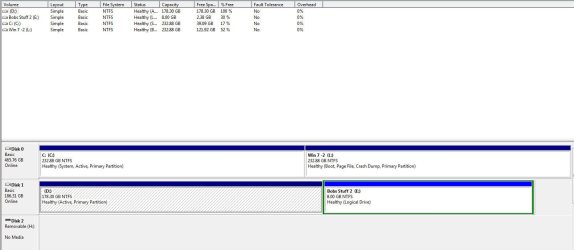
I neglected to indicate that the 2 copies are on the same physical drive and I installed the second one on a newly created partition from an installation DVD.
 

My Computer

Computer Manufacturer/Model Number
Compaq SR1630nx
OS
Win 7
CPU
Athlon X 2
Motherboard
Asus M2N-MX SE PLUS
Memory
2 Gb.
Hard Drives
200 Gb. WD IDE
Disk Management  screen shot.jpg
 

My Computer

Computer Manufacturer/Model Number
Compaq SR1630nx
OS
Win 7
CPU
Athlon X 2
Motherboard
Asus M2N-MX SE PLUS
Memory
2 Gb.
Hard Drives
200 Gb. WD IDE
As you requested.
 

My Computer

Computer Manufacturer/Model Number
Compaq SR1630nx
OS
Win 7
CPU
Athlon X 2
Motherboard
Asus M2N-MX SE PLUS
Memory
2 Gb.
Hard Drives
200 Gb. WD IDE
Well since you're booted into the Win7 on L as signified by the Boot flag on its partition, it means you must have run the Win7 installer from C instead of correctly booting it to install to its partition which would have made it C whenever it was booted.

So the question then becomes if you want to keep a Win7 install on L drive which most user's do not. If not then I would back up your files, unplug all other HD's and peripherals, boot the installer to http://www.sevenforums.com/tutorials/1649-clean-install-windows-7-a.html. Using the Drive Options in Steps 7/8 delete all partitions and create new as you wish or just click Next if you have no partition scheme in mind.

If you don't mind having Win7 on L, then http://www.sevenforums.com/tutorials/71432-partition-mark-active.html the L partition, boot into the Win7 installer or http://www.sevenforums.com/performance-maintenance/51100-repair-cd-system-repair-disk.html to run http://www.sevenforums.com/tutorials/105541-startup-repair-run-3-separate-times.html until it boots and the System Active flags are both on L.

You can then delete C and recover its space as shown in http://www.sevenforums.com/tutorials/109752-partition-recover-space-used-older-os.html?ltr=P so that Win7 is in the preferred left hand position for faster reads.
 
Back
Top