- Local time
- 3:53 PM
- Messages
- 89
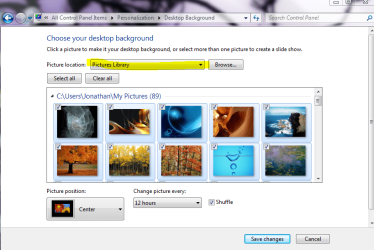
I right-clicked a JPG photo file and then accidently selected "Set as desktop background". The entire folder containing many other pics was also moved to the "Desktop Background Directory" and I can't delete the pic files or the folder.
Is it possible to remove this unwanted folder from the drop-down list for "picture location"? That path is Start Orb > Control Panel > Appearance&Personalization > Personalization > Change desktop background > Picture location dropdown.
Is it possible to remove this unwanted folder from the drop-down list for "picture location"? That path is Start Orb > Control Panel > Appearance&Personalization > Personalization > Change desktop background > Picture location dropdown.
My Computer
- Computer type
- PC/Desktop
- Computer Manufacturer/Model Number
- Homemade with cube tower
- OS
- Windows 7 Ultimate x64
- CPU
- 2x - Xeon E5-2687W
- Motherboard
- ASUS Z9PE-D8 WS
- Memory
- 128GB Kingston - (2ea kits – 4x16GB)
- Graphics Card(s)
- Gigabyte GTX-680 & EVGA GTX-Titan
- Sound Card
- Realtek ALC898 8-chan audio
- Monitor(s) Displays
- 2ea - Samsung T260HD 25.5-Inch LCD HDTV / Monitors
- Screen Resolution
- 1920x1200
- Hard Drives
- 8 ea. Crucial & Samsung EVO 2TB SSDs; misc 4ea. 8TB external Seagate spinners.
- PSU
- Corsair AX-1200
- Case
- Lian-Li cube custom
- Cooling
- 2x Dynatron R-17 - CPU Air sinks (160watts TDP)
- Keyboard
- HP slimline wireless
- Mouse
- Microsoft ARC
- Internet Speed
- Faster than a speeding bullet.
- Antivirus
- Norton Security 360 - 2020