Hi,
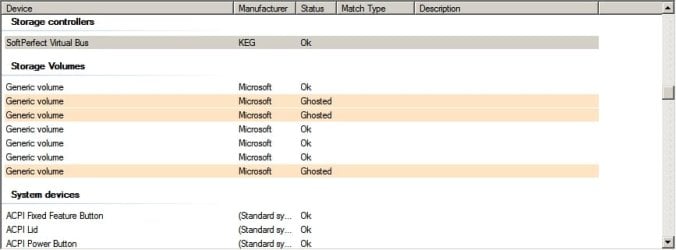
When Windows is configured to show ghosted devices (non-present devices) it shows a number of missing devices - at least on my machine. So my question is how to decide what to remove in order to improve boot time?
I've managed to figure out that the Avast legacy driver entries are okay to remove along with a few other entries that were related to previously installed software. It seems that Avast's own aswclear removal tool left them behind!
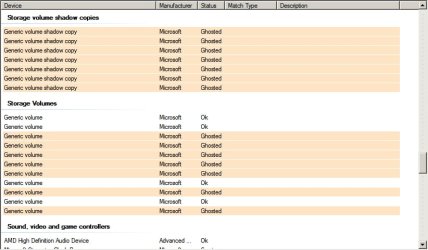
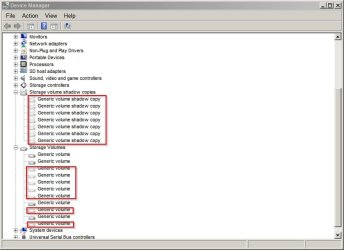
Anyway, currently system restore is disabled on my machine (I make system image backups) and I see numerous entries under "Storage Volume Shadow Copies" and "Storage Volumes" - is it safe to remove these? Is there any way that "Storage Volumes" could be related to encrypted drives?
When Windows is configured to show ghosted devices (non-present devices) it shows a number of missing devices - at least on my machine. So my question is how to decide what to remove in order to improve boot time?
I've managed to figure out that the Avast legacy driver entries are okay to remove along with a few other entries that were related to previously installed software. It seems that Avast's own aswclear removal tool left them behind!
Anyway, currently system restore is disabled on my machine (I make system image backups) and I see numerous entries under "Storage Volume Shadow Copies" and "Storage Volumes" - is it safe to remove these? Is there any way that "Storage Volumes" could be related to encrypted drives?
Attachments
My Computer
- Computer type
- Laptop
- Computer Manufacturer/Model Number
- ASUS
- OS
- Microsoft Windows 7 Home Premium 64-bit 7601 Multiprocessor Free Service Pack 1
- CPU
- AMD C-60 APU with Radeon(tm) HD Graphics
- Motherboard
- ASUSTeK COMPUTER INC. X501U
- Memory
- 4.00 GB
- Graphics Card(s)
- AMD Radeon HD 6290 Graphics
- Sound Card
- (1) AMD High Definition Audio Device (2) Realtek High Defi
- Screen Resolution
- 1366 x 768 x 32 bits (4294967296 colors) @ 60 Hz
- Hard Drives
- Hitachi HTS545050A7E380 SATA Disk Device
- Antivirus
- Comodo CIS & FW, SecureAplus App Whitelisting, Threatfire
- Browser
- Cyberfox 64bit, Opera 64bit, Airfox
- Other Info
- Spy-The-Spy, HitmanPro.Alert, Norton Connect Safe, MJRegWatcher, BitDefender TrafficLight, Voodoo Shield, Zemana AntiMalware