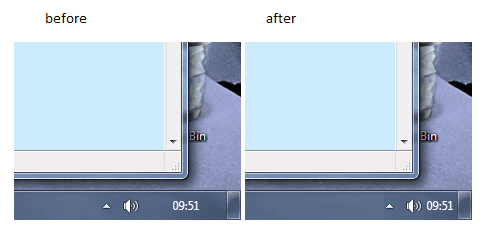
Remove Padding Around Time?

Seith

New member
Local time
9:02 AM
Messages
18
Location
Scotland
Hey guys,

I was wondering if there's any way to change the padding around the time because it seems to be a waste of my taskbar space. I managed to get it to go smaller when I changed the size of window borders but that makes my windows look really weird... is there any other way to get the desired effect?

Cheers,
S
 

My Computer My Computer

OS
7 Pro
CPU
Intel Core 2 Quad Q6600 2.40GHz
Memory
4GB
Graphics Card(s)
ATI Radeon HD 3600
Monitor(s) Displays
24
Screen Resolution
1920*1200
Hard Drives
1TB Internet & 500GB External
Keyboard
Logitech diNovo
Mouse
Roccat Kone
Internet Speed
20Mb
How big is the space you are talking about? Mine is barely half an icon
 

My Computer My Computer

Computer Manufacturer/Model Number
Custom by me.
OS
Windows 7 64bit RTM
CPU
Intel Core i7 920 Nehalem Over clocked to 3.5 Ghz
Motherboard
EVGA 132-BL-E758-A1 LGA 1366 Intel X58
Memory
CORSAIR DOMINATOR 6GB (3 x 2GB) 240-Pin DDR3 SDRAM DDR3 1600
Graphics Card(s)
EVGA 01G-P3-1280-AR GeForce GTX 280 1GB
Sound Card
Soundblaster X-Fi Fatal1ty
Monitor(s) Displays
2 x 20in Dell Flatpanels 3200x1200
Screen Resolution
3200x1200
Hard Drives
150GB WD Velociraptor(C:), WD 750GB (D:Games), WD 1TB Black (E:Data1), WD 1TB Green (F:Data2)
PSU
CORSAIR HX1000 1000 watt
Case
Desktop
Cooling
Air
Keyboard
Logitech G15
Mouse
Logitech Revolution MX
Internet Speed
25 MB/s
hey stevecn, hopefully this image will better explain
 

Attachments

  • Untitled.png
    Untitled.png
    9.1 KB · Views: 51

My Computer My Computer

OS
7 Pro
CPU
Intel Core 2 Quad Q6600 2.40GHz
Memory
4GB
Graphics Card(s)
ATI Radeon HD 3600
Monitor(s) Displays
24
Screen Resolution
1920*1200
Hard Drives
1TB Internet & 500GB External
Keyboard
Logitech diNovo
Mouse
Roccat Kone
Internet Speed
20Mb
Back
Top