Hey guys,
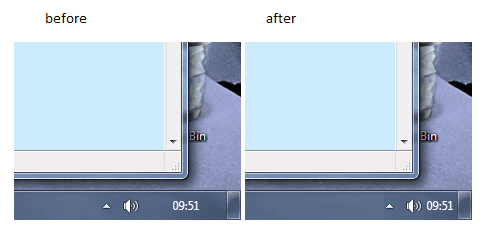
I was wondering if there's any way to change the padding around the time because it seems to be a waste of my taskbar space. I managed to get it to go smaller when I changed the size of window borders but that makes my windows look really weird... is there any other way to get the desired effect?
Cheers,
S
I was wondering if there's any way to change the padding around the time because it seems to be a waste of my taskbar space. I managed to get it to go smaller when I changed the size of window borders but that makes my windows look really weird... is there any other way to get the desired effect?
Cheers,
S
My Computer
- OS
- 7 Pro
- CPU
- Intel Core 2 Quad Q6600 2.40GHz
- Memory
- 4GB
- Graphics Card(s)
- ATI Radeon HD 3600
- Monitor(s) Displays
- 24
- Screen Resolution
- 1920*1200
- Hard Drives
- 1TB Internet & 500GB External
- Keyboard
- Logitech diNovo
- Mouse
- Roccat Kone
- Internet Speed
- 20Mb