Solved Remove read only attribute of folder.

zhshqzyc

New member
Local time
9:22 PM
Messages
15
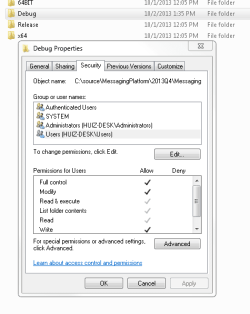
I have an executable file, which is a windows service. Now I cannot start it from service control management panel. I am the administrator. I guess the readonly attribute effects it. I found that the folder is readonly. I unclick it and apply it and click OK button. However next time when I look at the attribute again, its attribute goes back to readonly again. Why?

Windows 7 64-bit professional edition.
 

My Computer

Computer Manufacturer/Model Number
Toshiba/Statellite
OS
Windows 7 Home Prremium 64bit
CPU
Pentium Dual-Core T4400 @2.20GHz
Memory
4.0G
What is the name of the service? What error message when you (try to) start it?
 

My Computer

Computer type
Laptop
Computer Manufacturer/Model Number
ACER ASPIRE 5742G
OS
Microsoft Windows 7 Home Premium 64-bits 7601 Multiprocessor Free Service Pack 1
CPU
Intel(R) Core(TM) i3 CPU M 370 @ 2.40GHz
Motherboard
Acer Aspire 5742G
Memory
4,00 GB
Graphics Card(s)
ATI Mobility Radeon HD 5400 Series
Sound Card
(1) AMD High Definition Audio Device (2) Realtek High Defi
Screen Resolution
1366 x 768 x 32 bits (4294967296 colors) @ 60 Hz
Hard Drives
WDC WD5000BEVT-22ZAT0
Folders have no readonly attribute, the folder properties will always show the readonly check box the same. If you actually read it it clearly states: "Read-only (Only applies to files in folder)". Your problem has to so with something else.
 

My Computer

Computer type
PC/Desktop
Computer Manufacturer/Model Number
Alienware Aurora ALX R4
OS
Windows 10 Pro (x64)
CPU
Intel Core i7-3930K (3.2GHz - 4.5GHz)
Motherboard
Alienware Aurora-R4 x79
Memory
4x Samsung 4GB PC3-12800 DDR3 (16GB 1600MHz)
Graphics Card(s)
Nvidia Geforce GTX 690
Sound Card
SteelSeries Siberia Elite
Monitor(s) Displays
Dell UltraSharp U3011
Screen Resolution
2560x1600
Hard Drives
Samsung 850 Pro 256 GB, Seagate 1TB Desktop Hybrid HDD, 2x Western Digital 4TB Green HDD
PSU
875W Some Dell PSU <.<
Case
Alienware Aurora ALX
Cooling
Custom Liquid Cooling (EK CPU & GPU blocks) dual EK 480RAD
Keyboard
Logitech G710+ Mechanical
Mouse
Logitech G700s
Internet Speed
Verizon Fios (50 mbps average)
Other Info
Server: Intel NUC D54250WYK: i5-4250U, 16GB, 256 GB mSATA, Windows Server 2012 R2

Attachments

  • Capture1.PNG
    Capture1.PNG
    11 KB · Views: 40
  • Capture2.PNG
    Capture2.PNG
    7.3 KB · Views: 40

My Computer

Computer Manufacturer/Model Number
Toshiba/Statellite
OS
Windows 7 Home Prremium 64bit
CPU
Pentium Dual-Core T4400 @2.20GHz
Memory
4.0G

My Computer

Computer type
Laptop
Computer Manufacturer/Model Number
ACER ASPIRE 5742G
OS
Microsoft Windows 7 Home Premium 64-bits 7601 Multiprocessor Free Service Pack 1
CPU
Intel(R) Core(TM) i3 CPU M 370 @ 2.40GHz
Motherboard
Acer Aspire 5742G
Memory
4,00 GB
Graphics Card(s)
ATI Mobility Radeon HD 5400 Series
Sound Card
(1) AMD High Definition Audio Device (2) Realtek High Defi
Screen Resolution
1366 x 768 x 32 bits (4294967296 colors) @ 60 Hz
Hard Drives
WDC WD5000BEVT-22ZAT0
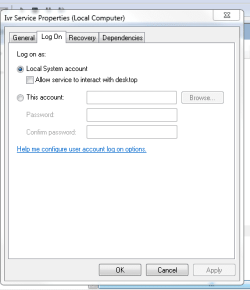
'xxxxx' actually is 'Ivr'. It is for demo purpose. Sorry for confusion. It is the custom service by C# code.
There are three answers in the link, which one is correct?
 

My Computer

Computer Manufacturer/Model Number
Toshiba/Statellite
OS
Windows 7 Home Prremium 64bit
CPU
Pentium Dual-Core T4400 @2.20GHz
Memory
4.0G
If UAC is enabled you will need to run the service manager as administrator. Otherwise you do not have rights to start or stop services, no matter what permissions you might have to the executable.
 

My Computer

Computer type
PC/Desktop
Computer Manufacturer/Model Number
HP
OS
Windows 7 Pro 64 bit
CPU
Xeon W3520
Memory
8 GB
Graphics Card(s)
Nvidia Geforce 210
If UAC is enabled you will need to run the service manager as administrator. Otherwise you do not have rights to start or stop services, no matter what permissions you might have to the executable.
But I login the computer as the administrator. I am confused.
 

My Computer

Computer Manufacturer/Model Number
Toshiba/Statellite
OS
Windows 7 Home Prremium 64bit
CPU
Pentium Dual-Core T4400 @2.20GHz
Memory
4.0G
Are you logging in with the "Administrator" account or one with administrator privileges? They are not the same.
 

My Computer

Computer type
PC/Desktop
Computer Manufacturer/Model Number
HP
OS
Windows 7 Pro 64 bit
CPU
Xeon W3520
Memory
8 GB
Graphics Card(s)
Nvidia Geforce 210
So I have to find the location of services.msc then right click to run it as administrator?
Normally we just run it from cmd.
 

My Computer

Computer Manufacturer/Model Number
Toshiba/Statellite
OS
Windows 7 Home Prremium 64bit
CPU
Pentium Dual-Core T4400 @2.20GHz
Memory
4.0G
Right click on cmd and run it as administrator.
 

My Computer

Computer type
PC/Desktop
Computer Manufacturer/Model Number
Custom Built
OS
Windows 10 Pro x64, Windows 8.1 Pro x64, Windows 7 Ultimate x64 SP1,
CPU
INTEL i9-7920X LGA 2066
Motherboard
Gigabyte X299-WU8 F3
Memory
64 GB (4 X 16 GB) G-Skill V Series DDR4 3200 Quad Channel
Graphics Card(s)
EVGA GTX 1060 SC 3 GB
Sound Card
Realtek Onboard ALC1220
Monitor(s) Displays
2 x Samsung S27E310
Screen Resolution
1920x1080
Hard Drives
Samsung 2 x 970 EVO Plus 500 GB NVMe
1 x 6TB WD 6003FZBX SATA
1 x 6TB WD 60EFRX SATA
12 x 3TB WD 30EFRX SATA
PSU
Seasonic X-1050
Case
Thermaltake Armor+
Cooling
Corsair H80i V2 Liquid AOI Cooler
Keyboard
Logitech G510s
Mouse
Logitech MX Master 2S
Internet Speed
200 Mb/s
Antivirus
ESET NOD32 13.1
Browser
EDGE (Dev, Canary, Beta), Chrome
Other Info
ASUS RT-AC68U router
Malwarebytes 4.0.4

My Computer

Computer type
Laptop
Computer Manufacturer/Model Number
ACER ASPIRE 5742G
OS
Microsoft Windows 7 Home Premium 64-bits 7601 Multiprocessor Free Service Pack 1
CPU
Intel(R) Core(TM) i3 CPU M 370 @ 2.40GHz
Motherboard
Acer Aspire 5742G
Memory
4,00 GB
Graphics Card(s)
ATI Mobility Radeon HD 5400 Series
Sound Card
(1) AMD High Definition Audio Device (2) Realtek High Defi
Screen Resolution
1366 x 768 x 32 bits (4294967296 colors) @ 60 Hz
Hard Drives
WDC WD5000BEVT-22ZAT0
I did run cmd as adminstrator. Please see the images.
 

Attachments

  • Capture.PNG
    Capture.PNG
    31.2 KB · Views: 0
  • Capture1.PNG
    Capture1.PNG
    25.1 KB · Views: 0

My Computer

Computer Manufacturer/Model Number
Toshiba/Statellite
OS
Windows 7 Home Prremium 64bit
CPU
Pentium Dual-Core T4400 @2.20GHz
Memory
4.0G
Here is from the event log.
Code:
Log Name:      System
Source:        Service Control Manager
Date:          10/3/2013 8:29:11 AM
Event ID:      7000
Task Category: None
Level:         Error
Keywords:      Classic
User:          N/A
Computer:      huiz-desk.corporate.test.com
Description:
The Ivr Service service failed to start due to the following error: 
Access is denied.
Event Xml:
<Event xmlns="http://schemas.microsoft.com/win/2004/08/events/event">
  <System>
    <Provider Name="Service Control Manager" Guid="{555908d1-a6d7-4695-8e1e-26931d2012f4}" EventSourceName="Service Control Manager" />
    <EventID Qualifiers="49152">7000</EventID>
    <Version>0</Version>
    <Level>2</Level>
    <Task>0</Task>
    <Opcode>0</Opcode>
    <Keywords>0x8080000000000000</Keywords>
    <TimeCreated SystemTime="2013-10-03T12:29:11.049186300Z" />
    <EventRecordID>98477</EventRecordID>
    <Correlation />
    <Execution ProcessID="944" ThreadID="7672" />
    <Channel>System</Channel>
    <Computer>huiz-desk.corporate.test.com</Computer>
    <Security />
  </System>
  <EventData>
    <Data Name="param1">Ivr Service</Data>
    <Data Name="param2">%%5</Data>
  </EventData>
</Event>

And scan the system.
Code:
C:\Windows\System32>sfc /scannow

Beginning system scan.  This process will take some time.

Beginning verification phase of system scan.
Verification 100% complete.

Windows Resource Protection did not find any integrity violations.

C:\Windows\System32>
 
Last edited:

My Computer

Computer Manufacturer/Model Number
Toshiba/Statellite
OS
Windows 7 Home Prremium 64bit
CPU
Pentium Dual-Core T4400 @2.20GHz
Memory
4.0G

My Computer

Computer type
Laptop
Computer Manufacturer/Model Number
ACER ASPIRE 5742G
OS
Microsoft Windows 7 Home Premium 64-bits 7601 Multiprocessor Free Service Pack 1
CPU
Intel(R) Core(TM) i3 CPU M 370 @ 2.40GHz
Motherboard
Acer Aspire 5742G
Memory
4,00 GB
Graphics Card(s)
ATI Mobility Radeon HD 5400 Series
Sound Card
(1) AMD High Definition Audio Device (2) Realtek High Defi
Screen Resolution
1366 x 768 x 32 bits (4294967296 colors) @ 60 Hz
Hard Drives
WDC WD5000BEVT-22ZAT0
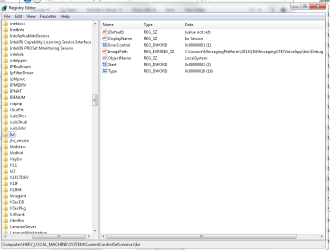
In regedit screenshot I cannot read all in ImagePath. Please show whole string!
 

My Computer

Computer type
Laptop
Computer Manufacturer/Model Number
ACER ASPIRE 5742G
OS
Microsoft Windows 7 Home Premium 64-bits 7601 Multiprocessor Free Service Pack 1
CPU
Intel(R) Core(TM) i3 CPU M 370 @ 2.40GHz
Motherboard
Acer Aspire 5742G
Memory
4,00 GB
Graphics Card(s)
ATI Mobility Radeon HD 5400 Series
Sound Card
(1) AMD High Definition Audio Device (2) Realtek High Defi
Screen Resolution
1366 x 768 x 32 bits (4294967296 colors) @ 60 Hz
Hard Drives
WDC WD5000BEVT-22ZAT0
C:\source\MessagingPlatform\2013Q4\MessagingCFE\VoiceApp\bin\Debug
 

My Computer

Computer Manufacturer/Model Number
Toshiba/Statellite
OS
Windows 7 Home Prremium 64bit
CPU
Pentium Dual-Core T4400 @2.20GHz
Memory
4.0G

My Computer

Computer Manufacturer/Model Number
Toshiba/Statellite
OS
Windows 7 Home Prremium 64bit
CPU
Pentium Dual-Core T4400 @2.20GHz
Memory
4.0G
Change ImagePath value to C:\source\MessagingPlatform\2013Q4\MessagingCFE\VoiceApp\bin\Debug\yourexename.exe

If you want C:\source\MessagingPlatform\2013Q4\MessagingCFE\VoiceApp\bin\Debug\yourexename.exe to run as a service!
 

My Computer

Computer type
Laptop
Computer Manufacturer/Model Number
ACER ASPIRE 5742G
OS
Microsoft Windows 7 Home Premium 64-bits 7601 Multiprocessor Free Service Pack 1
CPU
Intel(R) Core(TM) i3 CPU M 370 @ 2.40GHz
Motherboard
Acer Aspire 5742G
Memory
4,00 GB
Graphics Card(s)
ATI Mobility Radeon HD 5400 Series
Sound Card
(1) AMD High Definition Audio Device (2) Realtek High Defi
Screen Resolution
1366 x 768 x 32 bits (4294967296 colors) @ 60 Hz
Hard Drives
WDC WD5000BEVT-22ZAT0
service-name\ImagePath

HKLM\SYSTEM\CurrentControlSet\Services\service-name


Data type, Range, Value
REG_EXPAND_SZ, Path and file name, Systemroot\System32\Service-name.exe

Description: Specifies the location of the executable file for the service.
 

My Computer

Computer type
Laptop
Computer Manufacturer/Model Number
ACER ASPIRE 5742G
OS
Microsoft Windows 7 Home Premium 64-bits 7601 Multiprocessor Free Service Pack 1
CPU
Intel(R) Core(TM) i3 CPU M 370 @ 2.40GHz
Motherboard
Acer Aspire 5742G
Memory
4,00 GB
Graphics Card(s)
ATI Mobility Radeon HD 5400 Series
Sound Card
(1) AMD High Definition Audio Device (2) Realtek High Defi
Screen Resolution
1366 x 768 x 32 bits (4294967296 colors) @ 60 Hz
Hard Drives
WDC WD5000BEVT-22ZAT0
Back
Top