Solved Remove read only attribute of folder.

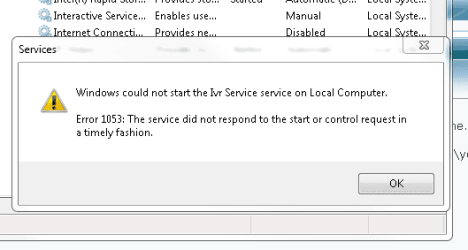
I changed the path, now error becomes a new one.

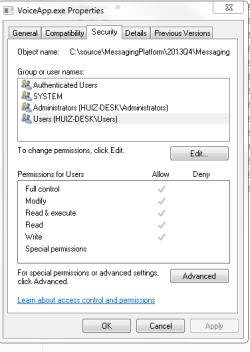
By the way, when I look at the property of exe file, why the full control is grayed out but ticked?
 

Attachments

  • Capture.PNG
    Capture.PNG
    6.4 KB · Views: 11
  • Capture3.PNG
    Capture3.PNG
    8.6 KB · Views: 11

My Computer

Computer Manufacturer/Model Number
Toshiba/Statellite
OS
Windows 7 Home Prremium 64bit
CPU
Pentium Dual-Core T4400 @2.20GHz
Memory
4.0G
Grayed out because the permission isn't actually set, but inhereted from one (or more levels) up
 

My Computer

Computer type
Laptop
Computer Manufacturer/Model Number
ACER ASPIRE 5742G
OS
Microsoft Windows 7 Home Premium 64-bits 7601 Multiprocessor Free Service Pack 1
CPU
Intel(R) Core(TM) i3 CPU M 370 @ 2.40GHz
Motherboard
Acer Aspire 5742G
Memory
4,00 GB
Graphics Card(s)
ATI Mobility Radeon HD 5400 Series
Sound Card
(1) AMD High Definition Audio Device (2) Realtek High Defi
Screen Resolution
1366 x 768 x 32 bits (4294967296 colors) @ 60 Hz
Hard Drives
WDC WD5000BEVT-22ZAT0
Who did make the exe file? Who and how did you configure it as service (how did you make imagpath etc)?
 

My Computer

Computer type
Laptop
Computer Manufacturer/Model Number
ACER ASPIRE 5742G
OS
Microsoft Windows 7 Home Premium 64-bits 7601 Multiprocessor Free Service Pack 1
CPU
Intel(R) Core(TM) i3 CPU M 370 @ 2.40GHz
Motherboard
Acer Aspire 5742G
Memory
4,00 GB
Graphics Card(s)
ATI Mobility Radeon HD 5400 Series
Sound Card
(1) AMD High Definition Audio Device (2) Realtek High Defi
Screen Resolution
1366 x 768 x 32 bits (4294967296 colors) @ 60 Hz
Hard Drives
WDC WD5000BEVT-22ZAT0
When those items are grayed out that means the permissions are being inherited from the parent folder. This is a normal and common situation. To change the permissions you would need to first remove the inheritance. Normally there is no need to do this.
 

My Computer

Computer type
PC/Desktop
Computer Manufacturer/Model Number
HP
OS
Windows 7 Pro 64 bit
CPU
Xeon W3520
Memory
8 GB
Graphics Card(s)
Nvidia Geforce 210
Creating a User Defined Service in Windows 7
But it is a little bit wrong
-> under HKEY_LOCAL_MACHINE\SYSTEM\CurrentControlSet\Services\MyService: create a 'Parameters' key
-> under the above key, create an 'Application' value of type REG_SZ and specify there the full path of your app executable (including the extension). For example:
Application: REG_SZ: D:\TOOLS\VI.EXE
-> OPTIONAL: under the above key, create an 'AppParameters' value of type REG_SZ and specify the parameters for your app. For Example:
AppParameters: REG_SZ: C:\TMP\FOO
-> OPTIONAL: under the above key, create an 'AppDirectory' value of type REG_SZ and specify the current directory to use for the app, eg:
AppDirectory: REG_SZ: C:\TMP

I highlighted the correct thing.
------
youtube video about it How to run Program As Service in Windows 7 FOR FREE full example - YouTube

even better explanation http://www.iopus.com/guides/srvany.htm
 

My Computer

Computer type
Laptop
Computer Manufacturer/Model Number
ACER ASPIRE 5742G
OS
Microsoft Windows 7 Home Premium 64-bits 7601 Multiprocessor Free Service Pack 1
CPU
Intel(R) Core(TM) i3 CPU M 370 @ 2.40GHz
Motherboard
Acer Aspire 5742G
Memory
4,00 GB
Graphics Card(s)
ATI Mobility Radeon HD 5400 Series
Sound Card
(1) AMD High Definition Audio Device (2) Realtek High Defi
Screen Resolution
1366 x 768 x 32 bits (4294967296 colors) @ 60 Hz
Hard Drives
WDC WD5000BEVT-22ZAT0
Back
Top